SERV Bit-Serial RISC-V CPU for Area-Constrained Hardware
SERV - The SErial RISC-V CPU
At a glance
- What is it?
- SERV is a small Verilog RISC-V core that processes instructions bit by bit to reduce logic and storage demand. It suits FPGA and ASIC designs where silicon area matters more than execution throughput, but it is not documented as a high-speed general-purpose CPU.
- Who is it for?
- Engineers building FPGA or ASIC systems with a strict area budget should consider SERV, especially when slow execution is acceptable. Projects needing high software throughput, an undocumented peripheral set, or a turnkey development board should first verify the current manual, supported target, and integration path.
- Can I use it commercially?
- Yes. ISC is a permissive licence: you can use, modify and sell software built on it, as long as you keep its copyright and licence notices.
- Is it still maintained?
- Yes. The repository last received commits 59 days ago.
- What is it written in?
- Mainly Verilog, according to GitHub's language statistics.
Answers come from the project's GitHub data, last synced on October 23, 2026, and from our analysis. They are not legal advice.
Star history
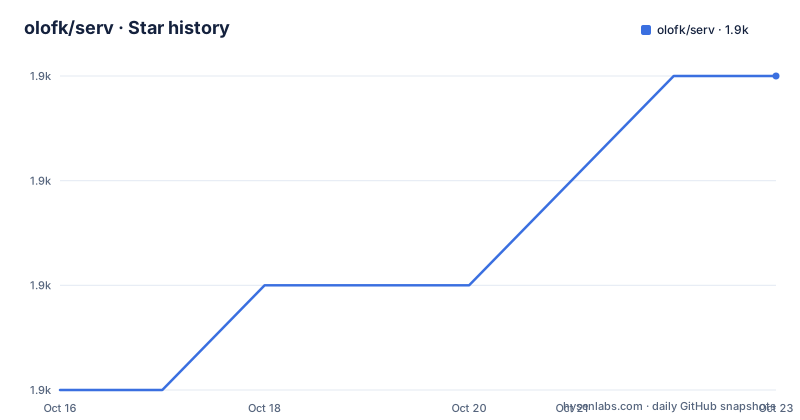
- olofk/serv1,905 ★ · +3
| Repository | 2026-10-16 | 2026-10-23 |
|---|---|---|
| olofk/serv | 1.9k | 1.9k |
3 Stars in the last 7 days, measured from the daily GitHub snapshot. Compare with other projects
Editorial analysis
Why SERV Uses a Bit-Serial RISC-V Architecture
SERV addresses a specific hardware constraint: fitting a processor into a design where gates, flip-flops, or ASIC area are scarce. The README describes it as a bit-serial RISC-V core and links introductory material explaining the architecture. Instead of treating a machine word as one parallel transaction, the defining idea is to process information serially. That choice lets the implementation share narrower logic across bits, which is especially relevant when silicon area is more valuable than speed.
The reported synthesis figures show why designers may accept that trade-off. The README lists 198 LUT and 164 FF for Lattice iCE40, 239 LUT and 164 FF for Intel Cyclone 10LP, and 125 LUT and 164 FF for AMD Artix-7. For a typical CMOS process, it lists 2.1kGE. These are project-reported figures for a minimal form, not independent measurements. They establish the scale of the design, but they do not provide clock frequency, instruction throughput, power, or performance-per-area results. The documentation therefore supports an area-efficiency claim, not a broad claim about speed.
The intended audience is hardware engineers integrating a RISC-V processor into FPGA or ASIC systems. The repository topics reinforce that context through `asic`, `fpga`, `risc-v`, and `verilog`. Existing users include Servant, CoreScore, Observer, Subservient, and Litex-based systems. This is useful evidence that the core is intended for embedded and experimental hardware, but the README does not present SERV as a replacement for a workstation-class processor. Its low area requirement is the central reason to accept its serial execution model.
How SERV Moves Instructions Through RTL
SERV is written primarily in Verilog, and the repository keeps the core definition in `serv.core`, RTL under `rtl/`, verification material under `verif/`, and software under `sw/`. The README links an official user manual with gate-level block diagrams, cycle-accurate timing diagrams, and an in-depth description. The excerpt does not reproduce the internal state machine or instruction decode path, so those details should be taken from the manual rather than inferred.
The documented interaction is still concrete at the build level. FuseSoC identifies the core as `award-winning:serv:serv`, and the version shown in the lint example is `1.4.0`. The command selects the `lint` target and asks Verilator to check the source. This gives new users a first path through the project without requiring a board, firmware image, or HDL simulator interface to be reconstructed from the README.
SERV can be used as the processor in larger systems rather than only as a standalone experiment. The repository includes `servant.core` and `servant/`, which correspond to the Servant reference platform. It also contains `servile.core`, `servile/`, `serving.core`, and `serving/`, indicating several related integration targets in the tree. The optional Multiplication and Division unit is kept as a separate FuseSoC library rather than being described as part of the minimal core. That separation matters because multiplication and division support adds another design decision for an area-constrained implementation.
The manual's claimed gate-level and cycle-accurate diagrams matter more here than a generic block diagram. A serial core's state transitions determine timing, interface expectations, and software-visible behavior. Engineers should use the documentation associated with the selected SERV version, especially if they need exact cycle timing.
Installing SERV with FuseSoC and Verilator
The README defines a workspace and installs FuseSoC through Python's package installer. These commands download the FuseSoC standard library and SERV as separate libraries so local SERV changes remain available in the workspace.
mkdir servWorkspace
cd servWorkspace
export WORKSPACE=$(pwd)
pip install fusesoc
The reader should now be in the new workspace directory with `WORKSPACE` set to that directory. The next commands register both the standard library and the SERV repository:
fusesoc library add fusesoc_cores https://github.com/fusesoc/fusesoc-cores
fusesoc library add serv https://github.com/olofk/serv
export SERV="$WORKSPACE/fusesoc_libraries/serv"
The README expects SERV to be available under `$WORKSPACE/fusesoc_libraries/serv`. The `$SERV` variable gives later commands a shorter reference to that checkout. It also instructs users to install the latest Verilator version, although the excerpt does not give a platform-specific installation command.
A real first use is the documented lint target. This verifies that FuseSoC can prepare SERV and invoke the simulation model for linting:
fusesoc run --target=lint servThe expected output begins with preparation of `award-winning:serv:serv:1.4.0`, followed by messages for setting up the project, building the simulation model, and running. Exact wording can depend on the installed FuseSoC and Verilator versions, so those messages are more useful as a sequence than as a byte-for-byte assertion.
Running Firmware Through the Servant Reference Platform
Servant is the documented route for trying SERV with actual software. The README describes it as a basic SoC with enough support to run Zephyr RTOS, and says it has been ported to around 20 FPGA boards. The excerpt does not list those boards or provide board-specific bitstreams, so this repository alone is not a complete board setup guide.
The single-threaded Zephyr Hello World example uses the `verilator_tb` target. The UART rate and prebuilt firmware hex file are passed as FuseSoC arguments:
fusesoc run --target=verilator_tb servant --uart_baudrate=57600 --firmware=$SERV/sw/zephyr_hello.hexThe README says to stop the command with Ctrl-C and expects the output to finish with the documented Zephyr boot line and `Hello World! service`. A multithreaded image and a larger memory are selected with documented arguments:
fusesoc run --target=verilator_tb servant --uart_baudrate=57600 --firmware=$SERV/sw/zephyr_hello_mt.hex --memsize=16384The repository also contains Dining philosophers, synchronization, and blinky firmware examples. Their commands use `zephyr_phil.hex`, `zephyr_sync.hex`, and `blinky.hex`. The blinky command omits `uart_baudrate`, as the README specifically notes. These examples are software verification paths, not proof of practical application performance. The bit-serial core is being driven through a reference platform and supplied test images.
For a hardware workflow, the README recommends obtaining the latest Verilator and refers to an external RISC-V toolchain link. It also points to FuseSoC libraries for Servant, SERV, and the optional MDU. Users should therefore distinguish cloning the core repository from installing a complete FPGA development environment.
SERV, Servant, Subservient, and Litex Integration Choices
SERV has several documented integration paths, but they do not solve the same problem. Direct SERV integration is appropriate when a custom design already has the required bus, memory, and firmware environment. The README calls Servant the reference platform and uses it for Verilator software examples. This is the clearest choice for evaluating the core without immediately designing a complete SoC.
Subservient is described as a small, technology-independent SERV-based SoC for ASIC implementations with a single-port SRAM. That is a different starting point from Servant's FPGA-oriented reference platform. A design intended for ASIC and a single-port memory can examine Subservient rather than assuming that an FPGA platform is the right baseline. The README excerpt does not give its build target or memory map, so those details require its own documentation.
Litex provides another path. The README says Litex is a Python framework for creating FPGA SoCs, lists SERV among more than 30 supported cores, and reports that a Litex-generated SoC has run DooM on SERV. Compared with direct FuseSoC use, this moves the design into Litex's SoC generation model. Compared with Servant, it shifts the purpose from a minimal reference target toward a generated FPGA SoC. Litex therefore offers integration rather than a different CPU architecture.
CoreScore is different again. It is an FPGA synthesis and place-and-route benchmark that measures how many SERV cores fit on a particular FPGA. It is useful for evaluating density, but it is not a software execution environment or an application benchmark. The choice is therefore between using the raw core, testing through Servant, adopting the ASIC-oriented Subservient SoC, generating an FPGA system through Litex, or measuring density with CoreScore. The README does not identify a separate conventional RISC-V core as a documented drop-in alternative.
Area Savings, Release Work, and Licensing Constraints
The central operational benefit is low hardware footprint. The README reports 164 FF for each listed FPGA architecture and relatively small LUT counts, while also describing SERV as the world's smallest RISC-V CPU. Those claims should be read within the minimal-form context used by the project. The excerpt does not provide a complete comparison table for multi-bit cores, and it does not document interrupt latency, maximum frequency, power consumption, or performance under a defined workload.
That missing data creates the main adoption risk. Bit-serial execution is a deliberate trade-off, but the excerpt does not quantify its cycle or wall-clock penalty. A system that must respond quickly, process substantial data, or run a software stack with demanding timing requirements may find the resource reduction less useful if execution becomes the bottleneck. SERV is also documented as a core rather than a complete board design. Firmware, memory, peripherals, toolchain configuration, and deployment still belong to the integrating project.
Maintenance appears current based on the repository's recent history. The repository is not archived, the last push was on 2026-08-25, and the listed releases include `1.4.0` on 2025-10-15, `1.3.0` on 2025-01-22, and `1.2.1` on 2022-12-25. That history shows recent release activity, but upgrade cost remains dependent on target compatibility and interface changes. The README does not provide a migration guide for moving between these versions.
SERV is released under the ISC license. The README separately offers a commercial license with patent grants, professional paid support, and added features through the listed contact address. This is a licensing distinction to review, not legal advice. The repository also has documentation, examples, verification material, and several related integration targets, which increases the scope that needs checking before an area-constrained design depends on it.
Editorial conclusion
Engineers building FPGA or ASIC systems with a strict area budget should consider SERV, especially when slow execution is acceptable. Projects needing high software throughput, an undocumented peripheral set, or a turnkey development board should first verify the current manual, supported target, and integration path. The first project-specific check should be whether `fusesoc run --target=lint serv` passes with the selected toolchain.
Frequently asked questions
What is SERV used for?
SERV is a bit-serial RISC-V CPU for FPGA and ASIC designs where logic and silicon area are constrained. The README also identifies software, verification, and multi-core density use cases through related projects.
How do I install and lint SERV?
Install FuseSoC, add the `fusesoc_cores` and `serv` libraries, install the latest Verilator, then run `fusesoc run --target=lint serv`. The README says the output should prepare the project, build the simulation model, and run it.
Can SERV run Zephyr software?
Yes, the README says the Servant reference platform contains enough support to run Zephyr RTOS. It provides commands using prebuilt `zephyr_hello.hex`, `zephyr_phil.hex`, `zephyr_sync.hex`, and `blinky.hex` images with Verilator.
Does SERV support multiplication and division?
The README says the RISC-V M extension can be supported through a separate Multiplication and Division unit library. It documents adding that library separately rather than treating the MDU as part of the minimal SERV setup.
Which FPGA platforms use SERV?
The README says Servant, SERV's reference platform, has been ported to around 20 different FPGA boards. The excerpt does not name those boards or document their individual build procedures.
Official sources
Add this badge to your README
If you maintain this project, the badge below links readers to this analysis and shows its maintenance status from the daily GitHub snapshot. Paste the markdown into your README; add ?metric=license or ?metric=stars to the image URL for a different field.

[](https://hysenlabs.com/projects/olofk-serv)Star history chart for your README
[](https://hysenlabs.com/projects/olofk-serv)Was this useful?