One click, three platforms, three different COLMAP builds
A local desktop app that turns videos and images into 3D Gaussian Splats in one click.
At a glance
- What is it?
- OOOSplat wraps FFmpeg, COLMAP and Brush into a local desktop pipeline that turns a video or a photo sequence into a 3D Gaussian splat. The pipeline is the same everywhere, but the engines under it are not: Windows ships a CUDA COLMAP, macOS an arm64 CPU build of version 4.0.4, Ubuntu the system 3.9 from its own repository.
- Who is it for?
- Use it when you want a splat from a clip without assembling the pipeline yourself, and run the quality tier you can afford, since the fine tier picks its training resolution from detected video memory and downgrades once before retrying.
- Can I use it commercially?
- Yes. Apache-2.0 is a permissive licence: you can use, modify and sell software built on it, as long as you keep its copyright and licence notices.
- Is it still maintained?
- Yes. The repository received new commits within the last day.
- What is it written in?
- Mainly Rust, according to GitHub's language statistics.
Answers come from the project's GitHub data, last synced on November 15, 2026, and from our analysis. They are not legal advice.
Star history
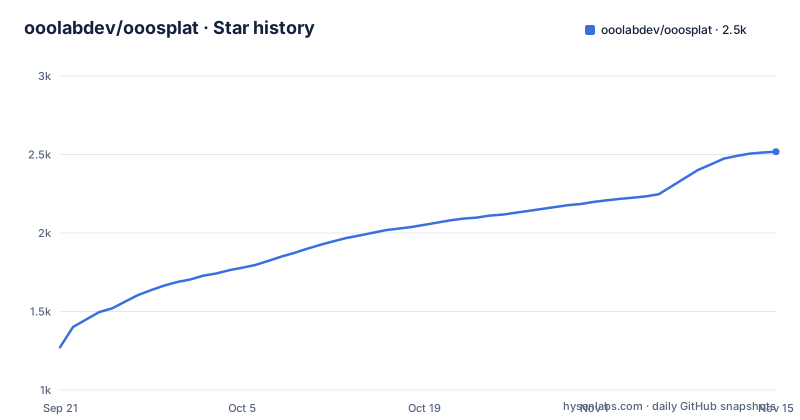
- ooolabdev/ooosplat2,518 ★ · +1,246
| Repository | 2026-09-21 | 2026-11-15 |
|---|---|---|
| ooolabdev/ooosplat | 1.3k | 2.5k |
1,246 Stars in the last 55 days, measured from the daily GitHub snapshot. Compare with other projects
Editorial analysis
The pipeline is FFprobe, FFmpeg, COLMAP, Brush and an atomic publish
The whole generation path is printed as a diagram in the documentation, and every step in it is a separate external program:
输入视频或图片序列
  │
  ├─ 视频:FFprobe 分析,FFmpeg 按档位目标 FPS 和工作分辨率抽帧;透明视频同步生成 RGBA 画面与 Mask
  ├─ 图片:按文件名排序并保留全部图片;透明 PNG 自动生成 Mask
  ├─ COLMAP:自动选择 CPU 或 CUDA GPU 提取特征;视频顺序匹配,图片穷举匹配
  ├─ COLMAP:增量重建并验证注册率和三维点;自动优化开启时可按需尝试桥接补帧
  ├─ Brush:使用可用 GPU 训练 Gaussian Splats;精细档按显存选择训练配置
  └─ 校验 PLY 后原子发布为 final.ply
Two decisions in there shape everything a user notices. Video and images take different matching paths, sequential for video and exhaustive for a photo sequence, which is why a long clip trains differently from a folder of stills. And the result is published atomically as `final.ply` after validation, so a cancelled or failed run leaves the previous file alone rather than a half-written model. Around the pipeline the app keeps up to 500 log lines in the interface while writing the raw process output in full to a `logs` directory inside the project, and cancelling a task kills the whole child process tree through a Windows Job Object or a Unix process group.
The 50% registration abort is gone and 80% is now only a warning
Whether a reconstruction is good enough is decided by two documented rules, and the looser one is recent. A task proceeds to Brush training as long as COLMAP registered at least one image and produced valid three-dimensional points, which is a very low bar. Below an 80% registration rate the app shows a quality warning. Below 50% it no longer stops the job by itself, where an earlier version did. That is a deliberate loosening, and it has a practical consequence worth knowing before you queue a batch: a video that reconstructs badly now goes on to spend GPU time training a splat from whatever frames registered, and the only signal that separates a good run from a bad one is that warning line in the log panel. The default project root is `Documents\SplatStudio\Projects`, written with a Windows separator even though the same build runs on macOS and Ubuntu, and finished jobs, failures, interruptions and cancellations are all recorded in a task history.
Version 0.5.0 turned auto-optimization on by default and added reshoot
The experimental auto-optimization switch is now enabled when you install, and turning it off is what restores the old behaviour. With it on, video is sampled at 6, 8 or 12 frames per second depending on the quality tier, frame extraction, COLMAP and Brush each get a matching resolution policy, and when the initial reconstruction covers too little the app spends whatever budget remains trying to add bridge frames so a moving subject stays connected between sampled frames. Image sequences are untouched by that: they keep every picture, use shared cameras, exhaustive matching and the existing incremental mapper, and bridge interpolation does not apply to them at all. The same release added incremental high-resolution reshoot. Shoot the same scene again with the same device, lens and resolution, and the app reuses the original database, shared cameras and sparse model, registering only the new frames before retraining Brush on everything registered. That reshoot creates a separate derived project and never overwrites the original.
The three platforms ship three different COLMAP builds
This is the detail that decides whether two people get the same splat from the same footage. The Windows installer bundles a COLMAP built for both CPU and CUDA GPU, and at startup the app inspects the bundled CUDA runtime, the NVIDIA driver version and the card's compute capability to choose a backend, falling back to CPU without asking. The macOS Alpha bundles a native arm64 CPU-only COLMAP 4.0.4, with COLMAP pinned to CPU and Brush picking whatever Metal backend is available. Ubuntu uses the system CPU COLMAP from the 24.04 repository, which the page names as 3.9, while Brush v0.3.0 is downloaded and verified by `npm run setup:engines`. The documentation says all three platforms use a pinned and checked FFmpeg and Brush setup, but the Ubuntu section also says it uses the system's own ffmpeg and ffprobe and that the `.deb` installs them through the package manager. Linux is the least verified path as well: Brush officially supports AMD, Intel and NVIDIA, end-to-end testing was done on NVIDIA, and a CPU-only software graphics backend has not been validated, although the startup check does not stop you from trying it. The build-side dependency list is a single apt line:
sudo apt update
sudo apt install -y \
  build-essential curl file ffmpeg colmap \
  libwebkit2gtk-4.1-dev libxdo-dev libssl-dev \
  libayatana-appindicator3-dev librsvg2-dev libdbus-1-dev
Installing the packaged build instead is one command, `sudo apt install ./OOOSplat-0.5.0-x64-linux.deb`, and people who take the `.deb` do not need Node.js, Rust or the Tauri development libraries that a source build asks for.
The macOS build is unsigned, Apple-silicon only, and CPU-bound
The Mac delivery is labelled an Alpha for a reason, and the limits are stated rather than discovered. It targets macOS 15 or later on M1 and newer Apple Silicon, with no Intel build and no Universal Binary. The `.app` and `.dmg` are unsigned and unnotarized, so Gatekeeper will block the first launch and the documented workaround is to right-click the app in Finder and choose Open; signing and notarization are promised for a formal release rather than shipped now. Inside, FFmpeg 8.1.2 is a native arm64 build with a separate FFprobe, COLMAP is the CPU-only CLI, and the app will not fall back to Homebrew or to a same-named binary on the system `PATH`, so a user does not need Homebrew installed and does not get a silent substitution if one is. That last choice cuts both ways: nothing on the machine can be picked up by accident, and nothing on the machine can be used to make reconstruction faster.
Windows asks for WebView2 twice and admin rights once
The Windows requirements are Windows 11 on x64 with the WebView2 Runtime present, and the runtime is needed twice over. The interface runs in it, and video export needs it to supply WebCodecs AVC encoding. When that encoder is missing the app does not fail quietly: animation playback still works in the window, and the export command explains why it is unavailable. Beyond that, Brush training needs a working graphics backend with a discrete GPU recommended, COLMAP's CUDA path needs an NVIDIA card with driver 528.33 or newer and compute capability 5.0 or above, and the GPU checks for COLMAP and for Brush are independent of each other, so one can run on the GPU while the other does not. Install mode is whole-machine, which can require administrator rights. Disk is the other quiet constraint: a project has to hold the source copy, the extracted frames, the COLMAP database, Brush intermediates and the final PLY, and long clips or the fine tier can take a great deal of it.
Editing writes edit.ply and never touches final.ply
The preview loads a historical `.ply` straight from disk and offers orbit, pan and zoom, and switching between the adjust and animation modes deliberately does not reload the model or reset the camera. Adjust mode moves, rotates and uniformly scales the whole model, with the scale range extended down to `0.001` and up to `10000`, and the transform saves as you work. Selection comes in three shapes: a rectangle that box-selects and deletes non-destructively, plus spherical and box volumes that keep their Gaussians live inside the region and drop you into an orthographic view. Undo and redo cover transform, crop and delete in one shared history, while camera moves and the temporary yellow selection stay out of it. Saving writes a single `edit.ply` that later saves replace safely, and the original `final.ply` is never overwritten, by the crop or by the delete. Export is where sizes matter: the single-file offline HTML keeps the current transform, the crop, the deletes and all undeleted Gaussian and spherical-harmonic data, so the file runs about four thirds of the PLY plus the viewer, and very large models remain at the mercy of the browser.
The build scripts verify telemetry endpoints the page says are not there
The privacy argument on the page is that reconstruction and training run on your own machine, that material, frames, camera data, models and logs stay in the project directory you chose, and that the React interface reaches a local Rust backend through Tauri with no remote service and no localhost API. The build tooling in `package.json` does not obviously agree. Alongside the expected `setup:engines`, `verify:engines` and `verify:licenses` entries for Windows, Linux and macOS, there is `verify:telemetry`, which runs `scripts/verify-telemetry-endpoint.mjs`, and a `verify:telemetry:release` variant of the same script with `--required`, meaning a release build is expected to pass it. The repository also carries a `server/` directory at the top level. The page says nothing about what that endpoint is or whether it is contacted at runtime, so the two statements sit side by side without meeting. Smaller inconsistencies have the same shape: the same trendshift badge is anchored twice, the test material lives on a Quark netdisk link, and the release titles changed format, with 0.5.0 tagged plainly while 0.4.1 and 0.4.0 were tagged OOOSplat v0.4.1 and OOOSplat v0.4.0.
Editorial conclusion
Use it when you want a splat from a clip without assembling the pipeline yourself, and run the quality tier you can afford, since the fine tier picks its training resolution from detected video memory and downgrades once before retrying. Judge results per platform rather than across them: COLMAP 4.0.4 on macOS and 3.9 from the Ubuntu repository are different reconstruction engines behind the same button, and Linux is the only path whose CPU-only graphics backend has not been verified end to end, even though the startup check will not stop you from launching it. Expect an unsigned build on Apple Silicon, a fixed 23-second animation with a watermark rather than a camera path of your own, and exports that keep every undeleted Gaussian, so an HTML share file runs about a third larger than the PLY it came from.
Frequently asked questions
What does OOOSplat need to turn a video into a 3D Gaussian splat?
Three external engines run in sequence: FFprobe and FFmpeg to analyse and extract frames, COLMAP for feature extraction, matching and incremental reconstruction, and Brush to train the splats. The result is validated and published atomically as `final.ply` inside the project directory.
Which COLMAP version runs on each OOOSplat platform?
The Windows installer bundles a build that supports both CPU and CUDA GPU, the macOS Alpha bundles an arm64 CPU-only COLMAP 4.0.4, and Ubuntu uses the system CPU COLMAP from the 24.04 repository, which the page names as 3.9. Brush is v0.3.0 on macOS and Linux.
Why did my OOOSplat task warn about registration rate?
Below an 80% registration rate the app shows a quality warning, and below 50% it no longer stops the job at all, where an earlier version did. A task proceeds as long as COLMAP registered at least one image and produced valid three-dimensional points, so a bad reconstruction now still reaches GPU training.
Can OOOSplat run on an Intel Mac or on Ubuntu 22.04?
No to both. The macOS build is an Alpha for macOS 15 or later on M1 and newer Apple Silicon, with no Intel or Universal Binary, and the Linux delivery is a `.deb` for Ubuntu 24.04 on x86_64 that explicitly does not claim support for 22.04, other distributions or production deployment.
Does OOOSplat overwrite my exported model when I edit it?
No. Saving writes a single `edit.ply` that later saves replace safely, and the original `final.ply` is never overwritten. The offline HTML export also leaves both files alone while keeping the current transform, crop, deletions and all undeleted Gaussian and spherical-harmonic data, at roughly four thirds the size of the PLY plus the viewer.
Official sources
Add this badge to your README
If you maintain this project, the badge below links readers to this analysis and shows its maintenance status from the daily GitHub snapshot. Paste the markdown into your README; add ?metric=license or ?metric=stars to the image URL for a different field.

[](https://hysenlabs.com/projects/ooolabdev-ooosplat)Star history chart for your README
[](https://hysenlabs.com/projects/ooolabdev-ooosplat)Was this useful?