OpalaTex splits into two products: a desktop LaTeX editor and a terminal agent
OpalaTex: your local academic production studio Create papers, classes, tutorials, and presentations with AI when you need it, paying for real usage while keeping control of your data.
At a glance
- What is it?
- A LaTeX editor that compiles locally with Tectonic and drives an AI agent, with the window features and the command line agent living in different installs. Worth knowing: the base install is the agent, the desktop needs an extra, and the Qt pins carry a written explanation of two crashes.
- Who is it for?
- Pick OpalaTex if you write LaTeX daily, want compilation to stay on your own machine, and would rather bring your own model credentials than sign up for an account. The editor half needs the packaged release or the gui extra, while the agent half works on its own, so decide which one you actually want before installing.
- Can I use it commercially?
- Yes. MIT is a permissive licence: you can use, modify and sell software built on it, as long as you keep its copyright and licence notices.
- Is it still maintained?
- Yes. The repository last received commits 19 days ago.
- What is it written in?
- Mainly Python, according to GitHub's language statistics.
Answers come from the project's GitHub data, last synced on October 4, 2026, and from our analysis. They are not legal advice.
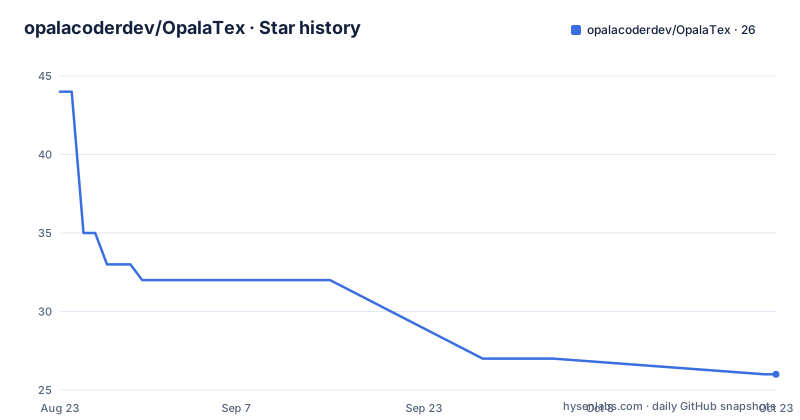
Star history
- opalacoderdev/OpalaTex27 ★ · -17
| Repository | 2026-08-23 | 2026-10-04 |
|---|---|---|
| opalacoderdev/OpalaTex | 44 | 27 |
-17 Stars in the last 42 days, measured from the daily GitHub snapshot. Compare with other projects
Editorial analysis
Two products share a name: a packaged editor and a base agent
The repository ships something you install two different ways, and confusing them is the first mistake available to make. The base install is the command line interface: the agent, its projects and its skills, with no desktop stack at all. The desktop application is the LaTeX editor, and it is reached by asking for the gui extra. In practice that means a plain install gives you a working agent that can handle projects, skills, tools and LaTeX compilation, and nothing you would recognise as an editor. Compilation itself is never bundled: it looks for a Tectonic binary on your PATH, so a missing Tectonic is a broken compile rather than a missing feature. The feature list also makes clear which half you are buying, since the terminal has no preview pane, no SyncTeX, no annotations and no dictation.
uv tool install opalatex # or: pip install opalatexpip install "opalatex[gui]"The Linux and macOS one-liner pipes a remote script straight into a shell
The documented shortcut downloads the installer from the repository's default branch and hands it to your shell in a single pipe, with no checksum and no signature in the command itself. The page immediately offers the careful version: fetch the script to a file, page through it with a pager, then run it from disk. That ordering is deliberate and costs one extra step, so there is no reason to skip it on a machine that holds your thesis. What you get afterwards is spelled out precisely: the application directory under the user's local share folder, a command symlink in the user's local bin folder so the launcher is on PATH, and a desktop launcher file under the applications directory. No administrator privileges are involved, because nothing is written outside your home directory.
curl -fsSL https://raw.githubusercontent.com/opalacoderdev/OpalaTex/master/install.sh | bashWindows installs into LOCALAPPDATA and edits the user PATH
The Windows path mirrors the Unix one with different names. PowerShell fetches the installer script from the same branch and executes it in the pipe form, and the page again offers an inspect-first variant that downloads the script to a file, prints its contents, and runs it from there. The install location is the OpalaTex folder under the local application data directory, and the installer does one thing that has consequences beyond convenience: it adds its own executable directory to the user PATH. That is why a fresh terminal is often needed before the command is found, and it is also why the install is per user rather than machine wide, consistent with the stated minimum of Windows 10 or 11 and the absence of any administrator requirement.
irm https://raw.githubusercontent.com/opalacoderdev/OpalaTex/master/install.ps1 | iexUninstall keeps your work unless you ask for the purge
Removal is designed to be boring. The Unix command removes the application while preserving settings, chats, caches, credentials and project directories, and project directories in particular are stated as never removed. A purge flag exists for the case where you also want the global data directory gone, and it is described as something to pass only when that is what you want. Windows behaves the same way through the normal settings entry or the Start menu item, and its optional PowerShell purge switch removes global application data only after a confirmation. Snap installations are not managed by these scripts at all and are removed by Snap itself. Older direct installations that predate the uninstall command get a separate script, which is the last remaining reason to keep that file around.
opalatex-uninstallsudo snap remove opalatexA usable model is two records, and a typo is refused rather than guessed
Registering a model is not one step but two, and the split matters when something does not work. A provider connection holds the credentials and the address of the service. A catalog entry names a model underneath such a connection and carries its context size and capability flags. The main model setting stores only an identifier, so pointing a project at a model that has no catalog entry behind it gives you no address, no key and no capabilities, which is a confusing failure if you assume the setting does the whole job. Unknown fields are rejected outright instead of being interpreted, so a misspelled option cannot become an invisible setting, and a parameter you do want sent to the provider is written in an explicit extra namespace. Every one of these commands also runs as a one shot, which is what makes scripted machine setup possible.
/providers add label="Ollama Gil" provider=ollama api_base=http://192.168.0.10:11434/v1
/providers add label="OpenAI" provider=openai api_key=sk-...
/providers                                    # list connections

/models add name=gemma4:26b connection=ollama-gil num_ctx=65000 supports_thinking=true
/models list                                  # the catalog
/models show ollama/gemma4:26b
/models set ollama/gemma4:26b profile=light policy=delegate
/models remove ollama/gemma4:26b

/set-main-model ollama/gemma4:26b             # point this project at it
Ctrl+C stops the turn, not the session, and resume picks it back up
Interrupting a running turn in the terminal is treated as a normal event rather than a crash. The written work already done is kept, the session stays open, and a resume command continues from that point, which matters when a long agent turn is going the wrong way and you want to redirect it without losing what it produced. Approval is also explicit rather than assumed: in edit mode the agent asks in the terminal before each change, and in plan mode it presents a plan for approval first. Output is streamed as the model writes it, with tool calls and their results shown inline, and reasoning can be dimmed with two separate switches. The help command lists commands by section with their arguments, and specific commands have worked examples attached.
cd my-thesis
opalatex --cli                       # interactive session for the project in this folder
opalatex --cli --here                # register this folder as a new project first
opalatex --cli --project my-thesis   # pick a project by name

opalatex -p "fix the compilation errors in chapter 3"   # one turn, then exit
echo "summarise the changes" | opalatex -p -            # prompt from standard input
Preview, SyncTeX, annotations and dictation exist only in the window
The split between the two halves is explicit about what the terminal gives up. The editor side offers a split source and PDF view with SyncTeX, rich text and WYSIWYG modes, PDF annotations, a presentation mode, dictation and read aloud. The documentation states plainly that these belong to the window and have no terminal equivalent. What the terminal adds on top of the shared chat commands is a conversation command for listing, creating and switching chats, a compile command, a cost command and the resume command. The other documented details are smaller but real: the interface ships in English and Brazilian Portuguese, compilation happens locally through Tectonic, and every editor feature works with no account at all, with third party API keys treated as optional.
The Qt pins come with the two crashes that forced them
The requirements file explains its own pins instead of leaving them as arbitrary version numbers, and the explanations are the most useful part of the file. An older Qt release embeds a Chromium build too old for the bundled PDF library, and the recorded symptom is that opening a PDF greys the window. A different Qt release ships a runtime that crashes the inference library on the first agent message. Both were found by testing rather than by reading release notes, so the packages are held at the release that was verified rather than left to a looser floor. The same pattern appears elsewhere: a parser library is declared in the package manifest precisely because an install that lacked it silently degraded to a slower regular expression path, and a PDF library is pinned directly rather than inherited through another package's dependencies.
Editorial conclusion
Pick OpalaTex if you write LaTeX daily, want compilation to stay on your own machine, and would rather bring your own model credentials than sign up for an account. The editor half needs the packaged release or the gui extra, while the agent half works on its own, so decide which one you actually want before installing. Check two things first: that a Tectonic binary is on your PATH, since compilation depends on it and is not bundled, and that your platform is one of the two named minimums, because the project states support for specific Ubuntu releases and specific Windows versions rather than a general range.
Frequently asked questions
What is the meaning of opalite?
Nothing in this repository covers opalite as a material or a word. OpalaTex is a LaTeX editor with an integrated AI assistant that compiles documents locally with Tectonic, works with no account, and treats third party API keys as optional. Its interface is available in English and Brazilian Portuguese.
Is opalite a real crystal?
The repository contains nothing about crystals. What it documents is software: the packaged desktop release installs into the user profile without administrator privileges, the base command line install runs the agent with no desktop stack, and the desktop half is reached by asking for the gui extra.
What does the song "Opalite" by Taylor Swift mean?
There is no music content anywhere in this project. The name overlap is with OpalaTex, a Python project whose version line runs at 0.2.16.1 and whose default branch is named edge_0_2_0, released under the MIT license with Python 3.10 or newer required.
Official sources
Add this badge to your README
If you maintain this project, the badge below links readers to this analysis and shows its maintenance status from the daily GitHub snapshot. Paste the markdown into your README; add ?metric=license or ?metric=stars to the image URL for a different field.

[](https://hysenlabs.com/projects/opalacoderdev-opalatex)Star history chart for your README
[](https://hysenlabs.com/projects/opalacoderdev-opalatex)