Animeko, formerly Ani: a Kotlin Multiplatform bangumi client that seeds what it downloads
An all-in-one platform for finding, tracking, and watching anime with danmaku (scrolling comments), cloud favorites sync (Bangumi), offline caching, BitTorrent support, and cloud danmaku filtering. 100% Kotlin/Compose Multiplatform.
At a glance
- What is it?
- Animeko is a Kotlin Multiplatform anime tracker and player for Android, iOS, Windows, macOS and Linux that hosts no video of its own. Streams come from the public BitTorrent network or a web source list, the app seeds automatically, and every comment you send is bound to your Bangumi username.
- Who is it for?
- Animeko suits a viewer who wants one client across Android, iOS, Windows, macOS and Linux, who accepts that streams come from the public BitTorrent network or a community source list, and who wants danmaku and Bangumi watch progress in the same app. It does not suit anyone who needs a library the app controls, because it hosts no video and will not index files you already own.
- Can I use it commercially?
- Yes, with strict conditions. AGPL-3.0 is a network copyleft licence: if people use a modified version over a network, for example as a hosted service, you must offer them its source code under the same licence.
- Is it still maintained?
- Yes. The repository received new commits within the last day.
- What is it written in?
- Mainly Kotlin, according to GitHub's language statistics.
Answers come from the project's GitHub data, last synced on November 14, 2026, and from our analysis. They are not legal advice.
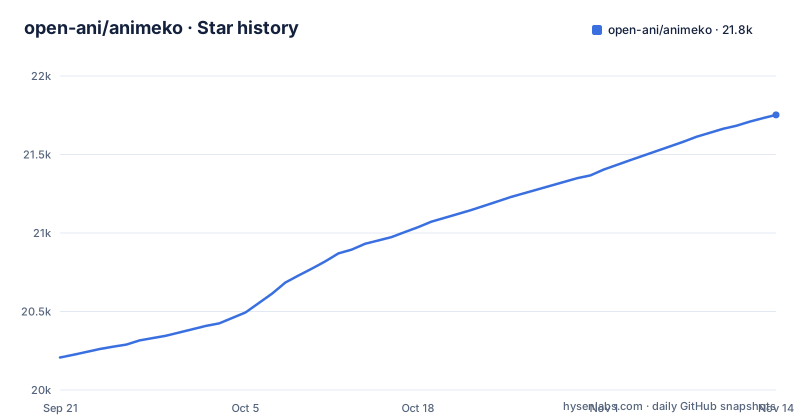
Star history
- open-ani/animeko21,752 ★ · +1,545
| Repository | 2026-09-21 | 2026-11-14 |
|---|---|---|
| open-ani/animeko | 20.2k | 21.8k |
1,545 Stars in the last 54 days, measured from the daily GitHub snapshot. Compare with other projects
Editorial analysis
Animeko stores no video, so every stream depends on a source being up
The resource model is stated plainly in the project's own FAQ: all video data comes from the network, Animeko stores none of it, and the app provides no video resources of its own. There are two source families. A BT source is the public BitTorrent peer to peer network, where anyone holding a file can share it. An online source is content shared by other sites, and the one currently wired in is the aggregated list published at the creamycake ani-subs repository.
That decision shapes everything else. The schedule screen, the episode list and the player all sit on top of sources that belong to other people, so an episode that no longer resolves anywhere cannot be fixed from inside the app. The offline cache that every source type supports covers this partially, since it stores what has been fetched, and it says nothing about an episode you have not opened yet.
A first run is therefore a source problem before it is a settings problem. If nothing resolves from your network or region, the rest of the interface has nothing to show.
The -AL4123- fingerprint encodes the libtorrent version you are running
Using a BT source makes the app share data automatically, which the project describes as a matter of mutual aid rather than an opt-in. The client identifies itself in two places. The BT fingerprint is `-AL4123-`, where 4123 stands for libtorrent version 4.12.3, and the user agent looks like `ani_libtorrent/4.12.3`.
Both strings are derived from the engine version, not chosen freely. When the bundled libtorrent moves, the fingerprint has to move with it, and until it does your client presents itself to peers and trackers as a build of a different version than the one it is. The repository has separate torrent and utils directories for this work, and the README does not document the fingerprint as something a user can set.
There is no documented way to disable the seeding either. If you are on a capped connection or a metered one, the upload side of the protocol is running on your machine and the documentation gives you no knob for it.
Every danmaku you send from the app is bound to your Bangumi username
Animeko runs its own public danmaku server, and comments sent inside the app go to it. Each one is bound to a Bangumi username, which the project gives as the reason for abuse prevention, and it mentions reporting and blocking as features being considered for the future. Future tense, which matters: the block and report controls are not there yet.
What that costs the reader is concrete. Your account name travels with every comment, and there is no documented anonymous posting mode, because the binding is applied at the server. The service address is public, with a swagger index and a danmaku directory in the repository, so the endpoint is not a private one either.
If you want to comment without attaching an identity, this is the wrong client, and the README gives no configuration that would change it.
Dandanplay pulls the same episodes' comments from other platforms
Comments are not limited to what Animeko's own server holds. The app also fetches related danmaku from dandanplay, and dandanplay in turn collects from other platforms, with Bilibili's Hong Kong, Macau and Taiwan region and Bahamut named in the README. The stated density is tens to thousands of comments per episode.
Two consequences follow. First, the comment track you watch on an episode is a merge of several communities with different rules about what gets said, and the app does not document any filtering beyond the danmaku service it ships. Second, the identity binding described for your own comments applies to what you send, and the repository does not document what identity, if any, arrives attached to comments fetched through dandanplay.
A screen carrying thousands of moving comments is a rendering load, and the project credits a high performance danmaku engine for it without publishing any figure or a description of how it drops comments when the engine cannot keep up.
Jellyfin and Emby sources do nothing until you already run a server
The source layer is wide. The README names the aggregated ani-subs list with automatic selection, BitTorrent, Jellyfin, Emby, and custom sources, with 动漫花园 and Mikan built in, a custom source editor, and an automatic source selector. The repository splits this across datasource, client and tools directories.
Two of those source types are dead weight unless a problem is already solved. Jellyfin and Emby are libraries you host, and Animeko is a client for them, not a server and not an indexer. Pointing it at one gives you nothing until you have that server running and populated, which is the same work you would do for any other client.
Automatic selection is the other soft spot. The README does not document the ranking or the order in which sources are tried, so when it lands on a dead mirror there is no documented preference list to reorder. The custom source editor is your way out, and it assumes you know the address format the aggregator uses.
Playback runs through mediamp, so Android and PC use different players
The player is mediamp, with ExoPlayer underneath on Android and VLC underneath on the PC builds. The BitTorrent engine is described as tuned for playing while downloading, so the streaming path is built around the network case rather than around a local file.
Two players means two sets of container and codec behaviour, and the repository publishes no compatibility matrix, so what plays on an Android phone is something you confirm yourself on a desktop build. The claim is worse for the online path: the stream-while-downloading tuning belongs to the BT engine, and nothing in the README makes an equivalent statement about online sources, where seeking and buffering work differently.
If you keep files locally, they arrive through the source layer, not through a local library, so a VLC install on your machine does not turn Animeko into a local player.
The website is the only distribution channel the README names
Supported platforms are Android, iOS, Windows, macOS and Linux, with a stable channel for feature stability and a test channel for new features sooner. Both links point at the same downloads page, animeko.org/downloads/, and the project recommends the stable build unless you want new features and are willing to work through bugs. The app was formerly called Ani and is still abbreviated that way.
No package manager line, no repository entry, no file format and no install command appear anywhere. A Linux reader gets no deb, AppImage or Flatpak named, and an iOS reader gets no installation route described, even though iOS is listed as supported. The repository does contain gradlew, gradlew.bat, settings.gradle.kts and build-logic, but that is the build system for contributors, and contributor detail is pointed at docs/contributing/README.md. It is not a documented install path for users.
The table at the top of the README also links the GitHub releases page, for the latest release and for all releases.
v6.3.0-alpha01 landed on 2026-10-02, four days after v6.2.0
The release record is recent and dense. v6.4.0-beta01 shipped on 2026-10-18, v6.4.0-beta02 on 2026-10-22 and v6.4.0 on 2026-10-24, and the last push to the repository was on 2026-11-01. The app version and the engine version move on separate schedules, since the 6.x line is the application while the user agent still reports libtorrent 4.12.3.
That pairing is where a test build is least predictable. A client on 6.4.0-beta02 can be running the same engine as the stable 6.4.0, so choosing the test channel buys new features without buying a new engine, and the fingerprint you present to the network may be identical to the one your neighbour on stable presents.
One more gap for anyone building from source. The README documents no update mechanism for a self-built client, so a fork has no way to learn that a new release exists. The licence identifier is AGPL-3.0 with LICENSE.txt at the top level, and the README says nothing about relicensing, trademark or commercial use, so read that file rather than the README.
Editorial conclusion
Animeko suits a viewer who wants one client across Android, iOS, Windows, macOS and Linux, who accepts that streams come from the public BitTorrent network or a community source list, and who wants danmaku and Bangumi watch progress in the same app. It does not suit anyone who needs a library the app controls, because it hosts no video and will not index files you already own. Check two things on the downloads page first: which channel you want, stable or test, and whether a BT source resolves on your network at all. Then read the fingerprint section, because seeding is automatic and the README documents no switch to stop it.
Frequently asked questions
Which platforms does Animeko run on, and how do you install it?
Android, iOS, Windows, macOS and Linux, through a stable channel and a test channel on the project's downloads page, with GitHub releases also linked from the README. The README gives no package manager command, repository line or file format, so there is nothing to script.
Does Animeko host or store any video files itself?
No. All video data comes from the network, either the public BitTorrent peer to peer network or an online source list, and the project states that it provides no video resources. It does cache sources locally, and it shares data automatically when a BT source is in use.
Where do Animeko's danmaku comments come from?
From the project's own public danmaku server and from dandanplay, which collects related comments and in turn draws on other platforms including Bilibili's Hong Kong, Macau and Taiwan region and Bahamut. An episode can carry tens to thousands of comments.
Is Animeko the same application as Ani?
Yes. The project was formerly called Ani and is now also shortened to Ani, so older references under that name refer to the same client.
Official sources
Add this badge to your README
If you maintain this project, the badge below links readers to this analysis and shows its maintenance status from the daily GitHub snapshot. Paste the markdown into your README; add ?metric=license or ?metric=stars to the image URL for a different field.

[](https://hysenlabs.com/projects/open-ani-animeko)Star history chart for your README
[](https://hysenlabs.com/projects/open-ani-animeko)Was this useful?