geti's PyPI wheel leaves out a copyleft model family on purpose, and the repository now hosts the third generation of a product whose release list only shows the application
Build, train, optimize, and run computer vision models locally, from raw images to live inference. Open source, optimized for Intel XPU (CPU-only and CUDA also supported).
At a glance
- What is it?
- Geti is an end-to-end computer vision platform, packaged here as two things: a desktop and container application, and a training library published to PyPI under a different name. Both are in this repository, and both have been renamed at least once in their history. The details worth reading are the packaging decisions, particularly one wheel that deliberately omits a model family because of its licence, and a release feed that only tracks half the repository.
- Who is it for?
- Geti is worth using if you are training and shipping computer vision models and want the same pipeline available as a library and as an application, because the library surface is small enough to read in one sitting and it will train, optimize, and deploy from Python. Three things to check before you plan around it.
- Can I use it commercially?
- Yes. Apache-2.0 is a permissive licence: you can use, modify and sell software built on it, as long as you keep its copyright and licence notices.
- Is it still maintained?
- Yes. The repository received new commits within the last day.
- What is it written in?
- Mainly Python, according to GitHub's language statistics.
Answers come from the project's GitHub data, last synced on November 22, 2026, and from our analysis. They are not legal advice.
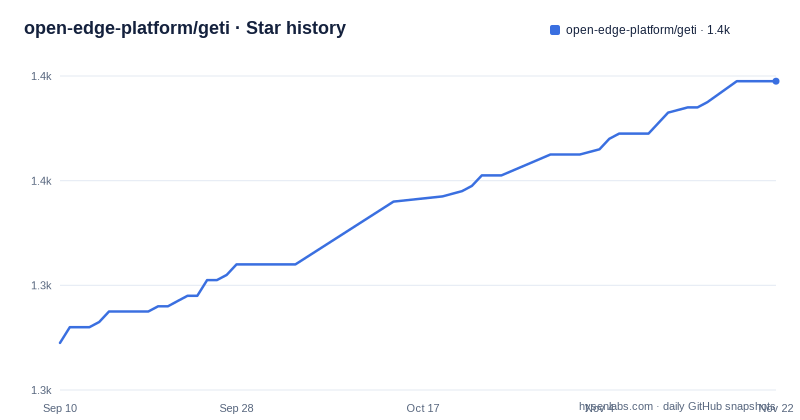
Star history
- open-edge-platform/geti1,379 ★ · +50
| Repository | 2026-09-10 | 2026-11-22 |
|---|---|---|
| open-edge-platform/geti | 1.3k | 1.4k |
50 Stars in the last 73 days, measured from the daily GitHub snapshot. Compare with other projects
Editorial analysis
This repository is the third product to occupy this address
Two notes near the top of the readme explain the repository's history, and together they describe a lineage three generations deep. The first says the application underwent a major revamp in version 3, producing a new application that is much more lightweight and easier to install than before, and that legacy versions remain in a separate repository, with a migration guide linked for moving from version 2 to version 3. The second says this repository previously hosted an entirely different project, the training extensions package, which has now been fully replaced by the current library, and that the legacy package is still available on the package index although deprecated, with a recommendation to migrate because the new library has a similar interface. So there are two relocations and one in-place rewrite, and the current tree is the third occupant. The asymmetry in the two notes is worth naming: one migration has a guide and a documented path, while the other is handled with a promise that the interface is similar. That promise is probably true and it is not the same as a guide, and it is the older migration that will bite whoever inherited code written against the deprecated package.
The published wheel omits a model family because of its licence
There is one line in the installation section marked important, and it is the most considered thing in this readme. The package published to the index does not include the Ultralytics object detection models, because those models are distributed under a copyleft licence rather than the permissive one this repository uses. The instruction is to build from source with the relevant extra if you want them. That is the whole story of a permissively licensed package choosing not to redistribute a copyleft dependency's weights inside its wheel, and it is a decision many projects either avoid by not supporting the model at all or get wrong by shipping it anyway. Doing it this way means the published artefact stays clean, the capability stays available, and the cost is paid by the person who wants it, who has to build locally. It also means the documentation has to be explicit, and it is, in a block marked important rather than in a footnote. The rest of the repository is permissively licensed with a licence file and a notice file at the root, so the split is deliberate rather than accidental.
The release feed tracks the application and not the library
Two facts about versioning. The first is the default branch, which is the development branch rather than a stable one, so a clone is development code and the tags are where releases come from. The second is the tag naming, which carries a prefix identifying the subproject. All three visible releases are prefixed for the application, at three minor versions across four months, and no library tag appears in that list at all. Since the library is the half of this repository that most Python developers will consume, and since it is published to a package index, that is arguably fine: library consumers track the index, not the repository's release page. It is still an asymmetry worth knowing, because the visible release history tells you when the application changed and nothing about when the thing you import changed. Combined with the development default branch, the practical guidance is narrow: pin the application to an exact tag when you deploy it, and pin the library to an exact index version when you depend on it, and do not assume the two move together.
The library installs three ways and the only difference is an extra and an index
The library's installation is three lines, and they are worth reading together because the design is clean:
uv pip install "getitune[xpu]" --extra-index-url https://download.pytorch.org/whl/xpu    # for Intel® XPU acceleration
uv pip install "getitune[cuda]" --extra-index-url https://download.pytorch.org/whl/cu128    # for NVIDIA® CUDA acceleration
uv pip install getitune # CPU-only by default
Two of the three add an accelerator extra and point the resolver at a wheel index matching that accelerator, and the third installs nothing extra and is explicitly the CPU default. That is the right shape for a package that targets one vendor's accelerators first and supports two others: the default is the thing that works everywhere, and the extras are opt-in with the correct wheel source attached, so a user on the wrong accelerator gets a CPU install rather than a broken one. The CUDA line also pins a specific minor version of the CUDA runtime in its index path, which means that when a new runtime ships this line has to be edited. Two structural notes: the accelerator defaults run through a modern installer rather than a bare pip invocation, which is a recommendation and not a requirement, and the documentation covers installation for the application separately from the library, so the two halves of the repository genuinely have different getting-started experiences.
The engine surface is one constructor and one listing function
The quick-start code for the library is short enough to read as an API summary:
from getitune.engine import create_engine
from getitune.utils import list_models

# Explore available models for your task
all_models = list_models()                    # List all model names
detection_models = list_models(task="DETECTION")  # Filter by task
recipes = list_models(return_recipes=True)    # Get full recipe YAML paths

# Create an engine using any model name or recipe path
engine = create_engine(
    model="efficientnet_b0",                  # model name, recipe YAML path, or exported IR/ONNX
    data="/path/to/dataset",                  # dataset directory or YAML path
)
Two design decisions in eleven lines. The constructor accepts three different kinds of model reference, a name from the catalogue, a recipe file, or an already-exported model in one of two interchange formats, which means the same code path serves a fresh training run and an inference-only deployment. And the listing function has three modes rather than one, including a mode that returns recipe file paths instead of names, which is how a user gets at configuration the catalogue does not expose. The data argument likewise takes either a directory or a recipe file, so the same convention applies on both sides. What is not in the snippet is how you configure the training itself, which the readme defers to the online documentation along with the full recipe list and the backend-specific options.
The model catalogue is a markdown table with a paper citation per row
The state-of-the-art catalogue is the largest section of the readme and it is maintained by hand, as a markdown table with one row per architecture and a citation column. Object detection alone is given eleven rows and a rowspan that spans them with a description of the task and its use cases, counting items, localising defects, surveillance. The citations are not always one paper: the newer transformer-based rows credit two or three, one architecture plus a training method plus the original detection framework it builds on. That is a genuinely useful level of provenance for a catalogue, since it tells you what to read when the model misbehaves. The cost is that the catalogue is prose in a readme, which is exactly why the library exposes recipe file paths through its listing function rather than a machine-readable index: the recipes are the structured layer, the table is the human layer, and the two have to be kept in step by hand. The architectures on the list are current-generation, including several from the last year, and the readme invites an issue for a model you want added, which is a cheap way to keep a hand-maintained list growing.
The application leads with a Windows package and its security policy is filed in lowercase
Two small facts that will cost somebody time. The first is the install order. Four ways to run the application are offered, and the first is a Windows application package, followed by a container, then an install script, and only then building from source. That ordering tells you the intended deployment for a lot of users is a Windows desktop install rather than a service, which is unusual for a platform that also ships a Docker image and a container-friendly library, and it means the container path is the one to read carefully if you are on anything else. Both installer scripts are checked in at the root, one for a Unix shell and one for PowerShell, so the script path is genuinely cross-platform even though the primary package is not. The second fact is the security policy file, which is named in lowercase while the readme's own link points at it in uppercase. GitHub's security tab looks for the uppercase filename, so a policy filed this way is not surfaced where contributors will find it. The repository does carry a security scorecard badge and a separate security file, so the intent is clearly there and only the filename is wrong.
The readme disables four lint rules before it writes a word
The very first line of the readme is a comment telling the markdown linter to disable four specific rules, one of which is the line-length limit and three of which cover document structure and heading conventions. A second disable appears inline partway down, immediately before the model catalogue table. Both of those decisions are explained by what follows, because the catalogue is a wide table with long cell contents and citation links, which a line-length rule cannot survive and which an inline-HTML rule is needed to permit. Disabling a linter at the top of a file to accommodate one table is a small sin; disabling it for the whole document to accommodate one table is a larger one, and doing both suggests the first was tried and abandoned. The repository's linting is otherwise thorough, with a dedicated configuration file for markdown, a pre-commit configuration, a continuous integration directory, and coverage configuration wired to an external service. It also ships agent guidance files and a skills directory, so the repository is written to be worked on by coding agents as well as people.
Editorial conclusion
Geti is worth using if you are training and shipping computer vision models and want the same pipeline available as a library and as an application, because the library surface is small enough to read in one sitting and it will train, optimize, and deploy from Python. Three things to check before you plan around it. Which model families you need, since one popular detection family is excluded from the published wheel for licence reasons and requires a source build to enable. Which installer you want, because the application is a Windows package first and a container second, and the library is the only part that behaves like an ordinary Python dependency. And which artefact you are actually consuming, since the repository's release page tracks the application only and the library's version lives on the package index rather than in the tags. The lineage is three products deep, so read the migration notes before assuming a tutorial you found applies.
Frequently asked questions
What is GETI?
It is an end-to-end platform for building computer vision models, covering dataset preparation, training, optimization, and deployment. It ships as a Docker container or a native Windows application, and its training and optimization engine is published separately on PyPI as getitune, so the pipeline is also available as a Python library.
What is the Intel Open Edge Platform?
It is the organisation this repository sits under, and Geti is the computer vision product inside it, optimized for the vendor's XPU portfolio with CPU and CUDA also supported. The repository is named for the platform rather than the product, which is why searching for the product name and the repository name land in different places.
Does the getitune PyPI package include YOLO models?
No. The package does not include the Ultralytics object detection models, because they are distributed under a copyleft licence, and the documented way to enable them is to build from source with the relevant extra. Everything else in the repository is permissively licensed.
How do I install getitune with GPU acceleration?
Three commands, differing only in the extra and the wheel index: one for the vendor's XPU acceleration pointing at that accelerator's wheel index, one for CUDA pointing at a pinned runtime wheel index, and a plain install that is CPU-only by default. The default is deliberately the option that works everywhere.
What replaced the old OTX training extensions package?
It was replaced by getitune, which the project says has a similar interface extended with several new models, and the legacy package remains on PyPI in a deprecated state. Geti itself is on its third generation: version 2 lives in a separate repository with a migration guide, and version 3 is what this repository holds.
How is the geti repository versioned?
The default branch is the development branch, and the release tags carry a prefix identifying the application subproject, so the visible release history tracks the application only. The library is published to a package index and its version does not appear in the repository's release list, so pin the application to a tag and the library to an index version separately.
Official sources
Add this badge to your README
If you maintain this project, the badge below links readers to this analysis and shows its maintenance status from the daily GitHub snapshot. Paste the markdown into your README; add ?metric=license or ?metric=stars to the image URL for a different field.

[](https://hysenlabs.com/projects/open-edge-platform-geti)Star history chart for your README
[](https://hysenlabs.com/projects/open-edge-platform-geti)Was this useful?