OpenAPI Generator turns a spec into code, and inherits the spec's risk
OpenAPI Generator allows generation of API client libraries (SDK generation), server stubs, documentation and configuration automatically given an OpenAPI Spec (v2, v3)
At a glance
- What is it?
- Give it an OpenAPI Spec in v2 or v3 and it writes client libraries, server stubs, documentation and configuration. How you get it is a choice among seven Maven modules, and the project's own security note is the most useful thing in the README: a spec from an untrusted source can inject code into the output.
- Who is it for?
- OpenAPI Generator fits a team that owns an OpenAPI document and wants several language clients and a server stub to stay in step with it, especially one already on the Java build with a plugin available. It does not fit a pipeline that ingests partner-supplied specs without review, because the output is executable code and the project says so.
- Can I use it commercially?
- Yes. Apache-2.0 is a permissive licence: you can use, modify and sell software built on it, as long as you keep its copyright and licence notices.
- Is it still maintained?
- Yes. The repository last received commits 1 day ago.
- What is it written in?
- Mainly Java, according to GitHub's language statistics.
Answers come from the project's GitHub data, last synced on November 13, 2026, and from our analysis. They are not legal advice.
Star history
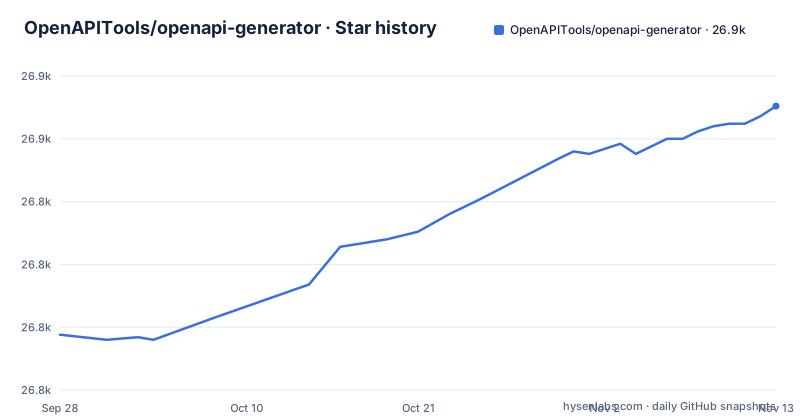
- OpenAPITools/openapi-generator26,863 ★ · +91
| Repository | 2026-09-28 | 2026-11-13 |
|---|---|---|
| OpenAPITools/openapi-generator | 26.8k | 26.9k |
91 Stars in the last 46 days, measured from the daily GitHub snapshot. Compare with other projects
Editorial analysis
One spec in, four kinds of output out
The scope is four outputs from one input. Given an OpenAPI Spec, in version 2 or version 3, the generator produces API client libraries, which is the SDK case, server stubs, documentation, and configuration files. The configuration output is the part that is easy to overlook.
The reason the repository exists as a Java project of this size is the width. `modules/` holds separate implementations per target language and per integration, and the `samples/` tree is organised the same way, with directories for client, server, documentation, config, schema, yaml, openapi3, and two meta-codegen entries for Kotlin and the meta-codegen layer itself. A sample directory per target is effectively a compatibility record: if a target's output lives in `samples/`, you can read what the generator currently produces for it without running anything.
A beginner's path exists too. The project links an eBook called A Beginner's Guide to Code Generation for REST APIs, plus a wiki and an FAQ page, which is where the README stops and sends you elsewhere. The opening of the README is mostly badges, a handful of warnings and a sponsor list.
Seven Maven modules decide which artifact you install
The Dockerfile copies each module's pom.xml separately, and that list is the clearest statement of what the project offers:
FROM maven:3-eclipse-temurin-17
RUN mvn dependency:go-offline
Between those two lines the copy layer names the modules: `openapi-generator-core`, `openapi-generator-cli`, `openapi-generator-online`, `openapi-generator-maven-plugin`, `openapi-generator-gradle-plugin` and `openapi-generator-mill-plugin` and `openapi-generator`, plus the top-level pom.xml. Each of those is a different way to obtain the same generator.
So "installing OpenAPI Generator" is not one decision. The CLI is a command you run. The Maven and Gradle plugins embed generation in an existing Java build. The Mill plugin covers the other JVM build tool. The online module is a separate artifact again. The core module is built as its own module too.
That is why the distribution decision belongs to your build system rather than to a single install command. The README links to a Maven search for the group `org.openapitools` and artifact `openapi-generator`, and leaves the choice of which module you depend on to you.
The container resolves every dependency before it copies any code
The image exists for reproducible builds, and the comments in the Dockerfile say why each step is where it is. Two steps are not about compilation at all. The `LICENSE` file is copied in with the note that it is required from a licensing standpoint, and `google_checkstyle.xml` is copied in as required to compile the project, which is how the build's code style rules reach the compiler.
The dependency step is the interesting one. All the poms are copied first, then `mvn dependency:go-offline` runs, so the expensive part of a Maven build happens before any source is in the image. The stated reason is better caching of code changes without fetching all dependencies each time. Module sources are then copied individually, with a comment explaining that this allows caching of Docker layers between major.minor versions.
The consequence for a user is that the image is built for the offline, repeatable case. A team that wants a fast local edit loop will spend more time on their own fork of the Dockerfile than on the generator itself, and a team that only needs the command once can ignore the layering entirely.
docker-compose.yml starts the documentation site, not the generator
This is a real trap for anyone reaching for Compose by habit. The file in the repository root defines one service, and it is not the code generator:
services:
  docusaurus:
    ports:
      - 3000:3000
The service is named `docusaurus`, it publishes ports 3000 and 35729, and it binds mount the documentation directories rather than the code: `./docs`, `./website/blog`, `./website/core`, `./website/i18n`, `./website/pages`, `./website/static`, plus two individual files, `./website/sidebars.json` and `./website/siteConfig.js`. The working directory is `/app/website`.
In other words, `docker compose up` here starts the documentation site for contributors. The generator itself is reached through the CLI, one of the build plugins, the online service, or the container image built by the Dockerfile. The repository does have `run-in-docker.sh` and `docker-entrypoint.sh` at the top level, which are the files to read next if you want the generator in a container, and the compose file is not one of them.
An untrusted spec can inject code into what you generate
The README carries an explicit warning, and it is the most consequential line in the project's documentation. If the OpenAPI spec, the templates, or any other input such as options or environment variables comes from an untrusted source or environment, review those inputs before using the generator, because of the risk of code injection.
Read the scope of that sentence carefully. It is not only the spec document. Templates are named as a separate risk, and so are options and environment variables. A generator that produces source code is a program that turns data into code, and any of those three inputs is a place where text ends up inside a file somebody will compile and run.
The practical consequence is a review gate, and it belongs upstream of the generator rather than inside it. If a build pipeline accepts a specification from a partner, a customer or an automated intake process, generating and publishing a client from it is publishing someone else's code into your repository. The project names an address for security reports, [email protected], which is separate from the issue tracker.
OpenAPI Generator is not the OpenAPI Initiative
The README states this explicitly: neither OpenAPI Tools, the parent organisation, nor OpenAPI Generator is affiliated with the OpenAPI Initiative. The names are close enough that this gets asked, and the distinction has practical consequences beyond trivia.
The specification is written elsewhere. OpenAPI Generator consumes a Spec in version 2 or version 3 and produces artifacts from it, which means a question about the meaning of a field in the document is a question for the Initiative's process rather than for this project's maintainers. Questions about generated output, templates, or a target's behaviour belong here. A team that assumes the two share a roadmap will be surprised when a spec change and a generator release land apart from each other.
The other named relationship is Swagger Codegen, the predecessor. Migrating from it is documented separately in `docs/migration-from-swagger-codegen.md`, which the README flags as mandatory reading rather than an optional link. Migration is treated as a distinct project with its own guide, not as a version bump.
master is 7.26.0 while the newest tag is v7.25.0
The README's build badge names the master branch as `7.28.0`. The most recent release is v7.27.0, published on 2026-11-02, with v7.26.0 on 2026-10-06 and v7.25.0 on 2026-08-24. The last push to the repository was on 2026-11-02, and the repository is not archived.
So the branch and the latest release are not the same code, which is normal, and it is worth being deliberate about which one a build depends on. A plugin pinned to a released tag gives you something with a changelog behind it. A build tracking master gives you whatever was on the branch that day, including changes no release notes describe.
For a code generator the cost of that choice is different from an ordinary dependency, because the output is checked into your repository. A client library regenerated under a different generator version can differ in formatting, in helper names, in retry logic, across dozens of files, and the diff will bury the actual API change. Pin the generator version, regenerate deliberately, and read the diff as a review artefact rather than a formatting change.
The repository is Apache-2.0 licensed.
Editorial conclusion
OpenAPI Generator fits a team that owns an OpenAPI document and wants several language clients and a server stub to stay in step with it, especially one already on the Java build with a plugin available. It does not fit a pipeline that ingests partner-supplied specs without review, because the output is executable code and the project says so. Verify first by regenerating one existing client into a scratch directory and diffing it against the copy already in your repository, since the gap between that diff and your spec is the real state of your API surface.
Frequently asked questions
What does an OpenAPI generator do?
It reads an OpenAPI Spec in version 2 or version 3 and writes artifacts from it: API client libraries for SDK use, server stubs, documentation, and configuration files. The point is to keep those outputs consistent with a single specification document rather than hand-written per language.
what is openapi generator
OpenAPI Generator is a Java project published under Apache-2.0 that produces clients, servers, documentation and configuration from an OpenAPI Spec. It is not affiliated with the OpenAPI Initiative, which is the body that defines the specification it consumes.
Is swagger the same as OpenAPI?
They are related but not interchangeable, and the project treats the relationship as a migration. The README points anyone coming from Swagger Codegen to a dedicated migration guide at docs/migration-from-swagger-codegen.md, which is separate from ordinary upgrade documentation.
openapi generator vs swagger codegen
Swagger Codegen is the predecessor project, and migrating from it is documented as its own task with its own guide rather than a version change. OpenAPI Generator additionally ships as a Maven plugin, a Gradle plugin, a Mill plugin, a CLI, an online service and an embeddable core module, so the choice of artifact is part of the decision.
how to use openapi generator maven plugin
Add a dependency on the openapi-generator-maven-plugin module rather than the CLI, so generation runs as part of your Maven build. The repository builds that module as its own pom, and the README links a Maven search for the group org.openapitools and the artifact openapi-generator, from which you pick the module matching your build.
Official sources
Add this badge to your README
If you maintain this project, the badge below links readers to this analysis and shows its maintenance status from the daily GitHub snapshot. Paste the markdown into your README; add ?metric=license or ?metric=stars to the image URL for a different field.

[](https://hysenlabs.com/projects/openapitools-openapi-generator)Star history chart for your README
[](https://hysenlabs.com/projects/openapitools-openapi-generator)Was this useful?