AppAuth-iOS: OAuth 2.0 and OpenID Connect for native Apple apps
iOS and macOS SDK for communicating with OAuth 2.0 and OpenID Connect providers.
At a glance
- What is it?
- AppAuth-iOS is the Objective-C client SDK for OAuth 2.0 and OpenID Connect on iOS, macOS and tvOS, mapping RFC 8252 onto ASWebAuthenticationSession, PKCE and a device grant. The friction sits in the details: the four documented install paths do not resolve to the same version of the library.
- Who is it for?
- AppAuth-iOS is the right tool for an app store binary that must sign a user into an account held by a server you do not control, and the wrong one for daemons, browser extensions and anything still targeting an OS below iOS 15 or macOS 12.
- Can I use it commercially?
- Yes. Apache-2.0 is a permissive licence: you can use, modify and sell software built on it, as long as you keep its copyright and licence notices.
- Is it still maintained?
- Yes. The repository last received commits 1 day ago.
- What is it written in?
- Mainly Objective-C, according to GitHub's language statistics.
Answers come from the project's GitHub data, last synced on October 23, 2026, and from our analysis. They are not legal advice.
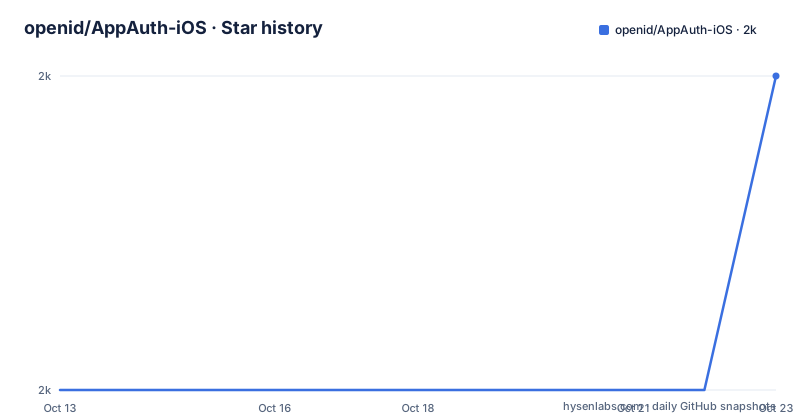
Star history
- openid/AppAuth-iOS2,035 ★ · +1
| Repository | 2026-10-13 | 2026-10-23 |
|---|---|---|
| openid/AppAuth-iOS | 2k | 2k |
1 Stars in the last 10 days, measured from the daily GitHub snapshot. Compare with other projects
Editorial analysis
The native client gap RFC 8252 set out to close
Hand-rolling OAuth 2.0 inside a phone app means re-solving a problem the web platform never had to solve. The authorization code grant defined in RFC 6749 assumes a client that can hold a secret and a redirect URI a browser can reach, while a native app is a public client with nowhere to put either one. RFC 8252 spells out the native case, and AppAuth-iOS implements that document rather than a house interpretation of it. Its stated aim is to map the requests and responses of OAuth 2.0 and OpenID Connect directly onto their specifications, then write them the way the platform language expects, which for this repository means Objective-C.
That aim narrows the audience fast. The library serves engineers shipping an app store binary that must sign a user into an account controlled by an authorization server they do not own. Daemons, browser extensions and back-end services get nothing from it, because the whole design is organised around a system browser handing a callback back to an app. An application whose deployment target still sits below iOS 15 cannot adopt it either. In exchange for those constraints you get protocol fidelity: what the RFC says is in the request, what the server sent back is in the response object, and nothing is smoothed over into a friendlier shape you then have to unpick.
The authorization request rides inside ASWebAuthenticationSession
Every authorization request leaves your process inside a system web view rather than inside your own UI. On iOS the README names `ASWebAuthenticationSession` as the component that performs authentication, while the opening paragraph pairs it with `SFSafariViewController` when describing how the library follows RFC 8252. Those two names disagree. `ASWebAuthenticationSession` is the only class iOS exposes for this job, and `SFAuthenticationSession` as spelled in the introduction does not exist in the SDK headers, so anyone who follows the prose instead of the API name ends up searching for something that was never shipped.
The exclusions matter more than the inclusions. `UIWebView` and `WKWebView` are refused outright, and the stated reason is the security and usability argument in Section 8.12 of RFC 8252: an embedded view lets the host app render and script a page the user believes belongs to the authorization server. Putting the login surface out of process also means the callback arrives as a URL your app claims, rather than as data your app scraped.
Extension handling follows the same philosophy. PKCE from RFC 7636 is supported to protect authorization codes in public clients that use custom URI scheme redirects, and the library accepts extra parameters in every protocol request and response, so a provider with non-standard extensions does not force a fork.
OIDAuthState convenience calls versus manual token exchange
Two entry points exist, and choosing between them is a design decision rather than a convenience. You can interact with the authorization server manually and perform your own token exchanges, or you can call the convenience method that runs part of that logic and returns either an `OIDAuthState` object or an error.
`OIDAuthState` is the piece of state most integrations end up serializing. It keeps track of the authorization and token requests and responses, exposes a convenience method for calling an API with fresh tokens, and is described as the only object you need to serialize to retain the authorization state of a session. That single claim carries the whole persistence requirement for most apps: one object in a file or keychain, rather than a hand-rolled pile of access tokens, refresh tokens and expiry dates.
Take the manual path when the token response from your provider carries fields the convenience call does not surface, or when you need to interleave your own interface between authorization and exchange. Take the convenience path when the defaults fit, because its failure branch hands back an error instead of a half-built state object.
Four install paths, four different version rules
To try the demo without writing a Podfile, the repository tells you to run one command:
pod try AppAuthThat installs the pod into a scratch project you can build immediately. Making the demo talk to a real provider is the next step: `Examples/README.md` walks through it, and the cost is updating three configuration points with your own OAuth client information.
Production dependencies go in one of four ways. CocoaPods wants a single line in your `Podfile`:
pod 'AppAuth'
pod install
On tvOS the TV subspec replaces it, as in `pod 'AppAuth/TV'`. Swift Package Manager wants a dependency in `Package.swift`:
dependencies: [
    .package(url: "https://github.com/openid/AppAuth-iOS.git", .upToNextMajor(from: "1.3.0"))
]
with the `AppAuthTV` target used on tvOS. Carthage takes one line in a `Cartfile`:
github "openid/AppAuth-iOS" "master"
carthage bootstrap
and the `AppAuthTV` framework for tvOS. The fourth option is a static library linked by hand: create an Xcode workspace, add `AppAuth.xcodeproj`, link `libAppAuth` for your target, and put `AppAuth-iOS/Source` on the header search paths.
Those four routes do not agree on which code you get. An unconstrained `pod 'AppAuth'` floats to the newest pod, Carthage pinned to `master` floats to the newest commit, and the SwiftPM snippet hard-codes `.upToNextMajor(from: "1.3.0")`, a requirement that resolves inside the 1.x line and never crosses into 2.0.0 or 3.0.0. Copy that snippet into a fresh project in 2026 and you have silently taken the oldest documented line, including its API and its redirect behaviour.
HTTPS redirects demand iOS 17.4 and a webcredentials AASA file
Claimed HTTPS redirects are where an afternoon disappears. Custom URI scheme redirects need no infrastructure beyond your app's own registration, which is why they remain the default path. The alternative is an HTTPS redirect URI, and it carries three requirements that only work together: iOS 17.4 or later, an Associated Domains entitlement for the redirect host using the `webcredentials` service, and an AASA file served from that host listing your app under `webcredentials`.
The warning that catches people is specific. An `applinks` association alone is not enough, even though Universal Links and `webcredentials` entries sit side by side in the same entitlement file and are easy to conflate. Miss any one of the three pieces and the callback never arrives, with no error raised in your code and nothing logged by the library. The redirect simply times out.
Because the requirement chain is tied to an OS version, an app whose deployment target is iOS 15 has to keep the custom scheme path alive for its oldest users. That redirect handling is dual-track for the life of the product, not a migration you finish in one version bump.
The macOS build runs an embedded loopback HTTP server
The macOS build changes the redirect model rather than reusing the iOS one. Custom URI schemes are supported, and so are loopback HTTP redirects handled by a small embedded server inside the process. A loopback redirect means binding a local port, waiting for the browser to hit it, and tearing it down once the authorization code arrives, which removes the collision risk of a claimed scheme and adds a network listener your app now owns for the duration of the flow. Minimum supported version is macOS 12.
The same provider caveat applies on both desktop targets, and it is worth reading as a structural statement rather than a bug report. Authorization servers that assume all clients are web-based, or that require clients to maintain the confidentiality of their client secrets, may not work well with this library. A native app is public by definition: its code ships inside a bundle anyone can unpack. A server that insists on verifying a secret it expects the client to hide has assumed a deployment model that cannot exist in a shipped application, and no amount of SDK polish repairs that mismatch.
AppAuthTV swaps browser redirects for a device code
tvOS gets its own artifact and its own protocol flow. The standard library can run on tvOS, but the documented tvOS path implements OAuth 2.0 Device Authorization Grant from RFC 8628: the app shows a short code, the user enters it on a second device, and the tvOS client polls for the token. That is the right shape for a living room, where typing a URL with a remote control is the actual problem being solved.
Packaging details follow from that split. Carthage ships an `AppAuthTV` framework, Swift Package Manager exposes an `AppAuthTV` target, and CocoaPods has a TV subspec. One line in the static library section settles another question outright: there is no static library for AppAuthTV, so an app that has committed to manual static linking has no documented route on tvOS.
The requirement that bites hardest is on the server, not the client. AppAuthTV is designed for authorization servers that implement the device authorization flow, so a provider without RFC 8628 support leaves that target with nothing to call.
Where a provider's assumptions break the AppAuth flow
The clearest limitation is documented rather than discovered: authorization servers that assume all clients are web-based, or that require clients to keep their client secrets confidential, may not work well here. That is the whole negotiation, and no configuration flag resolves it.
Second, the platform floor is high for a library with roots in the custom scheme era. iOS 15, macOS 12 and tvOS 15.0 are the minimums, and HTTPS redirects sit behind iOS 17.4 on top of that. Raising a deployment target is a product decision with user-facing consequences, so adoption costs more than an added dependency.
Third, the surrounding work stays with you. Registering a URL scheme, provisioning an Associated Domains entitlement and hosting an AASA file are all outside the library, and the fact that `Examples/` ships separate setup guides for Google, IdentityServer, Okta and PingFederate is a fair measure of how much of the effort lives in provider configuration rather than in code. Nothing in the README describes how to migrate an existing integration from the 1.x line to 3.0.0, or what to check first when an upgrade breaks a callback.
Two facts frame the maintenance side without settling it. The code is published under Apache-2.0, which is permissive enough for the SDK to ship inside a proprietary app binary, and the LICENSE file rather than any summary is the text that governs your use. The last push on the default branch landed on 2026-09-24 and the repository is not archived, so expect the redirect and platform layers to keep moving as Apple changes them.
Editorial conclusion
AppAuth-iOS is the right tool for an app store binary that must sign a user into an account held by a server you do not control, and the wrong one for daemons, browser extensions and anything still targeting an OS below iOS 15 or macOS 12. Before adopting it, confirm three things against your own provider: whether it accepts a public client that holds no secret, whether you can serve an AASA file under `webcredentials` or will ship a custom URI scheme, and whether its token response fits inside `OIDAuthState`. Then write your own version pin, because the SwiftPM snippet in the README still resolves to 1.3.0.
Frequently asked questions
What platforms and minimum OS versions does AppAuth-iOS support?
iOS 15 and above, macOS 12 and above, and tvOS 15.0 and above. HTTPS redirect URIs add a separate floor of iOS 17.4, so the custom URI scheme path remains necessary on older devices.
How do I add AppAuth-iOS to an Xcode project?
Four documented routes: a `pod 'AppAuth'` line in your `Podfile` followed by `pod install`, a dependency entry in `Package.swift`, a `github "openid/AppAuth-iOS" "master"` line in a `Cartfile` followed by `carthage bootstrap`, or manual static linking of `libAppAuth`. tvOS uses the TV subspec, the `AppAuthTV` target or the `AppAuthTV` framework, and no static library exists for AppAuthTV.
Does AppAuth-iOS support PKCE, and which web views does it refuse?
PKCE from RFC 7636 is supported, specifically to protect authorization codes in public clients that use custom URI scheme redirects. `UIWebView` and `WKWebView` are explicitly not supported, for the reasons given in Section 8.12 of RFC 8252.
Why does my HTTPS redirect URI never fire on iOS?
The chain has three parts that must all be in place: iOS 17.4 or later, an Associated Domains entitlement for the redirect host using the `webcredentials` service, and an AASA file on that host listing the app under `webcredentials`. An `applinks` association on its own does not satisfy it.
What do I persist between launches to keep a user signed in?
`OIDAuthState`, which is described as the only object you need to serialize. It tracks the authorization and token requests and responses and offers a convenience method for calling an API with fresh tokens.
How do I run the sample apps against my own authorization server?
Run `pod try AppAuth`, then follow `Examples/README.md`. Getting the demo pointed at a real provider means updating three configuration points with your own OAuth client information.
Official sources
Add this badge to your README
If you maintain this project, the badge below links readers to this analysis and shows its maintenance status from the daily GitHub snapshot. Paste the markdown into your README; add ?metric=license or ?metric=stars to the image URL for a different field.

[](https://hysenlabs.com/projects/openid-appauth-ios)Star history chart for your README
[](https://hysenlabs.com/projects/openid-appauth-ios)Was this useful?