OpenModelica: Compiler, OMEdit, and simulation workflow
OpenModelica is an open-source Modelica-based modeling and simulation environment intended for industrial and academic usage.
At a glance
- What is it?
- OpenModelica combines OMCompiler with graphical, notebook, plotting, shell, optimization, sensitivity, and co-simulation tools. It fits industrial and academic Modelica work, while the README leaves the complete installation and first-run workflow to linked guides.
- Who is it for?
- OpenModelica is appropriate for engineers, researchers, and institutions that want a Modelica compiler-centered environment with several ways to interact and simulate models. It is less suitable for users who need the README alone to provide a complete installation and first-run tutorial.
- Can I use it commercially?
- Check first. The repository uses a licence we do not classify automatically, so read its LICENSE file before any commercial use.
- Is it still maintained?
- Yes. The repository received new commits within the last day.
- What is it written in?
- Mainly Modelica, according to GitHub's language statistics.
Answers come from the project's GitHub data, last synced on November 7, 2026, and from our analysis. They are not legal advice.
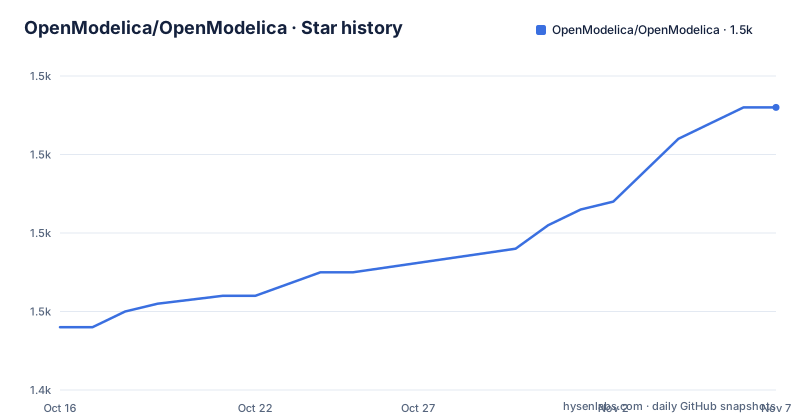
Star history
- OpenModelica/OpenModelica1,476 ★ · +28
| Repository | 2026-10-16 | 2026-11-07 |
|---|---|---|
| OpenModelica/OpenModelica | 1.4k | 1.5k |
28 Stars in the last 22 days, measured from the daily GitHub snapshot. Compare with other projects
Editorial analysis
OpenModelica's compiler-centered modeling scope
OpenModelica addresses the gap between writing a declarative Modelica model and working with a compiled, executable simulation. It is intended for industrial and academic users, but the repository presents it as an environment rather than a single application. The central component is OMCompiler. Around that compiler, the project places a graphical interface, standalone or integrated simulation facilities, notebooks, plotting, shell access, optimization, parsing, and sensitivity tools.
That architecture gives users several ways to reach the same modeling platform. OMEdit is positioned as the graphical interface above the compiler. OMSimulator provides FMI and SSP-based co-simulation, either as a standalone application or through OMEdit. OMNotebook, OMPlot, and OMShell offer different interactive environments for working with OMCompiler, while OMOptim, OMParser, and OMSens_Qt cover optimization, parsing, and sensitivity-oriented tasks.
The repository does not describe a narrower audience such as control engineers alone. Its stated scope includes industry, academia, model development, simulation, co-simulation, plotting, optimization, and parameter sensitivity. Users who only need to edit text may prefer the interactive shell or notebook path, while users who organize models visually can use OMEdit. Users whose primary need is exchanging simulation components through FMI or SSP can focus on OMSimulator.
How OMCompiler connects OpenModelica's tools
Based on the repository layout, OMCompiler is the foundation rather than a helper attached to the graphical application. OMEdit sits on top of it. This arrangement separates model compilation from at least one user interface, which is why the same compiler can also be approached through OMNotebook, OMPlot, and OMShell.
OMSimulator occupies a distinct execution role. The README identifies it as an environment for FMI and SSP-based Co-Simulation, and says that it is available separately or through OMEdit. FMI is the stated interoperability mechanism for connecting simulation models, while SSP is the other co-simulation standard named by the project. The repository overview does not publish a lower-level simulation pipeline or describe supported FMI and SSP versions, so version compatibility must be checked in the relevant documentation rather than inferred from this overview.
The surrounding tools also appear to consume or expose compiler functionality, but their internal data flows are not documented in the README. For example, OMPlot is identified as an interactive environment with OMCompiler, without a documented plotting workflow or result format. OMOptim is listed as another tool, but no optimization algorithm or solver interface is given. A technical evaluation should therefore distinguish confirmed component roles from undocumented implementation details.
Getting OpenModelica source and platform builds
The README offers two acquisition paths: compile the source or download an automatically generated development build. Windows and several Linux distributions have nightly build download pages. It does not provide a macOS download path in the overview, although it does provide macOS build instructions. It also does not state that a nightly build should be used for production work, so the distinction between a development version and a formal release matters.
To retrieve the complete source tree, including submodules, the documented clone command is:
git clone --recurse-submodules https://github.com/OpenModelica/OpenModelica.gitThe `--recurse-submodules` option matters because the repository contains submodule-aware working instructions in `CONTRIBUTING.md`. The README directs developers to that file for cloning, updating, and cleaning the repository and its submodules, so a source-based setup should begin there rather than treating this one command as the complete build guide.
OpenModelica does not use a single platform-neutral installer command in the README. Instead, it points users to separate Linux or WSL, Windows, and macOS instructions under `OMCompiler/`. It also points to `README.cmake.md` for CMake configuration, tests, and packaging. Since the README does not show the resulting OpenModelica launcher or a first model, the first real use cannot be reproduced from this overview. Users following the source route must complete the relevant platform guide before invoking OMEdit or OMSimulator.
Choosing OMEdit, OMSimulator, or an interactive OpenModelica tool
OpenModelica's suite offers practical alternatives in how a user works with the compiler. OMEdit is the main graphical route and can integrate OMSimulator. OMSimulator is the narrower choice for FMI and SSP-based co-simulation, particularly when a graphical modeling environment is not required. The distinction is based on the project's own component descriptions rather than an assumed performance advantage.
OMNotebook, OMPlot, and OMShell provide three further interaction models. The README calls them interactive environments that work with OMCompiler, but it does not explain whether notebook cells execute scripts, how plots receive simulation results, or whether OMShell is intended for automation. Those differences require consultation of each component's README or the generated User's Guide.
This component structure can reduce the need to adopt a separate tool for every task, but it does not prove that all tools are equally complete or appropriate for every model. A user who requires a documented graph editor, reproducible command-line sequence, and explicit simulation configuration should verify those details before selecting an interface. In particular, no executable command, script format, or first-model example is included in the README.
For an adoption review, the relevant decision is therefore narrower than a general preference between GUIs and command-line tools. Determine whether the workflow calls for visual model editing, FMI or SSP co-simulation, notebook-style interaction, plotting, optimization, parsing, or sensitivity analysis, then match that need to the corresponding component.
OpenModelica repository size and maintenance boundaries
OpenModelica is a large source repository with compiler code, interfaces, tests, documentation, libraries, build infrastructure, and specialized tools at the top level. The presence of `CMakeLists.txt`, `cmake/`, `Jenkinsfile`, `.CI/`, and `testsuite/` indicates that source builds involve more than compiling one application. The README also links platform-specific instructions and CMake documentation rather than presenting a short universal build recipe.
The repository is not archived, and its last push was on 2026-10-16. The repository also lists OpenModelica 1.27.1, released on 2026-09-08, and OpenModelica 1.27.0, released on 2026-07-02. These facts show recent repository activity and named releases, but they do not establish compatibility for a particular Modelica library, FMI import, SSP import, operating system, or model.
Upgrade planning should account for the custom OSMC license rather than assuming a standard package-manager license. The repository identifies `OSMC-License.txt` as the project license and also contains `OSMC-Runtime-License.txt`. The README does not summarize redistribution duties, runtime obligations, or compatibility with organizational policies. Review both files as written for the version being adopted. The documentation also points to `CITATION.cff` for citation instructions and to `doc/bibliography/openmodelica.bib` for publications related to OpenModelica.
Limits of the documented OpenModelica quick start
The clearest limitation in the README is onboarding depth. It identifies the tools, provides a source clone command, links platform instructions, and offers nightly downloads for Windows and Linux. It does not provide an exact installation command for those downloads, a verified executable path, a sample Modelica file, or the command used to compile and run that file.
This omission does not mean those workflows are absent. The project links an automatically generated User's Guide, component-specific README files, and separate Linux, Windows, and macOS build guides. It simply means this overview cannot establish the steps. A prospective user should not infer that cloning the repository automatically configures dependencies, initializes every development environment, or launches OMEdit.
There is also no claim in the README about supported operating-system versions, hardware requirements, solver coverage, Modelica library compatibility, numerical accuracy, or co-simulation version support. Those are substantive adoption boundaries, but naming a specific supported version or capability would require a source that the README does not provide. The same caution applies to optimization and sensitivity tools: their presence is confirmed, while their algorithms, inputs, outputs, and limits are not.
Editorial conclusion
OpenModelica is appropriate for engineers, researchers, and institutions that want a Modelica compiler-centered environment with several ways to interact and simulate models. It is less suitable for users who need the README alone to provide a complete installation and first-run tutorial. Before adoption, inspect OSMC-License.txt for the applicable obligations, review the platform-specific build instructions, and verify that the intended OMEdit or OMSimulator workflow is documented in the User's Guide for the chosen distribution.
Frequently asked questions
What is OpenModelica used for?
OpenModelica is a Modelica-based modeling and simulation environment intended for industrial and academic usage. Its components cover compilation, graphical editing, co-simulation, notebooks, plotting, shell interaction, optimization, parsing, and sensitivity work.
How do I install OpenModelica?
The README provides separate Linux or WSL, Windows, and macOS build instructions, plus nightly downloads for Windows and various Linux distributions. It does not provide one universal installation command or a complete first-run example.
What is the difference between OMEdit and OMSimulator in OpenModelica?
OMEdit is the graphical user interface over OMCompiler. OMSimulator is the FMI and SSP-based co-simulation environment and can run standalone or as part of OMEdit.
Official sources
Add this badge to your README
If you maintain this project, the badge below links readers to this analysis and shows its maintenance status from the daily GitHub snapshot. Paste the markdown into your README; add ?metric=license or ?metric=stars to the image URL for a different field.

[](https://hysenlabs.com/projects/openmodelica-openmodelica)Star history chart for your README
[](https://hysenlabs.com/projects/openmodelica-openmodelica)Was this useful?