OpenRemote Core: a self-hosted IoT platform for connected asset operations
100% open-source IoT Platform - Integrate your devices, add intelligence, build custom apps
At a glance
- What is it?
- OpenRemote Core combines device connectivity, asset management, automation, multi-tenancy, an edge gateway, and web applications in a Docker-based platform. It suits organizations that need a configurable IoT control plane, but its custom licensing and broad service stack require careful review before adoption.
- Who is it for?
- OpenRemote Core is a practical fit for engineering teams seeking one self-hosted platform for device connectivity, asset management, rules, dashboards, and custom applications. It is less suitable for projects that need a clearly classified open-source license, a minimal deployment, or a simple standalone MQTT service.
- Can I use it commercially?
- Check first. The repository uses a licence we do not classify automatically, so read its LICENSE file before any commercial use.
- Is it still maintained?
- Yes. The repository received new commits within the last day.
- What is it written in?
- Mainly Java, according to GitHub's language statistics.
Answers come from the project's GitHub data, last synced on October 23, 2026, and from our analysis. They are not legal advice.
Star history
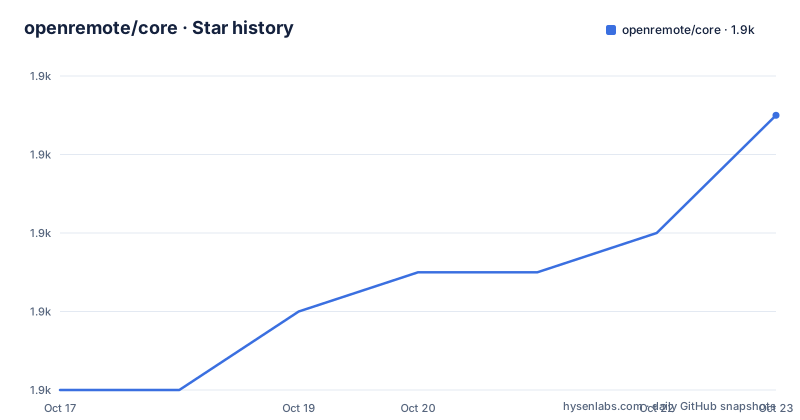
- openremote/core1,933 ★ · +7
| Repository | 2026-10-17 | 2026-10-23 |
|---|---|---|
| openremote/core | 1.9k | 1.9k |
7 Stars in the last 6 days, measured from the daily GitHub snapshot. Compare with other projects
Editorial analysis
OpenRemote Core's connected-asset operating scope
OpenRemote Core addresses the gap between connecting a device and operating it as part of a larger asset estate. Its intended users include IoT engineers, device-management teams, application developers, and organizations building dashboards or automation around buildings, energy systems, fleets, and connected equipment. The repository combines protocol access, an asset model, identity, automation, analytics, and user-facing web components rather than concentrating on one of those layers.
The platform is relevant when device data must be represented as manageable assets, not merely accepted by a broker. The README describes customizable asset types, automatic device provisioning, asset and device management, rules, and an Insights dashboard builder. It also includes realm-based multi-tenancy and user and role management, which matter when separate customers, sites, or operational groups need different access boundaries.
This is a platform decision rather than a lightweight library decision. A team adopting only MQTT broker functionality would deploy much more than it needs. OpenRemote makes sense when the surrounding manager, dashboards, identities, and application framework are part of the intended product. The primary-language label is Java, but the repository also contains Groovy, TypeScript, Gradle, Docker, Kubernetes, and frontend workspace files. That breadth reflects the platform scope, although it also increases the number of components that an adopter must understand.
OpenRemote's protocol-to-asset processing architecture
The documented architecture begins with protocol agents and manager APIs, including MQTT, HTTP/REST, and WebSocket connectivity. Those interfaces bring device information into OpenRemote, where assets can represent equipment and expose related attributes and values. Protocol agents are the integration boundary for systems that do not share a common device protocol.
Automation sits above the asset layer. The README lists when-then rules, flow rules, JavaScript rules, and Groovy rules. That choice matters because it permits simple condition-and-action behavior alongside more programmable logic, but the repository does not document execution guarantees, timeout behavior, dependency handling, or the full set of exposed runtime APIs. Engineers should not infer those properties merely from the rule types being listed.
The web side is part of the platform architecture rather than a separate reporting product. The repository contains Lit and TypeScript workspace packages, and the README identifies frontend web components, consoles, and compatible custom apps. The `package.json` defines workspace directories under `ui/util`, `ui/test`, `ui/app/*`, `ui/component/*`, and `ui/demo/*`. This arrangement supports application development against shared UI workspaces, but the repository does not document the public extension contract or packaging process for a deployable custom app.
The Docker Compose file adds supporting services around the manager. The visible configuration includes `proxy`, `postgresql`, `keycloak`, and `manager`, with `postgresql-data` used for persistent database storage. The proxy handles HTTPS, can use Let's Encrypt when a hostname is configured, and exposes an MQTT-related port at `8883`. This is a service-oriented architecture, so operational ownership extends beyond the manager application itself.
Docker Compose quickstart for OpenRemote Core
The README recommends Docker Desktop v18 or later and the repository's `docker-compose.yml`. Save the compose file, change to its directory, pull the images, and start the named Compose project. The documented commands are:
docker compose pull
docker compose -p openremote up
After the services start, the README says to open `https://127.0.0.1` and accept the self-signed certificate. The initial manager credentials are `admin` and `secret`. Those credentials are suitable for first access to a local evaluation, but the documented quickstart has no production credential-rotation tutorial.
The stack publishes HTTPS through `${OR_SSL_PORT:-443}:443`, also publishes port `80` for SSL generation, and exposes `8883` for MQTT. Metrics are bound to local loopback through `127.0.0.1:8404:8404`, with an additional optional private-interface mapping. This port exposure deserves review before installation on a shared or publicly reachable host.
If the manager must be reached through a specific network address, the README supplies `OR_HOSTNAME`. Its Bash example uses the legacy `docker-compose` executable:
OR_HOSTNAME=192.168.1.1 docker-compose -p openremote up -dThat command differs from the initial `docker compose` spelling. Use the version installed on the host rather than assuming both Compose command forms are interchangeable. The compose comments also describe optional certificate generation through Let's Encrypt, but they do not document the complete DNS and production proxy procedure.
PostgreSQL retention, backups, and observability in OpenRemote
OpenRemote stores persistent data in PostgreSQL. The README identifies the Docker volume as `openremote_postgresql-data`, although the visible `docker-compose.yml` declares `postgresql-data`. The volume declaration appears to follow Compose project-name prefixing when the stack is started as `-p openremote`, but the supplied files do not explicitly document that naming behavior. Operators should confirm the actual mounted volume before planning backup or restore procedures.
Historical attribute data is not necessarily permanent. The manager purges it daily according to `OR_DATA_POINTS_MAX_AGE_DAYS`. An individual attribute can override that policy through the `dataPointsMaxAgeDays` configuration item. This behavior makes retention planning part of deployment rather than an afterthought, particularly for energy monitoring, environmental telemetry, or other high-frequency time-series workloads.
The README directs administrators to the system-administration documentation for backup and restore details, but it does not reproduce those commands. No backup command is documented in the README. The visible compose configuration does not show the manager image, health checks, credentials pipeline, or every environment variable.
Manager distributions and container images support OpenTelemetry tracing. The repository links separate tracing documentation but does not state which exporters, sampling defaults, or dashboards are configured by default. Tracing is therefore documented as a capability, while its production configuration remains an external setup decision.
OpenRemote license and multi-service upgrade implications
The repository advertises OpenRemote Core as a 100% open-source IoT platform, but the repository metadata classifies its license as a custom license that GitHub cannot categorize. The controlling text is in `LICENSE.txt`. Those statements are related but not interchangeable: source availability does not by itself tell an adopter whether redistribution, modification, hosting, or commercial deployment carries particular conditions. No legal conclusion can be drawn from the README summary, so `LICENSE.txt` requires direct review.
Adoption therefore requires a direct review of `LICENSE.txt`, especially if OpenRemote will be modified, redistributed, embedded in a customer offering, or operated as a managed service. The project should not be described as using a standard license merely because its source code is public.
The repository is not archived, and the last push was on 2026-10-15. Recent releases include 1.32.1 on 2026-10-14, 1.32.0 on 2026-10-12, and 1.31.1 on 2026-09-28. This establishes recent repository and release activity, but the README does not publish a migration policy, support lifecycle, compatibility matrix, or rollback procedure for upgrades.
The deployment also uses multiple images, including proxy, PostgreSQL, Keycloak, and manager images. The visible proxy and Keycloak image references default to `latest`, while PostgreSQL defaults to `latest-slim`. Production operators should set the image version variables shown in the compose file and establish an upgrade procedure that accounts for the database, identity service, proxy, manager, and persistent volumes.
When OpenRemote exceeds the problem and viable alternatives
OpenRemote is the wrong tool when the requirement is limited to publishing MQTT messages, proxying an HTTP endpoint, or rendering a small read-only dashboard. In that case, the platform introduces PostgreSQL, Keycloak, a manager, a proxy, certificates, persistence, rules, and multiple configuration surfaces. A team should not adopt the full stack merely because its protocol endpoint resembles a simpler broker requirement.
The principal alternative is a custom, component-level IoT deployment. Such an architecture can pair a dedicated MQTT broker with a separate time-series database, a narrowly chosen HTTP or WebSocket integration layer, and an application-specific frontend. Its advantage is control over each component and the ability to keep runtime responsibilities small. Its cost is that cross-cutting capabilities must be assembled separately: asset lifecycle management, provisioning, identities, roles, realm separation, rules, dashboards, observability, and custom applications would not arrive as one documented platform.
OpenRemote's distinction is integration around a shared asset and application model. That is useful when the same devices must appear across manager functions and custom web applications. It is a trade-off rather than an automatic advantage. Organizations with strict internal platform standards or a prohibition on custom licensing may prefer separately governed components even if they implement more assembly work themselves.
Editorial conclusion
OpenRemote Core is a practical fit for engineering teams seeking one self-hosted platform for device connectivity, asset management, rules, dashboards, and custom applications. It is less suitable for projects that need a clearly classified open-source license, a minimal deployment, or a simple standalone MQTT service. Before adoption, verify the custom terms in LICENSE.txt, review the required container exposure and storage design, and confirm that the documented manager workflows match the intended operational model.
Frequently asked questions
How do I install and start OpenRemote Core with Docker Compose?
Install Docker Desktop v18 or later, save the repository's `docker-compose.yml`, and run `docker compose pull` followed by `docker compose -p openremote up`. The README says the Manager UI is then available at `https://127.0.0.1` after accepting its self-signed certificate.
What are the default login credentials for OpenRemote Core?
The documented quickstart credentials are username `admin` and password `secret`. The compose file also uses `secret` as the default when `OR_ADMIN_PASSWORD` is not supplied.
Where does OpenRemote Core store persistent data, and how long is it retained?
Persistent data is stored in PostgreSQL. Historical attribute data is purged daily using `OR_DATA_POINTS_MAX_AGE_DAYS`, while an individual attribute can override retention with `dataPointsMaxAgeDays`.
Does OpenRemote Core support gateways, rules, and multiple organizations?
The README lists an Edge gateway, when-then, flow, JavaScript, and Groovy rules, plus multi-tenancy through realms. It also lists users and roles management for controlling access.
Can OpenRemote Core be connected to devices over MQTT or HTTP?
The documented connectivity layer includes protocol agents and manager APIs such as MQTT, HTTP/REST, and WebSocket. The README also links to an HTTP Agent tutorial for connecting an online weather service.
Official sources
Add this badge to your README
If you maintain this project, the badge below links readers to this analysis and shows its maintenance status from the daily GitHub snapshot. Paste the markdown into your README; add ?metric=license or ?metric=stars to the image URL for a different field.

[](https://hysenlabs.com/projects/openremote-core)Star history chart for your README
[](https://hysenlabs.com/projects/openremote-core)Was this useful?