ORBAT Mapper: offline on a PMTiles file, except for the place search
Recreate historic battles and military scenarios in your browser
At a glance
- What is it?
- A client-side web application for building orders of battle and plotting units on a map, with three documented ways to run it without a network. One function in all three is hard-wired to a hosted geocoder, and the documentation says so without hedging.
- Who is it for?
- ORBAT Mapper fits a staff officer, instructor or analyst who wants to lay out a battle on a real map and hand someone a file that opens, rather than a login-gated tool that needs a subscription. Leave it if you need a supported product, since the project describes itself as work in progress and the author warns forks to expect fast change, and leave it if you need the place search to work on a machine with no route to the internet.
- Can I use it commercially?
- Yes. MIT is a permissive licence: you can use, modify and sell software built on it, as long as you keep its copyright and licence notices.
- Is it still maintained?
- Yes. The repository last received commits 1 day ago.
- What is it written in?
- Mainly TypeScript, according to GitHub's language statistics.
Answers come from the project's GitHub data, last synced on October 22, 2026, and from our analysis. They are not legal advice.
Star history
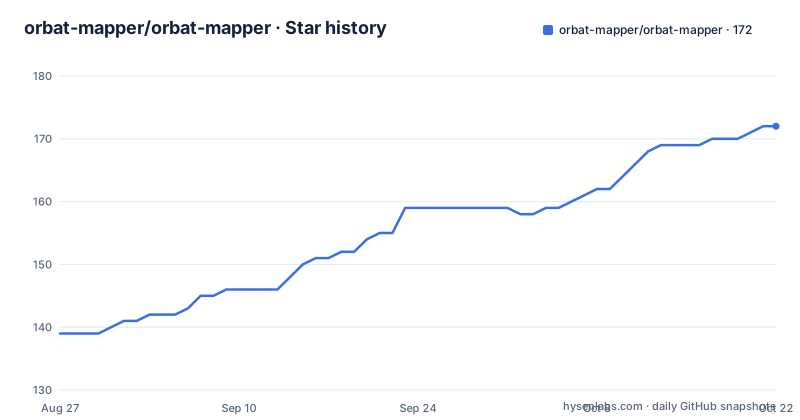
- orbat-mapper/orbat-mapper172 ★ · +33
| Repository | 2026-08-27 | 2026-10-22 |
|---|---|---|
| orbat-mapper/orbat-mapper | 139 | 172 |
33 Stars in the last 56 days, measured from the daily GitHub snapshot. Compare with other projects
Editorial analysis
One function cannot work offline, and the documentation says so twice
The offline section is the most useful part of this README, and the caveat in it is unusually well placed.
The application is static and runs on the client, so it can work with no network, but only after you tell it where to find map data. Three deployments are documented, and each needs you to supply a basemap rather than inheriting one.
What is then stated is the limit: the place name search sends its requests to a hosted geocoder run by a mapping company. That function needs an internet connection in all three of the deployment modes, and the documentation adds that there is no offline replacement for it.
That is a real design constraint rather than an oversight. Geocoding means turning a typed place into coordinates, and doing that well needs a gazetteer, which is a large dataset that nobody is going to bundle into a single-file build. The honest options would have been to ship a small local gazetteer and accept worse results, or to degrade the feature silently. The project chose the third of those in a way that at least does not pretend: the rest of the application is genuinely offline, one function is not, and you find that out from the documentation rather than from a search box that never returns.
So the offline story is strong with one hole in it, and the hole is the feature most people reach for first when placing a unit.
Three offline shapes, and the cost of each is where you serve the app from
The three options are distinguished by two independent choices: where the application comes from, and where the map data comes from.
The first is self-hosted on both sides. You serve the application from your own web server and point it at your own tile server. That is the option with no third-party dependency at all, and it is also the one that requires you to run a tile server.
The second serves the application from a web server but reads the basemap from a PMTiles archive sitting on your own disk. PMTiles is a single-file archive format for tiled map data, so one file holds a whole pyramid of zoom levels and can be read over HTTP range requests. This is the option for someone who has a map extract and a web server but no tile infrastructure.
The third is the standalone file. The application is one HTML file running from your disk, with a PMTiles archive next to it. No server at all, and the release page publishes exactly this artifact for each version.
The pattern to notice is that the application's own serving is the cheaper half and the map data is the expensive half. Every option that removes a web server also requires you to have the map data locally already, because there is no bundled basemap to fall back on.
Releases ship the artefacts, so you never have to build it
The build instructions are in the README, and you can ignore them if you are not forking.
The project is a Vite application. Cloning and installing dependencies and starting the development server gives you a hot-reloading instance on a local port, with changes pushed to the browser immediately. A production build writes an optimised bundle to a dist directory, and a preview command serves it.
The build that matters for a non-developer is the single-file one, produced by a separate build command with its own configuration file. The output is a single HTML file that runs from your disk with no web server at all, which is the artefact a lecturer can email to a class or an analyst can drop on a shared drive.
But none of that is required, because the documentation says explicitly that you do not have to make a build. Each release publishes a versioned zip for serving from a web server, and a versioned standalone HTML file, both named with the version number.
That is a deliberate choice about who the project is for. A mapping tool used for planning and teaching has a large population of users who will never open a terminal, and publishing the artefacts is what keeps them out of one. The cost is that the release cadence becomes the update mechanism, and with a major version arriving every few days that is a trade worth naming.
The symbology work targets a military standard, and there is a diff script for it
The dependency list and the script list together show what kind of tool this is.
Several dependencies are the project's own published packages, covering control measures, symbology conversion, tactical drawing, and an adapter that connects the drawing layer to the map renderer. So the military symbol handling is not a bundled asset, it is a set of separately versioned internal libraries the application consumes.
The script list is more revealing. There is a command to generate a military standard symbology set, a command to diff the generated output against a reference, and a third that produces an HTML report from that diff. Those three scripts are a data-pipeline tool for verifying that generated symbols still match a specification.
That is a much stronger signal about the project's seriousness than a feature list would be. Anyone who has worked on a symbol standard knows that the hard part is not drawing the icons but proving the output still conforms after a library upgrade or a colour tweak. Having a diff in the build tooling means that check can be run rather than trusted.
The rest of the stack is a conventional modern single-page application: a drag-and-drop library, a code editor with autocomplete for whatever the app lets you type into, a table library with virtualisation, a pan and zoom handler, icon sets, and a basemap package. The primary language is TypeScript and the framework underneath is Vue, which the type-checking script confirms.
The author warns you about forking, and the version numbers explain why
There is a sentence in the licence section that is worth more than most projects' stability guarantees.
The licence is MIT, so the source can be used, changed and given to others, subject to the licence conditions. And then the documentation says you can fork it and adapt it for your own applications, but to be careful, because the project changes quickly.
That is a maintainer telling you that the interface is not a stable contract. It is the honest thing to say about a project where a new major version has shipped on three consecutive recent days, and it should change how you approach a fork: you are forking a moving target and you will be merging, or you will be drifting.
The project also describes itself as work in progress, in bold, near the top, before the feature description. Together with the version numbers that increment by a whole number frequently, that reads as pre-1.0 discipline applied honestly rather than as a warning to be embarrassed about. A hosted instance is available to try, and there is a separate documentation site, so the intended path for a user who is not developing is to use the hosted version and let someone else absorb the churn.
For a tool whose output is a diagram that gets shared and archived, that instability is worth weighing against the alternative of a commercial product with a support commitment.
Editorial conclusion
ORBAT Mapper fits a staff officer, instructor or analyst who wants to lay out a battle on a real map and hand someone a file that opens, rather than a login-gated tool that needs a subscription. Leave it if you need a supported product, since the project describes itself as work in progress and the author warns forks to expect fast change, and leave it if you need the place search to work on a machine with no route to the internet. Verify first that the symbology you need is present, because the build scripts show a military standard being generated and diffed rather than a claim that every standard is covered, and check the offline documentation for the layer limits of the option you pick.
Frequently asked questions
What is ORBAT Mapper and what does it let you build?
A client-side web application for building order of battles and plotting unit locations on a map, so you can recreate historic battles and military scenarios in a browser. It is MIT licensed and described as work in progress, with a hosted instance and separate documentation site.
Can ORBAT Mapper work without an internet connection?
Mostly. It is a static application that can run offline once you tell it where to find map data, using your own tile server, a PMTiles archive on disk, or a standalone HTML file with a PMTiles archive beside it. The place name search is the exception: it calls a hosted geocoder and needs a connection in all three cases, with no offline replacement.
Do I have to build ORBAT Mapper from source?
No. Each release publishes a versioned zip for serving from a web server and a versioned standalone HTML file that runs from your disk. Building from source with the package manager is only needed if you are forking or developing.
How does ORBAT Mapper handle military symbols?
Through its own published packages covering control measures, symbology conversion and tactical drawing, plus an adapter connecting the drawing layer to the map renderer. The build scripts include commands to generate a military standard symbol set and to diff the output against a reference and report the differences.
Is it safe to fork ORBAT Mapper?
The licence permits it, but the documentation warns that the project changes quickly and advises care. Major versions have shipped on consecutive recent days, so a fork is forking a moving target and will either need merging or will drift from upstream.
Official sources
Add this badge to your README
If you maintain this project, the badge below links readers to this analysis and shows its maintenance status from the daily GitHub snapshot. Paste the markdown into your README; add ?metric=license or ?metric=stars to the image URL for a different field.

[](https://hysenlabs.com/projects/orbat-mapper-orbat-mapper)Star history chart for your README
[](https://hysenlabs.com/projects/orbat-mapper-orbat-mapper)