orbien: the benchmark table links its numbers somewhere else
A lightweight, high-performance NAT traversal tool with a binary size of about 5MB, supporting TCP, QUIC, KCP and WebSocket transport protocols and TCP/UDP/HTTP/HTTPS/SOCKS5 proxying, with a native cross-platform Rust desktop client and a web-based server interface.
At a glance
- What is it?
- orbien is a Rust and Tokio NAT traversal tool that publishes its server and client as binaries of about five megabytes, with four transports and five proxy protocols. The README is 268 words, and the two places where it could have been specific, the benchmark and the size claim, both point outward.
- Who is it for?
- orbien suits someone who needs a self-hosted tunnel to a machine behind NAT and wants a single binary rather than a service and an agent, and the TOML configuration is small enough to read in full. Two things to check before you rely on the performance claim.
- Can I use it commercially?
- Yes. Apache-2.0 is a permissive licence: you can use, modify and sell software built on it, as long as you keep its copyright and licence notices.
- Is it still maintained?
- Yes. The repository received new commits within the last day.
- What is it written in?
- Mainly Rust, according to GitHub's language statistics.
Answers come from the project's GitHub data, last synced on November 22, 2026, and from our analysis. They are not legal advice.
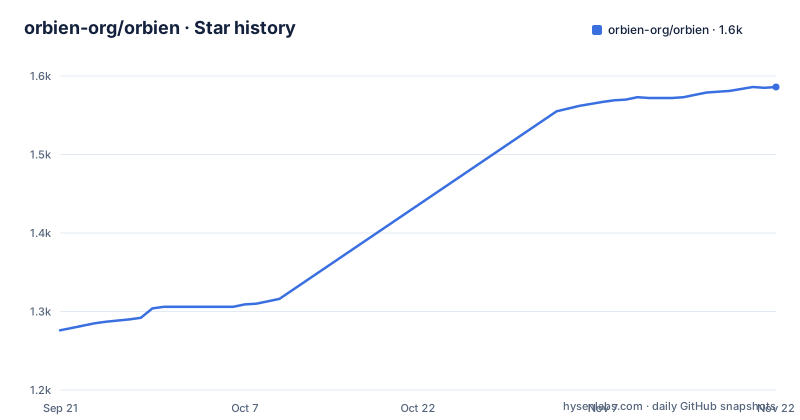
Star history
- orbien-org/orbien1,586 ★ · +310
| Repository | 2026-09-21 | 2026-11-22 |
|---|---|---|
| orbien-org/orbien | 1.3k | 1.6k |
310 Stars in the last 62 days, measured from the daily GitHub snapshot. Compare with other projects
Editorial analysis
The benchmark table contains no numbers and was measured on loopback
The benchmark section is a table with three rows and not one figure in it.
| Env | Details |
|-----|---------|
| Platform | macOS 26.2 · Darwin 25.2.0 · arm64 |
| Hardware | Apple M2 (8 cores) · 16 GB |
| Details | [benchmarks](https://github.com/orbien-org/benchmarks) |
The hardware row tells you what it ran on. The details row links to a different repository.
Then the comparison, which is the only comparative claim on the page: against frp, the clearest advantage is lower and steadier memory usage under high concurrency.
That is a careful claim, and the care extends to the method. The note underneath says the benchmarks were run on local loopback, to rule out various sources of interference.
Which is the right way to measure memory, and the wrong way to measure a tunnel. A loopback path has no packet loss, no NAT translation, no round trip to a distant server, and no relay hop. It tells you what the process costs when the network is free, which is the most useful single number for choosing a tool on a small machine, and it tells you nothing about behaviour under the conditions a tunnel exists to survive.
So the honest reading is: the memory claim is plausible and scoped, the throughput claims are not made, and the raw data lives one repository away from the one you are reading.
Two build profiles, one for speed and one for size
The five megabyte figure at the top of the page is not the default build.
[profile.release]
opt-level = 3
lto = true
codegen-units = 1
strip = true
panic = "abort"

[profile.release-size]
inherits = "release"
opt-level = "z"
Two profiles. The release profile optimises for speed at the highest optimisation level, enables link-time optimisation, forces a single codegen unit, strips symbols and aborts on panic rather than unwinding.
The size profile inherits all of that and changes one thing: the optimisation level, to the size-oriented setting. Everything else, including the strip and the abort, carries over.
The abort setting is worth a second look because it is not only a size decision. With unwinding disabled there is no catching of panics, so a bug in a tunnel handler takes the process down rather than failing one connection. That is the right trade for a small forwarder, and it is a trade rather than a free win.
Then there is the container build, which adds a third element:
docker-context:
	chmod +x scripts/prepare-docker-context.sh scripts/stage-docker-slice.sh
	./scripts/prepare-docker-context.sh --upx
A flag named after a binary packer, passed to the context preparation script. So the images are packed after the build, which is a legitimate way to ship a small image and also one where the reported artefact size and the unpacked behaviour are not the same thing.
TCP appears in both protocol lists, and the two lists measure different things
The features section separates proxy protocols from transport protocols, which is the right distinction and is also where the page is loosest.
The README lists the tunnel protocols as TCP, UDP, HTTP, HTTPS and SOCKS5, then lists the transport protocols as TCP, KCP, WebSocket and QUIC with TCP multiplexing support.
TCP is in both lists. In the first it is what you forward; in the second it is how the tunnel itself is carried. Both are true, and a reader scanning the list sees the same word twice with no indication that it means something different each time.
The dependency list confirms the design is genuinely layered. For the second layer there is a QUIC implementation, a KCP implementation, a WebSocket implementation, and a multiplexer, each pinned to a major version.
So the transport choice is real: you can carry the same tunnel over QUIC, over KCP, over WebSocket, or over plain TCP with multiplexing. That matters when the path you have to work with blocks or throttles one protocol, and it is the kind of feature that justifies a five-megabyte binary carrying four of them.
The first list is the thing you forward: TCP, UDP, HTTP, HTTPS and a SOCKS proxy. The word and more at the end of the README's first list is doing real work, since nothing else in the documentation enumerates what else is supported.
The server config is one line and the client config is five
The quick start shows both halves, and the asymmetry is informative.
# orbien-server.toml
listen = "0.0.0.0:9527"./orbien-server -c orbien-server.tomlThe server example is a single listen address on port 9527, bound to every interface. That is the entire documented configuration for the server side, which means everything else has a default.
The client is different:
server = "127.0.0.1:9527"

[[tunnels]]
name = "ssh"
protocol = "tcp"
service = "127.0.0.1:22"
remotePort = 9000
Four fields per tunnel, which is the whole data model of a tunnel: a name for the entry in a list, the protocol being forwarded, the local address being forwarded to, and the port that is exposed. The example forwards SSH, which is the canonical case and also the one with the obvious security implications.
Both are launched the same way, with a config path flag. Neither example shows a token, and the features section says authentication is token-based for the tunnel. So a server started from this file has no token configured, and the reader is expected to find the authentication option elsewhere, which is not documented on the page.
If you prefer not to use the command line at all, a native desktop client is offered instead, from the same releases page.
The admin interface is built with npm and embedded into the server binary
The operations feature mentions a server-side web admin interface, and the build shows what that costs.
WEB_DIR := server-ui

web:
	cd $(WEB_DIR) && npm install && npm run build
	@echo "dashboard assets -> server/assets"

release: web
	cargo build --release -p orbien-server -p orbien-client
The web interface is a separate npm project. Building it produces assets, the make target announces they go into the server's assets directory, and the Rust dependency list includes an embedding crate. So the dashboard is compiled into the server binary.
The consequence is in the dependency graph: a Rust release build of the server depends on a Node build having run first, which is why the release target depends on the web target. There is a JavaScript lockfile at the repository root alongside the Rust one.
The result is a nice property and a real trade. A single self-contained binary is much easier to deploy to a small box than a service plus a separate front end, and hot-reload of configuration is supported, so you do not rebuild for that. The trade is that building the release from source needs both toolchains, and that anyone auditing what is inside the binary has to look at two build systems.
One more asymmetry in the same file: the release target builds the server and the client and not the desktop, which has its own targets further down.
Three desktop packages, three shell scripts and no Linux image
The desktop client is packaged by script, one target per platform, and each target does two things before calling a script.
desktop-app desktop-dmg: desktop-build
	chmod +x scripts/pack-desktop-macos.sh
	./scripts/pack-desktop-macos.sh

desktop-deb: desktop-build
	chmod +x scripts/pack-desktop-linux-deb.sh
	./scripts/pack-desktop-linux-deb.sh
Every packaging target follows the same shape: make the script executable, run it, echo where the artefact landed. That is tidy and it means the artefacts are announced rather than hunted for.
Three formats come out of it: an application bundle and a disk image on macOS, an executable and a zip on Windows, and a Debian package on Linux.
Linux gets one. There is no AppImage, no Flatpak, no snap, and no RPM in the visible targets, even though the project lists Linux as a supported platform for the binaries themselves. So a Linux desktop user who wants the graphical client has a Debian package and nothing else, while a macOS or Windows user has two formats each.
There is also a font subsetting step with three presets, driven by a Python script, one of which restricts itself to a regular weight and one of which takes everything. Subsetting a font per platform is how the desktop binary stays small enough to justify the whole approach.
The Docker targets reuse the same context preparation, so the container images and the desktop packages come from one workspace with four crates.
One workspace, two web front ends and a Java client outside the workspace
The repository holds more surfaces than the two binaries the quick start shows.
The Rust workspace has four members: a core library, a client, a server and the desktop application. Everything versioned together inherits one version number from a single package block, and the visible tags match it.
Outside the workspace there are three more things.
A Java client directory at the repository root, not listed as a workspace member. So it is built by its own toolchain, on its own schedule, and it is not covered by the single command that builds the Rust crates.
A server-side web project, which is the admin interface discussed above, built with npm and embedded into the server binary.
And a documentation directory, alongside a second one with a different name, which is worth noting: two directories that both appear to hold documentation, distinguished only by a trailing character difference in the listing.
The security story is declared in one line on the features list: token-based tunnel authentication, TLS and mutual TLS, and for HTTPS, transparent forwarding with client-side TLS termination. The dependency list supports the claim in detail, with an HMAC library, two hash functions, a hex encoder, a base64 encoder, a TLS stack built with a specific crypto backend, a certificate generation library, a certificate parser and a TLS packet parser.
Automatic certificate issuance is listed under operations. Cross-platform support is Windows, Linux, macOS and FreeBSD, with the binaries distributed from a tags page rather than from releases.
Editorial conclusion
orbien suits someone who needs a self-hosted tunnel to a machine behind NAT and wants a single binary rather than a service and an agent, and the TOML configuration is small enough to read in full. Two things to check before you rely on the performance claim. The only comparison against frp is memory usage, it was measured on loopback on one laptop, and the numbers themselves are in a separate repository, so treat it as an unverified assertion with a method attached. And the five megabyte figure comes from a separate build profile that optimizes for size and, for the container images, from binary packing. If you want the speed profile instead, the size claim does not apply to your build.
Frequently asked questions
What is orbien and what does it do?
A lightweight, high-performance intranet penetration tool written in Rust on Tokio, published as a server and client binary of around 5 MB. It supports TCP, UDP, HTTP, HTTPS and SOCKS5 proxying over TCP, KCP, WebSocket and QUIC transports, with TCP multiplexing.
How does orbien compare with frp?
The README claims one advantage: lower and steadier memory usage under high concurrency. The benchmarks were run on local loopback on an Apple M2, and the raw data is in a separate benchmarks repository rather than in this one.
How do I configure an orbien tunnel?
The server example is a listen address on port 9527. The client config names a server and then an array of tunnels, each with a name, a protocol, a local service address and a remote port. Both are started with a config path flag.
What authentication does orbien use?
The features section lists token-based tunnel authentication, TLS and mutual TLS, with transparent forwarding and client-side TLS termination for HTTPS, and automatic certificate issuance. The documented server config example contains no token setting.
Is the orbien server binary self-contained?
The web admin interface is a separate npm project whose assets are embedded into the server binary at build time, so a Rust release build depends on a Node build having run first. The single binary is the deployment result, not the build input.
Official sources
Add this badge to your README
If you maintain this project, the badge below links readers to this analysis and shows its maintenance status from the daily GitHub snapshot. Paste the markdown into your README; add ?metric=license or ?metric=stars to the image URL for a different field.

[](https://hysenlabs.com/projects/orbien-org-orbien)Star history chart for your README
[](https://hysenlabs.com/projects/orbien-org-orbien)Was this useful?