kotlin-logging: a Kotlin-idiomatic facade over slf4j without the boilerplate
Lightweight Multiplatform logging framework for Kotlin. A convenient and performant logging facade.
At a glance
- What is it?
- A logging facade for Kotlin that removes the logger name boilerplate, makes message construction lazy, and leaves the actual backend to slf4j implementations you choose.
- Who is it for?
- kotlin-logging is worth adding when a JVM Kotlin project logs in more than a handful of places and the repeated logger declaration has become noise. The lazy lambda form stops expensive message construction when a level is disabled, which is a real saving in hot paths, and any slf4j implementation still works behind it.
- Can I use it commercially?
- Yes. Apache-2.0 is a permissive licence: you can use, modify and sell software built on it, as long as you keep its copyright and licence notices.
- Is it still maintained?
- Yes. The repository last received commits 1 day ago.
- What is it written in?
- Mainly Kotlin, according to GitHub's language statistics.
Answers come from the project's GitHub data, last synced on November 7, 2026, and from our analysis. They are not legal advice.
Star history
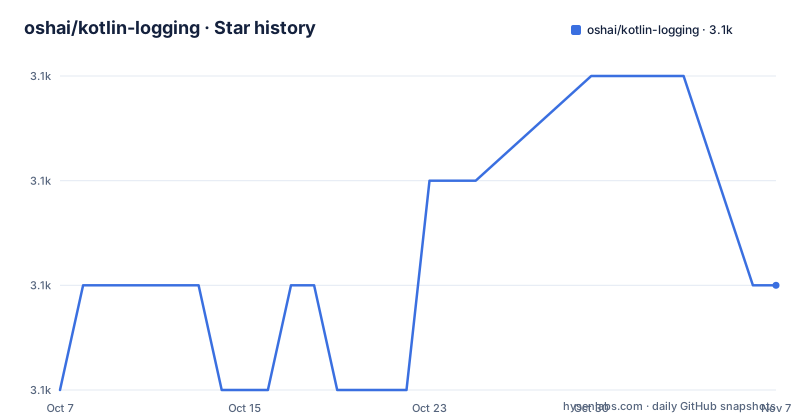
- oshai/kotlin-logging3,114 ★ · +1
| Repository | 2026-10-07 | 2026-11-07 |
|---|---|---|
| oshai/kotlin-logging | 3.1k | 3.1k |
1 Stars in the last 31 days, measured from the daily GitHub snapshot. Compare with other projects
Editorial analysis
It is a facade, not a logging engine
The single most important thing to understand about kotlin-logging is that it does not write log output. It is a wrapper around slf4j-api, which is itself only an API. The README is blunt about the consequence: at runtime you are also required to depend on a logging implementation, and if all you want is output on standard out, the library suggests adding `org.slf4j:slf4j-simple:2.0.3`.
So the dependency graph has three layers. Your code calls kotlin-logging, kotlin-logging calls slf4j-api, and something like logback, log4j or slf4j-simple does the writing. The project's claim that all previous slf4j implementations can still be used is exactly this architecture: nothing in the crate formats a date or writes a file.
This has a good consequence and a mildly annoying one. The good one is that changing backends is a dependency swap rather than a code change. The annoying one is that nothing works until you have configured a backend, and the level at which `logger.debug` actually emits is decided by that backend's configuration, not by anything in this library.
Three things it removes from your source
The README lists the advantages and then shows the mechanism for each, which is unusually well evidenced for a library of this size.
The first is logger boilerplate. Instead of naming a class or passing a string, you call a factory that reads the enclosing class name from the call site:
// Place definition above class declaration to make field static
private val logger = KotlinLogging.logger {}
The comment above that line is not decoration. Defining the logger as a property before the class declaration is what makes it a companion-level static field rather than one instance per object, which matters for classes that get instantiated in loops or in hot paths.
The second is lazy message construction. This is the part with an actual performance argument behind it:
logger.debug { "Some $expensive message!" }The lambda form means the string interpolation only runs when debug is enabled. The README expands what that compiles to, and the expansion is the whole justification: the equivalent eager call is guarded by an `if (logger.isDebugEnabled)` check that you would otherwise write yourself at every call site. On a log statement that formats a large object or performs a query, that guard is not cosmetic.
The third is exception logging. Rather than passing a throwable as the last argument, the exception is the first parameter and the message is still a lambda:
logger.error(exception) { "a $fancy message about the $exception" }A fluent builder for structured messages
Newer versions add a builder form that goes past a single message string, which is the feature that makes this more than a syntax convenience:
logger.atWarn {
    message    = "foo $bar"
    cause      = exception
    payload    = buildMap(capacity = 3) {
        put("foo", 1)
        put("bar", "x")
        put("obj", Pair(2, 3))
    }
}
The `atWarn` entry point returns a builder that collects a message, an optional cause and an arbitrary payload map before handing off to the underlying logger. That is the shape you want when a log line carries structured context rather than prose. The README's FAQ confirms that markers, parameters and other slf4j features are all still supported, so this is an addition to the API rather than a replacement for it.
Location awareness, the feature that logs the caller rather than the wrapper, was added in version 1.4 according to the FAQ. That is worth noting because a facade that loses the call site is annoying to debug, and this one explicitly fixed it.
What the builder does not do is change where the output goes. Once the builder has handed over, the backend decides the format, and whether `payload` becomes JSON, key-value pairs or nothing at all is up to your slf4j implementation.
Version 5 broke compatibility and version 8 is in flight
The repository has a `ChangeLog.md` and a `ChangeLog-old.md`, which is a reasonable sign for a project that has crossed a major boundary. Version 5 is the important one for anyone starting today, because the README is explicit that it is not backward compatible with v3, v2 or v1. The group id moved from `io.github.microutils` to `io.github.oshai`, the root package moved from `mu` to `io.github.oshai.kotlinlogging`, and slf4j stopped being a transitive dependency you could rely on.
That last change is the one with lasting consequences. Since version 5, you provide slf4j-api yourself, which is what allows the same artifact to work against slf4j 1 or slf4j 2. It also means a project that upgrades and sees `NoClassDefFoundError` has usually forgotten the explicit dependency rather than hit a bug in the facade.
The release history then gets interesting. The three most recent tags are `8.0.02` on 2026-05-03, `8.0.03` on 2026-05-19, and `8.0.4` on 2026-05-27. Two of those carry a leading zero in the patch position and one does not, and the last push was on 2026-05-27, the same day as the final tag. Whatever the cause, the numbering is inconsistent across those three releases, so do not assume a pattern when guessing which version a transitive dependency resolved to.
Separately, the README's dependency examples still specify `7.0.3`, which is one major line behind the released 8.x. The code samples are correct for the version they name and out of date relative to the current tag.
Where it does not fit
The clearest wrong-tool case is a project that has no logging complexity to speak of. If you write one log line in a small utility, this library adds a dependency, an indirection layer and a second configuration decision for no measurable gain, and Kotlin's own `println` or a bare slf4j call is the lighter answer.
The second case is multiplatform. The README describes multiplatform support as experimental and points at the wiki and at two long-running issues rather than at a feature list. The repository topics do advertise multiplatform, and there is a dedicated wiki page for it, but the word the project itself uses is experimental. Anyone building for iOS, Android, JS and JVM from one codebase should read that wiki page before committing, because the JVM artifact is the one the README documents properly.
There is also a licensing angle worth stating rather than glossing. The project is Apache 2.0, which is permissive and carries no copyleft obligation into your application, but it is worth noticing that the list of adopters includes large commercial projects, which is the clearest available signal about whether the API is stable enough to depend on.
The FAQ also names a specific failure that confuses people: calling `logger.debug` and seeing nothing in the IntelliJ run console. The library is a facade, so the level has to be set on the implementation, and the README points at the underlying logging library's configuration for that.
Adopting it in a Gradle or Maven project
The dependency coordinates are `io.github.oshai` with an artifact of `kotlin-logging-jvm` for the JVM artifact. In Maven that is:
<dependency>
  <groupId>io.github.oshai</groupId>
  <artifactId>kotlin-logging-jvm</artifactId>
  <version>7.0.3</version>
</dependency>
and in Gradle the same coordinate on one line:
implementation 'io.github.oshai:kotlin-logging-jvm:7.0.3'Both snippets name version 7.0.3, which is what the README specifies even though the current release tag is 8.0.4. Whichever you copy, check the release page for the number you actually want, and remember that you also need a backend on the runtime classpath.
The minimal working example in the README is short enough to be the whole mental model:
import io.github.oshai.kotlinlogging.KotlinLogging

private val logger = KotlinLogging.logger {}

class FooWithLogging {
    val message = "world"
    fun bar() {
        logger.debug { "hello $message" }
    }
}
Once that compiles, two things decide whether it is working. If you see nothing at all, you are missing a backend. If you see something but not the debug line, you are at the level the backend defaults to, not at a fault in the facade. The library offers a full Maven example project and JAR downloads from GitHub releases or Maven Central as alternatives to resolving through a build tool.
Editorial conclusion
kotlin-logging is worth adding when a JVM Kotlin project logs in more than a handful of places and the repeated logger declaration has become noise. The lazy lambda form stops expensive message construction when a level is disabled, which is a real saving in hot paths, and any slf4j implementation still works behind it. Two costs to weigh: you still have to choose and configure a backend yourself, and the README's own dependency examples still name version 7.0.3 while the current release is 8.0.4, so the getting started snippet is not the newest API. If you only need one logger in a small CLI, Kotlin's stdlib logging or a direct slf4j call is lighter.
Frequently asked questions
Why use kotlin-logging instead of plain slf4j?
The README's own answer is better native Kotlin support with less boilerplate. You get a logger factory that fills in the class name for you and a lambda form where the message is only built when the level is enabled, which spares you writing an isDebugEnabled guard at every call site. Underneath it is still slf4j-api, so every existing implementation keeps working.
Does kotlin-logging need a logging backend at runtime?
Yes. The library is a facade over slf4j-api and does not write output itself, so you must also depend on an implementation. The README suggests org.slf4j:slf4j-simple:2.0.3 if you only want output on standard out, and logback, log4j or others work as alternatives.
Is multiplatform support stable in kotlin-logging?
The README calls it experimental and links to a wiki page plus two tracking issues rather than documenting a feature matrix. The JVM artifact is the one the README documents properly, so multiplatform users should read the wiki page before depending on it.
Why does logger.debug print nothing in my run console?
Because kotlin-logging is a facade and does not set levels. The README's FAQ says log level configuration is done per implementation, so you need to raise the level in your underlying logging library, such as logback or log4j, rather than at the call site.
Official sources
Add this badge to your README
If you maintain this project, the badge below links readers to this analysis and shows its maintenance status from the daily GitHub snapshot. Paste the markdown into your README; add ?metric=license or ?metric=stars to the image URL for a different field.

[](https://hysenlabs.com/projects/oshai-kotlin-logging)Star history chart for your README
[](https://hysenlabs.com/projects/oshai-kotlin-logging)Was this useful?