Nominatim ships as two wheels, and its four step start still needs a planet file
Open Source search based on OpenStreetMap data
At a glance
- What is it?
- Nominatim turns OpenStreetMap data into a geocoder you host: forward geocoding by name and address, reverse geocoding from a point back to an address. The pipeline is a Python virtualenv install followed by an import step that expects input you have to supply yourself.
- Who is it for?
- Nominatim earns its setup cost when you want an OpenStreetMap geocoder under your own control, and the four step summary is enough to prove the pipeline works end to end. It is the wrong tool if you need an answer this afternoon without a database import and a virtualenv.
- Can I use it commercially?
- Yes, with conditions. GPL-3.0 is a copyleft licence: if you distribute software that includes it, you must release that software's source code under the same licence. Running it internally without distributing it does not trigger that obligation.
- Is it still maintained?
- Yes. The repository last received commits 12 days ago.
- What is it written in?
- Mainly Python, according to GitHub's language statistics.
Answers come from the project's GitHub data, last synced on November 15, 2026, and from our analysis. They are not legal advice.
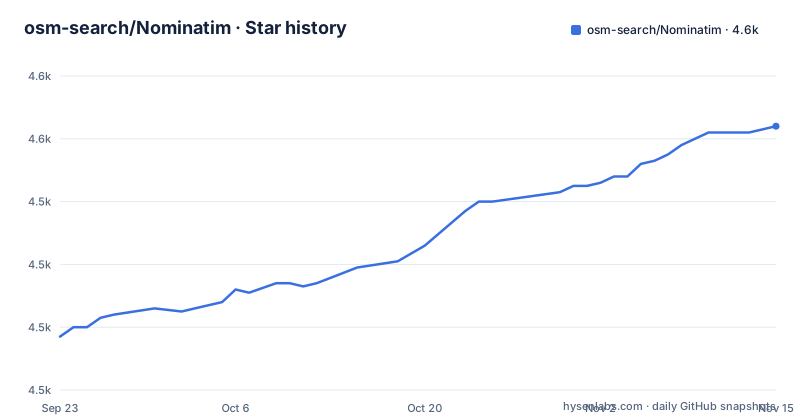
Star history
- osm-search/Nominatim4,564 ★ · +67
| Repository | 2026-09-23 | 2026-11-15 |
|---|---|---|
| osm-search/Nominatim | 4.5k | 4.6k |
67 Stars in the last 53 days, measured from the daily GitHub snapshot. Compare with other projects
Editorial analysis
Two wheels come out of packaging/, and one CLI sits at the root
Nominatim does not install as one package. Step two of the quick start is `./nominatim-venv/bin/pip install packaging/nominatim-{api,db}`, a shell brace expansion over two directories inside `packaging/`, and the Makefile confirms they are two separate distributions: `build-db` runs `python3 -m build packaging/nominatim-db --outdir dist/` and `build-api` runs the same command against `packaging/nominatim-api`, with the `build` target chaining a clean step before both. A `nominatim-cli.py` file sits at the repository root, while the quick start runs import and serve through the `nominatim` command in the virtualenv. Around it sit `src/` for the package code, `lib-sql/` and `lib-lua/` for the database and Lua layers, `settings/` for configuration, `utils/` for helper scripts, `data/` for the country grid, `man/` for a generated manpage and `munin/` for monitoring plugins. A `Vagrantfile`, a `vagrant/` directory and `VAGRANT.md` sit alongside, so a virtual machine based setup is a path the project expects rather than something a community invented. `.gitmodules` is present too, so a plain clone leaves submodule directories empty until you fetch them.
Step three of the quick start assumes you already own a planet file
The four step summary skips the part that decides your afternoon. Step one clones the repository and pulls the country grid on its own, with `wget -O Nominatim/data/country_osm_grid.sql.gz https://nominatim.org/data/country_grid.sql.gz` landing in the `data/` directory inside the checkout. Step two builds a virtualenv called `nominatim-venv` and installs the two wheels into it. Step three then runs `../nominatim-venv/bin/nominatim import --osm-file <your planet file>` and pipes the output into `setup.log` through `tee`. That placeholder is the whole story: the import step wants a file you already have, and for a whole planet that file is not something this repository can hand you. Every step after it assumes the import worked, so a reader following the four steps literally runs out of input at step three. The stable release instructions and a troubleshooting FAQ are published on nominatim.org for the rest of the job.
The web server is a group you install after the import
The dependency groups show where the serving stack sits, and it is not in the runtime list. `runtime` carries `psycopg`, `async-timeout`, `python-dotenv`, `jinja2`, `pyYAML`, `psutil`, `PyICU`, `mwparserfromhell` and `SQLAlchemy`, which is what you need to read a database and render output. The web server is a group named `serve`, holding `falcon`, `starlette` and `uvicorn`, and step four makes the dependency explicit by installing two of them on the spot before starting:
./nominatim-venv/bin/pip install uvicorn falcon
../nominatim-venv/bin/nominatim serve
A virtualenv built exactly as step two describes therefore has no HTTP layer in it. Skip step four and you end up with an imported database and no way to query it over HTTP, which is the usual way this quick start dead ends. The group also holds two web frameworks, falcon and starlette, while step four installs only falcon.
Three licenses sit under one COPYING file
The licensing paragraph is short and does not reduce to a single answer. The Python source is under a GPL version 3 or later, the Lua configuration files for osm2pgsql are under the Apache License, Version 2.0, and all other files in the repository are under GPLv2. The tree backs that up with `COPYING` at the root and a `LICENSES/` directory for the per file terms. The practical consequence is about what you can reuse. If you need osm2pgsql's Lua configuration inside a project whose own license cannot tolerate GPL, that one directory is the part of Nominatim you can take, on Apache 2.0 terms. The Python code, which is the part that actually performs the geocoding, is GPLv3 or later and comes with copyleft obligations attached. The remaining files being GPLv2 rather than GPLv3 also means there is no single license version to cite when you write a notice.
psycopg 3.3.0 is excluded and SQLAlchemy stops below 2.1
The runtime constraints are narrow enough to matter during deployment:
runtime = [
    "psycopg != 3.3.0",
    "async-timeout",
    "python-dotenv",
    "jinja2",
    "pyYAML>=5.1",
    "psutil",
    "PyICU",
    "mwparserfromhell",
    "SQLAlchemy[asyncio]>=1.4.31",
]
`psycopg != 3.3.0` excludes one specific release instead of setting a floor, so a machine or container image that already carries 3.3.0 is not a starting point you can reuse. The SQLAlchemy constraint sets only a floor of 1.4.31, with the asyncio extra requested explicitly. `pyYAML>=5.1` is the only other lower bound in the list; the rest float. Nine runtime entries is not a large surface, but the pinned ones are pinned for reasons the file does not spell out, so a resolution that looks clean can still fail at import time.
mypy runs in strict mode and the BDD target carries a purge flag
Four targets make up `make tests`, and each is narrower than the name suggests:
tests: mypy lint pytest bdd

mypy:
	mypy --strict --python-version 3.10 src

pytest:
	pytest test/python

lint:
	flake8 src test/python test/bdd

bdd:
	pytest test/bdd --nominatim-purge
The type check is `mypy --strict` against `src`, pinned to Python 3.10 as the target version. The two pytest targets are separate suites, `test/python` for unit tests and `test/bdd` for behaviour tests, and the behaviour suite passes `--nominatim-purge`, a flag whose name says it empties what it runs against. That is a test design choice with an operational consequence, because it decides whether the suite may ever be pointed at an instance you care about. The same Makefile builds the docs with `mkdocs build`, serves them with `mkdocs serve`, and generates `man/nominatim.1` from `man/create-manpage.py` through `argparse-manpage`.
The published docs track master, and the last release is five months older
Two documentation sets exist and they are not interchangeable. `docs/` in this repository holds the documentation for the latest development version, rendered at nominatim.org/release-docs/develop/, while the installation instructions for the release and the troubleshooting FAQ live under release-docs/latest. The gap between those two sets is where surprises live. The most recent tagged releases are v5.3.1 on 2026-04-10, v5.3.2 on 2026-04-19 and v5.3.3 on 2026-10-14, and the last push landed on 2026-10-28 with the repository not archived. Master can therefore hold work no release contains, so an instruction copied from the develop documentation can describe code no tagged version contains, and a feature you read about can be absent from 5.3.3. For reference behaviour before you import anything, a public instance with up to date data runs at nominatim.openstreetmap.org, and Nominatim is one of the sources behind the search box on the OpenStreetMap home page.
Editorial conclusion
Nominatim earns its setup cost when you want an OpenStreetMap geocoder under your own control, and the four step summary is enough to prove the pipeline works end to end. It is the wrong tool if you need an answer this afternoon without a database import and a virtualenv. Before you commit to a version, check three things: which documentation set you are reading, develop or latest, because they describe different code; whether your environment satisfies the psycopg and SQLAlchemy constraints in the runtime group; and whether the behaviour driven suite is ever allowed to point at a database you care about.
Frequently asked questions
What is Nominatim used for?
It searches OpenStreetMap data by name and address, which is geocoding, and it generates synthetic addresses of OSM points, which is reverse geocoding. An instance with up to date data runs at nominatim.openstreetmap.org.
what does nominatim do
It turns OpenStreetMap data into a search index you host yourself, covering both directions: name and address to coordinates, and coordinates back to an address.
how to install nominatim
Clone the repository and download the country grid, create a Python virtualenv and pip install packaging/nominatim-{api,db}, then create a project directory and run nominatim import against your own OSM file. Serving needs uvicorn and falcon installed before nominatim serve.
how to use nominatim api
Installation instructions for the release, the same for current master, and a troubleshooting FAQ are all published at nominatim.org, with the develop docs rendered from the docs/ directory of the repository.
what is nominatim in python
The Python source is licensed under GPL version 3 or later. It builds as two distributions, nominatim-db and nominatim-api, out of the packaging/ directory, with the command line entry point at nominatim-cli.py.
Is Nominatim free?
The Python source is available under a GPL license version 3 or later. The Lua configuration files for osm2pgsql are under the Apache License, Version 2.0, and all other files are under a GPLv2 license.
Official sources
Add this badge to your README
If you maintain this project, the badge below links readers to this analysis and shows its maintenance status from the daily GitHub snapshot. Paste the markdown into your README; add ?metric=license or ?metric=stars to the image URL for a different field.

[](https://hysenlabs.com/projects/osm-search-nominatim)Star history chart for your README
[](https://hysenlabs.com/projects/osm-search-nominatim)Was this useful?