redis-operator for Kubernetes Redis topologies and monitoring
A golang based redis operator that will make/oversee Redis standalone/cluster/replication/ sentinel mode setup on top of the Kubernetes.
At a glance
- What is it?
- OT-CONTAINER-KIT/redis-operator manages standalone, replication, cluster, and Sentinel Redis on Kubernetes through a Go-based operator. It suits platform teams that need declarative topology management, recovery, security options, and Prometheus-compatible monitoring.
- Who is it for?
- Adopt redis-operator when the team operates Redis directly on Kubernetes and needs a controller for several Redis deployment modes. Do not adopt it for Redis versions below 6, unmanaged Redis outside Kubernetes, or situations requiring an upgrade path that the README does not document.
- Can I use it commercially?
- Yes. Apache-2.0 is a permissive licence: you can use, modify and sell software built on it, as long as you keep its copyright and licence notices.
- Is it still maintained?
- Yes. The repository last received commits 3 days ago.
- What is it written in?
- Mainly Go, according to GitHub's language statistics.
Answers come from the project's GitHub data, last synced on November 7, 2026, and from our analysis. They are not legal advice.
Star history
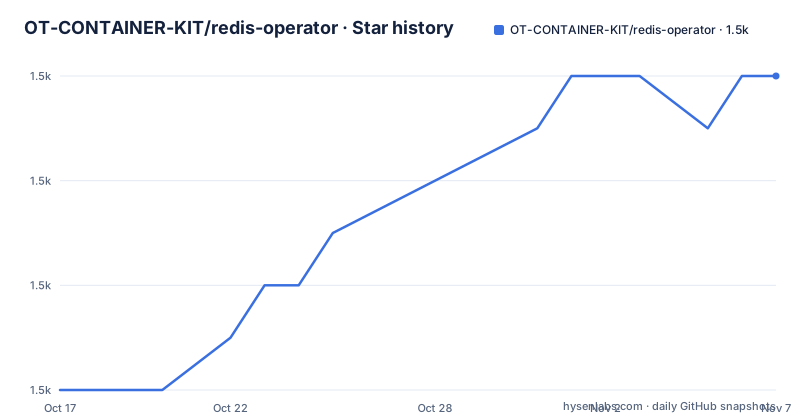
- OT-CONTAINER-KIT/redis-operator1,482 ★ · +6
| Repository | 2026-10-17 | 2026-11-07 |
|---|---|---|
| OT-CONTAINER-KIT/redis-operator | 1.5k | 1.5k |
6 Stars in the last 21 days, measured from the daily GitHub snapshot. Compare with other projects
Editorial analysis
Why redis-operator exists for Kubernetes Redis workloads
redis-operator addresses the operational work required to place Redis on Kubernetes without reducing the deployment to a generic container or Deployment manifest. Its documented scope covers standalone, cluster, replication, and Sentinel modes. That range matters because each mode has different topology rules: a standalone server does not need Redis Cluster membership, replication depends on primary and replica relationships, Sentinel requires quorum-aware monitoring processes, and cluster mode distributes data across multiple masters. The operator gives these forms one Kubernetes management layer.
The intended users are platform engineers, SREs, and application teams that run Redis workloads in Kubernetes clusters, including OpenShift deployments. The repository is written in Go and follows the Kubernetes operator and CRD controller model. Based on the repository layout, reconciliation code is under `internal/`, API definitions are under `api/`, deployment configuration is under `config/`, and Helm packaging is under `charts/`.
The project also addresses monitoring as part of Redis operations rather than leaving metrics configuration entirely to each workload. The README identifies `redis-exporter` as built-in monitoring and documents Prometheus service discovery annotations. This makes the operator more useful for teams operating multiple Redis installations, although it still depends on a suitable Kubernetes environment, compatible Redis images, and a monitoring platform.
How redis-operator reconciles Redis topologies
The central mechanism is Kubernetes controller reconciliation. The repository includes an `api/` tree for custom API definitions and an `internal/` tree for implementation code, consistent with a CRD controller design. The operator watches Kubernetes configuration, manages the resources needed to realize the declared Redis setup, and oversees ongoing state. The README specifically states that Redis cluster failover and recovery are supported.
The result depends on the selected Redis mode. Cluster mode requires a multi-node topology and cluster membership. Replication mode needs primary and replica relationships. Sentinel mode adds Sentinel processes that monitor Redis availability and coordinate failover. Standalone mode represents the simpler case without cluster distribution. The README lists all four modes but does not document the complete reconciliation sequence, readiness rules, update behavior, or failure transitions for each mode.
The operator image is built as a single Go binary. Its Dockerfile invokes `cmd/main.go`, sets `CGO_ENABLED=0`, and places the resulting binary in a distroless static image. The container entry point runs the manager command:
ENTRYPOINT ["/operator", "manager"]This packaging does not mean Redis itself runs inside the operator container. Redis, Sentinel, and exporter workloads use the separate Quay images listed by the project. The operator manages those workloads, while Redis processes the data.
Installing redis-operator and preparing a first deployment
The README does not reproduce installation commands or a complete first Redis custom resource. It directs users to the installation documentation and says that the documentation can be used to deploy the first cluster. No installer command or Helm parameter should be inferred from the README. The project homepage is `https://redis-operator.opstree.dev/`, and the installation guide is linked from the README.
For a source build, the Makefile documents the current default image and local tooling versions, but it does not provide enough context in the README for a complete first-use procedure. Do not treat those build variables as an installation tutorial without consulting the linked documentation.
One documented configuration step is the annotation set applied to Redis installations for Prometheus discovery. The following is the exact YAML shown in the README. It marks the resource for Redis discovery, enables scraping, and sets the exporter port to `9121`:
annotations:
  redis.opstreelabs.in: "true"
  prometheus.io/scrape: "true"
  prometheus.io/port: "9121"
The surrounding Kubernetes object name is not given, so the snippet should be added to the relevant Service metadata in the configuration format used by the operator. A complete first use still requires a topology manifest from the installation guide. The README does not document a post-install verification command, rollback procedure, or `kubectl` command for checking failover.
Security, network, and Redis version constraints
The documented security controls include password-protected Redis, passwordless Redis, and TLS. These are configuration options, not a guarantee that every deployment will be encrypted or authenticated. The operator still needs suitable secret handling, certificate configuration, network policy, and Redis access controls in the target cluster. The README does not describe how credentials are stored in custom resources, whether secrets are recreated during reconciliation, or what happens when a certificate expires.
Redis networking can use IPv4 or IPv6. That is useful in dual-stack clusters, but it makes the Kubernetes Service, Redis bind configuration, exporter discovery, and client routing part of the deployment design. The project does not claim compatibility with every Redis topology or hosting platform, so existing networking assumptions should be checked against the installation documentation.
Version support is explicit: redis-operator only supports Redis `>=6`. The README recommends using the latest stable Redis release for upstream security fixes and bug fixes, but it does not define a tested version matrix or a direct mapping between operator releases and Redis releases. Redis 6 or later is therefore a necessary admission check, not a sufficient compatibility guarantee.
The operator image runs as UID and GID `65532` in a distroless static container. This reduces the contents of the management container, but it does not secure the Redis workload containers themselves. The README does not document Pod Security Admission profiles, RBAC examples, NetworkPolicy templates, or secret rotation behavior.
Prometheus metrics and Grafana dashboard integration
Monitoring uses `redis-exporter`, exposed through the project image `quay.io/opstree/redis-exporter`. The README says Prometheus service discovery is supported through annotations, removing the need for additional Prometheus scrape configuration when the annotated resources are discovered correctly. The `prometheus.io/port` annotation points Prometheus to port `9121`, the documented exporter port.
Operators can also deploy a `ServiceMonitor` for each Redis installation through Helm values. The README does not provide the value names or chart settings, so this is a deployment option rather than a reproducible configuration from the documentation. Existing Prometheus Operator users may find that preferable to annotation-based discovery because a `ServiceMonitor` is a Kubernetes custom resource managed through the monitoring stack.
For Grafana, the project documents dashboard ID `16056` and provides a link to Grafana.com for manual JSON import. Automated installation as a ConfigMap is not built into the documented operator path. The README instead points to the community Helm chart `redis-grafana-dashboard`, which can be imported automatically through the kube-prometheus-stack sidecar.
This division has a practical consequence. redis-operator supplies Redis management and exporter integration, but it does not by itself establish that Prometheus and Grafana are installed. Metrics collection also requires the cluster's discovery configuration to recognize the annotations or `ServiceMonitor` objects.
redis-operator versus a static Redis manifest
A static Kubernetes manifest represents resources and their desired settings, but it does not contain a Redis-aware controller to manage topology membership, replication relationships, Sentinel coordination, or recovery actions. redis-operator is the appropriate alternative when those behaviors are required. Its controller-oriented design is materially different from continuously editing YAML when nodes fail or topology state changes.
The trade-off is additional platform complexity. Adopting the operator means accepting a controller process, its Kubernetes permissions, custom resource definitions, operator upgrades, and the need to understand how it handles the selected topology. The repository supports several modes, but that breadth also means an engineer must choose and validate the correct mode rather than assuming one deployment pattern fits every use case.
The built-in monitoring is another differentiator from a plain Redis Pod or StatefulSet. A bare workload can expose metrics, but the operator explicitly supports exporter integration, service discovery annotations, optional `ServiceMonitor` objects, and a documented Grafana dashboard.
The README does not compare redis-operator with a commercial Redis service, managed Kubernetes Redis add-on, or another operator. It also does not describe automated Redis major-version upgrades, backup restoration, or point-in-time recovery. Those missing capabilities must not be inferred from cluster failover and recovery support.
Maintenance, releases, and Apache-2.0 implications
The repository is not archived. Its last push was on 2026-10-09, and release `v0.27.0` was published on 2026-10-09. Earlier releases listed for the project are `v0.26.0` on 2026-07-15 and `v0.25.0` on 2026-05-13. This recent commit and release activity indicates ongoing release work, but the README does not provide a support policy, upgrade compatibility matrix, long-term-support branch, or migration guide for each version.
The repository layout includes an `upgrade/` directory, but the README does not explain its contents. It would be unsafe to claim that upgrading redis-operator automatically upgrades Redis or automatically migrates every custom resource. Upgrade planning should begin with the project's release history and the version-specific installation documentation.
The project uses the Apache-2.0 license. That license permits broad use, modification, and distribution subject to its terms, including preservation of applicable notices. This is not legal advice. Organizations also need to account for the separate terms and security posture of the Redis images they deploy; the README lists Quay-hosted images but does not reproduce their licenses.
Editorial conclusion
Adopt redis-operator when the team operates Redis directly on Kubernetes and needs a controller for several Redis deployment modes. Do not adopt it for Redis versions below 6, unmanaged Redis outside Kubernetes, or situations requiring an upgrade path that the README does not document. Before installation, verify the exact deployment commands and CR examples in the project documentation, then confirm that the selected topology, persistence model, security settings, and monitoring approach match the cluster design.
Frequently asked questions
Which Redis deployment modes does redis-operator support?
The README documents standalone, cluster, replication, and Sentinel modes. It also states that cluster failover and recovery are supported.
Which Redis versions are supported by redis-operator?
redis-operator supports Redis versions `>=6`. The project recommends using the latest stable Redis version for upstream security fixes and bug fixes.
How does redis-operator expose Redis metrics to Prometheus?
The operator supports `redis-exporter` and Prometheus service discovery annotations on port `9121`. A `ServiceMonitor` can also be deployed for each Redis installation through Helm values.
Official sources
Add this badge to your README
If you maintain this project, the badge below links readers to this analysis and shows its maintenance status from the daily GitHub snapshot. Paste the markdown into your README; add ?metric=license or ?metric=stars to the image URL for a different field.

[](https://hysenlabs.com/projects/ot-container-kit-redis-operator)Star history chart for your README
[](https://hysenlabs.com/projects/ot-container-kit-redis-operator)Was this useful?