confuse-9live Review: iOS Obfuscation and Static Analysis Tool
🔥🔥🔥 专业版iOS混淆工具,马甲工具包、ipa静态分析工具(相似度对比、敏感词检测),提供试用版本,100%过机器审核,解决 AppStore 4.3,2.3.1问题,支持语言 c、c++、objc、dart、swift 并支持各种资源改名,混淆、傻瓜化操作、一键出包,提供良好的UI界面,支持多包管理一包一特征、支持Unity3d、cocos2d全家桶、swiftUI、flutter、虚幻等各种引擎。支持混淆.a/.framework/.xcframework,混淆比例95%,支持dSYM文件混淆和恢复功能,不影响bugly等各种在线崩溃收集,可持续迭代原工程。
At a glance
- What is it?
- confuse-9live is presented as a macOS-oriented iOS package processing tool for code, resource, and external SDK obfuscation. Its README describes Xcode-oriented packaging and IPA analysis features, but the repository documents neither installation commands nor license terms.
- Who is it for?
- confuse-9live may fit iOS developers who need package-level obfuscation, resource processing, IPA comparison, or external SDK handling and who can verify the commercial package and trial terms themselves. It is a poor fit for teams that need a source-available build, a documented license, CI integration, or guarantees about App Store review outcomes.
- Can I use it commercially?
- Not without permission. GitHub finds no licence file in the repository, and without a licence all rights are reserved by default: you may read the code but not reuse it. Check the README, or ask the authors, before using it.
- Is it still maintained?
- Yes. The repository last received commits 29 days ago.
- What is it written in?
- Mainly Swift, according to GitHub's language statistics.
Answers come from the project's GitHub data, last synced on November 7, 2026, and from our analysis. They are not legal advice.
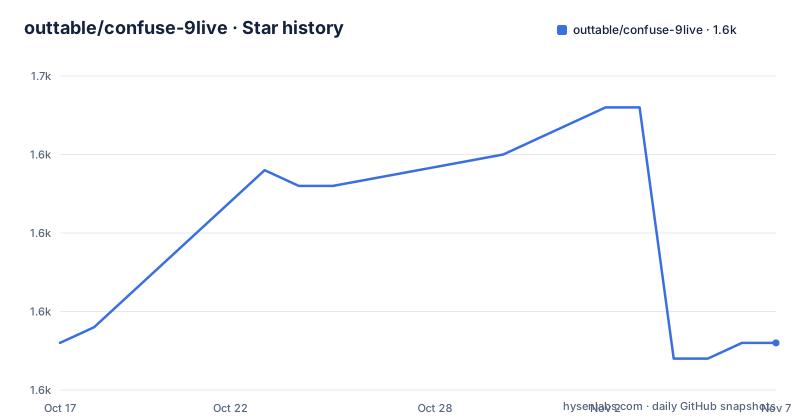
Star history
- outtable/confuse-9live1,633 ★ · +0
| Repository | 2026-10-17 | 2026-11-07 |
|---|---|---|
| outtable/confuse-9live | 1.6k | 1.6k |
0 Stars in the last 21 days, measured from the daily GitHub snapshot. Compare with other projects
Editorial analysis
What confuse-9live Is Intended to Process
confuse-9live is described as a professional iOS obfuscation and package-processing tool for developers who have an IPA or a compiled iOS application but do not want to rebuild the entire application from intermediate source code. The README says it can process executable files, resources, and external SDKs, with separate support for C, C++, Swift, Objective-C, Objective-C++, and Dart. That scope makes it relevant to teams working across native iOS projects and engine-based applications, rather than only developers who maintain a conventional Xcode source tree.
The target use cases are broad. The README mentions SwiftUI, Flutter, Unity3D, cocos2d-x, quick-cocos, cocos-creator, SpriteKit, Unreal, and uniapp. It also describes handling for `.a`, `.framework`, and `.xcframework` static libraries. Resource processing covers `.png`, `.jpg`, `.gif`, `.webp`, `.xib`, `.storyboard`, `.plist`, `.xcassets`, `.bundle`, `.strings`, and `.sks`, with the documentation also claiming arbitrary resource encryption for extension formats.
The repository description presents additional functions for sensitive-word detection, similarity comparison, dSYM handling, multi-package management, and creating multiple app variants with different features. Those claims describe a vendor workflow, not independently established technical guarantees. In particular, the statement that the tool provides a "100%" machine-review result and addresses App Store 4.3 and 2.3.1 should be treated as a marketing claim. The README does not provide test data, an Apple approval record, or a reproducible procedure for confirming those outcomes.
How confuse-9live's Obfuscation Workflow Is Structured
The README describes a reverse-engineering-based, compile-level workflow that applies an independent feature library to code and resources. It presents the tool as operating on compiled artifacts, including the execution file and external SDK packages, rather than requiring an intermediate source-code project. The documentation also says that the tool supports engineering-level reconstruction and that different projects receive different results.
This architecture implies two related processing paths. One path handles compiled code and linked libraries. The other path handles resources and package contents. The listed file types show that the tool is not limited to changing symbol names. It also processes interface files, asset catalogs, bundles, localized strings, SpriteKit scene resources, and unspecified extension resources.
The documentation claims support for armv7, armv7s, arm64, and arm64s. It further states that the obfuscated program can be debugged in Xcode and that dSYM files can be obfuscated or restored. The paid and free versions differ on dSYM handling, compilation acceleration, technical support, package comparison, and App Store submission support. Those distinctions matter when deciding whether the free edition can cover a production workflow, although the README does not explain the exact transformation stages or the interface used to configure them.
The repository's tool-principle diagram is linked as `assets/snapshots/snapshot-25.png`, and the README includes several product screenshots. The repository does not provide a readable command-line interface, configuration schema, or source-level description of the processing engine. Its architecture can be summarized from the documented artifact types and product claims, but the exact implementation cannot be evaluated from the repository.
Installation and First Use Through crab-ios.com
The README does not publish Homebrew, npm, Swift Package Manager, pip, Docker, or other installation commands. It explicitly directs users to the official download page at `crab-ios.com`, and it separately links to the online documentation at `crab-ios.com/docs/`. No package version, checksum, command-line invocation, configuration file, or first-run procedure appears in the repository README.
A first real use therefore has to begin outside the repository. A developer would need to download the installer from `crab-ios.com`, install it according to the vendor's current instructions, and obtain a free trial authorization code. The README lists `[email protected]` as the contact for a trial code and says to add QQ if there is no reply. It does not state the trial duration, supported macOS versions, activation requirements, or whether a network connection is required after installation.
The first meaningful project-level check should use a disposable IPA rather than a production build. Start with a small native Swift application, preserve an unmodified copy, and compare the packaged artifact, launch behavior, resource loading, and debugging output before expanding the test to external SDKs. The documentation says the tool supports Xcode debugging, but it does not give the exact UI sequence or command used to open the processed program. Users should also verify whether their Xcode version is accepted, because the support table marks Xcode 15.x after version 1.8 as unsupported and lists Xcode 16.x and 26.x as supported.
Because the repository contains no reproducible installation instructions, a successful download alone is not evidence that the tool can be built from source or operated in CI. Teams that require repeatable automation should treat the downloadable application as an external dependency and request the vendor's exact supported workflow.
Xcode Compatibility and Engine Coverage Boundaries
The compatibility table establishes one firm boundary: the README does not list Xcode 15.x after tool version 1.8 as supported. It lists Xcode 16.x and Xcode 26.x as supported, and says that newer versions are generally adapted within three months. The repository's last push was on 2026-10-10, while the repository has no GitHub releases. That gives a recent repository activity signal, but it does not provide a release history or a versioned changelog from which compatibility can be traced.
The engine list is broad but does not define the depth of support for each engine. Naming Unreal, Flutter, Unity3D, and cocos2d-x indicates intended compatibility, yet the README does not describe engine-specific build hooks, symbol formats, asset-pipeline limitations, or how debug symbols are recovered for each engine. It also says the tool supports SwiftUI, but it does not explain whether this refers to Swift symbol processing, app resource handling, or a specific compilation integration.
The support matrix therefore distinguishes advertised compatibility from verified implementation coverage. A team with a conventional Xcode project may have a more straightforward path than a team using a custom engine build system. Before relying on the product, developers should check the vendor's current documentation for their exact engine version and confirm whether their app includes dynamic frameworks, Swift interfaces, asset catalogs, or third-party SDKs that require special handling.
Free Edition, Paid Capabilities, and License Constraints
The README distinguishes two editions. The free edition includes code and external SDK obfuscation, onboarding, and product documentation. The paid edition adds dSYM obfuscation, compilation acceleration, technical support, package comparison, and App Store submission support. Pricing is linked through `crab-ios.com/pricing`, but the repository does not state an amount, subscription period, renewal rule, or redistribution term.
The repository metadata says the license is unknown. The README does not provide a LICENSE file, license identifier, or wording describing rights to use, modify, or redistribute the tool or its output. Directories named `Code/` and `docs/` exist in the repository, but the README does not explain whether they contain the product implementation, website documentation, generated content, or unrelated project content. It would therefore be unsafe to infer that the repository grants a right to build or redistribute the commercial application.
The product is not archived, and its last push was on 2026-10-10. No GitHub releases are listed. This indicates repository activity, not proof of support for every Xcode release, engine, or submitted application. The vendor's separate distribution channel and license terms should be reviewed before introducing the tool into a commercial build or release process.
Static Analysis, App Variants, and Release Claims
The repository description positions confuse-9live as more than a symbol-renaming utility. It mentions IPA static analysis, similarity comparison, sensitive-word detection, multi-package management, and package-specific characteristics. The README's paid-versus-free table assigns the comparison tool and App Store package support to the paid edition, which indicates that these functions are part of a broader release-management product rather than an incidental command-line filter.
The workflow is aimed at teams managing similar apps or multiple package variants. The documentation says that different projects can produce different results and that each package can have isolated characteristics. That design is relevant where engineers need to vary packaging or resource presentation, but the README does not describe how a package profile is created, whether transformations are reversible, or how profiles are audited after an update.
The App Store claims need especially careful treatment. The README uses language about passing review and addressing guideline 4.3 and 2.3.1. It does not document a controlled test procedure, a list of rejected or accepted submissions, or the relationship between obfuscation and Apple's review criteria. The product may be useful for preparing a package, but the documentation does not support treating it as a guaranteed review solution. App Store decisions also depend on application behavior, metadata, account information, and review context that an obfuscator cannot establish from code changes alone.
Limitations and a Source-Level Alternative
The clearest limitation is verification. The README describes aggressive transformations, package variants, static analysis, sensitive-word detection, and App Store review outcomes, but it does not include a reproducible command, transformation log, test corpus, approval record, or independent benchmark. A processed IPA may launch while still containing detectable strings, duplicated resources, or code paths that depend on original symbols. The feature list alone cannot establish the quality of those outputs.
There is also a scope mismatch between the product claims and the repository's available instructions. The README points to a downloadable commercial application, while the repository provides no documented installation or build path. That makes the repository useful for reading the product description, but insufficient for auditing the implementation or automating the product from source.
A real alternative is a source-level build-hardening approach: configure compiler symbols, strip unnecessary symbols, minimize debug information, protect sensitive strings, and review assets in the normal Xcode build pipeline. The difference is the point at which protection occurs. confuse-9live is presented as a package-oriented tool for compiled IPA processing and external SDK handling, whereas source-level hardening works before the application is compiled and keeps transformation rules visible in the project's build configuration. Xcode build settings and ordinary static analysis are another option, but they do not provide the documented IPA comparison or external SDK workflow.
Editorial conclusion
confuse-9live may fit iOS developers who need package-level obfuscation, resource processing, IPA comparison, or external SDK handling and who can verify the commercial package and trial terms themselves. It is a poor fit for teams that need a source-available build, a documented license, CI integration, or guarantees about App Store review outcomes. Before adoption, verify the actual installer and supported Xcode version, inspect the license, and test a representative package containing the SDKs, resources, and crash-reporting paths used in production.
Frequently asked questions
How do I install confuse-9live?
The README directs users to `crab-ios.com` for the installer. It does not publish command-line installation steps, supported macOS versions, checksums, or a reproducible source build procedure.
Which Xcode versions does confuse-9live support?
The README lists Xcode 16.x and Xcode 26.x as supported. It marks Xcode 15.x after version 1.8 as unsupported and says newer versions are generally adapted within three months.
Can confuse-9live process external iOS SDKs and IPA files?
The README states that the tool can process compiled iOS artifacts and external `.a`, `.framework`, and `.xcframework` libraries. It also describes IPA static analysis, but it does not publish a step-by-step IPA workflow or output format.
Official sources
Add this badge to your README
If you maintain this project, the badge below links readers to this analysis and shows its maintenance status from the daily GitHub snapshot. Paste the markdown into your README; add ?metric=license or ?metric=stars to the image URL for a different field.

[](https://hysenlabs.com/projects/outtable-confuse-9live)Star history chart for your README
[](https://hysenlabs.com/projects/outtable-confuse-9live)Was this useful?