Yark keeps deleted YouTube videos by marking them deleted instead of removing them
OSINT for YouTube made simple.
At a glance
- What is it?
- Owez/yark is a Python command line tool that archives a YouTube channel to a local folder and serves it back as an offline website. Its archives only ever grow, and the download engine is pinned to one yt-dlp release.
- Who is it for?
- Use Yark if you want a personal, local archive of specific YouTube channels that records what changed and keeps videos after they vanish upstream, and you can schedule refreshes yourself. Skip it if you need a scheduler, a hosted viewer or a tool that tracks the newest YouTube changes.
- Can I use it commercially?
- Yes. MIT is a permissive licence: you can use, modify and sell software built on it, as long as you keep its copyright and licence notices.
- Is it still maintained?
- Yes. The repository last received commits 117 days ago.
- What is it written in?
- Mainly Python, according to GitHub's language statistics.
Answers come from the project's GitHub data, last synced on November 22, 2026, and from our analysis. They are not legal advice.
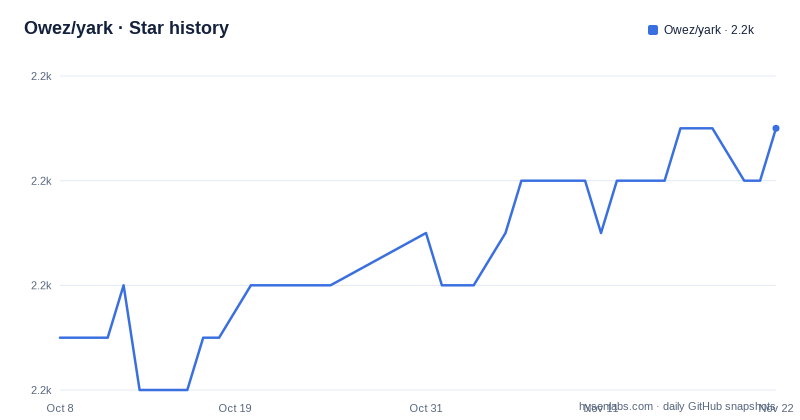
Star history
- Owez/yark2,195 ★ · +4
| Repository | 2026-10-08 | 2026-11-22 |
|---|---|---|
| Owez/yark | 2.2k | 2.2k |
4 Stars in the last 45 days, measured from the daily GitHub snapshot. Compare with other projects
Editorial analysis
Three commands create, fill and open an archive
Yark has a short life cycle. First, pick a name for the archive and give it a channel URL:
$ yark new foobar https://www.youtube.com/channel/UCSMdm6bUYIBN0KfS2CVuEPAThen tell Yark to download all videos and metadata:
$ yark refresh foobarWhen everything has been downloaded, Yark automatically prints a status report of what changed since the last refresh. Viewing is a third command:
$ yark view foobarThat pops up an offline website in the browser for watching the videos. The installation step before all this is `pip3 install yark`, and the README asks for Python 3.9+ with FFmpeg as an optional extra. The pyproject.toml registers the command as yark, pointing at yark.cli. There are no other commands in the README, so these four, new, refresh and view, plus the install, are the whole surface.
Archives only grow, and a video removed from YouTube stays with a deleted tag
The README is explicit that archives are always additive. If a video is deleted or marked private on the YouTube side, Yark retains the video and marks it with the deleted tag. The file stays in your local archive.
That behavior is the reason to use the tool for preservation. A channel owner can remove a video, and your copy remains, with a record that it is gone from the source. It also means the archive never shrinks on its own. Disk use only goes up, and a channel with many long videos will need space accordingly. Nothing in the README describes a prune command or a way to drop old videos, so removing a video means deleting its files from the videos directory by hand.
Another consequence of the tag approach is that you must check the deleted marker to distinguish what YouTube still serves from what only you still have.
Refresh, do not recreate, and schedule it yourself
Two lines in the details list save people from mistakes. Do not create a new archive again if you only want to update, because Yark accumulates new metadata for you through timestamps. Running yark refresh against the existing name is the update path.
Scheduling is not a feature. The README says to use cron or something similar, so a nightly or weekly job calling yark refresh with the archive name is the intended setup. If the machine is off or the job fails, nothing retries, and the next successful refresh catches up through the same accumulation.
The cost is that the tool has no daemon and no notification. The status report appears in the terminal where refresh ran, and under cron it goes wherever you send standard output. A silent failure is only visible if you redirect output to a log and read it.
The archive is a plain directory with yark.json and a yark.bak backup
Each archive is a self-contained directory named after the archive. Inside it are yark.json with all metadata, yark.bak as a backup file to protect against data damage, a videos directory holding files named by video id, and a thumbnails directory holding PNG files named by hash.
Because the layout is ordinary files, backups and copies are ordinary file operations. Copying the directory to another disk moves the whole archive. The README suggests spending a few minutes looking through the files, since everything is quite readable, which is true of the JSON metadata at least.
The weak point is that yark.json is a single file holding all metadata. The yark.bak copy guards against corruption, but it sits in the same directory, so a disk failure takes both. An off-machine copy of the directory is the only real protection.
The viewer adds a history report and timestamped notes to each video
Under every video in the offline website, there is a history report with timelines and graphs, plus a noting feature for adding timestamped and permalinked comments. Light and dark modes are both available and apply automatically from the system theme.
The viewer is built with Flask, one of the dependencies in pyproject.toml at ^2.3.1, and the package includes templates through the include entry for templates. Running `yark view foobar` starts that server locally, which is why it counts as an offline website: no external hosting is involved.
The notes live with the archive, so they travel when the directory is copied. The limit is the viewer's audience. It runs on your machine and opens in your browser, so sharing an archive with someone else means giving them the directory and having them install Yark, because the README describes no export to a standalone static site.
yt-dlp is pinned to one exact release
The dependency list in pyproject.toml gives most packages a caret range, such as requests ^2.28.2 and colorama ^0.4.6, but yt-dlp is fixed to 2024.10.07. Python is ^3.9, Flask is ^2.3.1 and progress is ^1.6.
An exact pin on the downloader is a trade. It makes installs reproducible, and it also means the downloader inside Yark does not move unless the Yark version is bumped. When YouTube changes its pages, fixes arrive in new yt-dlp releases, and an installation locked to the October 2024 version will not get them through a normal upgrade of other packages. If downloads start failing, the pin is the first thing to examine.
The pyproject.toml version is 1.2.12, while the newest GitHub releases are Yark 1.2 on 2023-01-05 and Yark 1.1 on 2023-01-02. The versions between were published without GitHub releases, so PyPI is where the later ones appear.
Recent pushes, old releases, and a rewrite left as comments
The repository is not archived. The last push was 2026-07-30. Yet the README carries commented out notes about a delayed rewrite and a new GUI, in HTML comments that do not render. They show that a larger change was planned and set aside, and the current README describes the command line version.
The tool targets YouTube only. It is described as OSINT for YouTube made simple, and its own subtitle says YouTube archiving. The README does not mention other platforms, playlists as separate objects, live streams or comment downloads, so treat anything beyond channel videos, metadata and thumbnails as unsupported until you test it.
The repository has an examples directory with madness.py and an images folder, and the license is MIT. For a one-maintainer project, expect issues and feature requests to go through the issues tab, which the README invites.
Editorial conclusion
Use Yark if you want a personal, local archive of specific YouTube channels that records what changed and keeps videos after they vanish upstream, and you can schedule refreshes yourself. Skip it if you need a scheduler, a hosted viewer or a tool that tracks the newest YouTube changes. Before relying on it, run yark refresh against a small channel and confirm the downloads work with the yt-dlp version Yark pins.
Frequently asked questions
How do I install and start using Yark?
Install Python 3.9+ and optionally FFmpeg, then run pip3 install yark. Create an archive with yark new, fill it with yark refresh and open it with yark view.
What happens to videos that are deleted from YouTube after Yark archives them?
Yark retains them. Archives are always additive, so a deleted or privated video stays in the local archive and gets the deleted tag.
Does Yark update archives automatically?
No. Scheduling is not a feature, so the README tells you to use cron or something similar to run yark refresh. Do not create a new archive just to update an existing one.
Official sources
Add this badge to your README
If you maintain this project, the badge below links readers to this analysis and shows its maintenance status from the daily GitHub snapshot. Paste the markdown into your README; add ?metric=license or ?metric=stars to the image URL for a different field.

[](https://hysenlabs.com/projects/owez-yark)Star history chart for your README
[](https://hysenlabs.com/projects/owez-yark)Was this useful?