Network Optimizer keeps acknowledged Wi-Fi issues in the score, and a license key opens an outbound call
Self-hosted optimization, monitoring (NMS), and security audit tool for UniFi Networks. Includes Wi-Fi Optimizer for wireless health scoring and channel optimization, advanced DNS/VLAN/firewall security checks, config optimization suggestions, centralized WAN and LAN speed test server w/ L2 tracing, CM, ONT, SFP, 5G modem stats +more.
At a glance
- What is it?
- Network Optimizer for UniFi is a self-hosted tool that audits DNS, VLAN and firewall configuration, scores wireless health, and rolls firmware out across a site. The audit logic and the grading logic are not the same thing: an issue you acknowledge disappears from the list but stays in the score. Licensing splits the project in two, with a free tier that makes no outbound calls and a keyed tier that contacts a vendor hostname.
- Who is it for?
- Network Optimizer is worth setting up if you run UniFi gear and want the configuration audit and the wireless scoring in one self-hosted place. Two numbers deserve scepticism before you act on them.
- Can I use it commercially?
- Check first. The repository uses a licence we do not classify automatically, so read its LICENSE file before any commercial use.
- Is it still maintained?
- Yes. The repository received new commits within the last day.
- What is it written in?
- Mainly C#, according to GitHub's language statistics.
Answers come from the project's GitHub data, last synced on November 15, 2026, and from our analysis. They are not legal advice.
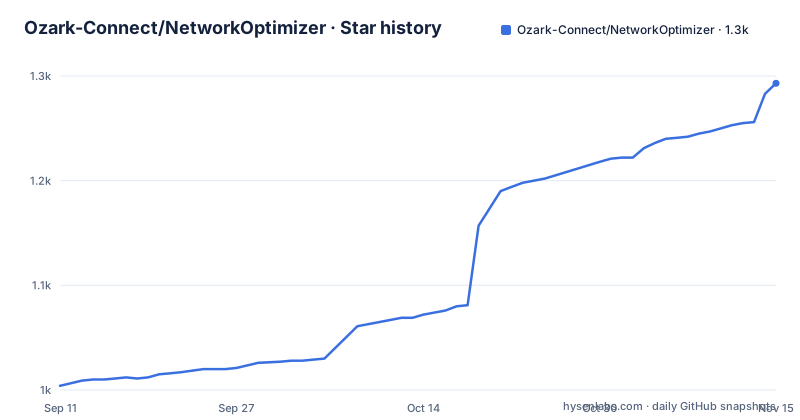
Star history
- Ozark-Connect/NetworkOptimizer1,293 ★ · +289
| Repository | 2026-09-11 | 2026-11-15 |
|---|---|---|
| Ozark-Connect/NetworkOptimizer | 1k | 1.3k |
289 Stars in the last 65 days, measured from the daily GitHub snapshot. Compare with other projects
Editorial analysis
An acknowledged issue leaves the list but stays in the score
The Wi-Fi health panel offers the same acknowledge affordance as Security Audit, and the description of it is where the grading model shows through. Acknowledging hides the issue from the list while it remains part of the score. A related rule applies to settings you chose on purpose: set a channel or a transmit power deliberately and it is noted rather than flagged. So the visible list and the grade are two different surfaces, and clearing the list by acknowledging entries does not move the number. That design choice is defensible for triage, since an acknowledged sticky client is still a sticky client. It does mean a score improvement has to be read against the underlying findings, not against an empty panel.
Activating a license key makes an outbound request to a vendor hostname
Personal, non-commercial use on up to three sites is free, with no key and nothing phoning home. Commercial use, or more than three sites, needs a license key entered under Settings, then a request to the author for the key itself. The part worth planning around is what activation does: it makes an outbound HTTPS request to `licensing.ozarkconnect.net`, so HTTPS on port 443 to that hostname has to be reachable if you run strict egress rules. The counterweight is stated too. Entitlements are cached and verified locally, so a licensing server outage never disables your sites. The free tier therefore has no outbound dependency and the keyed tier has one that is soft rather than hard. Separately, a LICENSE file sits at the repository root while the license field on the repository records nothing, so the terms in the tree and the terms in the metadata do not agree.
The hosted tier is sold in the same section that explains what the free tier omits
A fully hosted option is announced as coming soon, at 15 dollars a month for up to three sites with a 14 day free trial, and a commercial plan at 25 dollars a month per site adding management and consulting. What the hosted plan gives up is named in the same breath: the on-site agent runs on your gateway, so the only thing you lose is LAN speed testing. WAN speed testing is included, with data limits. That is an unusual inversion for a hosted product, where you normally lose the thing that needs a local agent, and it means the hosted tier is not a way to avoid running anything. It is a way to avoid running a server. The multi-site path in the free tier is a different design entirely, built around an agent that dials home.
AP Telemetry is code pushed to access points over SSH
Until this feature, everything the tool knew about wireless came through the UniFi Console, and the limits given are specific: client stats on the Console's own schedule, roams reported after the fact, and nothing at all about traffic that never left the LAN. AP Telemetry gets the data from the access points themselves, by pushing a small agent to each AP over SSH. Three properties are stated. It runs in memory. It comes back on its own after a reboot or a firmware update. And it is removed everywhere when you turn the feature off. It is opt-in, and it supports U6 and U7 access points, so nothing is described for older hardware. The visible effect is client performance: signal and rates update twice a second, the page follows a device through a roam instead of stalling until the Console catches up, and a Roam button moves the client to a chosen AP or band for walk testing.
Without the agent a site gets audits but no ISP Health or path analysis
There are two ways to bring a site online and they do not deliver the same feature set. A site already reachable over a site-to-site VPN can be onboarded with no agent at all, and still gets security audits, Wi-Fi and channel optimization, performance tweaks, Adaptive SQM, WAN steering and SNMP device health, straight over the VPN. What that floor leaves out is the monitoring and performance layer: ISP Health scoring, path discovery, latency and loss, and speed tests. The agent is what adds those. It is described as light enough in practice at around 50 MB to run directly on the site's UniFi gateway, so a site does not need a separate box. The claim to check before planning an estate around it is that no inbound access is needed to the site and nothing has to be port-forwarded, because the agent reaches the server over a single outbound HTTPS tunnel and works behind CGNAT.
The tunnel carries the site's SSH and SNMP, not just its measurements
The multi-site design routes more than telemetry through that one outbound HTTPS tunnel. The agent proxies the site's probing, SNMP, UniFi Console access and device SSH across it, with each site's data kept separate, and it delivers the full feature set rather than a summary. That is the part to weigh. The convenience that removes inbound exposure and port forwarding is bought by concentrating site-to-site SSH inside a tunnel to your own server, which means the server holds a path to every gateway's management plane. Access control is per site rather than global: a client can be granted Viewer access to one site only, or a field tech Operator on the three sites they manage. Whether that separation holds depends on the server configuration, and the page does not describe the authentication used between agent and server.
Channel width is worked out on the radio's real 320 MHz block, not the channel number
Channel Recommendation now takes width into account, and the rule is a measurement rather than a preference. Narrower when no client has used more than half the width in the past week, wider when clients could use it and the channel is quiet. The calculation is explicitly not done from the channel number, which the page says would only be a guess, but on the 320 MHz block the radio is actually sitting on. Pin a radio and the plan works around it. After a move the tool keeps measuring and the card shows interference before and after, so the recommendation is falsifiable rather than asserted. RF Environment draws on each AP's own neighbour and spectrum scans, which are described as seconds old rather than the Console's minutes. That freshness is what lets a raised noise floor be judged against the radio's own history instead of against a network-wide guess.
Firmware rollout holds every device until CPU and memory look unchanged
The rollout feature replaces one-device-at-a-time clicking with a policy. One device per model goes first, and the rest of that model wait until it is back on the new firmware with CPU, memory and health looking as they did before. Models can be held on Official while another is pushed to Early Access, or a device can be left out entirely. Autopilot runs the whole thing every time new firmware lands, with a notice before it starts and a way to stop it. The scheduling decision comes from your own traffic history, so the reboots are placed in the quietest window your network actually has rather than a fixed hour. That is the useful idea here: the gate is a comparison against the device's own prior state, not a fixed delay, which means a switch that comes back degraded holds up the model instead of silently failing.
Editorial conclusion
Network Optimizer is worth setting up if you run UniFi gear and want the configuration audit and the wireless scoring in one self-hosted place. Two numbers deserve scepticism before you act on them. The Health score counts issues you have already acknowledged, so a clean-looking list is not the same as a clean score, and read them separately. And the free tier is the one with no outbound traffic: activating a license key contacts licensing.ozarkconnect.net over HTTPS, which is a detail to settle before you wire this into a network with strict egress rules. AP Telemetry is SSH-pushed code running on your access points, opt-in and limited to U6 and U7 hardware. Releases move fast, with three tags in the last four days including a preview.
Frequently asked questions
Is Network Optimizer free to use?
Personal, non-commercial use on up to three sites is free with no key and nothing phoning home. Commercial use, or more than three sites, needs a license key. A hosted plan is announced as coming soon at 15 dollars a month for up to three sites.
Does activating a Network Optimizer license key require internet access?
Yes. Activation makes an outbound HTTPS request to `licensing.ozarkconnect.net`, so port 443 to that hostname must be reachable under strict egress rules. Entitlements are cached and verified locally, so an outage at the licensing server does not disable your sites.
What does the Network Optimizer on-site agent need to reach my sites?
No inbound access and no port forwarding. The agent dials the self-hosted server over a single outbound HTTPS tunnel, which works behind CGNAT, and proxies the site's probing, SNMP, UniFi Console and device SSH over it. At around 50 MB it can run directly on a UniFi gateway.
What is AP Telemetry and which hardware supports it?
A small agent pushed to each access point over SSH so wireless data comes from the AP rather than the UniFi Console. It runs in memory, returns after a reboot or firmware update, is removed when the feature is switched off, and supports U6 and U7 access points.
What can I do with a Network Optimizer site that has no agent?
If the site is already reachable over a VPN you can onboard it with no agent and still get security audits, Wi-Fi and channel optimization, performance tweaks, Adaptive SQM, WAN steering and SNMP device health. ISP Health, path discovery, latency and loss and speed tests need the agent.
Official sources
Add this badge to your README
If you maintain this project, the badge below links readers to this analysis and shows its maintenance status from the daily GitHub snapshot. Paste the markdown into your README; add ?metric=license or ?metric=stars to the image URL for a different field.

[](https://hysenlabs.com/projects/ozark-connect-networkoptimizer)Star history chart for your README
[](https://hysenlabs.com/projects/ozark-connect-networkoptimizer)Was this useful?