docusaurus-openapi-docs: turning an OpenAPI spec into a rendered API reference in Docusaurus
🦝 OpenAPI plugin for generating API reference docs in Docusaurus v3.
At a glance
- What is it?
- The docusaurus-plugin-openapi-docs package extends the Docusaurus CLI with commands that convert an OpenAPI specification into MDX pages, which the docs plugin then renders with a dedicated theme. It is MIT licensed, it supports Swagger 2.0 and OpenAPI 3.x, and it pins itself to a narrow band of Docusaurus versions.
- Who is it for?
- docusaurus-openapi-docs fits a team that already runs Docusaurus and wants its API reference generated from the specification rather than written by hand, and it fits anyone who wants one documentation site rather than a separate reference site. It does not fit a team that is not already on Docusaurus, and it does not fit a project that wants its reference docs decoupled from the docs site.
- Can I use it commercially?
- Yes. MIT is a permissive licence: you can use, modify and sell software built on it, as long as you keep its copyright and licence notices.
- Is it still maintained?
- Yes. The repository last received commits 2 days ago.
- What is it written in?
- Mainly TypeScript, according to GitHub's language statistics.
Answers come from the project's GitHub data, last synced on November 7, 2026, and from our analysis. They are not legal advice.
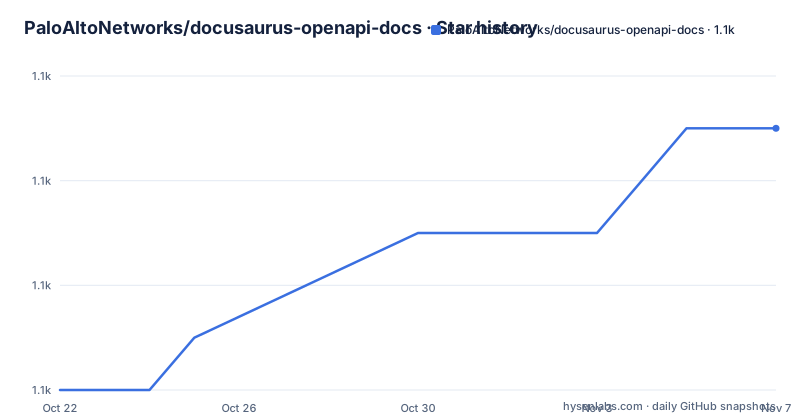
Star history
- PaloAltoNetworks/docusaurus-openapi-docs1,107 ★ · +5
| Repository | 2026-10-22 | 2026-11-07 |
|---|---|---|
| PaloAltoNetworks/docusaurus-openapi-docs | 1.1k | 1.1k |
5 Stars in the last 16 days, measured from the daily GitHub snapshot. Compare with other projects
Editorial analysis
Two packages, a generator and a theme
The project installs as two separate packages, and the split is the first thing to understand.
The generator is docusaurus-plugin-openapi-docs. The package extends the Docusaurus CLI with commands for generating MDX using the OpenAPI specification as the source. The resulting MDX is fully compatible with plugin-content-docs, so the standard docs machinery renders it.
The presentation layer is docusaurus-theme-openapi-docs, a separate package that supplies the components the generated pages use. The README's configuration example makes the division concrete, with a docItemComponent set to @theme/ApiItem derived from docusaurus-theme-openapi-docs, and the theme registered separately in the themes array of the Docusaurus config.
That arrangement is the design choice that makes the plugin usable. A Docusaurus site can already render Markdown and MDX through plugin-content-docs, so the plugin does not need to reimplement a documentation system. It produces pages in a format that system already understands, and the theme supplies the API specific presentation.
The consequence is that the reference documentation is not a separate site. It is a set of pages inside the documentation site, with a sidebar, a search index and a build pipeline it shares with the rest of the docs. Whether that is what you want depends entirely on whether you wanted one site or two.
A compatibility matrix that is unusually explicit for a plugin
Most plugins state a peer dependency range and leave it at that. This one publishes a table, and it is worth reading because it documents the plugin's own end-of-support policy.
| Docusaurus OpenAPI Docs | Docusaurus | | ----------------------- | --------------- | | 5.x.x (current) | `3.10.0+` | | 4.x.x (legacy) | `3.5.0 - 3.9.2` | | 3.0.x (end-of-support) | `3.0.1 - 3.4.0` | | 2.2.3 (end-of-support) | `2.4.1 - 2.4.3` | | 1.7.3 (end-of-support) | `2.0.1 - 2.2.0` |
So the current line of the plugin needs Docusaurus 3.10.0 or newer, the legacy 4.x line covers 3.5.0 through 3.9.2, and there are three older lines that are marked end-of-support. The plugin has been through five major versions and has kept a compatibility line for each, with the oldest ones explicitly retired.
That retirement policy is the interesting part. A plugin that keeps a line alive for a Docusaurus version it no longer tests against is a plugin whose bug fixes do not reach you. Reading the matrix tells you which line you are on and therefore which line of fixes you will receive.
The README also notes that the plugin and theme are currently designed to pair with a specific Docusaurus release, and that the Docusaurus badge in the README always reflects the current compatible versions. The badge is generated from the demo site's package.json, so the published documentation cannot drift from the published compatibility claim.
Bootstrapping a site, and the two CLI flags that matter
For a new site, the quick start is a single command that creates a Docusaurus v3 site with the classic theme and the plugin already wired in.
npx create-docusaurus-openapi-docs my-websiteThen you start it.
cd my-website
yarn start
If all goes well you should be greeted by a brand new Docusaurus site that includes API reference docs for the ubiquitous Petstore API. That last part is worth pausing on, because it means the scaffold ships with a working example, and the Petstore spec is the standard fixture everyone uses to test an OpenAPI toolchain. You can see the whole pipeline working before you point it at your own specification.
The bootstrap command takes two options.
| Option | Description | | --------------------------------- | ----------------------------------------------------- | | `-p, --package-manager <manager>` | Use a specific package manager (yarn, npm, pnpm, bun) | | `-s, --skip-install` | Skip automatic dependency installation |
The package manager option matters more than it looks, because the plugin is published to npm and the choice determines what the lockfile looks like and whether the install is reproducible. The skip-install option exists for the case where the tool is run in an environment that installs dependencies separately.
For an existing Docusaurus site, the two packages are added with your own package manager, and the README is explicit that the plugin and the theme are designed to pair with a specific Docusaurus release.
The configuration, and the spec to output directory mapping
The configuration example in the README is the best single piece of documentation the project has, because it shows the whole wiring in one file. The excerpt below is trimmed, the README notes that parts of the complete config were left out for brevity.
plugins: [
  [
    'docusaurus-plugin-openapi-docs',
    {
      id: "api",
      config: {
        petstore: {
          specPath: "examples/petstore.yaml",
          outputDir: "docs/petstore",
          maskCredentials: false,
        }
      }
    }
  ]
]
The structure is one entry per API, keyed by a name, here petstore. Each entry names a specPath, which is the OpenAPI file to read, and an outputDir, which is where the generated MDX lands. The specPath and outputDir pair is the whole contract between your specification and your site.
Two options inside deserve attention. maskCredentials is set to false in the example, with the comment that this disables credential masking in code snippets, which is a documentation decision rather than a security one, since these are sample values in generated example requests. And sidebarOptions with groupPathsBy set to tag means the generated sidebar groups the operations by their OpenAPI tag, which is the difference between a flat list of endpoints and something navigable.
The id and docsPluginId fields at the top level control how the plugin identifies itself and which docs plugin instance it writes into, and the README notes that you may optionally configure a dedicated @docusaurus/plugin-content-docs instance for use with the theme by setting docItemComponent to @theme/ApiItem.
Vendor extensions, and the option table that is cut off
The features list ends with extensibility, and it points at a section for details: recognizes common vendor extensions for customizing your docs.
That is a feature worth having in practice. An OpenAPI specification carries only so much, and the ways teams want to add their own notes to an endpoint, or change the grouping, or mark an operation differently, are conventionally expressed as vendor extensions, a key with an x- prefix that the specification ignores and tools can interpret. A generator that understands common ones means the specification stays the single source of truth and the customisation lives inside it.
The other three features on the list are equally practical. Compatible, works with Swagger 2.0 and OpenAPI 3.x, which matters because a lot of existing internal specifications are still Swagger 2.0. It supports single, multi and even micro OpenAPI specs, and the phrasing is telling, because a micro spec is one operation per file, which is what a large organisation ends up with when each team owns one endpoint. Extensible is the vendor extension point above.
One caveat about the documentation itself. The plugin configuration options table in the README is truncated in the visible material, cut off after the description of the id option, so the full option reference is not readable there. The configuration is documented on the project site rather than in the README, and the same applies to the supported vendor extensions list. That is a minor documentation gap rather than a design problem, but it does mean the README alone is not enough to configure the plugin properly, and the project homepage is at docusaurus-openapi.tryingpan.dev.
A monorepo with a canary channel, and how the packages are versioned together
The repository is a yarn workspace with lerna, and the packages/ directory holds the published packages alongside a demo/ workspace. The root package.json is marked private and names the workspaces as packages/* and demo.
The scripts show the shape of the development loop. The build runs build-packages and then build-demo, where build-packages is a lerna run across the non-private packages. There is a watch mode using nodemon that restarts the demo when the packages lib output changes, which is the usual trick for developing a Docusaurus plugin against a live site. There are separate gen-api and clean-api-docs scripts that run the demo's own doc generation for all specs and all versions.
What is unusual, and worth understanding, is the release channel structure. There are canary and canaryBeta scripts alongside the normal release path, and they build their version numbers from the git history. The canary version is computed as 0.0.0- followed by the commit count and the short commit hash, and the canaryBeta version as 0.0.0-beta. followed by the same. Both then bump the lerna version and publish with the canary dist-tag and no verify access.
So every commit to the main branch produces a uniquely versioned canary build, which is a common pattern for a package where the main branch is a moving target and the numbered releases are what most people should use. The npm badges in the README reflect this, with separate badges for the latest package and the canary package.
The test story is a mix. The unit tests run jest with NODE_OPTIONS set to experimental-vm-modules, and the end to end tests run Cypress, with cypress run and cypress open scripts, and a start-server-and-test invocation that starts the demo and waits for it to serve on port 3000 before running the browser tests against it. The demo/ directory holds the actual Docusaurus site, with its own docusaurus.config.ts, sidebars.ts, customMdGenerators.ts and a templates/ directory, and the custom generator file is the hook for overriding how individual pieces of MDX are produced.
Editorial conclusion
docusaurus-openapi-docs fits a team that already runs Docusaurus and wants its API reference generated from the specification rather than written by hand, and it fits anyone who wants one documentation site rather than a separate reference site. It does not fit a team that is not already on Docusaurus, and it does not fit a project that wants its reference docs decoupled from the docs site. Check three things before you commit. Check your Docusaurus version against the compatibility matrix, because the current line requires 3.10.0 or newer while the legacy 4.x line covers 3.5.0 to 3.9.2 and everything below is end of support, and the plugin and theme are designed to pair with a specific Docusaurus release. Check that you accept the MDX as the intermediate form, because the generated output is MDX consumed by the standard docs plugin, so the reference lives inside the same site and inherits its build. And check how you will handle multiple specifications, because the plugin supports single, multi and micro specs, each with its own id and output directory. The last push was on 2026-10-14, the newest release listed is v5.2.0 from 2026-08-11, and the license is MIT.
Frequently asked questions
What does docusaurus-plugin-openapi-docs do?
It extends the Docusaurus CLI with commands for generating MDX using the OpenAPI specification as the source. The resulting MDX is fully compatible with plugin-content-docs, and it can be rendered as API reference documentation when combined with the docusaurus-theme-openapi-docs theme.
Which Docusaurus versions does docusaurus-openapi-docs support?
The current 5.x.x line requires Docusaurus 3.10.0 or newer, the legacy 4.x.x line covers 3.5.0 to 3.9.2, and the 3.0.x, 2.2.3 and 1.7.3 lines are marked end-of-support, covering 3.0.1 to 3.4.0, 2.4.1 to 2.4.3 and 2.0.1 to 2.2.0 respectively.
How do I create a new Docusaurus site with OpenAPI docs?
Run npx create-docusaurus-openapi-docs my-website, then cd my-website and run yarn start. The generated site includes API reference docs for the Petstore API as a working example. The command accepts -p or --package-manager for yarn, npm, pnpm or bun, and -s or --skip-install.
How do I add the plugin and theme to an existing Docusaurus site?
Install docusaurus-plugin-openapi-docs and docusaurus-theme-openapi-docs, then configure the plugin in docusaurus.config.ts with an id, a docsPluginId, and one config entry per API giving its specPath, outputDir and sidebarOptions, and register the theme in the themes array.
Does docusaurus-openapi-docs work with Swagger 2.0?
Yes, the compatibility feature states that it works with Swagger 2.0 and OpenAPI 3.x, and it supports single, multi and micro OpenAPI specs, recognises common vendor extensions for customising the docs, and renders with the Infima styling framework that powers the Docusaurus UI.
What license is docusaurus-openapi-docs released under?
MIT, with a LICENSE file at the root of the repository. The newest listed release is v5.2.0 from 2026-08-11, and the last push was on 2026-10-14.
Official sources
Add this badge to your README
If you maintain this project, the badge below links readers to this analysis and shows its maintenance status from the daily GitHub snapshot. Paste the markdown into your README; add ?metric=license or ?metric=stars to the image URL for a different field.

[](https://hysenlabs.com/projects/paloaltonetworks-docusaurus-openapi-docs)Star history chart for your README
[](https://hysenlabs.com/projects/paloaltonetworks-docusaurus-openapi-docs)Was this useful?