Papra: one container, three ways to get documents in
The minimalistic document archiving platform.
At a glance
- What is it?
- Papra is a minimalistic document management and archiving platform that runs as a single Docker container on port 1221. It takes documents in by email, by folder, and by text extraction from scans, then keeps tags, custom properties, sharing links, a CLI and an API on top of them.
- Who is it for?
- Papra fits a household or small team that wants one archive for receipts, warranties and scanned papers, and that is willing to run a container and supply its own secret. It does not fit a workflow that needs collection links for outside contributors today.
- Can I use it commercially?
- Yes, with strict conditions. AGPL-3.0 is a network copyleft licence: if people use a modified version over a network, for example as a hosted service, you must offer them its source code under the same licence.
- Is it still maintained?
- Yes. The repository last received commits 3 days ago.
- What is it written in?
- Mainly TypeScript, according to GitHub's language statistics.
Answers come from the project's GitHub data, last synced on November 13, 2026, and from our analysis. They are not legal advice.
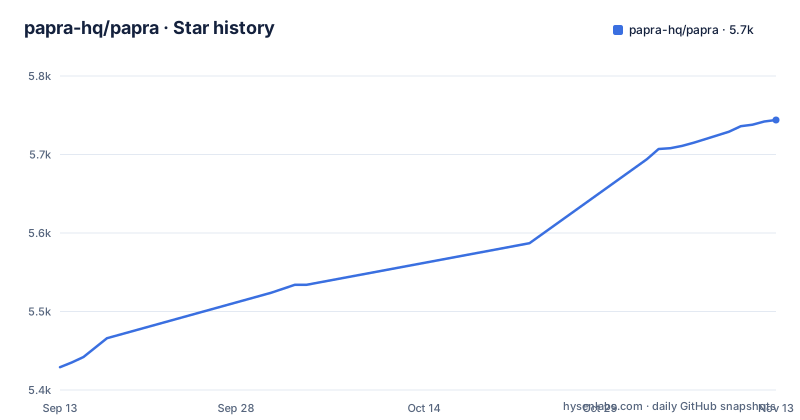
Star history
- papra-hq/papra5,744 ★ · +315
| Repository | 2026-09-13 | 2026-11-13 |
|---|---|---|
| papra-hq/papra | 5.4k | 5.7k |
315 Stars in the last 61 days, measured from the daily GitHub snapshot. Compare with other projects
Editorial analysis
One container, port 1221, and a throwaway AUTH_SECRET
A single command puts a working instance on port 1221, and the only mandatory input is an authentication secret:
docker run -d --name papra -p 1221:1221 -e AUTH_SECRET=a-dummy-secret-for-testing-purposes-only ghcr.io/papra-hq/papra:latestThe value in that command is explicitly a placeholder for kicking the tires. For a real instance the README says to generate your own, and 48 random bytes in hex is the size it suggests:
openssl rand -hex 48Two details matter to a self-hoster. The `-p 1221:1221` mapping publishes the server on the host, and `-e` hands the secret to the container instead of writing a config file, so your credentials live in the container's environment rather than in a mounted file. The command uses the `latest` image tag. Everything past this command lives on the self-hosting documentation page; the README documents no other flag, volume or environment variable.
The demo instance runs with no backend at all
The public demo is worth knowing about before you judge the interface, because of what it leaves out. It has no backend and uses client-side local storage only, so nothing uploaded there leaves the browser and nothing survives a different device.
That makes it a reasonable place to click through tags, organizations, document sharing, the dark theme and the responsive layout. It is a poor place to judge full-text search, email ingestion, content extraction, or anything that needs two accounts, because those paths only exist once the server component is running, which is what the container image provides.
Underneath that demo the feature list is longer than most archiving tools manage: full-text search with advanced filters, i18n, per-organization custom properties, sharing with optional expiration dates and password protection, plus a CLI, an API, an SDK and webhooks. Whether each item is finished is a separate question, and the feature list itself answers it in two different ways.
Email, folder, and scan ingestion feed one archive
Three ingestion routes exist, and each matches a different habit of keeping paperwork.
Email ingestion gives you a generated address. You send or forward a message there and the attachment becomes a document, which is the shortest path for the receipt and the warranty that arrive by mail. Folder ingestion imports from a directory you already keep, so the output folder of a scanner can be the source. Content extraction pulls text out of images and scanned documents, and that extracted text is what full-text search can match against. That is the difference between owning a searchable archive and owning a pile of files with names.
Tagging rules close the loop. You write rules once, and documents get tagged as they arrive rather than after you remember to do it. Anyone sizing hardware for a large scan backlog should check the docs for the extraction engine before buying anything.
Organizations own the custom properties, not the documents
Organizations are the unit of ownership, and the README frames them socially rather than technically: you create one to manage documents with family, friends or colleagues. Custom properties are defined per organization, so the extra fields you record about a document, a serial number, an insurer, a renewal date, belong to that organization instead of to your user account.
Authentication is handled by Better Auth, and user accounts are part of the feature set rather than an add-on. Sharing sits outside membership: a document can go to an external user, with an expiration date and password protection set on the link. For receipts and warranties that is the part that matters, since the person who needs the document is often not the person who filed it.
The cost is that this structure is something you adopt on day one.
CadenceMQ is the job queue behind every import
The backend is a Hono application with Drizzle as the ORM and Better Auth for authentication, arranged as a pnpm workspace monorepo: the client sits in apps/papra-client, the server in apps/papra-server, and shared code under packages.
The piece that matters to a self-hoster is CadenceMQ, a job queue the project wrote itself and describes as self-hosted-friendly. Queueing is what email ingestion, folder ingestion and text extraction all need, since none of those belongs inside an HTTP request. Running your own queue rather than pointing at a hosted one is what keeps extraction jobs running inside your instance.
Tooling around it is small and current. The root package.json pins oxlint and oxfmt for lint and format, vitest for tests, changesets for versioning, and declares [email protected] as the package manager. A renovate.json sits at the repository root, so dependency updates are handled by configuration rather than by hand.
Three packages shipped within seconds of each other
On 2026-10-22 three packages were published within seconds of each other, and the version numbers say more about the project than the feature list does.
@papra/app reached 26.7.1, @papra/api-sdk reached 1.4.0 and @papra/cli reached 0.2.6.
The repository's last push was on 2026-10-31, while the monorepo root package.json is still at 0.3.0, a number that belongs to the workspace root rather than to any shipped application.
The CLI and SDK have no documented entry point
A CLI, an API, an SDK and webhooks are all listed as features, and the README links a self-hosting documentation site. Neither the CLI nor the SDK has an install command in the README's self-hosting section. The only command given is the container run, although the release list shows the CLI and SDK published as separate packages, @papra/cli and @papra/api-sdk.
That gap matters more than it first appears. A document archive earns its keep inside a workflow only if something can push into it without a browser, and the API with webhooks is the intended route. The shape of that interface, the endpoints, the authentication scheme, the pagination rules, is not in the README at all. The server package.json referenced in the acknowledgements is where the dependency list lives, and it is not reproduced there either.
Dark mode, the responsive layout and i18n are shipped frontend concerns, and none of them costs a self-hoster anything.
Coming soon, and coming maybe one day
The feature list separates what is nearly here from what is aspirational, and does it in the open rather than in an issue tracker.
Document requests are marked as coming soon. That is the gap a team feels first, because generating an upload link for somebody who will not log in is how you collect a document from outside your organization. Until it lands, that person has to reach the app themselves.
Four more items are marked as coming maybe one day: a desktop app, a browser extension, a mobile app, and AI-assisted management and tagging. Read that wording as intent rather than schedule. One further limit is worth stating plainly: the public demo runs with no backend at all, so it is not a place to measure this tool.
Editorial conclusion
Papra fits a household or small team that wants one archive for receipts, warranties and scanned papers, and that is willing to run a container and supply its own secret. It does not fit a workflow that needs collection links for outside contributors today. Before deploying, check three things: that port 1221 is reachable the way you need it, which OCR backend the docs name for content extraction, and whether the API shape matches whatever will push documents in without a browser.
Frequently asked questions
What is Papra?
Papra describes itself as a minimalistic document management and archiving platform, a long-term home for receipts, warranties and other papers. It adds organizations, tags, full-text search, sharing with expiration dates, and self-hosting through Docker.
How do I install Papra?
Run the published image and map port 1221 to the host, passing an AUTH_SECRET. The README's placeholder value is for testing only and suggests generating a real one with `openssl rand -hex 48`. Further configuration options are on the self-hosting documentation page.
Papra or Paperless ngx?
Papra's README documents email ingestion, folder ingestion, content extraction, tagging rules, a CLI, an API with SDK and webhooks, per-organization custom properties, and sharing with expiration dates and passwords.
What is an alternative to Papra?
The README's introduction and feature list name none. It does point to a managed instance, though that link is commented out in the current README, and to a roadmap board on the project page for what is planned.
Official sources
Add this badge to your README
If you maintain this project, the badge below links readers to this analysis and shows its maintenance status from the daily GitHub snapshot. Paste the markdown into your README; add ?metric=license or ?metric=stars to the image URL for a different field.

[](https://hysenlabs.com/projects/papra-hq-papra)Star history chart for your README
[](https://hysenlabs.com/projects/papra-hq-papra)Was this useful?