PardCode's C++ 3D tutorial: building a DX3D engine in DirectX 11
C++ 3D Game Tutorial Series (DirectX) - Learn to code a DirectX 3D Game in C++ from scratch
At a glance
- What is it?
- The C++ 3D Game Tutorial Series is a video course and a source tree at once, and the source tree is the interesting part, because it ships a small 3D engine called DX3D with a DirectX 11 renderer, a Win32 window, an input system and an entity component system, plus a game sample built on top. The project is MIT based with two conditions attached, and the default branch is early-access while the completed code lives on master.
- Who is it for?
- Adopt this project if you are learning 3D rendering in C++ and you want to see a window, a renderer, an input layer and an entity system assembled in one place rather than abstracted away behind an engine's API. Do not adopt it if you need to ship a game quickly on a platform other than Windows, since the prerequisites are Visual Studio 2022 and Windows 10 or later and the stack is DirectX 11.
- Can I use it commercially?
- Check first. The repository uses a licence we do not classify automatically, so read its LICENSE file before any commercial use.
- Is it still maintained?
- Yes. The repository last received commits 33 days ago.
- What is it written in?
- Mainly C++, according to GitHub's language statistics.
Answers come from the project's GitHub data, last synced on November 7, 2026, and from our analysis. They are not legal advice.
Star history
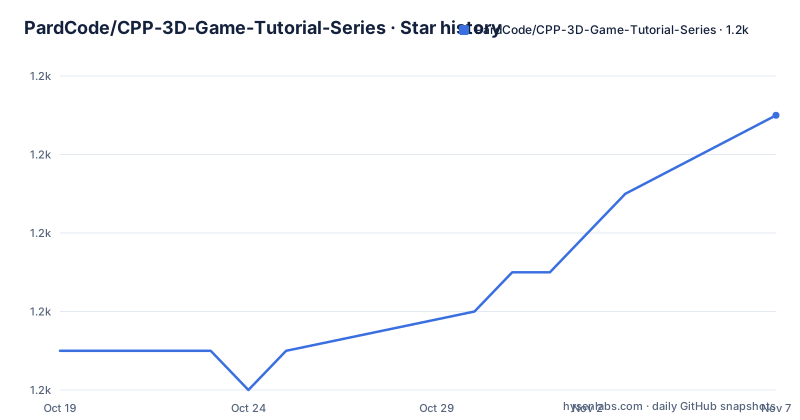
- PardCode/CPP-3D-Game-Tutorial-Series1,161 ★ · +6
| Repository | 2026-10-19 | 2026-11-07 |
|---|---|---|
| PardCode/CPP-3D-Game-Tutorial-Series | 1.2k | 1.2k |
6 Stars in the last 19 days, measured from the daily GitHub snapshot. Compare with other projects
Editorial analysis
A course whose real deliverable is the engine
The repository description is plain: a C++ 3D game tutorial series in DirectX, to learn to code a DirectX 3D game in C++ from scratch.
The README is more specific about the shape of the thing. The series is designed for developers of all levels, from novice to expert, taking their first steps into game development from scratch using C++. It teaches how to create a 3D game sample, starting with creating a window using the Win32 API and progressing to building a game engine that enables the development of a functional 3D game.
That progression is the design. Most game programming resources start at the top, with an engine that has already solved the hard parts for you, and the learner assembles gameplay on top. This one starts at the bottom with a window and ends with an engine, and the stated aim is to give developers the foundational knowledge needed to have full control over game development, from low level systems such as the graphics engine, the input manager and the entity system, all the way to high level concepts such as entities.
The source code is organised to match. The DX3D folder contains both the public API and the source code of the DX3D engine that will be implemented and used to create the game sample, and the Game folder contains the source code of the game sample itself. The master branch contains the source code of the entire project as developed through the series.
The licence in the repository metadata is recorded as a custom one that GitHub cannot classify, and the README explains why in the licence section, which we will come to.
Four subsystems inside DX3D
The engine is described as composed by four sub-systems, and the list is the curriculum.
The DirectX 11 3D Graphics Engine is the first, and it is where the rendering work lives. The Win32 Windowing System is the second, and it is what the series starts with, since a window is the thing you can get on screen in a day and it gives every later subsystem a place to draw. The Input System is the third, which turns keyboard and mouse events into something the game layer can consume. The Entity-Component System is the fourth, and it is where the object model of the game lives.
That last one is the interesting choice for a tutorial, because an entity component system is a design pattern rather than a necessity, and a course that teaches it is making a statement about how you should structure a game rather than just how to draw one. Combined with the low level start, the series is not only about graphics. It is about building the whole stack so you know what is underneath.
The project is written in C++ 20, according to the badge in the README, and the topic tags list cpp11 alongside d3d11, direct3d, direct3d11, directx, directx-11, directx-3d, directx11, 3d, 3d-graphics, 3d-graphics-engine, game, game-development, game-engine, gamedev, graphics, graphics-engine and graphics-programming, which is an unusually complete index of what a reader is signing up for.
The Game folder is where the payoff sits, because it is the sample built with the engine the series just taught you to construct.
Tags per tutorial, and two branches that mean different things
The repository has a structure that is worth reading carefully, because the default branch is not the finished project.
The default branch is early-access. The README, however, describes the master branch as the one that contains the source code of the entire project developed in the tutorial series. So the branch you land on by default is the working branch, and the branch you want if you are reading the finished code is master. That distinction is easy to miss and it changes what you see when you open the repository.
The mechanism for stepping through the course is the tags list, which is linked from the README. It is possible to access the source code of each tutorial by checking out the corresponding tag, which means the repository doubles as a set of snapshots, one per episode. For a course that builds a system incrementally, that is a genuinely useful arrangement, because a reader who falls behind can diff their tree against the state at any lesson.
There is also a branch called AssetsAndLibs, which the README describes as related to the previous version of the C++ 3D Game Tutorial Series. So the tree carries two generations of the material, and the older one lives in its own branch rather than in the history, which is a sensible way to keep the current series readable.
The repository root also holds DirectXGame.sln and DirectXGame.vcxproj along with the .vcxproj.user file, a THIRD_PARTY_LICENSES.md, a shadertoolsconfig.json, and the .media/ directory that holds the banner used in the README.
Building the sample on Windows
The quick guide is short, and short is the point for a project whose build system is an IDE.
The prerequisites are Visual Studio 2022 and Windows 10 or later. Then you open the DirectXGame.sln project, which is available under the project root folder, and in Visual Studio you press the Local Windows Debugger button available in the toolbar.
There are no build scripts, no package manager and no command line in the instructions, because there is nothing to run. The engine is a set of C++ sources and a Visual Studio solution, and the sample is built the same way any other Visual Studio project is built. The consequence is that this is a Windows only project in a very literal sense, since the renderer is DirectX 11 and the windowing is Win32. That is stated plainly in the prerequisites rather than discovered later.
The THIRD_PARTY_LICENSES.md file at the root and the shadertoolsconfig.json point at the parts of the project that pull in outside code, since a DirectX 11 sample of this size normally uses an external shader compilation tool and some third party libraries whose terms are tracked separately from the project's own modified MIT licence.
For a reader, the practical workflow is therefore: install Visual Studio 2022, clone, open the solution, press the debugger button, and then work through the tags in order as the course progresses. There is no build system to fight, and equally no way to build it on Linux.
The modified MIT licence and its two conditions
The licence is the part to read carefully, because the README states that it is based on the modified MIT License and then lists conditions that plain MIT does not have.
The preamble is friendly. The project is offered under the free and permissive MIT licence, and the code is free to use, modify and distribute. But there are two conditions you must follow.
The first is that you must include the license text in your product, for example in the About window of a GUI application or in the About and Credits section of a 2D or 3D video game. The second is that you must include the license text in all source code files, copy and paste the license text at the top of each source file you obtain from the repository, even if you have made partial modifications.
That second condition is the one with teeth, and it is unusual. Requiring attribution in a product is common, and a modified MIT licence with an attribution clause is a known pattern, but the obligation to paste the licence header into every source file you received, including partially modified ones, is a requirement on the distributed source rather than a courtesy.
If you wish to modify and redistribute the source code files, you may optionally add your own copyright notice alongside the licence text, and the README gives the exact form:
...
C++ 3D Game Tutorial Series (https://github.com/PardCode/CPP-3D-Game-Tutorial-Series)
<project name>, <website link or nothing>

Copyright (c) 2019-2026, PardCode
Copyright (c) <your years>, <your name>
...
The licence text itself is in the LICENSE file. For a tutorial repository this is a reasonable arrangement, since the author is asking for attribution in exchange for the course being free. The support section puts the same point in different words, saying that the project requires financial support to continue its development, with a Patreon link, and that every contribution makes a difference no matter the amount.
The playlist and the Discord are part of the course
The repository is one half of a learning product, and the other half is the video.
The homepage recorded in the repository metadata is a YouTube playlist, and the README links a second time to the same playlist for the tutorial list, and also to the repository's Tags page under a Code badge. So the intended loop is: watch an episode, then compare your tree against the tag for that episode.
The Discord server is described as the go-to place for news about the tutorial series, discussions on the latest developments and any questions about the series, and it is where the link to the Patreon page and the channel badge point as well. A support forum is not mentioned, and that is consistent with a project run by one person where the community channel is the only place to ask.
The repository also carries a .github/ directory, which is where the community contribution files live, and a CONTRIBUTING.md in the top level entries.
The last push was on 2026-10-05 and the repository is not archived, so the series is still being worked on. There are no GitHub releases, which is consistent with a project whose distribution is the tags and the playlist rather than a packaged artefact.
Editorial conclusion
Adopt this project if you are learning 3D rendering in C++ and you want to see a window, a renderer, an input layer and an entity system assembled in one place rather than abstracted away behind an engine's API. Do not adopt it if you need to ship a game quickly on a platform other than Windows, since the prerequisites are Visual Studio 2022 and Windows 10 or later and the stack is DirectX 11. Verify first which branch you are actually reading, because the default is early-access while the finished project is on master, and read the modified MIT licence in full before you copy the code, because it carries two conditions that plain MIT does not.
Frequently asked questions
What does the PardCode C++ 3D Game Tutorial Series contain?
A DX3D engine made up of a DirectX 11 3D graphics engine, a Win32 windowing system, an input system and an entity component system, plus a game sample in the Game folder that is built on the engine. The DX3D folder holds both the public API and the engine source.
How do I build the 3D game sample?
You need Visual Studio 2022 and Windows 10 or later. Open DirectXGame.sln from the project root in Visual Studio and press the Local Windows Debugger button in the toolbar.
Which branch contains the finished tutorial code?
The README says the master branch contains the source code of the entire project developed in the tutorial series, while the repository's default branch is early-access. The source code of each individual tutorial is reachable through the Tags list, and a branch named AssetsAndLibs holds material related to the previous version of the series.
What are the conditions of the licence for this project?
The licence is based on a modified MIT licence. You are free to use, modify and distribute the code, but you must include the licence text in your product, such as an About window or a Credits section, and you must include the licence text at the top of every source code file you obtain, even if you have partially modified it. The full text is in the LICENSE file.
Official sources
Add this badge to your README
If you maintain this project, the badge below links readers to this analysis and shows its maintenance status from the daily GitHub snapshot. Paste the markdown into your README; add ?metric=license or ?metric=stars to the image URL for a different field.

[](https://hysenlabs.com/projects/pardcode-cpp-3d-game-tutorial-series)Star history chart for your README
[](https://hysenlabs.com/projects/pardcode-cpp-3d-game-tutorial-series)Was this useful?