paroj/gltut: A C++ Tutorial Progression for Modern OpenGL
Learning Modern 3D Graphics Programming
At a glance
- What is it?
- paroj/gltut is a documentation-led OpenGL rendering tutorial whose C++ examples progress from a hello triangle through objects, motion, lighting, impostors, and textures. It suits learners who want the rendered result connected to the accompanying written material, but the repository does not document runtime requirements, supported OpenGL versions, or how to launch individual examples.
- Who is it for?
- Adopt paroj/gltut if you want a structured C++ learning path that ties OpenGL sample code to a separate tutorial narrative. Do not treat it as a turnkey engine or framework, because the repository describes examples rather than an application platform.
- Can I use it commercially?
- Yes. MIT is a permissive licence: you can use, modify and sell software built on it, as long as you keep its copyright and licence notices.
- Is it still maintained?
- Yes. The repository last received commits 63 days ago.
- What is it written in?
- Mainly C++, according to GitHub's language statistics.
Answers come from the project's GitHub data, last synced on November 7, 2026, and from our analysis. They are not legal advice.
Star history
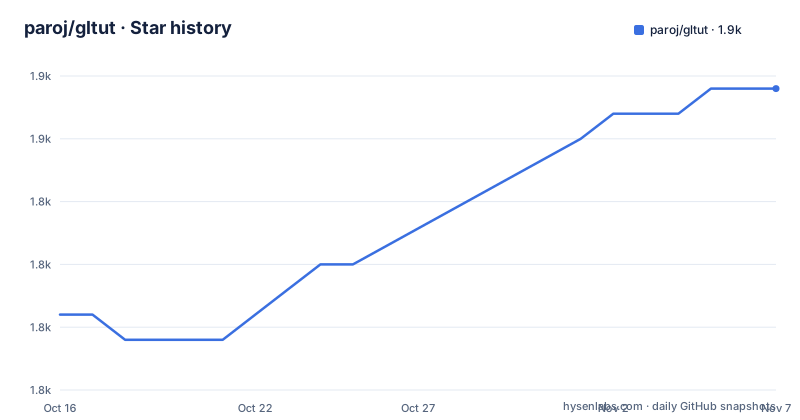
- paroj/gltut1,852 ★ · +9
| Repository | 2026-10-16 | 2026-11-07 |
|---|---|---|
| paroj/gltut | 1.8k | 1.9k |
9 Stars in the last 22 days, measured from the daily GitHub snapshot. Compare with other projects
Editorial analysis
Why paroj/gltut teaches with coordinated source and prose
paroj/gltut addresses learners who need to understand graphical rendering as a sequence of concrete programs rather than as an isolated API example. The repository is organized as a series of OpenGL tutorials, with each lesson located in a numbered `Tut*` directory. Its subject starts with `Tut 01 Hello Triangle` and then moves through colors, a moving triangle, static and depth-sorted objects, motion, orientation, lights, shininess, dynamic range, impostors, and several stages of texture handling.
The central design choice is that source code is not presented as sufficient by itself. The README states that the code alone does not provide enough information to understand what is happening. The written documentation is therefore part of the learning material, not optional commentary added after the examples. Readers who only inspect the C++ files would miss the explanation the project intends them to read alongside those files.
The target audience is best described as C++ programmers learning current OpenGL graphical rendering. The repository includes shared directories such as `framework/`, `glsdk/`, `Meshes/`, and `data/`, which suggests that the tutorial programs depend on project-local code and assets. However, the README does not define a reusable public library API or describe gltut as an engine. The repository is a course arranged as source, documentation, and supporting material.
There is also a Java alternative. The README points readers who prefer Java to Giuseppe Barbieri's `modern-jogl-examples` port. That distinction matters because the native repository is written primarily in C++, while the linked port is a separate project. It is not necessary for C++ learners, but it confirms that the tutorial concept can be implemented through a different binding or language stack.
How the numbered Tut directories build an OpenGL learning path
The repository layout reveals a progressive lesson structure. Early tutorials use names such as `Tut 01 Hello Triangle`, `Tut 02 Playing with Colors`, and `Tut 03 OpenGLs Moving Triangle`. Later directories move toward spatial and rendering concerns, including `Tut 05 Objects in Depth`, `Tut 06 Objects in Motion`, `Tut 08 Getting Oriented`, `Tut 09 Lights on`, `Tut 12 Dynamic Range`, and `Tut 13 Impostors`.
Texture instruction occupies the largest visible portion of the sequence. `Tut 14 Textures Are Not Pictures` is followed by `Tut 15 Many Images`, `Tut 16 Gamma and Textures`, and `Tut 17 Spotlight on Textures`. `Tut 18 Bumpy Textures` then changes the stated subject again. The directory names support a broad conclusion about the course: it treats textures as a multi-stage rendering problem rather than a single texture-loading example.
Based on the repository layout, CMake coordinates the tutorial build rather than presenting each directory as an independent command-line program. The root also contains a `CMakeLists.txt`, while reusable support appears to live under `framework/`, `glsdk/`, `Meshes/`, and `data/`. The README does not explain the rendering architecture, shader loading process, asset path logic, or class boundaries. Those details would need to come from the HTML documentation or individual source files.
This arrangement favors progressive reading. A learner starting with lighting without first locating the preceding orientation and object tutorials may encounter unexplained code. It also means that the repository is larger than a single copy-and-run sample. Each stage should be treated as part of a curriculum, with its related documentation used to establish the concepts and expected visual result.
Building the C++ tutorials with CMake on Linux
The README provides a short Linux-oriented build sequence beginning with CMake installation. These are the only documented commands for building the tutorials, so they should be reproduced as written. The command uses `apt-get`, which normally requires administrative privileges and a Debian-family package environment.
The following command installs the build tool named by the repository:
apt-get install cmakeAfter that, create the build directory and enter it. Keeping generated build files outside the source tree also gives CMake a separate directory for its configuration and outputs.
mkdir build && cd buildConfigure the project using the parent directory as the source root:
cmake ..The final documented step builds the configured targets with the `Release` configuration:
cmake --build . --config ReleaseThe README does not give executable names, working-directory requirements, display-server settings, GPU expectations, or a command for launching a specific tutorial. It also does not document Linux distribution versions beyond using `apt-get`. As a result, the build sequence is verifiable, but what the reader should see on screen is not. The HTML tutorial documentation is the appropriate place to identify the expected output for each lesson.
For a first real use, start with `Tut 01 Hello Triangle`, build the repository, and read that tutorial's documentation before inspecting the generated build output. Do not substitute a guessed binary name. If configuration fails, CMake will report the missing source, compiler, or dependency, but the README provides no separate dependency troubleshooting procedure.
Reading the HTML and PDF documentation for each lesson
gltut places unusually heavy emphasis on documentation. The HTML version is published at `https://paroj.github.io/gltut/`, while the source repository includes a `Documents/` directory and scripts for rebuilding the HTML and PDF forms. This makes the written tutorial part of the deliverable rather than merely a description in the README.
Rebuilding the HTML documentation requires Lua-related filesystem support, an XSLT processor, and DocBook stylesheets. The documented package command is:
apt-get install lua-filesystem xsltproc docbook-xslAfter installing those packages, run the repository script from a location where its relative paths resolve correctly:
lua CopyWebsite.luaThe PDF path is more involved. The README says to install the HTML prerequisites and then adds packages for `fop` and related Java libraries. It also requires editing `/usr/bin/fop` by adding a `find_jars` line before running `BuildComputerFO.lua` from `Documents/Build`. Because the README describes modification of a system executable file, the documentation-generation workflow should be isolated from the normal tutorial build and reviewed carefully.
The known documentation issue concerns some `fop` versions producing `java.lang.NoClassDefFoundError: org/w3c/dom/events/CustomEvent`. The README states that installing version `2.6` from the Apache FOP download page fixes it. This is a known tooling failure, not an OpenGL rendering failure. It affects teams that intend to rebuild the documentation rather than only read the published HTML.
The C++ repository and Java port serve different preferences
The closest documented alternative is Giuseppe Barbieri's `modern-jogl-examples`, linked by the README specifically for readers who prefer Java. The difference is not merely a change in file extension. gltut organizes native C++ tutorials in numbered `Tut*` directories and includes its own documentation build scripts. The alternative is a separate Java port, so its source layout, build requirements, and lesson correspondence cannot be assumed from gltut's documentation.
For a C++ learner, staying with gltut keeps the examples in the language used by the repository and preserves the documented progression from the hello triangle through textures and bump mapping. For a Java learner, the port offers a separate Java implementation. The README does not claim that the port is maintained in lockstep with gltut, nor does it provide a mapping between individual directories, so version parity should not be assumed.
This distinction also affects project selection. gltut is appropriate when the goal is to study its specific sequence of rendering examples and read its associated documentation. It is less appropriate when the requirement is only to load one texture, draw one mesh, or embed OpenGL behind a small abstraction. Those narrower needs require a focused library or application framework, neither of which is documented here.
Maintenance, licensing, and the cost of following older tutorials
The repository is not archived, and its last push was on 2026-09-05. That indicates recent repository activity, although the listed releases are much older: `v0.4.0` was released on 2022-03-16 and `v0.3.9` on 2015-12-29. The availability of newer repository commits does not by itself establish that every tutorial has been revised for current graphics APIs, drivers, or build environments.
The repository metadata identifies the project under the MIT license. The README directs readers to `License.txt` for licensing information about the tutorial materials, while the top-level entries also include `LICENSE` and `CC BY 3.0 legalcode.txt`. This mixed licensing layout means adopters should inspect those files for the materials they copy or redistribute. The repository's identification as MIT should not be treated as a blanket resolution for every document, mesh, or third-party asset without checking the relevant file.
Upgrade cost is mainly instructional rather than package-driven. There is no dependency lockfile or declared support matrix in the README. Source changes, CMake configuration, and tutorial corrections can therefore create differences from the explanation a learner remembers from an earlier checkout. Before building an entire course from one checkout, readers should verify the exact tutorial revision and check whether its expected source still matches the documentation.
The documentation toolchain carries an additional maintenance concern. The reported `fop` compatibility error and required system-level edit affect anyone rebuilding PDFs. Reading the published HTML avoids that particular build path, though it does not resolve the absence of stated OpenGL and operating-system support requirements.
Editorial conclusion
Adopt paroj/gltut if you want a structured C++ learning path that ties OpenGL sample code to a separate tutorial narrative. Do not treat it as a turnkey engine or framework, because the repository describes examples rather than an application platform. Before selecting a specific tutorial, first verify that its dependencies, target OpenGL version, windowing requirements, and expected output are documented in the corresponding tutorial materials.
Frequently asked questions
How do I build the paroj/gltut C++ tutorials?
The README documents installing `cmake`, creating a `build` directory, running `cmake ..`, and building with `cmake --build . --config Release`. It does not provide commands for launching the resulting tutorial executables.
Does paroj/gltut include a Java alternative?
Yes. The README links to Giuseppe Barbieri's `modern-jogl-examples` for readers who prefer Java.
Which paroj/gltut tutorial covers bump mapping?
The repository includes `Tut 18 Bumpy Textures`. Earlier texture lessons cover images, gamma, and spotlight effects on textures.
Official sources
Add this badge to your README
If you maintain this project, the badge below links readers to this analysis and shows its maintenance status from the daily GitHub snapshot. Paste the markdown into your README; add ?metric=license or ?metric=stars to the image URL for a different field.

[](https://hysenlabs.com/projects/paroj-gltut)Star history chart for your README
[](https://hysenlabs.com/projects/paroj-gltut)Was this useful?