SMAPI: seven stated purposes, numbered one to eight
The modding API for Stardew Valley.
At a glance
- What is it?
- SMAPI is the C# modding framework for Stardew Valley, installed beside the game executable without touching game files. Its README announces seven purposes and then numbers them 1, 2, 3, 5, 6, 7 and 8, which is the least of what the page leaves unexplained about how much the loader actually does on a player's behalf.
- Who is it for?
- SMAPI is the layer you cannot avoid if you want code mods in Stardew Valley at all, since it is what loads them, and it is also the layer that quietly keeps old mods alive across game updates. What is worth knowing before you install anything is how much it acts on its own.
- Can I use it commercially?
- Yes, with conditions. LGPL-3.0 is a weak copyleft licence: you can use it inside commercial and closed-source software, but if you distribute changes to its own files, you must publish those changes under the same licence.
- Is it still maintained?
- Yes. The repository last received commits 46 days ago.
- What is it written in?
- Mainly C#, according to GitHub's language statistics.
Answers come from the project's GitHub data, last synced on November 14, 2026, and from our analysis. They are not legal advice.
Star history
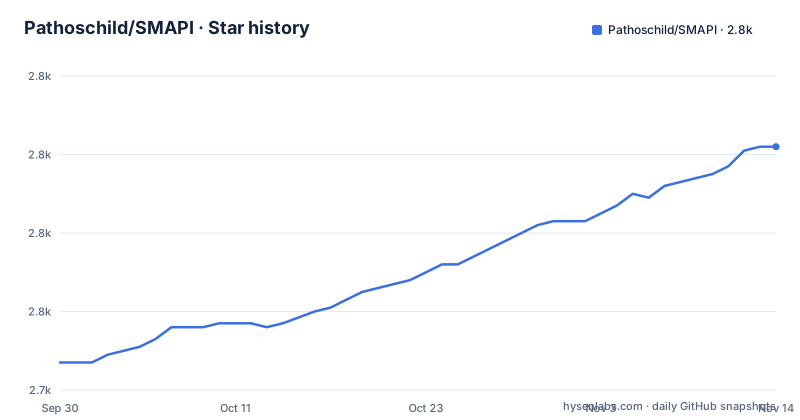
- Pathoschild/SMAPI2,802 ★ · +55
| Repository | 2026-09-30 | 2026-11-14 |
|---|---|---|
| Pathoschild/SMAPI | 2.7k | 2.8k |
55 Stars in the last 45 days, measured from the daily GitHub snapshot. Compare with other projects
Editorial analysis
The purpose list runs 1, 2, 3, 5, 6, 7 and 8
The page opens by saying SMAPI serves seven main purposes, and it is right about the count. The numbering is not right. The items are numbered 1, 2, 3, then 5, 6, 7 and 8, so there is no 4 anywhere in the list and the sequence visibly skips one. The seven items are: loading mods at game startup so they can interact, providing APIs and events, rewriting mods for compatibility, intercepting errors and fixing saves, update checks, compatibility checks, and save backups. Only the third and the fourth are numbered out of step, which suggests two behaviours were folded into one entry at some point rather than one being dropped, since the totals still agree. Either way, a reader counting along with the numbers loses track of which purpose they are on, and there is no other list on the page to reconcile against.
Compiled mod code is rewritten before it loads
The compatibility purpose is the least visible and the most consequential. SMAPI rewrites a mod's compiled code before loading it, so the mod works on Linux, macOS and Windows without the mod author handling the differences between the Windows and non-Windows builds of the game themselves. In some cases it also rewrites code that a game update has broken, which is what keeps a large share of existing mods playable after a patch rather than turning them all into errors at once. The practical consequence is that a mod author targeting one platform is not silently unsupported on the others, and a player does not need a per-platform mod list. The cost is that the code running in memory is not byte for byte what the author shipped, so anything depending on exact instruction sequences or on reading its own assembly back is operating outside what this layer guarantees.
Broken mods are disabled before they cause problems
Compatibility checks are a separate purpose from rewriting, and they act in the opposite direction: instead of repairing a mod, SMAPI detects outdated or broken code in mods and safely disables them before they cause problems. Update checks are the third piece of the same maintenance story, where SMAPI automatically checks installed mods for new versions and notifies you when any are available. So a player meets three separate behaviours from the same framework, one that patches old code to keep it running, one that switches new code off when it cannot be trusted, and one that tells you an update exists. A disabled mod is not a broken install, and neither is an unpatched one. The page gives no setting to change any of this, and no list of what counts as outdated, so which mods get switched off is decided by the framework rather than by you.
Error interception is what turns a crash into a message
When something does go wrong, the framework's job is to make it legible. SMAPI intercepts errors, shows the error information in the SMAPI console, and in most cases automatically recovers the game. The stated purpose is twofold: it stops mods from crashing the game outright, and it makes it possible to troubleshoot errors in the game itself that would otherwise surface as a generic program has stopped working message. That second half is the important one, because a fault originating in the game is otherwise indistinguishable from a fault originating in a mod. The console is where that information lands, which makes it the first thing worth capturing when reporting a problem. The wording in the page is careful, in most cases automatically recovers, and it does not claim to recover from everything.
Save repair covers files a removed mod made unopenable
The same purpose that handles errors also handles saves, and the example given is specific: SMAPI automatically fixes save data in some cases when a load would crash, for instance because a custom location or NPC mod that the save depended on was removed. That is a common shape of modded-game breakage rather than an exotic one, since removing a content mod is a normal thing a player does and a save written with that content in it can then fail to open at all. The framework attempts the repair itself rather than refusing the file, with the qualifier in some cases doing real work in that sentence. Combined with the error interception above it, this is the layer that decides whether a bad save becomes an afternoon of recovery or an afternoon of not knowing what happened. Neither behaviour is presented as configurable on this page.
The ten daily backups come from a bundled mod
Backups are the seventh purpose, and the implementation is delegated. SMAPI automatically creates a daily backup of your saves and keeps ten backups, and it does that via the bundled Save Backup mod rather than as framework code. Two things follow from that arrangement. The retention policy is ten copies on a daily cycle, so a save you have played for months needs older history from somewhere else if you want it. And the feature is not mysterious or hidden, it is a mod that ships with the framework and can be treated like one. Installation itself is described the same way, as safely installed alongside the game's executable and not changing any of your game files, which is also the reason removing it is a matter of taking those files away again rather than repairing an installation.
Three translated locales live outside the repository
The translation table is a status list with two states, a check for fully translated and a circular arrow for partly translated, and it covers sixteen locales. Eight are complete: the default text, French, Indonesian, Korean, Portuguese, Russian, Spanish and Thai. Eight are partial: Chinese, German, Hungarian, Italian, Japanese, Polish, Turkish and Ukrainian. The file links are what make the table interesting, because most rows point at a locale file inside this repository under `src/SMAPI/i18n/`, while three rows, Polish, Thai and Ukrainian, point outward to mod pages on an external mod site instead. Those three are marked fully translated while their text lives somewhere this repository does not contain, so a build assembled from this tree alone would not have them. The table also carries no date, so there is no way to tell from it whether the partial locales are close to done or barely started.
4.5.0 and 4.5.1 shipped six seconds apart
The recent release list is short and tightly spaced. Version 4.5.0 and version 4.5.1 were both published on 28 January 2026, six seconds apart, and 4.5.2 followed on 22 March 2026. That pattern is what a framework does when a release turns out to need a fix on the same day, rather than anything to do with the numbering scheme itself. The branch, which is `develop` rather than `main`, was last pushed on 28 September 2026, about six months after the newest tag. The project is not archived. So the published version most players are on is 4.5.2 from March, while the branch has moved considerably further, and the page offers no release notes inline: they sit behind a separate document, alongside a mod build configuration guide for packaging a mod, technical documentation for working on SMAPI itself, and a modding documentation set for writing mods. Documentation for players is off-site entirely, on the game wiki.
Editorial conclusion
SMAPI is the layer you cannot avoid if you want code mods in Stardew Valley at all, since it is what loads them, and it is also the layer that quietly keeps old mods alive across game updates. What is worth knowing before you install anything is how much it acts on its own. It rewrites mod code before loading, disables mods it judges broken, repairs saves that would fail to open, and keeps ten daily backups, all without asking first. Its page also leaves real gaps: the purpose list has no item 4, the install steps are not here at all, and three translations in its own table live on an external mod site rather than in this repository. For a player, the guide it points to is the place to start. For a mod author, the mod build configuration and the technical docs are where the packaging rules actually live.
Frequently asked questions
Do you need smapi for Stardew Valley?
You need it for code mods, because SMAPI is what loads them and code mods are not possible without it to load them. It is installed safely alongside the game's executable and does not change any of your game files, so the game itself runs the same with it present.
What is SMAPI used for?
Seven stated purposes: loading mods at startup, providing APIs and events for them, rewriting their compiled code so one build works across Linux, macOS and Windows and survives game updates, intercepting errors and repairing some saves, checking installed mods for updates, disabling outdated or broken mods before they cause problems, and keeping ten daily save backups.
How do I get rid of Smapi?
SMAPI is installed safely alongside the game's executable and does not change any of your game files, so it is not woven into an installation you have to repair. Code mods will stop loading without it, since it is what loads them.
how to install smapi
This page carries no install steps. It points players to a player guide on the Stardew Valley wiki, modders to the modding documentation at smapi.io/docs, and SMAPI developers to technical docs in the repository under technical/smapi.md.
Official sources
Add this badge to your README
If you maintain this project, the badge below links readers to this analysis and shows its maintenance status from the daily GitHub snapshot. Paste the markdown into your README; add ?metric=license or ?metric=stars to the image URL for a different field.

[](https://hysenlabs.com/projects/pathoschild-smapi)Star history chart for your README
[](https://hysenlabs.com/projects/pathoschild-smapi)Was this useful?