Six fzf searches in Fish, one mnemonic letter each, and an install step that removes your other fzf plugin
🔍🐟 Fzf plugin for Fish
At a glance
- What is it?
- fzf.fish wraps fzf into six Fish searches for files, git log, git status, history, processes and shell variables, each with a preview pane and a one letter mnemonic binding. The parts that surprise people are the trailing slash rule in file search, the two-level fzf option precedence, and the requirement to uninstall any other fzf plugin first.
- Who is it for?
- fzf.fish is worth installing if you already live in Fish and want file, commit and history search without leaving the command line, and the per-command option variables make it adjustable without patching. Three things to settle first.
- Can I use it commercially?
- Yes. MIT is a permissive licence: you can use, modify and sell software built on it, as long as you keep its copyright and licence notices.
- Is it still maintained?
- Yes. The repository last received commits 150 days ago.
- What is it written in?
- Mainly Shell, according to GitHub's language statistics.
Answers come from the project's GitHub data, last synced on November 15, 2026, and from our analysis. They are not legal advice.
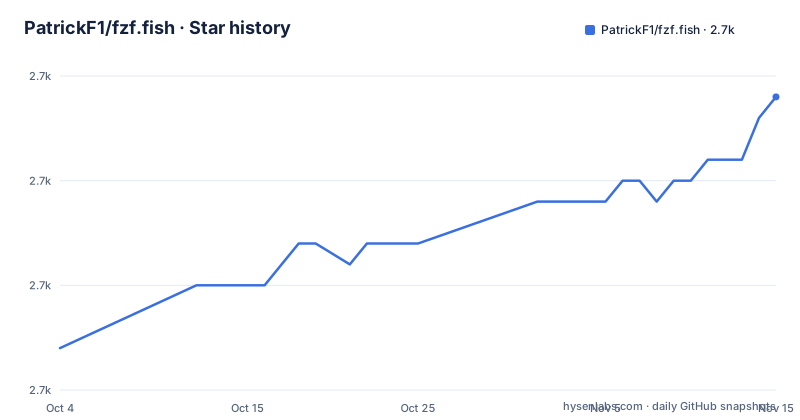
Star history
- PatrickF1/fzf.fish2,714 ★ · +12
| Repository | 2026-10-04 | 2026-11-15 |
|---|---|---|
| PatrickF1/fzf.fish | 2.7k | 2.7k |
12 Stars in the last 42 days, measured from the daily GitHub snapshot. Compare with other projects
Editorial analysis
The word under the cursor seeds the query and is then replaced
Every search in fzf.fish works the same way at the entry point. Trigger one while the cursor sits on a word and that word becomes the seed for the fzf query, then it is replaced by whatever you select, so the result lands on the command line where the word used to be. Tab selects multiple entries in one pass. Each of the six searches also opens a preview window for the entry currently hovered, which is what makes the difference between two similarly named commits or two same-named variables visible before you commit to one. The outputs are deliberately narrow and differ per search: Search Directory returns relative paths of selected files, Search Git Log returns hashes of selected commits, Search Git Status returns relative paths of selected lines, Search History returns selected commands, Search Processes returns pids, and Search Variables returns selected shell variables. Nothing generic is inserted, only the identifier the next command needs.
Six mnemonics, one letter each, and two different modifier sets
The bindings are built from a mnemonic letter that names the thing being searched. Search Directory is Ctrl+Alt+F, F for file, and its fzf input is a recursive listing of the current directory's non-hidden files. Search Git Log is Ctrl+Alt+L, L for log, fed by the current repository's formatted `git log`, with a preview of the commit message and diff. Search Git Status is Ctrl+Alt+S, S for status, fed by the repository's `git status`, previewing the git diff of the file. Search Processes is Ctrl+Alt+P, P for process, fed by the pid and command of every running process as `ps` prints them, previewing CPU usage, memory usage, start time and other information. Search Variables is Ctrl+Alt+V, V for variable. The two exceptions to the Ctrl+Alt pattern are Search History on plain Ctrl+R, named after reverse-i-search in Fish, and Search Variables, which is the only other search that uses Ctrl without Alt.
Search Directory switches target when the current token ends in a slash
File search carries three remarks that change what it lists. Directories are inserted with a trailing `/`, so selecting exactly one directory means you can hit ENTER immediately and end up inside it. If the token under the cursor is already a directory with a trailing slash, written in the documentation as `.config/<CURSOR>`, that directory is searched instead of the current one, which turns the same key into a descend-into-path gesture. And the listing skips files that git also ignores. The default listing is non-hidden files, so dotfiles stay out unless you ask for them through the file option variable, while the preview window shows the file with syntax highlighting, the contents of a directory, or the file type depending on what is hovered. The backing tool is `fd`, which is what makes the gitignore filtering free rather than a separate setting.
Four dependencies with minimum versions, two of them optional
Installation starts from a table of four command line dependencies with minimum versions: fish at 4.0.0 described as a modern shell, fzf at 0.33.0 described as the fuzzy finder that powers this plugin, fd at 8.5.0 described as a faster, colorized alternative to `find`, and bat at 0.16.0 described as a smarter `cat` with syntax highlighting. A note under the table narrows that list: fd and bat are only needed if you will use Search Directory. So the real floor is two tools for anyone who never searches directories, fish and fzf, and four tools for everyone else, and the plugin itself is installed with Fisher in one command:
fisher install PatrickF1/fzf.fishThe same paragraph notes that fzf.fish can also be installed manually or through other plugin managers, but that only Fisher is officially supported, which puts the burden of keeping a manual install working on whoever wrote it.
Other fzf plugins have to go before Fisher installs this one
fzf.fish is incompatible with other fzf plugins, and the install step tells you to check for and remove two common alternatives before going further, linking a wiki page for uninstalling them. Two fzf integrations in one shell means two sets of key bindings competing for the same modifier combinations, which is the practical reason the check is asked for rather than assumed. Bindings can be changed afterwards through a function the project ships, documented on its own help page:
fzf_configure_bindings --helpCalling `fzf_configure_bindings` in your `config.fish` is what makes custom bindings persist, since anything typed at an interactive prompt dies with that prompt. The repository keeps its code in functions/, its configuration in conf.d/, its shell completions in completions/ and its tests in tests/, with LICENSE.md and the README at the root, and the fish sources referenced from the documentation point into those same directories.
Per-command option variables win because fzf keeps the last flag
There are two levels of fzf options and the precedence between them is mechanical. fzf itself reads global defaults from the FZF_DEFAULT_OPTS and FZF_DEFAULT_OPTS_FILE environment variables, and fzf.fish supplies its own default options only when neither of those is set, which it does inside the wrapper function that executes fzf. Set either environment variable and the plugin's defaults step aside. Finer control comes from one variable per search: `fzf_directory_opts`, `fzf_git_log_opts`, `fzf_git_status_opts`, `fzf_history_opts`, `fzf_processes_opts` and `fzf_variables_opts`. Each value is appended last to fzf's option list, and since fzf uses the last instance of an option when it appears more than once, a custom value takes precedence over both the defaults and anything set through the environment.
Preview command variables take no path argument, on purpose
The preview pane gets most of its content from two swappable variables, and the default split is by file kind. Search Directory executes `ls` to preview directories and `bat` to preview regular files. Setting `fzf_preview_dir_cmd` replaces the first:
set fzf_preview_dir_cmd eza --all --color=alwaysAnd setting `fzf_preview_file_cmd` replaces the second:
set fzf_preview_file_cmd cat -nThe instruction attached to both is the one that catches people out: omit the target path, because fzf.fish itself specifies the argument to preview. A preview command is therefore a command plus flags and never a command plus a file, and writing a path into either variable produces a preview of nothing at all. Custom fzf options are also the documented route to adjusting the preview command or window beyond these two variables.
fzf_fd_opts decides the file list, and gitignore filtering comes free
The listing behind Search Directory is produced by `fd`, and its options pass through a single variable:
set fzf_fd_opts --hidden --max-depth 5By default `fd` hides files listed in `.gitignore`, and the documented way to turn that off is to add the `--no-ignore` flag to `fzf_fd_opts`. Hidden file visibility and ignore file visibility are therefore two separate switches with different defaults, neither of them a setting of the plugin itself, only flags you put into the variable. The same per-command mechanism opens up the wider extensions: adding fzf key bindings so a previewed file opens in Vim, re-populating fzf's input list on demand, changing the search mode, and adjusting the preview window. A wiki cookbook collects further ideas, and the releases move on their own slow clock, with v11.0 dated 2026-03-10 following v10.3 dated 2024-04-07 and v10.2 dated 2023-11-06.
Editorial conclusion
fzf.fish is worth installing if you already live in Fish and want file, commit and history search without leaving the command line, and the per-command option variables make it adjustable without patching. Three things to settle first. It refuses to share a shell with any other fzf plugin, so check what you already have before installing rather than after. The plugin's own fzf defaults exist only while neither FZF_DEFAULT_OPTS nor FZF_DEFAULT_OPTS_FILE is set, so exporting either one changes behaviour everywhere at once. And the preview command variables must not carry a path, since the plugin supplies the argument itself. Releases move slowly, with v11.0 dated 2026-03-10 sitting after v10.3 dated 2024-04-07, so pin a version if your shell startup depends on it.
Frequently asked questions
How do I use fzf to find files with fzf.fish?
Search Directory is bound to Ctrl+Alt+F and feeds fzf a recursive listing of the current directory's non-hidden files, returning relative paths. Directories come back with a trailing slash so you can press ENTER to move into one, a token that already ends in a slash searches that directory instead, and files ignored by git are left out of the list.
How to use fzf.fish after installing it?
Install it with `fisher install PatrickF1/fzf.fish`, having first removed any other fzf plugin because fzf.fish is incompatible with them. The six searches bind to Ctrl+Alt+F, L, S, P and V plus Ctrl+R for history, and `fzf_configure_bindings` in your config.fish is what persists any binding you change.
What are some alternatives to fzf for Fish users?
The repository names no alternatives to fzf. Its dependency table instead lists what must sit beside it: fish 4.0.0, fzf 0.33.0, fd 8.5.0 described as a faster, colorized alternative to find, and bat 0.16.0 described as a smarter cat, with fd and bat needed only for Search Directory.
What are the key differences between ripgrep and fzf?
The repository never mentions ripgrep, so it makes no comparison. The nearest thing is the file listing behind Search Directory, which is produced by fd rather than a grep tool, and fd hides files listed in .gitignore unless the --no-ignore flag is added to fzf_fd_opts.
Official sources
Add this badge to your README
If you maintain this project, the badge below links readers to this analysis and shows its maintenance status from the daily GitHub snapshot. Paste the markdown into your README; add ?metric=license or ?metric=stars to the image URL for a different field.

[](https://hysenlabs.com/projects/patrickf1-fzf-fish)Star history chart for your README
[](https://hysenlabs.com/projects/patrickf1-fzf-fish)Was this useful?