h1-brain: one call builds the attack briefing, and the public database never refreshes
MCP server that connects AI assistants to HackerOne for bug bounty hunting
At a glance
- What is it?
- h1-brain is a single-file MCP server that puts your HackerOne history, program scope and a bundled set of public disclosures behind one tool call, and the parts worth reading are the two databases, the two unpinned dependencies, and a markdown file that holds the instructions.
- Who is it for?
- h1-brain fits a bug bounty hunter who already holds a HackerOne token and wants their own report history plus public disclosures queryable from an MCP client. It fits badly as a reference for the current state of HackerOne, because the public database is a committed snapshot and no tool refreshes it.
- Can I use it commercially?
- Yes. MIT is a permissive licence: you can use, modify and sell software built on it, as long as you keep its copyright and licence notices.
- Is it still maintained?
- Yes. The repository last received commits 33 days ago.
- What is it written in?
- Mainly Python, according to GitHub's language statistics.
Answers come from the project's GitHub data, last synced on November 15, 2026, and from our analysis. They are not legal advice.
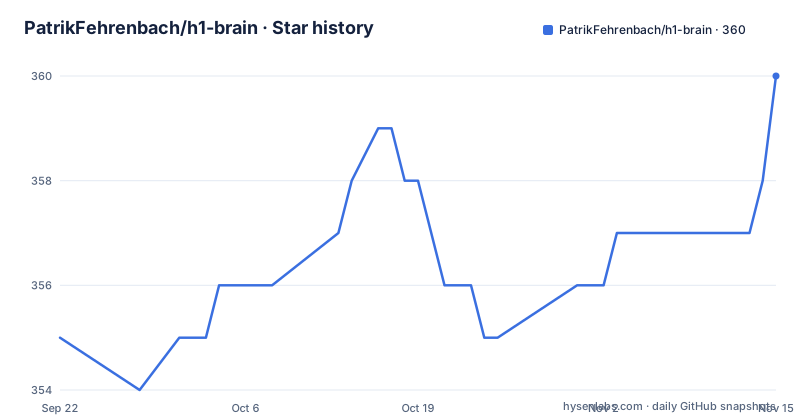
Star history
- PatrikFehrenbach/h1-brain360 ★ · +5
| Repository | 2026-09-22 | 2026-11-15 |
|---|---|---|
| PatrikFehrenbach/h1-brain | 355 | 360 |
5 Stars in the last 54 days, measured from the daily GitHub snapshot. Compare with other projects
Editorial analysis
The public disclosure database ships in the clone and nothing refreshes it
Most of h1-brain's immediate value arrives as a committed file. `disclosed_reports.db` is a pre-built SQLite database of more than 3,600 bounty-awarded reports that HackerOne has publicly disclosed, with full vulnerability write-ups, weakness types and bounty amounts, and the README states that it needs no extra setup. Your own data lives somewhere else entirely, in a personal database called `h1_data.db`, which the sync tools create on your machine. The asymmetry matters, because the data sync tools cover only three things: your bounty-awarded reports, the programs you can access, and the scopes for a given program handle. No tool refreshes the public corpus. So the half of the knowledge base that arrives in the repository ages silently, and since the file is checked in rather than generated, the last push to main on 7 April 2026 is the date its contents reflect.
requirements.txt is two unpinned lines in a security tool
The whole dependency list is two names with no version constraints:
mcp
httpx
There is no pyproject.toml, no setup.py and no package index entry anywhere in the tree, so installation is a manual exercise:
git clone https://github.com/PatrikFehrenbach/h1-brain.git
cd h1-brain
python -m venv venv
source venv/bin/activate
pip install -r requirements.txt
Python 3.10 or newer is the stated floor. Nothing here constrains the MCP library or the HTTP client that will carry your HackerOne token, which means a fresh environment resolves whatever is current at install time, and a rebuild months later may not resolve the same tree. For a process that reads a vulnerability corpus and holds a bounty account credential, that is the first thing to tighten before running it anywhere that matters.
The attack instructions are a markdown file, not code
The behaviour that makes hack() aggressive is not hardcoded in the server. `hack_instructions.md` is a separate file at the repository root holding the attack briefing instructions, and hack() loads it. That is a deliberate design choice with two consequences. You can read exactly what the model is being told to do before you run it, and you can edit it, since changing a markdown file is a much smaller commitment than patching a server. The documented flow runs in seven steps: fetch fresh scope from the HackerOne API, pull your reports on that program from SQLite, analyze weakness patterns across all programs rather than just the one in hand, identify untouched bounty-eligible assets, cross-reference the public disclosed reports for the program, and generate the briefing with agent instructions. Two mermaid diagrams in the README draw the same path, one for the overall architecture and one for the tool itself.
hack(handle) folds seven API and database steps into one call
The primary tool takes a program handle and does everything in a single call, which is what makes it usable from a chat client where every step would otherwise be a round trip. In order, it fetches fresh program scopes from the HackerOne API, pulls your past rewarded reports for that program, cross-references your full report history for weakness patterns, identifies untouched bounty-eligible assets, pulls the public disclosed reports for the program, suggests attack vectors based on weaknesses that paid elsewhere but have not been found here, and returns a briefing. The briefing has a fixed seven-part structure: scope split into bounty-eligible and non-bounty assets with severity caps, your past findings with severity, weakness type and bounty amounts, weakness types that worked for you before, untouched scope with zero findings from you, suggested attack vectors, the public disclosed reports, and finally a set of instructions whose stated job is to put the model in attack mode. Step five, pulling scopes, is invoked automatically rather than asked for.
Your own reports are answered locally, with no API call
Six tools read the personal database and are described as returning results instantly because nothing leaves the machine. `search_reports` takes a query, a program, a weakness and a severity with a limit, so you can narrow by any of them. `get_report` returns one report in full, including the write-up and attachments, and `get_report_summary` groups your reports by program with totals. `search_programs` filters your stored programs with a bounty-only flag, and `search_scopes` searches in-scope assets across programs by program, asset and the same bounty-only flag. The sixth is different in kind: `fetch_attachment` returns fresh download URLs rather than file content, and those URLs expire in about an hour, so anything you keep has to be fetched before they lapse. Worth noting is what is absent from this group: none of these tools refresh anything, which is why the sync tools exist separately.
Both client configs hardcode an absolute path to your venv
Because there is no console script, the MCP client has to be told which interpreter to run and which file to run. The Claude Desktop route edits `claude_desktop_config.json` under `~/Library/Application Support/Claude/`, adding an `h1-brain` entry whose command is `/path/to/h1-brain/venv/bin/python` and whose single argument is `/path/to/h1-brain/server.py`, with the credentials passed as environment variables named `H1_USERNAME` and `H1_API_TOKEN`. Claude Desktop has to be restarted after the file is saved. The Claude Code route does the same thing on the command line:
claude mcp add h1-brain \
  -e H1_USERNAME=your_hackerone_username \
  -e H1_API_TOKEN=your_api_token \
  -- /path/to/h1-brain/venv/bin/python /path/to/h1-brain/server.py
Two things follow from that shape. The paths are absolute and duplicated across the two setups, so relocating the checkout breaks both configurations, and the Desktop path is written for macOS, where the Application Support layout differs from Windows and Linux.
Two sync calls come before any briefing is worth running
On first connection the server has knowledge of HackerOne but not of you, and two tools fix that. `fetch_rewarded_reports` pulls every bounty-awarded report of yours with its full vulnerability write-up, and it is called out as the most important step of the two. `fetch_programs` pulls every program you have access to. Both need to run once, and re-running them periodically syncs new reports. Until then, the sections of a briefing that depend on your history, past findings and the weaknesses that worked for you, have nothing behind them. The public side needs no equivalent step: the disclosed reports are queryable the moment the server starts, which is why the bundled database exists in the first place. Two tools sit on top of the public set as well, a full-text search across titles and write-ups by query, program and weakness, and a single-report lookup by id.
One server file, one committed database, and a cut-off architecture list
The tree is short enough to read in one sitting. `server.py` is the MCP server, `hack_instructions.md` is the briefing text it loads, `requirements.txt` is the two-line dependency list, `disclosed_reports.db` is the bundled corpus, and there is a `demo.gif` at the root. Everything else is repository furniture: `.gitattributes`, `.gitignore`, a LICENSE, and `.github/`. The personal database is not among them, because it is generated on your machine. The architecture section of the README lists the files this way and then stops partway through the entry for the personal database, so the storage layout beyond those two lines is not spelled out in the document. The walkthroughs live outside the repository as a three-part series called Bug Bounty Goldfish, covering the motivation and setup, what each tool does, and a run against a real target, and there are no tagged releases to correlate with any of it.
Editorial conclusion
h1-brain fits a bug bounty hunter who already holds a HackerOne token and wants their own report history plus public disclosures queryable from an MCP client. It fits badly as a reference for the current state of HackerOne, because the public database is a committed snapshot and no tool refreshes it. Three things to check. The last push to main was on 7 April 2026 and there are no tagged releases, so treat the bundled disclosures as a snapshot from that date rather than a live corpus. The dependency file names mcp and httpx with no version constraints at all, which is a thin floor for a process that holds an API token and reads a vulnerability corpus. And both client configurations hardcode an absolute path to your virtual environment interpreter, so moving the checkout means editing the client config. The project is MIT licensed.
Frequently asked questions
What does h1-brain connect an AI assistant to?
HackerOne, through an API token. The server pulls your bounty history, program scopes and report details into a local SQLite database and exposes tools to any MCP-compatible client, such as Claude Desktop or Claude Code. Python 3.10 or newer is required.
What does the hack(handle) tool return?
One attack briefing assembled from seven inputs: fresh scope from the HackerOne API, your past rewarded reports for that program, weakness patterns from your full history, untouched bounty-eligible assets, public disclosed reports for the program, attack vectors drawn from weaknesses that paid on other programs, and instructions that put the model in attack mode.
Do I need a HackerOne account before trying h1-brain?
You need an API token from your HackerOne settings, and the server reads it from the H1_USERNAME and H1_API_TOKEN environment variables in the MCP client configuration. The 3,600 or so publicly disclosed reports need no account at all, since that database is committed to the repository and can be queried immediately.
How is h1-brain installed?
By hand. Clone the repository, create a virtual environment with `python -m venv venv`, activate it, and install the two requirements with `pip install -r requirements.txt`. There is no package index entry and no console script, so both MCP client configurations reference the virtual environment interpreter by absolute path.
Official sources
Add this badge to your README
If you maintain this project, the badge below links readers to this analysis and shows its maintenance status from the daily GitHub snapshot. Paste the markdown into your README; add ?metric=license or ?metric=stars to the image URL for a different field.

[](https://hysenlabs.com/projects/patrikfehrenbach-h1-brain)Star history chart for your README
[](https://hysenlabs.com/projects/patrikfehrenbach-h1-brain)Was this useful?