claude-code-my-workflow ships seven wildcard allow rules and calls it a fork me
Project brief: A ready-to-fork Claude Code template for academics using LaTeX/Beamer + R. Multi-agent review, quality gates, adversarial QA, and replication protocols.
At a glance
- What is it?
- A fork-and-edit Claude Code template for academic work, where the quick start tells you almost nothing prompts in Manual mode, two bypass keys in the VS Code settings are never read, and one of the ten gates exists to re-count the readme's own numbers from disk.
- Who is it for?
- This template is unusually honest about itself, which is both its best and its most awkward feature. The permission-modes section does not oversell: it says a project's `.claude/settings.json` cannot set a bypass default, that seven wildcard allow rules mean almost nothing prompts in Manual mode, and that two of its own VS Code keys are inert.
- Can I use it commercially?
- Yes. MIT is a permissive licence: you can use, modify and sell software built on it, as long as you keep its copyright and licence notices.
- Is it still maintained?
- Yes. The repository last received commits 6 days ago.
- What is it written in?
- Mainly HTML, according to GitHub's language statistics.
Answers come from the project's GitHub data, last synced on November 13, 2026, and from our analysis. They are not legal advice.
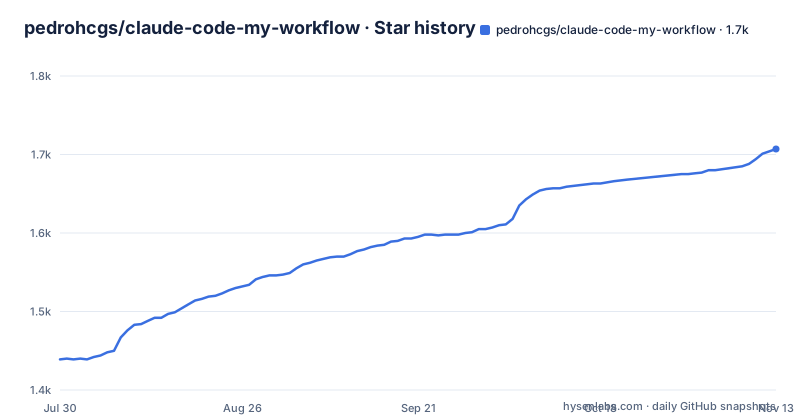
Star history
- pedrohcgs/claude-code-my-workflow1,707 ★ · +268
| Repository | 2026-07-30 | 2026-11-13 |
|---|---|---|
| pedrohcgs/claude-code-my-workflow | 1.4k | 1.7k |
268 Stars in the last 106 days, measured from the daily GitHub snapshot. Compare with other projects
Editorial analysis
The shipped settings.json has seven wildcard allows, so almost nothing prompts
The template's `.claude/settings.json` ships broad catch-all permissions rather than a curated list. The three named in the documentation are `Bash(*)`, `Edit(**)` and `Write(**)`, and they are described as seven wildcard rules in total, not three. The consequence the template itself spells out is blunt: in Manual mode, almost nothing prompts.
Manual mode is the fallback, not the default. On Claude Code 2.1.283 and later, new interactive sessions start in auto mode, which is classifier-gated so that most actions run and only risky ones prompt. Auto mode drops the blanket `Bash(*)` allowance and routes shell commands through that classifier, which is why the same settings file behaves very differently depending on which mode the session lands in.
Four modes are in play, and the ordering matters. Manual prompts per risky tool call. Auto-accept edits is a keybinding. `claude --permission-mode acceptEdits` sets it from the command line. And bypass skips permission prompts and safety checks altogether, with deny rules still applying, which Anthropic scopes to isolated containers and virtual machines.
The template's `.claude/settings.json` deliberately sets no default mode, so terminal sessions get whatever the platform does. What it does ship is the wide allow list, which is the part to look at before you fork. A repository that has forked this and then added deny rules for restricted data is doing the right thing; a repository that forked it and did nothing has a shell wildcard in place.
Two bypass keys in the VS Code settings are never read by the extension
The template also ships a `.vscode/settings.json`, and it carries two bypass-related keys. They do not work.
The reason given is specific: the current VS Code extension reads `claudeCode.initialPermissionMode` and `claudeCode.allowDangerouslySkipPermissions` only from your VS Code user settings, and it never reads the unprefixed `allowDangerouslySkipPermissions` key. So a bypass default placed in a repository's `.vscode/settings.json` is silently ignored, and VS Code sessions start in auto mode unless your own user settings say otherwise.
There is a second layer on the same point, and it is the more useful one. A bypass default in a project's `.claude/settings.json` is not honoured either: the session simply starts in Manual. Bypass takes effect from the CLI flag, from `--settings`, or from user and managed settings at `~/.claude/settings.json`. Two files in this repository attempt to set it, and neither is a place the tool reads it from.
That cuts both ways. It means you cannot accidentally hand a colleague a bypass session through a committed file, which is a genuine safety property. It also means the two keys sitting in `.vscode/settings.json` are dead configuration that will confuse anyone who reads the repository expecting them to do something. The documented fix is to set both `claudeCode.` prefixed keys in your own VS Code user settings if you want bypass in VS Code.
backtest.sh runs ten gates, and one of them re-counts the readme's claims
The claim the template makes about itself is unusual. One command, `./scripts/backtest.sh`, runs ten gates. The named ones are surface-sync, skill integrity, model currency against the single source of truth, link and anchor resolution, Agent Skills spec conformance, staleness including source-versus-published divergence, repo hygiene, derived counts, ledger coverage, and a tenth the visible text cuts off mid-word.
Most of those are ordinary. Link checking, repo hygiene and spec conformance are the checks you would expect on a template with hundreds of internal links across a guide, a troubleshooting document and a site.
Two are worth stopping on. Derived counts means enumerable claims get re-counted from disk, which is a gate that exists because the documentation makes numeric claims and somebody decided those numbers should be verified mechanically rather than trusted. Ledger coverage is the accounting counterpart, and the visible text cuts off in the middle of describing it. The combination suggests a maintainer who has been bitten by documentation drifting away from the repository and built a check for it.
Alongside that, `./scripts/validate-setup.sh` is the environment check, and it reports exactly what is missing with install links. Two scripts with two different jobs: one validates the machine, one validates the template.
/init will overwrite the CLAUDE.md the skills depend on
A fork-and-edit template lives or dies on its instruction file, and this one ships a `CLAUDE.md` at the root that covers the academic setup in full. The documentation then tells you when to replace it, and the replacement mechanism is Anthropic's built-in `/init` command, which re-derives a `CLAUDE.md` from your codebase as a starting point.
The guidance is narrow and conditional: you only need `/init` if your fork has diverged substantially, with a Python or machine-learning project that does not use LaTeX or Quarto given as the example. For a heavily adapted non-academic fork, run it. For a lightly adapted academic one, do not.
The trap is that `/init` shows up in Claude Code's command list alongside everything else, so it is one mistaken invocation away from replacing the file that the skills, rules and orchestration all reference. There is no warning in the template about this beyond the conditional sentence, and there is no gate in the ten that would catch a reverted `CLAUDE.md`.
The on-ramp itself is a fill-in-the-blank form rather than a command. The starter prompt reads: I am starting to work on PROJECT NAME in this repo, followed by two or three sentences describing the project, then a request to read the configuration files, adapt them and enter plan mode. Everything the first session needs arrives as blanks you fill, and the complete version with all the details lives in the hosted guide.
MEMORY.md is committed on purpose and the machine-local memory is not
There are two memory stores, and the distinction is deliberate enough to have a governance document about it. `MEMORY.md` sits at the root, is committed, and collects generic `[LEARN]` entries that are meant to help every fork. Machine-specific notes accumulate somewhere else entirely, in Claude Code's native auto memory under `~/.claude/projects/<project>/memory/`, which is machine-local and never committed.
The rationale is obvious once stated: a fact about your laptop is noise in a shared template, and a fact about how to compile a Beamer deck is useful to everyone. `.claude/rules/meta-governance.md` holds the rule that draws the line.
The practical consequence is a disclosure question rather than a technical one. Anything you write into the committed file is on its way to a public repository the moment you push, and the framing of the file invites exactly the kind of notes people would not want published, such as what went wrong in a particular build. The escape route exists and is documented, but it is a decision you have to make at the moment you are about to type the note.
This is also the mechanism behind the community claim in the readme, that the template has been extended by a growing number of forks. Generic learnings travel back up into the shared file, and everyone downstream gets them for free.
The real floor is Python 3, and XeLaTeX only gates two demo files
The quick start advertises five to ten minutes plus about thirty minutes for first-time installs, which is an estimate worth breaking into. The minimum is Claude Code, git and Python 3, and Python 3 is called out as the one that matters because it runs the hooks, the ten-checker gate suite and the quality scorer. It is also already installed on macOS and Linux, so on those platforms it is not part of the thirty minutes at all.
Everything above Python 3 is optional for a specific artifact. XeLaTeX is needed for the Beamer sample and Quarto for the Quarto sample, and the readme says so directly: if you only need Python, R or markdown you do not need either, because the agents, rules, skills and orchestration patterns work for any text or code artifact. The route for those users is to skip the demo files and go straight to `/data-analysis`, `/review-paper`, `/lit-review` or `/review-r`.
R and the GitHub CLI sit in a third tier, recommended rather than required. The suggested order is to clone first and run the validation script, which reports what is missing with install links, rather than reading the prerequisites and installing everything up front:
# Fork this repo on GitHub (click "Fork" on the repo page), then:
git clone https://github.com/YOUR_USERNAME/claude-code-my-workflow.git my-project
cd my-project
./scripts/validate-setup.sh        # reports missing tools with install links
Note that the clone URL carries a `YOUR_USERNAME` placeholder, which is the template convention and is explained immediately after the block. You fork on GitHub first, then clone your own copy.
The verification step is two slash commands against the sample files, `/compile-latex HelloWorld` to produce a PDF from `Slides/HelloWorld.tex` and `/deploy HelloWorld` to render `Quarto/HelloWorld.qmd` to HTML. When both pass you delete the two sample files and start on real work. Both tools therefore have to be installed before you can get to the deletion step, which is the only reason to install them at all.
Release titles name what got enforced, and the newest tag is a month behind the last push
The three most recent releases are titled after what they changed rather than after what they added. v2.5.0 is verification and currency, published 2026-08-23. v2.5.1 is enforcement, published the next day. v1.9.0, from 2026-05-20, is a guide refresh plus ecosystem catch-up.
Read as a sequence, that says the project spent May on documentation and then two consecutive days in August on the part that checks the documentation. It matches what the gate list contains, with model currency and staleness checks doing exactly the work the titles name. A project that versions its releases by enforcement rather than by feature is telling you its priority is that the template agrees with itself.
The cadence has a gap. Those two August releases are one day apart and then a month passes with no tag, while the repository's last push is dated 2026-09-27. The readme opens by describing the project as actively maintained, and on the evidence of the two facts the gate is allowed to use, an unarchived repository with a push six days ago supports that. What it does not support is a reading of the release list as a complete record of recent change; whatever landed in September is not in a tag.
The repository itself is an academic artifact as much as a software one. Alongside the configuration directories sit `Bibliography_base.bib` and `CITATION.cff`, so the template can be cited, and `Figures/`, `Preambles/`, `Slides/`, `Quarto/`, `templates/`, `master_supporting_docs/` and `quality_reports/` show the gate outputs committed alongside the material they check. The licence is MIT.
Editorial conclusion
This template is unusually honest about itself, which is both its best and its most awkward feature. The permission-modes section does not oversell: it says a project's `.claude/settings.json` cannot set a bypass default, that seven wildcard allow rules mean almost nothing prompts in Manual mode, and that two of its own VS Code keys are inert. Read that paragraph before forking rather than after, and decide whether you want the shipped allow list or a curated one. Then run `./scripts/validate-setup.sh` first, because it reports missing tools with install links and the honest floor is Python 3 plus git, with XeLaTeX and Quarto needed only for the two demo artifacts. Do not run `/init` in a fresh clone unless you have decided to discard the shipped `CLAUDE.md`, because it re-derives one from your codebase and overwrites the academic configuration the skills depend on. Finally, treat the committed `MEMORY.md` as public: generic learnings are meant to help every fork, so anything machine-specific belongs in the uncommitted local memory instead. Teams that want a governed agent workflow will find the gate suite worth stealing even if they never fork the template.
Frequently asked questions
What does claude-code-my-workflow do after I fork it?
You clone it, run ./scripts/validate-setup.sh to see which tools are missing, start Claude Code and paste a starter prompt with blanks for your project name and a two or three sentence description. Claude then reads the configuration files, fills in your details and enters plan mode before any skill runs.
What tools do I need to install for claude-code-my-workflow?
Claude Code, git and Python 3 are the minimum, with Python 3 running the hooks, the gate suite and the quality scorer. XeLaTeX and Quarto are needed only for the HelloWorld demo files, and R and the GitHub CLI are recommended rather than required.
What does backtest.sh check in claude-code-my-workflow?
One script runs ten gates, named as surface-sync, skill integrity, model currency against the single source of truth, link and anchor resolution, Agent Skills spec conformance, staleness including source-versus-published divergence, repo hygiene, derived counts and ledger coverage. Derived counts re-count enumerable claims from disk rather than trusting the documentation.
Can I set bypass permissions mode in the claude-code-my-workflow repo settings?
No. Bypass takes effect from the CLI flag, from --settings, or from user and managed settings at ~/.claude/settings.json, and a bypass default in a project's .claude/settings.json is not honoured. The template's .vscode/settings.json also carries two bypass keys the extension never reads, because it only honours the claudeCode. prefixed keys from your VS Code user settings.
Where should notes go in claude-code-my-workflow, MEMORY.md or local memory?
Generic learnings go in the committed MEMORY.md so every fork benefits, and machine-specific notes go into Claude Code's auto memory under ~/.claude/projects/<project>/memory/, which is machine-local and never committed. The distinction is written down in .claude/rules/meta-governance.md.
Official sources
Add this badge to your README
If you maintain this project, the badge below links readers to this analysis and shows its maintenance status from the daily GitHub snapshot. Paste the markdown into your README; add ?metric=license or ?metric=stars to the image URL for a different field.

[](https://hysenlabs.com/projects/pedrohcgs-claude-code-my-workflow)Star history chart for your README
[](https://hysenlabs.com/projects/pedrohcgs-claude-code-my-workflow)Was this useful?