PenEcho publishes through a hand-written list of individual asset files
Think with AI beyond the chat box. A shared canvas for handwriting, equations, diagrams, and spatial reasoning.
At a glance
- What is it?
- An AGPL-3.0 canvas application shipped as an npm package whose files array enumerates dozens of individual JavaScript and CSS assets by name. Its local server opens on port 3888 behind a six-digit code or nothing at all, its quick start offers no Linux desktop build, and the release list skips v1.3.4.
- Who is it for?
- PenEcho suits you if you want an AI agent and a whiteboard in the same place, since the MCP bridge lets Claude Code or Codex draw onto the canvas and then read your hand annotations back on the next turn. Four things to check before adopting it.
- Can I use it commercially?
- Yes, with strict conditions. AGPL-3.0 is a network copyleft licence: if people use a modified version over a network, for example as a hosted service, you must offer them its source code under the same licence.
- Is it still maintained?
- Yes. The repository last received commits 21 days ago.
- What is it written in?
- Mainly JavaScript, according to GitHub's language statistics.
Answers come from the project's GitHub data, last synced on November 22, 2026, and from our analysis. They are not legal advice.
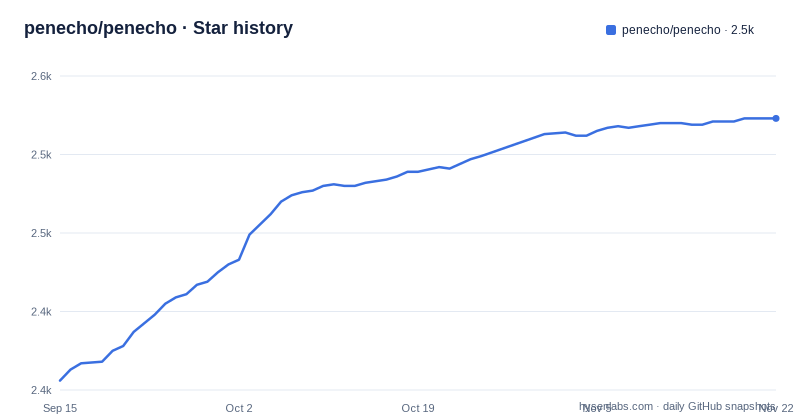
Star history
- penecho/penecho2,523 ★ · +167
| Repository | 2026-09-15 | 2026-11-22 |
|---|---|---|
| penecho/penecho | 2.4k | 2.5k |
167 Stars in the last 68 days, measured from the daily GitHub snapshot. Compare with other projects
Editorial analysis
The publish list names individual asset files one by one
The package manifest carries an unusually long `files` array, and most of it is single paths rather than directories. Alongside `cli.js`, `server.js`, and `src/`, it enumerates build scripts by exact name such as `scripts/build-client.js` and `scripts/build-playground.cjs`, then works through the public directory file by file: `public/index.html`, `public/access.html`, `public/access.css`, `public/access.js`, `public/cloud-mcp.js`, `public/mcp-cloud-transport.js`, `public/mcp-settings.js`, `public/studio-shell.css`, `public/widget-host.html`, `public/mathjax-config.js`, and a long tail of the same shape.
With npm, a `files` array is an allowlist. Anything not named is not published, including files that live in a directory you did name.
So the asset list is maintained by hand, and a developer who adds `public/anything.js` and expects it to be served from the installed package gets a missing file instead. There is no build step that catches it, because the build runs in development where the whole source tree is present.
The repository also carries a `.npmignore`, which is a second mechanism for deciding what ships and is redundant while `files` exists.
One entry in the list is worth singling out: `public/three-LICENSE.txt`, a third-party licence notice travelling inside the published package.
The local server is behind a six-digit code or nothing at all
The npm route starts a local server and opens `http://localhost:3888`. On first start, the tip block tells you to choose a six-digit access code, or to open access on a trusted network.
That is the whole access control story for the local server, and it has two halves worth weighing separately.
A six-digit numeric code is short enough to guess. There is no mention of lockout, rate limiting, or expiry, and the code protects a service that can reach your model credentials and render an agent's output. Binding to loopback limits who can try, which is the real mitigation, but the code is what stands between a network neighbour and the canvas if the bind address is ever broader.
The opt-out is the larger concern. Opening access on a trusted network removes authentication entirely, and the phrase trusted network is doing a lot of work: a coffee shop wifi and a home LAN are both trusted in the loose sense, and the second is shared with anything else on it.
The rest of the configuration lives in Settings, where you add a model by supplying your own API key, signing in to a Codex, Claude Code, or Kimi CLI, or using PenEcho's own models. Since the key is added to a service that is reachable over HTTP on your machine, the access code decision and the key decision compound each other.
Agents see only the canvases you switch on
The MCP integration is the interesting part of the design, and one sentence in it is the security property worth having: agents only see canvases you turn on.
Access is per canvas rather than per application. You open Settings, go to the MCP service, and enable the current canvas. An agent with a valid connection still sees nothing you have not switched on, which is a materially better default than granting a connected client the whole workspace.
There are two transports, and the page separates them explicitly. Local MCP stays on your computer. Cloud MCP is a separate signed-in connection used for Cloud canvases. So enabling an agent on a local canvas does not silently extend to your cloud projects, and the reverse is equally true.
The connection itself is configured either through Auto configure for a supported client, or by copying a generated setup prompt. Codex, Claude Code, Kimi, and Cursor are named. For clients that accept `mcpServers` JSON, there is a compatibility entry:
{
  "mcpServers": {
    "penecho": {
      "command": "penecho",
      "args": ["mcp"]
    }
  }
}
One more boundary is stated under How it works: the cloud service can reach your linked computer. That is what makes a cloud canvas and a local agent interoperable, and it is also the point where a signed-in web service gains a path to your machine.
Three ways to start, and no Linux desktop build
The quick start is a three-row table, and each row has a different cost.
The desktop app is offered for macOS and Windows from GitHub Releases, described as including everything and updating itself. Linux is absent from that row, which is a real gap given that the project's own npm route is the only listed path there.
The npm route requires Node.js 22.19 or newer, then a global install:
npm install -g penecho
penecho             # opens http://localhost:3888
Node 22.19 is a tight floor. It is a recent patch release of a major version rather than a conservative minimum, so an organisation still on Node 20 has no supported route except the browser one.
The browser row needs no install at all: sign in at penecho.ai for hosted models and Cloud canvases.
There is also a source path, folded into a details element:
git clone https://github.com/penecho/penecho.git
cd penecho
npm install
npm start
Note the install style. The repository carries `package-lock.json` rather than a pnpm or yarn lockfile, consistent with the npm-first instructions and with the absence of a Linux desktop build being about packaging rather than tooling.
There is no v1.3.4 and the licence is dual
Three of the recent releases are visible: v1.3.5 on 2026-09-27, v1.3.3 on 2026-09-20, and v1.3.2 on 2026-09-15, the last carrying the note Canvas, MCP, and desktop improvements.
The numbering skips v1.3.4. Whether that was a withdrawn build or a mis-tag is not something the release list explains, and with a weekly cadence across three consecutive dates the gap is more noticeable than it would be in a slower project.
The cadence itself is worth noting. Three releases in thirteen days, all on a Monday, suggests a fixed release rhythm rather than a response to demand.
The manifest version, 1.3.5, matches the newest tag. The desktop application tracks its version separately, in a config block that also names the Electron build file at `forge.config.js` and repeats `desktopVersion` as 1.3.5. Two version fields, currently in agreement, with no stated mechanism keeping them aligned.
The licensing is the item to read most carefully. The manifest declares `AGPL-3.0-only`. The root also carries `COMMERCIAL-LICENSE.md`, `CONTRIBUTOR-LICENSE-AGREEMENT.md`, a `NOTICE`, and `TRADEMARKS.md`. An AGPL-only declaration alongside a commercial licence file is a normal dual arrangement, but the `-only` suffix means the published package itself is not dual licensed, so what the commercial file grants and to whom is the question to answer before you embed this anywhere.
Two badge rows, no Linux target, and nine README translations
The header of the page carries the usual damage from being maintained as HTML rather than Markdown.
There are two separate badge rows. The first links to the newest release, the npm package, `LICENSE`, a Discord invite, and the MCP setup document. The second links to the newest release twice more and to penecho.ai. Across the two rows, three of the anchors point at the same releases page.
Every one of those anchors is also empty. The images that gave them their visible content are gone, so the rows render as a line of blank links at the top of the page, three of which lead to the same place.
There are two empty container elements as well, one in the header between the language selector and the summary line, and one directly under the How it works heading.
The language selector is the part that is genuinely thorough. Alongside English there are eight translations, and they live under `docs/readme/` rather than at the repository root: Chinese, Japanese, Korean, Russian, Spanish, Brazilian Portuguese, French, and German. Nine maintained documents is unusual care for a project at 1.3.x, and keeping them in a docs subdirectory keeps the root readable.
The repository layout is similarly spread out. Alongside `src/` and `desktop/` there are `build/`, `skills/`, `spec/`, `integrations/`, `tools/`, `fixtures/`, `test/`, and a separate `testcase/` directory, plus a `.cursor-plugin/` folder matching the Cursor client named in the MCP setup instructions.
The npm entry point is the desktop app's main process
The package manifest declares `main` as `desktop/main.js`, and separately registers a binary named `penecho` pointing at `cli.js`.
That combination says what this is. It is an application published to npm, not a library you import. The entry point is the Electron main process file, so anyone doing `require('penecho')` or an import of the package name would be loading the desktop shell rather than any documented API.
The keywords reinforce the positioning: canvas, handwriting, ai, whiteboard, math, visualization, productivity, agent.
Two root-level files carry the entry points in practice. `cli.js` is what the `penecho` command runs and what the MCP compatibility configuration invokes with the `mcp` argument. `server.js` is the local server that serves the canvas on port 3888. Both are single files at the root rather than commands in a `bin/` directory, and both are named explicitly in the publish list.
The desktop build is handled by Electron Forge through `forge.config.js`, which the manifest also points at from its config block, alongside the duplicated desktop version.
Editorial conclusion
PenEcho suits you if you want an AI agent and a whiteboard in the same place, since the MCP bridge lets Claude Code or Codex draw onto the canvas and then read your hand annotations back on the next turn. Four things to check before adopting it. The license is AGPL-3.0-only in the manifest, with a commercial license file beside it, so read both before you embed it in a product. The local server is protected by a six-digit code or nothing, which is a thin boundary for a service that talks to your model keys. The npm package is published from a hand-maintained asset allowlist, so an unlisted file silently does not ship. And there is no Linux desktop build, only the npm route. In exchange you get per-canvas MCP opt-in, a Local and Cloud MCP split, and the freedom to bring your own model API or reuse a subscription you already pay for.
Frequently asked questions
How do I run PenEcho on my own machine?
With Node.js 22.19 or newer, run `npm i -g penecho` and then `penecho`, which opens http://localhost:3888. Desktop builds for macOS and Windows are on GitHub Releases, and a hosted version at penecho.ai needs no installation.
How is the local PenEcho server protected?
On first start you choose a six-digit access code, or you open access on a trusted network. Models are then configured under Settings, using your own API key, a signed-in Codex, Claude Code or Kimi CLI, or PenEcho models.
Which agents can connect to a PenEcho canvas over MCP?
Codex, Claude Code, Kimi, and Cursor are named, with Auto configure or a copied setup prompt. Clients accepting `mcpServers` JSON can use a compatibility entry with the command `penecho` and the argument `mcp`, and agents only see canvases you have turned on.
What license is PenEcho released under?
The package manifest declares AGPL-3.0-only. The repository root also carries COMMERCIAL-LICENSE.md, CONTRIBUTOR-LICENSE-AGREEMENT.md, NOTICE, and TRADEMARKS.md alongside the LICENSE file.
Which model connections does PenEcho support?
PenEcho models billed to account credits, your own OpenAI- or Anthropic-compatible model API, or a signed-in Codex, Claude Code, or Kimi CLI so you can reuse a subscription you already pay for.
Is there a PenEcho desktop app for Linux?
The quick start lists desktop builds for macOS and Windows only. On Linux the npm route applies, which requires Node.js 22.19 or newer, or you can use the hosted version in a browser.
Official sources
Add this badge to your README
If you maintain this project, the badge below links readers to this analysis and shows its maintenance status from the daily GitHub snapshot. Paste the markdown into your README; add ?metric=license or ?metric=stars to the image URL for a different field.

[](https://hysenlabs.com/projects/penecho-penecho)Star history chart for your README
[](https://hysenlabs.com/projects/penecho-penecho)Was this useful?