A whole-image embed counts as a failure, and v1.2 plans what v1.1 promises
A skill for research/academic figure drawing that converts generated images into editable formats like Visio, turning AI-generated figures into paper-ready editable graphics so authors can adjust drawing details.
At a glance
- What is it?
- This Codex skill rebuilds reference figures as native editable Visio shapes through COM automation and exports the delivery formats from one saved file. It is six files and three PowerShell scripts, Windows only, and its own version history promises cube and heatmap helpers that the planned release has not built yet.
- Who is it for?
- Judgment: this skill is unusually explicit about what counts as a good result, and the acceptance criteria are the part to read before anything else. Nine checks, of which three matter most: no whole reference image as the final background, text that stays editable, and every requested format exported from the same saved file rather than redrawn.
- Can I use it commercially?
- Yes. MIT is a permissive licence: you can use, modify and sell software built on it, as long as you keep its copyright and licence notices.
- Is it still maintained?
- Yes. The repository last received commits 10 days ago.
- What is it written in?
- Mainly PowerShell, according to GitHub's language statistics.
Answers come from the project's GitHub data, last synced on November 21, 2026, and from our analysis. They are not legal advice.
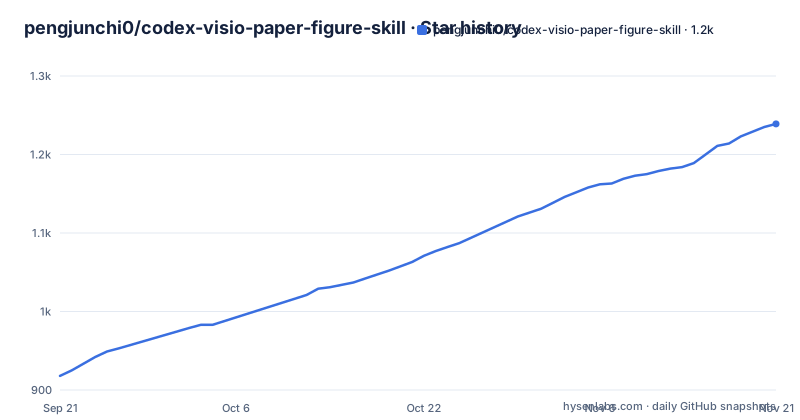
Star history
- pengjunchi0/codex-visio-paper-figure-skill1,239 ★ · +321
| Repository | 2026-09-21 | 2026-11-21 |
|---|---|---|
| pengjunchi0/codex-visio-paper-figure-skill | 918 | 1.2k |
321 Stars in the last 61 days, measured from the daily GitHub snapshot. Compare with other projects
Editorial analysis
Six files, three PowerShell scripts, and no tagged release
The repository structure is given in the README and matches the tree exactly. At the top are README.md, SKILL.md and LICENSE, plus three directories. `agents/` holds a single file, openai.yaml, described as Codex UI metadata. `references/` holds rebuild-guidelines.md, which covers panel decomposition, drawing order, style parameters, export strategy and a verification rubric. `scripts/` holds three PowerShell files: visio_export_formats.ps1 for reusable PNG, SVG, PDF and PPTX export functions, visio_page_tools.ps1 for backup, export and inspecting the `.vsdx` package structure, and visio_rebuild_scaffold.ps1 for writing one-to-one rebuild scripts, with global and panel-local coordinate helpers built in. That is the whole project. The version, v1.1.1, appears in the README text and nowhere else, because there are no GitHub releases to record it, so the version history is a section of prose rather than a tag. The last push to the repository landed on 16 August 2026.
Embedding the reference image counts as failing the job
The central rule is stated before anything else and it is a prohibition rather than a feature. The delivered `.vsdx` should be built from Visio native rectangles, circles, lines, arrows and connectors, with editable text and editable groups, plus natively approximated small charts, heatmaps, node graphs, cubes and stacked plots. What is forbidden is using the whole reference image as the final page content to fake a reconstruction; the reference is a temporary tracing aid, and the finished file should not contain a complete large reference PNG or JPG. The acceptance list repeats it as a check: the main layout must match the reference, modules, titles, numbering, arrows and captions must be present, text must be editable, individual graphic objects must be selectable and modifiable, and no full reference image may serve as the final background. It also requires a backup of the original file, which is a detail most such tools omit.
One backend, and the author says it is not portable yet
The implementation talks to Visio through COM Automation, and the documentation states the consequence plainly: since the author only uses this drawing software, the skill has not been extended to other drawing applications, and anyone working in Drawio or a similar tool is told to modify the corresponding interface and adapt it to their own agent. That is an honest limitation rather than a hidden one, and it makes the project a reference implementation as much as a tool. The recommended environment is Windows with Microsoft Visio, PowerShell, Git, Microsoft PowerPoint for the PPTX export, and Codex Desktop or a Codex environment that can call local files and tools. The formats are produced by different programs, which matters for anyone automating a pipeline: SVG and PNG come from exporting Visio pages, PDF comes from Visio's fixed format export, and PPTX is built by PowerPoint COM as a single-page presentation with the exported SVG page render inserted into it.
Panels are drawn in 0 to 1 coordinates and assert on overflow
Version 1.1.1 is entirely about multi-panel figures drifting, and the mechanism is coordinate discipline rather than better drawing. The recommended flow has four steps: calibrate the whole reference image size and the Visio page size first, then calibrate each main panel's top-left corner, width and height, recording four corner points where necessary, then draw elements inside a panel using 0 to 1 local coordinates instead of hand-written whole-image coordinates, and finally export a preview and check whether submodules escape their parent panel, whether adjacent panels overlap, and whether arrows or text cross unrelated modules. The scaffold script ships the helpers that enforce it: `RectRel`, `TextRel`, `OvalRel` and `LineRel` map local coordinates back to the global reference frame, while `Assert-RelBox` and `Assert-RelPoint` raise an error when a local element leaves the parent panel. The failure the version is named after, a shift appearing in the second half of a complex figure, becomes an exception instead of a rendering artefact.
The rules promise cubes and heatmaps that the roadmap has not built
There is an inconsistency between the core principles and the roadmap. The principles list, among the native shapes the delivered file should be made of, natively approximated small charts, heatmaps, node graphs, cubes and stacked plots. The planned v1.2 section then lists exactly those as future work: more reusable motif helpers such as `DrawCube`, `DrawHeatmap`, `DrawGraph`, `DrawStackedSequence` and `DrawMiniChart`. So the document describes cube, heatmap, node graph and stacked plot support as a property of a qualifying result while scheduling the helpers that would produce it. In practice the two statements can be reconciled, since an agent could draw a heatmap from primitives without a dedicated helper, but the acceptance criteria and the roadmap then measure the same capability against different baselines. The same version also plans a script to read the reference image's dimensions and a shape inventory export to analyse text, colours, positions and grouping in an existing file.
Without Visio installed you can still inspect the package
The environment section draws a line between the full path and the partial one. With Visio present, the skill can rebuild a figure one to one through COM Automation. Without it, you can still do `.vsdx` package structure checks or limited XML modifications, but the documentation says that is not suitable for a complete one-to-one reconstruction. That is a useful distinction because a `.vsdx` is a package of XML parts, so inspecting one on a machine with no Visio is legitimate work, and the `visio_page_tools.ps1` script is the tool for it, combining backup, export and an `-InspectPackage` switch. It is also why the acceptance criteria insist the requested formats be exported from the same saved `.vsdx` and be non-empty: an agent that produced an empty or stale export has not satisfied the contract even if the shapes look right on screen. The page tools combine all three jobs in one invocation:
powershell -ExecutionPolicy Bypass -File scripts\visio_page_tools.ps1 `
  -VsdxPath "C:\path\model.vsdx" `
  -ExportFormats svg,pdf,pptx `
  -OutputDir "C:\path\exports" `
  -InspectPackage
The installed skill is named differently from the repository
Installation is a clone into the Codex skills directory, and the Windows example puts it under a name that does not match the repository: the target is `visio-image-rebuilder` inside the user's profile, so a clone of codex-visio-paper-figure-skill ends up in a directory called visio-image-rebuilder. That name then appears in the example requests, where the skill is invoked by that name, so the identifier a user types is the directory name rather than anything in the repository. After installing, the instruction is to restart Codex or open a new session so the skill is rediscovered, which is a discovery detail worth knowing since a fresh clone is otherwise invisible until it is picked up. The three example requests show the intended range: rebuild a model diagram from a reference image with SVG, PDF and PPTX output, recolour an existing `.vsdx` while keeping the layout editable, and check whether a file is merely an embedded PNG.
Two releases, both about output, and one about failure
The version history is short enough to read in full. v1.0 established the structure, the core rule that a qualifying `.vsdx` must be built from native editable shapes rather than an embedded reference image, the Visio COM drawing scaffold, the package inspection tool and a drawing flow for complex multi-panel figures. v1.1 was entirely about outputs: it added visio_export_formats.ps1, taught the page tools the `-ExportFormats png,svg,pdf,pptx` flag along with `-OutputDir` and `-OutputBaseName`, taught the scaffold to export directly after a rebuild, and wrote the export strategy and acceptance criteria into both SKILL.md and the guidelines. v1.1.1 was entirely about failure: panel calibration in SKILL.md, panel-local coordinates and anti-overlap rules in the guidelines, the four relative helpers plus the two assertion helpers in the scaffold, and an update to the UI metadata and the README to describe the anti-shift and anti-overlap capability.
Editorial conclusion
Judgment: this skill is unusually explicit about what counts as a good result, and the acceptance criteria are the part to read before anything else. Nine checks, of which three matter most: no whole reference image as the final background, text that stays editable, and every requested format exported from the same saved file rather than redrawn. That is a defensible contract for a figure-reconstruction tool, and it is enforced in prose rather than in code, so the reviewer is the agent. The practical limits are equally clear. Visio COM is the only backend, the author says the interface will need adapting for Drawio and similar tools, and PPTX export needs PowerPoint as a separate dependency. Before using it, confirm the reference figure is a diagram rather than a data chart, since the skill itself says charts are better plotted from extracted data, and check that the planned motif helpers your figure needs actually exist in the version you installed.
Frequently asked questions
What does codex-visio-paper-figure-skill do?
It is a Codex Skill that rebuilds reference images, screenshots or generated figures as native, editable Microsoft Visio .vsdx graphics using shapes, text, connectors and groups, then exports PNG, SVG, PDF or PPTX from that same saved file.
Which platforms does the Visio figure skill work on?
Windows with Microsoft Visio, because the drawing path depends on Visio COM Automation, and PowerShell runs the scripts. Microsoft PowerPoint is required for the PPTX export, which is built by PowerPoint COM from the exported SVG. Without Visio you can still inspect the .vsdx package structure or make limited XML edits.
How is the Visio figure skill installed?
Clone or copy the repository into the Codex skills directory, for example into $env:USERPROFILE\.codex\skills\visio-image-rebuilder, then restart Codex or open a new session so the skill is discovered again. Note that the installed directory name is not the repository name.
What kinds of figure does the skill refuse to handle?
It targets model diagrams, architecture diagrams and flowcharts. The README says metric charts, or anything containing real data results, are better handled by a script or by extracting the data and plotting it, and it lists plain image insertion into a Visio page, image retouching, and pure bitmap reproduction as unsuitable.
How does the skill stop multi-panel figures from shifting?
Version 1.1.1 calibrates each panel and draws its contents in 0 to 1 local coordinates. The scaffold provides RectRel, TextRel, OvalRel and LineRel to map those back to global coordinates, and Assert-RelBox and Assert-RelPoint, which raise an error when a local element leaves the parent panel.
Official sources
Add this badge to your README
If you maintain this project, the badge below links readers to this analysis and shows its maintenance status from the daily GitHub snapshot. Paste the markdown into your README; add ?metric=license or ?metric=stars to the image URL for a different field.

[](https://hysenlabs.com/projects/pengjunchi0-codex-visio-paper-figure-skill)Star history chart for your README
[](https://hysenlabs.com/projects/pengjunchi0-codex-visio-paper-figure-skill)Was this useful?