Horizon, a terminal board on an infinite canvas, and the fork its VNC decoder comes from
GPU-accelerated terminal board that puts all your sessions on an infinite canvas
At a glance
- What is it?
- Horizon is an MIT licensed Rust terminal board that keeps shells, coding agents, browsers, and VNC desktops as panels on one infinite canvas. The parts worth reading closely are its pinned VNC fork, the browser surface it shares with agents, and a release channel that sits two months behind main.
- Who is it for?
- Horizon fits a specific person: someone running several coding agents, a browser, and a remote desktop at once, who is willing to configure presets instead of accepting defaults. Check three things before depending on it.
- Can I use it commercially?
- Yes. MIT is a permissive licence: you can use, modify and sell software built on it, as long as you keep its copyright and licence notices.
- Is it still maintained?
- Yes. The repository last received commits 2 days ago.
- What is it written in?
- Mainly Rust, according to GitHub's language statistics.
Answers come from the project's GitHub data, last synced on November 21, 2026, and from our analysis. They are not legal advice.
Star history
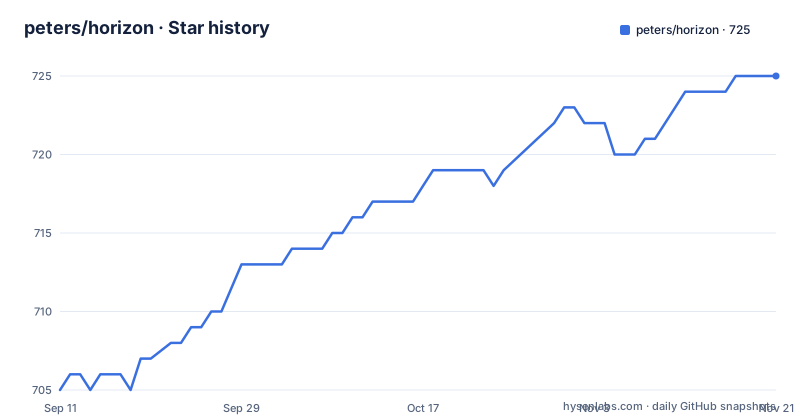
- peters/horizon725 ★ · +20
| Repository | 2026-09-11 | 2026-11-21 |
|---|---|---|
| peters/horizon | 705 | 725 |
20 Stars in the last 71 days, measured from the daily GitHub snapshot. Compare with other projects
Editorial analysis
Five nouns, and ten anchors for a page that writes out three
Horizon describes itself through five nouns and says everything else is a shortcut, a preset, or a panel kind. Canvas is the infinite 2D surface you pan by dragging empty space or swiping with two fingers, and zoom with a pinch or Ctrl+scroll. Workspace is a colour coded cluster with a shared working directory. Panel is one live surface inside a workspace. Preset is a named template for a new panel. Session is a saved board you come back to, switched with Ctrl+Shift+J.
A board looks like a file tree, which is also how the overview draws it:
Session
└── Canvas
    ├── Workspace "Backend"     cwd: ~/projects/api
    │     ├── Shell
    │     ├── Grok
    │     ├── Browser  →  http://127.0.0.1:3000
    │     └── Git Changes
    └── Workspace "Frontend"    cwd: ~/projects/web
          ├── Shell
          └── Claude
The anchor list at the top of the page names ten sections, and three of them carry their text: the model, a five minute walkthrough, and the highlights. Install, keyboard and mouse, configuration, browsing, the VNC section, a browser panel reference, and speech input are named in the list without their write ups following, so how Horizon installs, what the shortcut table covers, and what the config file accepts beyond the path `~/.horizon/config.yaml` have to come from somewhere else.
The VNC decoder comes from a fork pinned to one commit
The workspace manifest does not take the VNC implementation from crates.io. The `vnc` entry is the `vnc-rs` package pulled from `https://github.com/peters/vnc-rs.git` at a fixed revision, `773ec2351241c80bbab88ffedae73f1972e0a4c1`, with a comment explaining that licensed decoder fixes are shared by the native viewer and an optional resize adapter. Anyone building from source needs that fork reachable and that revision present, since a version range cannot resolve it.
That matters because of what sits on top of it. A `device` panel is either a native view of a loopback desktop or a remote desktop reached through an SSH tunnel, and a remote host only works once its key is already trusted, for example by opening it over SSH first. The panel stays read only until you switch Interact on, and that switch sends your mouse and keyboard to that desktop. So the feature that lets you watch a build machine is the same feature that can type into it, and the gate is one toggle rather than a separate permission model.
A browser panel that agents can click, fill, and read traffic from
Browser support is spread across six crates in the workspace: `horizon-browser`, `horizon-browser-cli`, `horizon-browser-control`, `horizon-browser-mcp`, `horizon-browser-protocol`, and `horizon-browser-routines`. On a local machine the page is shared, so you and an agent can navigate, inspect, click, fill, capture network traffic, and hand control back and forth in the same live Chromium, Firefox, or Safari view. Naming a BrowserStack browser or phone in config gives a remote browser that takes the same navigate, click, and fill actions.
The `horizon-browser-mcp` crate is the piece to look at first. An MCP surface attached to a browser profile you are already logged into is a direct path from a coding agent to whatever that profile can reach: authenticated sessions, internal dashboards, saved cookies. The overview describes no permission prompt and no allowlist for that surface, and it does not say whether an agent can reach tabs outside the panel it was handed. Treat a shared browser panel as granting an agent your logged in web surface, not as a screenshot tool.
Ctrl+Shift carries nine shortcuts and the palette takes two prefixes
The app is drivable from the keyboard, and its density shows there. Ctrl+double-click on empty canvas opens a preset picker, and shell and agent presets then ask for a working directory that becomes the workspace cwd. Ctrl+Shift+N adds another panel of the first preset, Shell by default. Ctrl+Shift+K opens the command palette, where `@` filters to panels only and `>` reaches presets and actions, and selecting a panel pans the canvas to it rather than opening anything. Ctrl+Shift+H covers SSH and Tailscale hosts, Ctrl+Shift+J switches saved boards, and Ctrl+Shift+, opens Settings.
Two of those are easy to mix up. Ctrl+Shift+9 fits the workspace into view and changes zoom, while Ctrl+Shift+W jumps back to it without changing zoom. The split is deliberate: fit is for seeing everything, jump is for returning to a framing you already set. The palette also accepts preset aliases, with `gb`, `cc`, `web`, and `gc` offered as examples, so the panel you want is two keys away once those aliases are in memory.
Fit, jump, and detach are three different operations on a workspace
The pitch against tabbed and tiled terminals is that workspaces never hide. If something is off screen you pan, zoom, fit, or search rather than hunting a tab strip. Each workspace carries its own working directory, and arrangement is chosen per workspace from four modes: Default for free dragging, Rows, Cols, and Grid. Detach moves a workspace into its own operating system window, which is the escape hatch when a cluster needs a real window for a modal dialog or a second monitor.
A minimap in the corner keeps the infinite surface navigable, and clicking or dragging it jumps to a region. Sessions sit above workspaces, so closing the app and reopening it restores the session, the layout, the canvas pan and zoom position, and terminal history. That persistence is the reason the app is described as a board that is still there tomorrow, and it is also why on disk state matters. Whatever Horizon writes for a user sits under `~/.horizon`, and the repository itself carries a `.horizon` directory at its root.
Two months of commits sit past the newest tag
Releases are plain semantic versions and the newest one is old. v0.2.5 shipped on 2026-04-11, v0.2.6 on 2026-05-01, and v0.2.7 on 2026-08-02. The workspace manifest still declares version 0.2.7, which matches the newest tag, while the last commit to the tree is dated 2026-10-02. Two months of work are therefore on main with no release cut, and the badge at the top of the README points at the latest release page, so a binary a new user installs is not the code in the repository.
The gaps between tags are uneven too, one month then five then three, which reads like releases happen when a feature set is ready rather than on a schedule. For a tool whose argument is an opinionated agent workspace, the build you get from a package channel is the thing to pin, and the tag is what to compare it against. The tree itself is busy: 713 stars, 29 forks, and 54 open issues, a fork count low enough that most people here are reading rather than shipping patches.
The root carries editor config, publishing config, and app state
The top level of the repository holds more than source. There is `.idea/` for JetBrains projects, `.surge/` for the Surge static publishing tool, and `.horizon/`, the same name Horizon uses for the per user state directory under the home directory. Alongside them sit `AGENTS.md` and `CLAUDE.md`, both instructions for coding agents working in the tree, plus a `.dockerignore` with no Dockerfile among the top level entries. Distribution lives in `packaging/` and `snap/`, and `.cargo/` holds the crate source configuration.
None of that blocks a build, and `snap/` is a real channel rather than an experiment. It does mean the checkout is not a clean library view, and the `.horizon` directory at the root and the one under your home are two different things sharing one name. That is the first place to look when a config change appears not to take effect.
Sixteen crates, a recent toolchain floor, and one lint exception
The sixteen workspace members map closely onto the feature list: `horizon-core`, `horizon-ui`, `horizon-cursor`, `horizon-device`, `horizon-device-vnc`, `horizon-wayland`, `horizon-process-time`, `horizon-browser` with five siblings, `horizon-cloud`, `horizon-cloud-protocol`, and `horizon-cloud-worker`. Two details matter before you build. `resolver = "3"` with `edition = "2024"` and `rust-version = "1.95"` sets a recent toolchain floor, so an older stable compiler will not build it. And four members carry hyphens, `horizon-browser-control`, `horizon-browser-protocol`, `horizon-browser-routines`, and `horizon-cloud-protocol`, where every other crate is a single word, which is the sort of inconsistency that reappears as a different spelling in Rust imports.
The crypto dependencies point at the cloud side: `ring` and `ed25519-dalek` with the `zeroize` feature, next to a `horizon-cloud-worker` crate that also appears as `examples/cloud-worker/`. Lint policy is visible and strict, with `unsafe_op_in_unsafe_fn` at warn and clippy `pedantic` at warn, and exactly one exception, `struct_excessive_bools` set to allow. MIT is the declared licence in both the manifest and the repository.
Editorial conclusion
Horizon fits a specific person: someone running several coding agents, a browser, and a remote desktop at once, who is willing to configure presets instead of accepting defaults. Check three things before depending on it. Whether the browser panel is acceptable as an agent reachable surface for your logged in sessions, since the overview describes no allowlist for it. Whether the pinned `vnc-rs` revision is something your build can fetch and your policy accepts. And which build you actually install, because the package channel trails the main branch by two months. For a single shell or a plain multiplexer, this is a heavier answer than the problem needs.
Frequently asked questions
What is Horizon, the Rust terminal board?
It is described as a GPU-accelerated terminal board that puts all sessions on an infinite canvas, where workspaces group related panels, presets launch them, and a command palette jumps you there. It is MIT licensed, written in Rust, and the shell panels are powered by the Alacritty terminal engine.
Which coding agents does Horizon support?
Seven of them, as first class panels: Grok, Claude Code, Codex, OpenCode, Gemini CLI, KiloCode, and Pi. Session persistence and resume work where the underlying CLI supports it, and title bars show a working indicator plus the session id when one is bound.
Is a Horizon device panel safe to interact with?
A device panel is read only until you turn Interact on, and only then does it send your mouse and keyboard to that desktop. Remote desktops arrive through an SSH tunnel and require the host key to already be trusted, for example by opening the host once over SSH first.
Where does Horizon keep its configuration and sessions?
Settings edits ~/.horizon/config.yaml with the canvas still visible behind it, and that is where you name a BrowserStack browser or phone. Sessions, layout, canvas pan and zoom, and terminal history survive closing the app. The repository also carries a .horizon directory at its root, which is a different thing.
What does the VNC support in Horizon depend on?
The workspace manifest pulls the vnc-rs package from https://github.com/peters/vnc-rs.git at a pinned revision instead of taking it from crates.io, with a comment saying licensed decoder fixes are shared by the native viewer and an optional resize adapter. A source build needs that fork and that exact revision.
How often does Horizon cut a release?
Unevenly. v0.2.5 shipped on 2026-04-11, v0.2.6 on 2026-05-01, and v0.2.7 on 2026-08-02, with the workspace manifest still declaring 0.2.7. The last commit to the tree is dated 2026-10-02, so main sits about two months ahead of the newest tag.
Official sources
Add this badge to your README
If you maintain this project, the badge below links readers to this analysis and shows its maintenance status from the daily GitHub snapshot. Paste the markdown into your README; add ?metric=license or ?metric=stars to the image URL for a different field.

[](https://hysenlabs.com/projects/peters-horizon)Star history chart for your README
[](https://hysenlabs.com/projects/peters-horizon)Was this useful?