The tagline promises Meteor and the build matrix has none
Docker base images for Ruby, Python, Node.js and Meteor web apps
At a glance
- What is it?
- passenger-docker is a family of thirteen Docker base images for Ruby, Python, Node.js and Meteor apps, built on Ubuntu 26.04 with Runit and syslog-ng. The tagline lists four languages, the build matrix covers three of them, and the version scheme, the target registry and the architecture tagging all changed at some point without the page following.
- Who is it for?
- passenger-docker is a sensible base when you want Ruby, Python or Node.js with an init process, a package manager fix and Runit already in place, and a poor fit if you want a minimal image or if your architecture strategy depends on multi-arch manifests, because the architecture is part of the tag. Before you build on it, check three things the page leaves implicit.
- Can I use it commercially?
- Yes. MIT is a permissive licence: you can use, modify and sell software built on it, as long as you keep its copyright and licence notices.
- Is it still maintained?
- Yes. The repository last received commits 5 days ago.
- What is it written in?
- Mainly Shell, according to GitHub's language statistics.
Answers come from the project's GitHub data, last synced on November 14, 2026, and from our analysis. They are not legal advice.
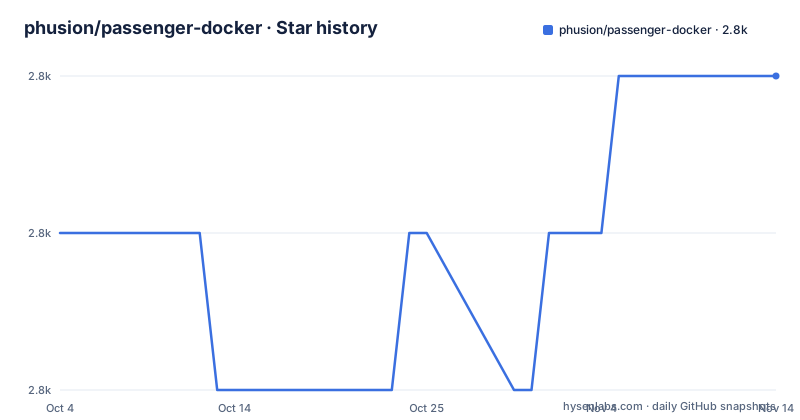
Star history
- phusion/passenger-docker2,818 ★ · +1
| Repository | 2026-10-04 | 2026-11-14 |
|---|---|---|
| phusion/passenger-docker | 2.8k | 2.8k |
1 Stars in the last 41 days, measured from the daily GitHub snapshot. Compare with other projects
Editorial analysis
Thirteen images, three languages, four mentions of Meteor
The title and the description both say the images are for Ruby, Python, Node.js and Meteor web apps. The build matrix says otherwise. Four variables hold the whole list.
SPECIAL_IMAGES := customizable full
CRUBY_IMAGES := ruby33 ruby34 ruby40
PYTHON_IMAGES := python310 python311 python312 python313 python314
MISC_IMAGES := jruby94 jruby100 nodejs
Counting those gives thirteen images: two general ones, three cRuby, five Python and three miscellaneous. No Meteor entry appears in any of the four, and the language support section further down names Ruby, Python and Node.js only, with no Meteor bullet. So the word survives in the one line every visitor reads first and in the image family title, while the thing being built does not include it. The version split also follows those lists rather than a single matrix: three cRuby releases and two JRuby releases get one image each, five Python versions get one image each, and Node.js gets exactly one image for three runtimes.
The architecture is in the tag, and there are two version schemes
Read the build comment and the tagging is explicit about what comes out. Building with a name and version override pushes two tags per image, the pinned version followed by the architecture and a latest tag with the architecture appended, in an example using the version 2.5.1.4. So an image is addressed as a version-architecture pair rather than as a multi-arch manifest, and the word latest is per-architecture too. The switches for this are two variables, BUILD_AMD64 and BUILD_ARM64, each set to 0 to skip that architecture and otherwise defaulting to building both. Meanwhile the default version in the file is 3.2.0, so the two version numbers in the same Makefile are three years apart in scheme, one being a plain three-part release and the other a four-part one. Nothing in the page explains the change, and the newest recorded push to the repository is 15 September 2026.
The registry is picked by an environment variable the page never mentions
The first conditional in the build file decides where images go.
ifeq ($(GITHUB_ACTIONS),true)
REGISTRY = ghcr.io
else
REGISTRY ?= docker.io
endif

NAME ?= $(REGISTRY)/phusion/passenger
VERSION ?= 3.2.0
Inside GitHub Actions the registry is set to the GitHub Container Registry, and everywhere else it falls back to Docker Hub, where the registry variable uses a conditional assignment so a caller can still override it. The page documents only one of the two. Its registry link points at Docker Hub, and it points it at a specific image inside that registry, the full variant, rather than at a list. The link also uses the older registry subdomain form rather than the current one. The result is that a reader following the page never learns a second registry exists, and an image built locally and the same image built by the project's own pipeline end up in different places under different names.
Nginx and Passenger ship switched off
Two of the headline components are disabled in the base. Nginx 1.24 is listed as disabled by default, and Phusion Passenger 6 is disabled by default too, with the reason given in brackets: it starts along with Nginx. So an image you pull does not have a web server running, and Passenger is coupled to Nginx rather than independently enabled. Redis 7.0 and Memcached are in the list as not installed by default as well. What does run is the supervision layer: a correct init process, with a blog post linked about the init process and zombie reaping, syslog-ng, the cron daemon, and Runit for service supervision and management, on top of Ubuntu 26.04 LTS. The page also claims memory efficiency, stating 10 MB in the default configuration for bash, runit, syslog-ng and the rest, with no measurement method given.
One Node image covers three runtimes, Python gets five images
The asymmetry between languages is the interesting part of the support matrix. Node.js 24 is the default, and any version provided by Nodesource is available, currently 20, 22 and 24, all inside a single image. Python gets the opposite treatment: 3.14 is the headline, and 3.10 through 3.13 come from the Deadsnakes package archive, each with its own image. Ruby is per-version again, with 3.3.12, 3.4.10 and 4.0.7 where 4.0.7 is the configured default, and two JRuby releases, 10.0.2.0 and 9.4.14.0, paired with different OpenJDK majors, 21 and 17 respectively. Managing all of that Ruby matrix is RVM's job, and the page has a table of contents entry devoted to the question of why RVM rather than rbenv or chruby, plus another for the default wrapper scripts that switch versions.
Adding an image means editing two shell scripts by hand
The build file says so in a comment attached to the special images list: when adding a cRuby image, also update the Nginx Passenger script and the Ruby finalize script. Those are two files inside the image directory, and nothing enforces the pairing, so a new Ruby version is a three-file edit where one of the files is a shell script inside a Docker build context. Two other mechanisms make the build harder to reproduce from the page. Extra flags can be passed to the build through an environment variable holding a semicolon separated list, with an example exporting a no-cache flag before building everything. And the file detects whether it is running in a terminal, which means the same make invocation takes a different path in an interactive shell than it does in continuous integration. There is also an empty FORCE target and a comment about waits being needed so each Ruby version compiles once per architecture even when building in parallel.
The test harness is Ruby and Vagrant, the deliverable is containers
The root of the repository holds a Gemfile, a locked Gemfile, an RSpec configuration file, a Vagrantfile and a test directory, next to the image directory that holds the actual Dockerfiles. So the images are built and validated by a Ruby toolchain running inside a Vagrant virtual machine, which is a heavier dependency than the shell script in the Makefile would suggest. Alongside that sit a changelog, a code of conduct, a contributing guide, a dockerignore, an editorconfig and a GitHub workflows directory. The page itself is maintained by hand in a way that shows: the table of contents is a separate list of about forty entries anchored with raw HTML name attributes rather than generated from headings, and it includes its own promotional and closing entries, so it is a document that can drift from the sections below it. The same hand-maintenance applies to the reasons the page gives for choosing this base at all. Its five arguments are all about Dockerfile size, the time to write a correct one, the correctness of the base system, the time docker build takes, and download time on redeploys, where the argument is that Docker only downloads the base image once and later deploys transfer only the layers added on top. Every one of those is a claim about the build pipeline rather than about the running application, which tells you what kind of problem this image is solving.
Editorial conclusion
passenger-docker is a sensible base when you want Ruby, Python or Node.js with an init process, a package manager fix and Runit already in place, and a poor fit if you want a minimal image or if your architecture strategy depends on multi-arch manifests, because the architecture is part of the tag. Before you build on it, check three things the page leaves implicit. The language matrix has moved quickly and the Meteor support in the tagline has no corresponding image. The registry switches on whether a GitHub Actions variable is set, so local and CI builds land in different places. And every image is maintained by hand through two shell scripts, so a new language version is a code change rather than a configuration change.
Frequently asked questions
What operating system base does passenger-docker use?
Ubuntu 26.04 LTS, codename Resolute, on top of Phusion's baseimage-docker. It adds an init process chosen to avoid the zombie reaping problem, fixes APT incompatibilities with Docker, and runs syslog-ng, the cron daemon and Runit for service supervision. The most recent recorded push is 15 September 2026 and there are no GitHub releases.
Which Ruby and Python versions do the images ship?
Ruby 3.3.12, 3.4.10 and 4.0.7, with 4.0.7 configured as the default, managed by RVM, plus JRuby 10.0.2.0 on OpenJDK 21 and JRuby 9.4.14.0 on OpenJDK 17. Python is 3.14 by default, with 3.10, 3.11, 3.12 and 3.13 available from the Deadsnakes archive. Each version has its own image, while Node.js 20, 22 and 24 all live in one.
Is Nginx and Passenger running in the base image?
No. Nginx 1.24 is listed as disabled by default, and Phusion Passenger 6 is disabled by default too, with the stated reason that it starts along with Nginx. Redis 7.0 and Memcached are also listed as not installed by default, so the services actually running are the init process, syslog-ng, cron and Runit.
How much memory does the passenger-docker base image use?
The page states that in its default configuration passenger-docker uses 10 MB, covering what bash, runit, syslog-ng and similar consume. No measurement method, test conditions or comparison figure is given for that number.
Where are the passenger-docker images published?
To one of two registries, chosen by the build. When the GitHub Actions environment variable is true the registry is the GitHub Container Registry, otherwise it defaults to Docker Hub, and the name defaults to a path under that registry. The page links Docker Hub only, and does not mention the GitHub Container Registry at all. The registry link it does give points at one specific variant, the full image, rather than at the family of thirteen.
Official sources
Add this badge to your README
If you maintain this project, the badge below links readers to this analysis and shows its maintenance status from the daily GitHub snapshot. Paste the markdown into your README; add ?metric=license or ?metric=stars to the image URL for a different field.

[](https://hysenlabs.com/projects/phusion-passenger-docker)Star history chart for your README
[](https://hysenlabs.com/projects/phusion-passenger-docker)Was this useful?