GameShell: a shell teaching game whose Docker escape hatch still downloads a script
a game to learn (or teach) how to use standard commands in a Unix shell
At a glance
- What is it?
- GameShell turns a normal shell session into a graded exercise by loading a configuration file of missions that get checked as you go. The documented way to avoid running a downloaded shell script is a container, and that container fetches the same script over the network at build time.
- Who is it for?
- GameShell suits an instructor who wants first-year students practising in a real shell rather than a simulator, and a learner who is comfortable with a shell session that is being watched and checked. Three things to know before you hand it to a class.
- Can I use it commercially?
- Yes, with conditions. GPL-3.0 is a copyleft licence: if you distribute software that includes it, you must release that software's source code under the same licence. Running it internally without distributing it does not trigger that obligation.
- Is it still maintained?
- Yes. The repository last received commits 55 days ago.
- What is it written in?
- Mainly Shell, according to GitHub's language statistics.
Answers come from the project's GitHub data, last synced on November 15, 2026, and from our analysis. They are not legal advice.
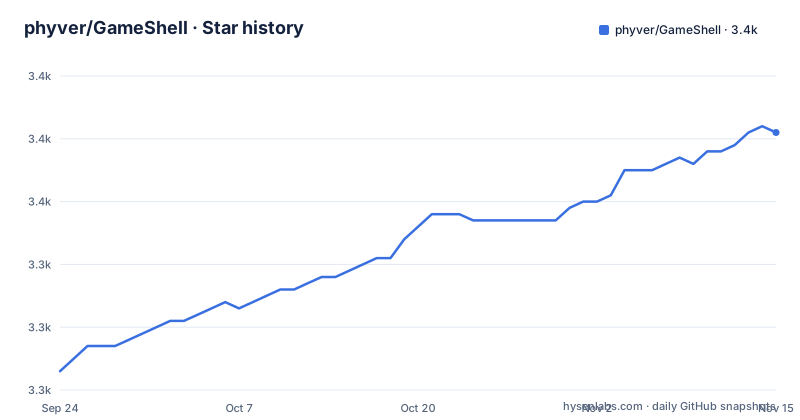
Star history
- phyver/GameShell3,361 ★ · +38
| Repository | 2026-09-24 | 2026-11-15 |
|---|---|---|
| phyver/GameShell | 3.3k | 3.4k |
38 Stars in the last 52 days, measured from the daily GitHub snapshot. Compare with other projects
Editorial analysis
The container alternative still downloads the script it promises to avoid
The quick start tells you to fetch a shell script over the network and run it, and then immediately offers an alternative for anyone who would prefer not running foreign shell scripts on their computer: build a Docker image from a downloaded Dockerfile. The three commands are a directory to make, a `wget` of the Dockerfile from the same moving release URL, then `docker build -t gsh .` and `docker run -it gsh`. What the Dockerfile does with that trust is the interesting part. It installs the dependencies from Debian stable, generates three locales and defaults to `en_US.UTF-8`, creates an unprivileged user, switches to it, and then adds the game with a remote `ADD` instruction pointing at the release URL for `gameshell.sh`, with a comment reading use the latest github version. A `COPY gameshell.sh .` line sits right underneath, commented out, for anyone who generated their own archive locally. So the container path fetches and runs a remote shell archive at image build time, from a tag named `latest`, with no checksum in sight.
Progress is saved into another self-extracting archive
The game state is not in a database or a hidden directory. Quitting with `control-d` or with the command `gsh exit` writes your progression into a new archive called `gameshell-save.sh`, and running that archive is how you resume. The unit of state is therefore a file, in the same self-extracting format as the game itself, sitting next to wherever you ran it. That has consequences worth stating plainly. Move or delete the file and the progression is gone. Copy the game archive to a new machine and you need the save file too. And a save archive is a shell script like any other, so it inherits the same distrust that motivated the container route in the first place. The container documentation is explicit about the other half of the trade: the game will not be saved when you exit the container, and additional flags are needed if you want to run X programs from inside it.
Missions with unmet dependencies are skipped without announcement
The dependency story is two tiered and the second tier is quiet. On Debian or Ubuntu the only dependencies besides `bash` are `gettext-base` and `awk`, the latter usually installed already, and the documented command installs the full set for the game and for missions together:
$ sudo apt install gettext man-db procps psmisc nano tree ncal x11-apps wgetThat list explains what missions reach for: manual pages from `man-db`, process tools from `procps`, `psmisc`, `tree`, `ncal`, an editor in `nano`, and X programs from `x11-apps`. Then the sentence that matters for a classroom: some missions have additional dependencies, and those missions will be skipped if the dependencies are not met. Nothing on the page says the player is told. A learner working through the list on a minimal container could complete every visible objective while a block of content quietly went unplayed, and would have no way to notice except by comparing against a full installation. For teaching use that is worth handling deliberately rather than leaving to chance.
Translations are extracted from the shell sources by the Makefile itself
The internationalisation is a gettext pipeline pointed at the source code rather than a set of hand maintained message files. The Makefile derives the language list from a wildcard over `i18n/*.po` and filters out `i18n/en.po`, which makes English the template. The template itself, `i18n/template.pot`, is regenerated by `xgettext` from two sets of inputs: the shell files, named explicitly as `start.sh`, everything under `scripts/`, `lib/gsh.sh`, `lib/bashrc`, `lib/zshrc` and `lib/gshrc`, plus a second `xgettext` invocation in awk mode with its own keyword flags for `scripts/_gsh_stat.awk`. English is produced with `msgen` from that template, and every other catalogue is refreshed with `msgmerge`. A consequence is visible in that file list: the game configures both bash and zsh, so the strings a translator sees come from the rc files for both shells. Adding a language is an interactive target, not a documented manual step: `new` prompts for a language code, refuses to overwrite an existing catalogue, and creates the new `.po` from the template with `msgcat`.
The self-test generates a numbered archive and drives fifty missions through it
Two Makefile targets check the archive generator, and they are worth reading because they show how the packaging is exercised. Both first run `clean`, then invoke `utils/gameshell_archive.sh` with a name argument of `game shell (1)`, which produces a shell script called `game shell (1).sh`. The script is then launched with a batch of flags and a command string: `gsh systemconfig`, a loop that runs `gsh auto --abort` fifty times reading its input from a here-string, and finally `gsh stat`. The verbose variant differs by one flag, turning on debug output. Two details stand out. The archive name carries a sequence number, so the test is exercising the generator's naming rather than just its contents. And the fifty repetitions of an auto-run mission are there to catch state that leaks between runs, which is the failure mode that matters most in a game that rewrites configuration and measures progress. The in-game statistics command is what the test reads at the end.
The release named latest is over a year older than the last commit
The quick start downloads from a release tag literally named `latest`, described as the latest game archive, and that release is dated 2025-05-27. The repository itself was pushed on 2026-09-21. The tagged releases around it are versioned normally, with v0.6.0 from 2024-11-18 and v0.5.1 from 2024-03-20. So the artifact that every quick start path fetches, the wget of `gameshell.sh`, the wget of the Dockerfile, and the remote `ADD` in the Dockerfile itself, all resolve to an asset dated well before the current tree, and none of them carry a version assertion you could check. That is a deliberate design, since it means students always get the same published archive, but it also means the URL is a moving target with no integrity check attached, and the gap between the asset date and the source date is invisible to anyone following the instructions. The Dev Container path is different in kind: it runs `bash start.sh` from the checkout you have, so it tracks the tree rather than the archive.
The idea is a configuration file of checked missions, not a rewritten shell
The design choice that makes this work is that nothing is emulated. The original idea, credited to Rodolphe Lepigre, was to run a standard shell session with an appropriate configuration file that defined missions which would then be checked in order to progress through the game. So the student is in a real bash session with the real binaries, and the game is a layer that knows what should have happened by now. Two consequences follow from that. Missions can ask for `man` pages, for `ncal`, for an X program, because those are real programs on the machine. And a mission with a dependency that is not installed simply cannot run, which is the skipping behaviour described earlier. The project describes itself as a game for first-year university students and high schoolers, devised for a university context, with two developers and a longer list of mission and translation contributors. Acknowledgement is handled in an unusual way too: the licence section asks you to link to the repository, and suggests a postcard as an alternative thank you.
Editorial conclusion
GameShell suits an instructor who wants first-year students practising in a real shell rather than a simulator, and a learner who is comfortable with a shell session that is being watched and checked. Three things to know before you hand it to a class. Missions whose extra dependencies are absent are skipped without announcement, so a student can finish the game having silently done less than their neighbour. Progress is stored in a self-extracting archive file, which means it lives wherever you put the file and disappears if you clean up downloads. And the container route, offered for people who would rather not run a fetched shell script, still fetches that script during the image build from a moving release URL, and it does not save progress at all. The project is GPLv3 and asks you to link back to it, and it asks for a postcard if you want to acknowledge the work, which is a reasonable thing to do once a year.
Frequently asked questions
What is GameShell?
A game for learning the Unix shell, devised for students at Universite Savoie Mont Blanc. The idea, credited to Rodolphe Lepigre, is to run a standard bash session with a configuration file that defines missions, which are checked in order to let you progress. Nothing is emulated, so students work with the real shell and the real system tools.
how to install gameshell
On Debian or Ubuntu install the dependencies with `sudo apt install gettext man-db procps psmisc nano tree ncal x11-apps wget`, then fetch the archive with `wget https://github.com/phyver/GameShell/releases/download/latest/gameshell.sh` and run `bash gameshell.sh`, which initialises and runs the game from the downloaded archive. The user manual covers installing on macOS and BSD.
Does GameShell work on macOS and BSD?
The project states it should work on any standard Linux system and also on macOS and BSD, with the qualification that fewer tests have been run on the latter systems. The user manual at `doc/user_manual.md` is where the dependency installation instructions for those platforms live.
What languages does GameShell support?
English, French and Italian. You can pick one with the `-L` option, so `bash start.sh -L it` starts the game in Italian, and the application also tries to detect your system language where a translation exists. Translations are gettext catalogues under `i18n/`, with English generated from the template that the Makefile extracts from the shell sources.
Does GameShell save my progress?
Yes, in a file. Quitting with `control-d` or with `gsh exit` writes your progression into a new archive called `gameshell-save.sh`, and running that archive resumes the game where you left off. In the Docker path the game is explicitly not saved when you exit.
Official sources
Add this badge to your README
If you maintain this project, the badge below links readers to this analysis and shows its maintenance status from the daily GitHub snapshot. Paste the markdown into your README; add ?metric=license or ?metric=stars to the image URL for a different field.

[](https://hysenlabs.com/projects/phyver-gameshell)Star history chart for your README
[](https://hysenlabs.com/projects/phyver-gameshell)Was this useful?