Pico CMS: the end of life notice is the first thing in the README
Pico is a stupidly simple, blazing fast, flat file CMS.
At a glance
- What is it?
- A flat file CMS in PHP whose README opens by telling you not to start a new site on it. The install instructions are still coherent, the release history stopped in 2020, and the maintainers name four alternatives.
- Who is it for?
- Pico still makes sense for an existing small site whose content lives in plain Markdown files, provided you accept that no further releases are coming and that you will be maintaining it yourself. It does not make sense for a new project, and the maintainers say so in the first paragraph rather than leaving you to infer it.
- Can I use it commercially?
- Yes. MIT is a permissive licence: you can use, modify and sell software built on it, as long as you keep its copyright and licence notices.
- Is it still maintained?
- Yes. The repository last received commits 130 days ago.
- What is it written in?
- Mainly PHP, according to GitHub's language statistics.
Answers come from the project's GitHub data, last synced on November 14, 2026, and from our analysis. They are not legal advice.
Star history
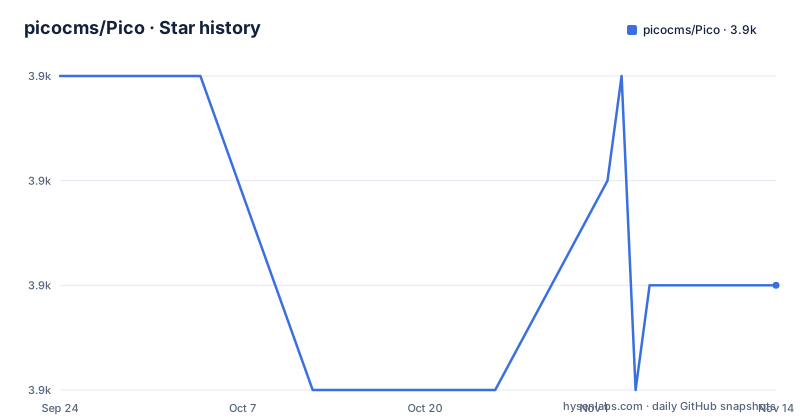
- picocms/Pico3,903 ★ · -2
| Repository | 2026-09-24 | 2026-11-14 |
|---|---|---|
| picocms/Pico | 3.9k | 3.9k |
-2 Stars in the last 51 days, measured from the daily GitHub snapshot. Compare with other projects
Editorial analysis
The README opens with an end of life notice
The first thing on the page is a banner saying development of Pico stopped a long time ago, and that the maintainers advise against using it for new websites. They add three qualifications that matter more than the banner. Existing websites can keep running, and Pico is said to have no known security issues. You will still run into trouble, because Pico was not designed for modern PHP versions. And for anything new, they point at alternatives instead. Two release paths are offered for people who want the last code: the v3.0.0-alpha.2 release, and a branch called pico-3.0, both described as as stable as the last stable releases but never taken through the release process before work stopped. The record backs the notice up, with releases dated 10 July 2020, 29 August 2020 and 24 December 2020, while the last push to master is dated 7 July 2026.
The stated floor is PHP 5.3.6 with dom and mbstring
Requirements are given in one sentence: PHP 5.3.6 or newer, with the dom and mbstring extensions enabled. That floor is the clearest signal of the project's age, and it is also the practical reason the maintainers warn about modern PHP versions. Nothing in the README names a tested maximum, and there is no statement about which PHP 8 releases work. If you inherit a Pico site on a host that has moved to a current PHP, expect to find that yourself rather than finding it in the documentation. The extension list matters too, since a shared host with mbstring disabled will fail in a way that looks like a broken install rather than a missing requirement.
Composer create-project is the recommended install, and the reason is upgrades
Two routes are documented and the first is preferred whenever a shell is available. Download Composer, then let it create the project, which is two commands with no configuration step in between.
$ curl -sSSL https://getcomposer.org/installer | php
$ php composer.phar create-project picocms/pico-composer pico
The stated reason for preferring it is upgrading, and that is the whole argument: a Composer install records dependencies, so a later upgrade is a dependency operation rather than a manual file replacement. A pre-bundled release gives you the same files with none of that history. If you do not have shell access on your server, that decides it for you, and the README says so plainly: if you do not know what SSH access is, use the pre-bundled release.
The pre-bundled release has no setup script and no database
The pitch for this route is a list of things that cannot go wrong. There is no database to create before the installer runs, and no permission step afterwards where a setup script complains about file permissions. You download the latest release, upload every file into a directory under your httpdocs directory, and open it in a browser. The sample content that ships with it is what explains how to create your own, which doubles as the tutorial. The trade is exactly the one the Composer route avoids: no dependency record, so upgrading later means replacing files by hand, and no indication of which version is on disk except whatever you remember.
content/ is the database, and index.php sits next to index.php.dist
The top-level layout explains the design in one look. There is a content/ directory and a content-sample/ directory, an assets/ directory, config/, lib/, plugins/ and themes/, and at the front index.php next to index.php.dist, which is the convention for shipping the shipped-default copy beside the one you are expected to edit. A .htaccess at the root sits with them. There is no database directory, no schema file and no migration folder, which is the practical meaning of flat file here: your posts are files in content/, and deploying the site is copying that directory. Also worth knowing before you read anything else: SECURITY.md and CHANGELOG.md are both at the top level, and the project carries .phpcs.xml and .phpdoc.xml, so the code was held to a style and documentation standard even as releases stopped.
Git deployment is documented only through the Composer route
Managing a site from Git is presented as a workflow rather than a feature, and it is built on the Composer install, not the pre-bundled one. Fork the Composer starter project, clone your fork, add your content and assets, and either edit composer.json for third-party plugins and themes or drop your own into the plugins and themes directories. On the server, clone and install.
$ git clone https://github.com/<YOUR_USERNAME>/<YOUR_REPOSITORY> pico
$ php composer.phar --working-dir=pico install
Updates are a pull plus a dependency update, which is the sequence that makes the Composer choice pay off.
$ git pull
$ php composer.phar update
The README notes you are not required to use GitHub and can point at any Git server, though forking by hand adds steps. Two placeholders are left in the clone URL, so replace the username and repository before running it.
Cloning the source repositories gets you an unstable build
There is a separate path for people working on Pico rather than running it, and it comes with a warning attached. You are pointed at Pico's own repository plus the repositories of the default theme and the PicoDeprecated plugin, with a Composer starter project to tie them together as local packages. The stated consequence is that this gives you the current development version, described as likely unstable and not ready for production use. Note that a pre-bundled release is arguably the safer artifact for an existing site: it is a fixed tarball, whereas the branch tip moves whenever anyone pushes. A .build/ directory at the top level suggests the release output is assembled somewhere inside the tree, and composer.json at the root is the manifest for the packaged form.
Four alternatives are named, and a maintainer is wanted
The end of life notice does two practical things. It redirects new projects to Grav CMS, HTMLy, Automad and Typemill, all of them flat file CMS options, so someone arriving at the page with no history here has somewhere to go. And it asks for a successor: create an issue with brief information about the extent of your commitment, your motivation, and your experience with Pico, PHP and open source development in general. The maintainers say they are happy to help someone take over but are no longer able to maintain the project themselves. If you do take it on, the practical inheritance is the composer.json, the plugins and themes directories, and the obligation to answer the PHP version question the README leaves open.
Editorial conclusion
Pico still makes sense for an existing small site whose content lives in plain Markdown files, provided you accept that no further releases are coming and that you will be maintaining it yourself. It does not make sense for a new project, and the maintainers say so in the first paragraph rather than leaving you to infer it. If you are choosing today, start from Grav, HTMLy, Automad or Typemill instead. If you already run Pico, read the security policy file, confirm your host is still on a PHP version that satisfies the stated floor, and take a copy of the content directory before you touch anything, because there is no release process left to fall back on.
Frequently asked questions
Is Pico CMS still maintained?
No. The README opens with an end of life notice saying development stopped a long time ago and advising against Pico for new websites. The last releases were dated July and December 2020, and the maintainers are actively looking for someone to take the project over.
Is it safe to keep an existing Pico website online?
The maintainers say existing websites can keep using Pico and that it has no known security issues. They add that you will ultimately run into problems, because Pico was not designed for modern PHP versions.
How do I install Pico CMS?
With a shell, download Composer and run php composer.phar create-project picocms/pico-composer pico. Without one, download the latest release and upload every file into a directory under httpdocs. There is no setup script and no database to create either way.
Which PHP version does Pico CMS need?
PHP 5.3.6 or newer, with the dom and mbstring extensions enabled. No tested maximum is named, which is what the maintainers mean when they say Pico was not designed for modern PHP versions.
Can I manage a Pico CMS site from Git?
Yes, through a Composer-based installation: fork the Composer starter project, add your content and assets, then clone it on the server and run php composer.phar --working-dir=pico install. Later updates are git pull followed by php composer.phar update.
What should I use instead of Pico for a new site?
The maintainers name four flat file alternatives in the end of life notice: Grav CMS, HTMLy, Automad and Typemill. For existing Pico sites they point to the v3.0.0-alpha.2 release or the pico-3.0 branch.
Official sources
Add this badge to your README
If you maintain this project, the badge below links readers to this analysis and shows its maintenance status from the daily GitHub snapshot. Paste the markdown into your README; add ?metric=license or ?metric=stars to the image URL for a different field.

[](https://hysenlabs.com/projects/picocms-pico)Star history chart for your README
[](https://hysenlabs.com/projects/picocms-pico)Was this useful?