Eto.Forms draws one Form on four native toolkits and admits its mobile port is incomplete
Cross platform GUI framework for desktop and mobile applications in .NET
At a glance
- What is it?
- Eto.Forms is a .NET user interface framework that targets WinForms, WPF, MonoMac and GTK# from a single codebase, and its README is unusually candid about the gap between that promise and its state: the mobile port is in the works and considered incomplete, the default branch is develop, the license field is left unasserted, and the sample link points at master.
- Who is it for?
- Eto.Forms is worth evaluating if you are writing a desktop application for Windows, macOS and Linux from one codebase and can accept that each platform gets its own native rendering rather than a single look. It is not a mobile framework yet: the README calls the iOS port incomplete, and no amount of abstraction changes that.
- Can I use it commercially?
- Check first. The repository uses a licence we do not classify automatically, so read its LICENSE file before any commercial use.
- Is it still maintained?
- Yes. The repository last received commits 1 day ago.
- What is it written in?
- Mainly C#, according to GitHub's language statistics.
Answers come from the project's GitHub data, last synced on November 15, 2026, and from our analysis. They are not legal advice.
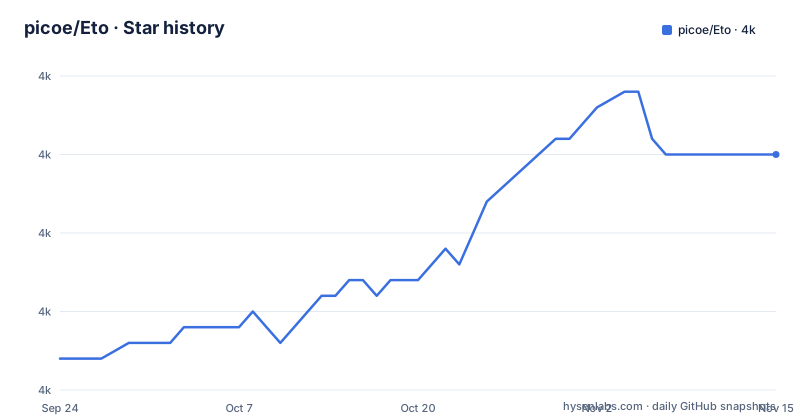
Star history
- picoe/Eto3,985 ★ · +13
| Repository | 2026-09-24 | 2026-11-15 |
|---|---|---|
| picoe/Eto | 4k | 4k |
13 Stars in the last 52 days, measured from the daily GitHub snapshot. Compare with other projects
Editorial analysis
One Form subclass is drawn by four different native toolkits
The pitch is a single user interface codebase that looks native on each platform because it is native on each platform. The desktop story names four toolkits explicitly: Windows Forms, WPF, MonoMac and GTK#. Nothing in the framework tries to make those four look alike; the same `Form` and `Label` types resolve to the closest native control on the machine that runs the app.
The README also names the escape hatch for when that is not enough. For advanced cases you can wrap your common interface in a larger application, or write your own high-level control with a separate implementation per platform, which is the pattern the third-party control packages at the bottom of the README follow. That is the difference between the abstraction and a plugin boundary, and it is the part of the design a project will hit as soon as it needs one control that does not map cleanly.
The mobile port is described as in the works and considered incomplete
The repository description calls Eto.Forms a framework for desktop and mobile applications, and then the README concedes the point directly: there is a mobile and iOS port in the works, but it is considered incomplete. That sentence sits in the same paragraph that lists the four finished desktop toolkits, so the difference between shipped and unfinished is stated rather than implied.
The third-party table complicates the picture slightly. Among the controls listed is Eto.RainbowLoading, described as a control showing the Android loading indicator, with a package for the plain Eto.Forms build and a separate SkiaSharp edition. So an Android-flavoured control exists in the ecosystem while the framework's own mobile story is unfinished, which is the sort of combination that makes it worth asking a vendor which side they support.
Packages live on two feeds and the README does not compare them
Two package sources appear in the badge row at the top: the NuGet package page for Eto.Forms and a MyGet gallery at myget.org/gallery/eto. The repository also carries a `nuget.config` at its root, which is the file that decides which feed a restore actually contacts when you build from source.
What the README does not do is say which feed carries which builds. One is presumably the stable line and the other a prerelease feed, but that mapping is left to the reader, and it matters because the two most recent tags, 2.12.0 from 24 September 2026 and 2.11.0 from March 2026, do not tell you where to look for a given feature. The installation story otherwise lives off this file, in a Quick Start Guide and a Contributing Guide hosted in the project wiki.
The default branch is develop while sample links still point at master
The repository's default branch is `develop`, which is what a plain clone gives you and what a fork's pull request targets by default. Parts of the README are written against the other name: the Eto.Test entry in the applications list links into `tree/master/test/Eto.Test`, a path that only resolves on the older branch.
A smaller mismatch sits in the screenshots section, where the platform labels read Windows via WPF, Mac via MonoMac and Linux via GTK#3, while the description above names the toolkit as GTK# without a version. Neither difference breaks anything, but both are the kind of detail that tells you the README is maintained by hand alongside the code rather than generated from it.
build.cmd, build.sh, a pinned SDK and a workloads manifest
The build surface is wider than a single project file. There is a `build.cmd` for Windows and a `build.sh` for everything else, a `build/` directory holding whatever they drive, a `global.json` that pins the .NET SDK, and a `dotnet-workloads.json` that names the workloads the build expects installed. A `nuget.config` sits beside them to point restores at the right feed.
The samples tree has its own build props and targets, `samples/Directory.Build.props` and `samples/Directory.Build.targets`, so settings can differ between the framework and the samples without either one being edited by hand. The solution file is `samples/Samples.slnx`, and there is a `samples/SdkTest/` project next to the platform folders for Gtk, MacOS, WinForms and Wpf, which is where the per-platform surfaces are exercised. `.gitmodules` and a committed `lib/` directory indicate that some dependencies arrive as submodules rather than as packages.
C# runs an Application loop, F# initializes a platform and calls Show
Two languages, two startup shapes, in the same README section. The C# version subclasses `Form`, sets a title, a client size and a label, then hands the form to `new Application().Run(new MyForm())` from a method marked `[STAThread]`, which is the conventional Windows Forms shape.
using Eto.Forms;
using Eto.Drawing;

public class MyForm : Form
{
	public MyForm ()
	{
		Title = "My Cross-Platform App";
		ClientSize = new Size(200, 200);
		Content = new Label { Text = "Hello World!" };
	}

	[STAThread]
	static void Main()
	{
		new Application().Run(new MyForm());
	}
}
The F# script takes a different route: it loads a Paket-generated script for the Windows platform, calls `Eto.Platform.Initialize(Eto.Platforms.WinForms)` explicitly, then creates the form and calls `form.Show()` with no application object in sight. The platform choice is a runtime decision there, which is the more useful of the two shapes for a script or a test.
Agent instruction files and an unset license field share the root
Several files at the root are about the process rather than the code. There is `AGENTS.md` and `CLAUDE.md` side by side, a `.claude/` directory, a `.codex` entry, plus `CODE_OF_CONDUCT.md`, `.editorconfig`, `.config/` and `.vscode/`. Whatever tooling the maintainers use to work on the framework is checked in for contributors to read.
The licensing needs the same kind of attention. The repository carries a `LICENSE.txt` at its root, while its published license field is left unasserted and the README names no license anywhere in its text. A file that exists and a field that says nothing are two different signals, and for a framework meant to be embedded in commercial applications, reading `LICENSE.txt` is the step that settles it.
Eleven named applications, one of them a commercial CAD package
The applications list is the most concrete evidence of what the framework can carry. It names the MonoGame Pipeline Tool for content management, Manager for accounting, PabloDraw for character based drawing, Notedown for note taking, DWSIM as a chemical process simulator, GEDKeeper v3 for genealogical databases, Visual SEO Studio, two regex tools built on .NET 5, Termission as a serial and TCP terminal with scriptable auto-response, and Eto.Test, which exists to exercise each widget.
The outlier is Rhinoceros 3D, a commercial 3D graphics and CAD application. A modelling package of that class does not take a new cross-platform toolkit on a whim, which says something about how the abstraction holds up when the widgets involved are specialised.
Editorial conclusion
Eto.Forms is worth evaluating if you are writing a desktop application for Windows, macOS and Linux from one codebase and can accept that each platform gets its own native rendering rather than a single look. It is not a mobile framework yet: the README calls the iOS port incomplete, and no amount of abstraction changes that. Before you commit, pick the feed deliberately, because the packages live on both NuGet and a MyGet gallery and the difference between them is not explained anywhere in the README, and check that the build tooling matches your machine, since the repository ships a Windows build.cmd alongside build.sh, pins an SDK in global.json and carries a workloads manifest. If you plan to contribute, remember the default branch is develop, while parts of the README still link to master paths.
Frequently asked questions
What is Eto.Forms?
It is a cross platform user interface framework for .NET that lets one interface codebase run on several platforms by using each platform's native toolkit, so the application looks and behaves natively everywhere. Desktop support covers Windows Forms, WPF, MonoMac and GTK#, with a mobile and iOS port described as in the works and considered incomplete.
Which platforms can Eto.Forms build desktop applications for?
Four desktop toolkits: Windows Forms, WPF, MonoMac and GTK#, with the framework resolving the same Form and Label types to the closest native control on each. For cases that do not map cleanly you can wrap your common interface in a larger application or write a high-level control with a separate implementation per platform.
Where do I get the Eto.Forms packages?
Two feeds appear in the project badges: the Eto.Forms package on NuGet and a gallery on MyGet at myget.org/gallery/eto. The README does not say which builds sit on which feed, and the Quick Start Guide and Contributing Guide are hosted in the project wiki rather than in the repository.
Does Eto.Forms support Android or iOS apps?
Not as a finished platform. The README states there is a mobile and iOS port in the works but considered incomplete, while the desktop toolkits are presented as usable. A third-party control package for an Android loading indicator does exist in the extensions table.
Which applications are built with Eto.Forms?
The README names eleven, among them the MonoGame Pipeline Tool, Manager, PabloDraw, Notedown, DWSIM, GEDKeeper v3, Visual SEO Studio, Termission, two regex tools for .NET 5, Eto.Test for exercising each widget, and Rhinoceros 3D.
Which branch do I clone to build Eto.Forms?
The default branch is develop. Parts of the README still link to master, including the path for the Eto.Test sample application, so a link followed from the README may not resolve on the branch a clone gives you.
Official sources
Add this badge to your README
If you maintain this project, the badge below links readers to this analysis and shows its maintenance status from the daily GitHub snapshot. Paste the markdown into your README; add ?metric=license or ?metric=stars to the image URL for a different field.

[](https://hysenlabs.com/projects/picoe-eto)Star history chart for your README
[](https://hysenlabs.com/projects/picoe-eto)Was this useful?