pingoo: a load balancer, gateway and WAF written in Rust
The fast and secure Load Balancer / API Gateway / Reverse Proxy with built-in service discovery, GeoIP, WAF, bot protection and much more - https://pingoo.io
At a glance
- What is it?
- Pingoo is a load balancer, API gateway and reverse proxy written in Rust, with service discovery, GeoIP, a web application firewall, bot protection and automatic TLS built in. The licence is MIT and the README is explicit that there is no open core split and no enterprise edition, which is the argument the project leads with.
- Who is it for?
- Adopt pingoo if you want to self-host a reverse proxy with the feature set you would otherwise rent from a managed edge, and if you are willing to run a Rust binary that holds your TLS keys and your routing rules. Do not adopt it if you need a battle-tested provider network, because the project competes with services whose value is their global footprint, not their software.
- Can I use it commercially?
- Yes. MIT is a permissive licence: you can use, modify and sell software built on it, as long as you keep its copyright and licence notices.
- Is it still maintained?
- Yes. The repository last received commits 17 days ago.
- What is it written in?
- Mainly Rust, according to GitHub's language statistics.
Answers come from the project's GitHub data, last synced on November 7, 2026, and from our analysis. They are not legal advice.
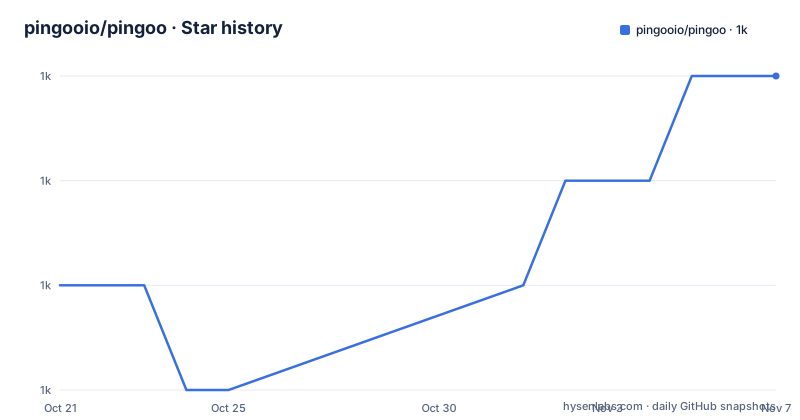
Star history
- pingooio/pingoo1,042 ★ · +2
| Repository | 2026-10-21 | 2026-11-07 |
|---|---|---|
| pingooio/pingoo | 1k | 1k |
2 Stars in the last 17 days, measured from the daily GitHub snapshot. Compare with other projects
Editorial analysis
The argument is about who owns the traffic
The pitch in the README is a complaint first. Open source load balancers and reverse proxies are stuck in the past century with a very slow pace of development, and most of the important features are reserved for enterprise editions, which leads developers to use third-party cloud services, exposing their users' traffic to legal, security and reliability risks.
Pingoo is the answer to that: a modern load balancer, API gateway and reverse proxy that runs on your own servers and already has, or will have soon, all the features you expect from managed services, with a boost in performance and security from reduced latency and, the project says, Rust.
The feature list is what a managed edge actually does. Automatic and post-quantum HTTPS and TLS. Service discovery for Docker and DNS. A web application firewall. Bot protection and management. TCP proxying. GeoIP by country and ASN. Static sites. And much more.
Two of those deserve a note. Automatic TLS with ACME is table stakes for anything running a public site, and post-quantum TLS is unusual to see in a self-hosted proxy, which suggests the project is thinking about the next decade of cryptography rather than only about the current one. GeoIP by country and ASN is what you need for a firewall with geographic rules, and it is also what needs the extra database handling described later.
The licence is MIT, and the last line of the README is a promise rather than a fact about the present: Forever Open Source, no Open Core or Enterprise Edition.
The site is pingoo.io, and there is a launch post linked from the header.
A static site in one command
The quickstart is the shortest thing in the README, and it is worth reading because it shows how little the project asks of you.
# You have a static site in the www folder
$ ls www
index.html
$ docker run --rm -ti -p 80:80 -v `pwd`/www:/var/wwww pingooio/pingoo
# Pingoo is now listenning on http://0.0.0.0
One container, one published port and one volume mount, and the proxy serves the directory. There is no configuration file, no certificate to obtain and no DNS to set up for a first look.
That simplicity is a design statement as much as a convenience. A reverse proxy is the component that has to be running before anything else is useful, and every step of setup is a step where somebody gives up and uses a hosted service instead. The image is published as pingooio/pingoo on Docker Hub, and the same image is what the Makefile tags and pushes in the release flow.
The flip side is that the quickstart tells you almost nothing about the interesting parts, which are the service discovery, the WAF, the bot protection and the certificate automation. Those live in the documentation site at pingoo.io, and that is where a real evaluation has to happen.
The workspace shows the feature boundaries
The Cargo manifest is a single package with four path dependencies, and those paths are the clearest description of the project.
The main package is pingoo at version 0.14.9 with edition 2024, and the binary is also called pingoo, built from pingoo/main.rs. The path dependencies are docker, jwt, captcha and rules, each of them its own directory in the repository and its own crate. The pong/ directory sits alongside them.
The names describe the design. The rules crate is the firewall and the matching engine, the WAF and the bot protection. The jwt crate is the token handling. The captcha crate is the challenge functionality, and it is the one that is not pure Rust, which the Docker build confirms. The docker crate is the service discovery for containerised backends, and it is what makes a Docker label on a container mean something to the proxy.
The release profile is tuned hard, which is the Rust way of saying the performance claim is meant. opt-level 3, strip enabled, lto enabled and codegen-units set to 1, which trades compile time for a smaller and faster binary. The development profile goes the other way: debug is set to 0 and the debuginfo is stripped, because the comment in the file says those settings should improve compile time during development by avoiding linking and including debugger data, and it is apparently faster on machines with slow disks.
That second comment is a small human detail in a manifest that otherwise reads like a performance spec.
The dependency list is the architecture
The workspace dependencies say more about what Pingoo is than the feature list does.
The HTTP stack is hyper with the full feature set, hyper-rustls with http2 and http1, and hyper-util, so it speaks HTTP/2 as well as HTTP/1.1. The TLS implementation is aws-lc-rs, which is the Rust binding to the AWS-LC library and the reason the post-quantum TLS claim is credible rather than aspirational. Certificate issuance is instant-acme, so the automatic HTTPS is an ACME client built in rather than a script around another tool.
Name resolution is hickory-resolver, configured with the https-aws-lc-rs, webpki-roots and tls-aws-lc-rs features, which is the DNS resolver for service discovery and for the DNS records. GeoIP is maxminddb, reading the MaxMind database format directly.
Then the supporting pieces. moka is the cache, with the future feature enabled, so a hot path can await its value. dashmap is the concurrent map, ipnetwork handles address ranges for the firewall rules, mime_guess and chrono handle content types and time, and mimalloc is the allocator, which is a Rust project telling you it cares about memory behaviour. rand is there for the parts where randomness is security relevant, and heapless with serde is a fixed-capacity container for data whose size must be known at compile time.
The whole list is free of heavyweight frameworks and of a database. Pingoo is a proxy that holds configuration in memory and reads files, and the absence of a database is consistent with a tool that is meant to be a few megabytes and start instantly.
The container image is a three-language build
The Dockerfile is a three-stage build, and the reason it is complicated is instructive.
The first stage builds the captcha crate, which is not pure Rust. The stage is node:lts, it installs the Perl EXIF tooling and make, copies the source, and runs the captcha Makefile targets: make exif, make clean, make install_ci and make build. So the captcha functionality depends on a JavaScript toolchain, and the Rust binary depends on its output.
The second stage is the Rust build, on rust:alpine, and the package list tells you what the project needs to link a static binary: lld and mold as linkers, musl and musl-dev for the C library, cmake, clang and clang-dev, openssl, zstd, and upx for executable compression.
The third stage exists for a security reason, and the comment in the file says so. Debian is used instead of the traditional Ubuntu because their root certificates, the ca-certificates package, are certainly more secure. That is a small decision with a real consequence: a proxy that terminates TLS is only as trustworthy as the certificate bundle it validates against, and the project chose the distribution with the better maintained root store rather than the one that matched its base image.
The build also uses the FROM --platform= pattern so that steps can be reused between platforms, with a comment explaining the constraint: cross-compilation is not possible for the build step because not all the build tools support it, so the build runs on the build platform and the artefacts are moved between stages.
Releases, the GeoIP database and the project policy
The Makefile is short and shows the release flow, which is a plain git sequence rather than a tool.
The release target prints the date, checks out main, pushes, tags v$(VERSION) with the version read out of the Cargo.toml, pushes the tags, checks out a release branch, merges main into it, pushes, and checks out main again. The version number is read with a grep and a cut out of the manifest, so there is one place where the version lives.
There is a separate target for the GeoIP database, which compresses the MaxMind file with zstd at the highest compression level, with the checksum flag, and moves the result into the distribution directory. That is a distribution concern rather than a build one, and having it in the Makefile rather than in a script keeps the release steps in one place.
The build target itself compiles the release binary, copies it into the distribution directory and strips it with strip --strip-all -xX. The docker targets build the image, tag it with the version and push both tags.
The contribution policy is short and unusually specific. Please open an issue to discuss your idea before submitting a pull request, and AI-assisted contributions must be disclosed. That second rule matters for a project of this size, because a proxy is security-critical code, and knowing which parts of it were written by a model is exactly the kind of thing a reviewer needs to know.
Security issues go to the same contact address as support, and the README frames the goal in characterful terms: making Pingoo the most secure load balancer and reverse proxy in the universe and beyond.
Editorial conclusion
Adopt pingoo if you want to self-host a reverse proxy with the feature set you would otherwise rent from a managed edge, and if you are willing to run a Rust binary that holds your TLS keys and your routing rules. Do not adopt it if you need a battle-tested provider network, because the project competes with services whose value is their global footprint, not their software. Before you start, read the documentation site, decide whether the automatic ACME certificate flow and the post-quantum TLS option meet your compliance requirements, and check the licensing promise carefully, because the no enterprise edition claim is a promise about the future, not just about the current tree.
Frequently asked questions
What is Pingoo?
It is a modern load balancer, API gateway and reverse proxy written in Rust, with service discovery for Docker and DNS, a web application firewall, bot protection, TCP proxying, GeoIP by country and ASN, static site serving and automatic TLS. The licence is MIT and the project states there is no open core split and no enterprise edition.
How do I try Pingoo quickly?
Run docker run --rm -ti -p 80:80 with your www directory mounted at /var/wwww and the image pingooio/pingoo, as in the quickstart, and the proxy serves the directory on port 80. The deeper features are documented on the project site at pingoo.io.
What is the Pingoo codebase made of?
The main package is pingoo at version 0.14.9 with edition 2024, and it has four path dependencies that are separate crates: docker for container service discovery, jwt, captcha and rules for the firewall and matching engine. The release profile uses opt-level 3, lto and codegen-units 1 for a small, fast binary.
How does Pingoo handle TLS and certificates?
The manifest shows aws-lc-rs for the TLS implementation and instant-acme for certificate issuance, which is what makes the automatic and post-quantum HTTPS claim work. The Docker build uses the FROM --platform pattern and finishes on Debian rather than Ubuntu because the root certificates are considered more secure there.
What are Pingoo's contribution and disclosure rules?
You are asked to open an issue to discuss an idea before submitting a pull request, and AI-assisted contributions must be disclosed. Security issues are reported through the contact address on the project site rather than in a public issue, and the licence is MIT in the LICENSE.txt file.
Official sources
Add this badge to your README
If you maintain this project, the badge below links readers to this analysis and shows its maintenance status from the daily GitHub snapshot. Paste the markdown into your README; add ?metric=license or ?metric=stars to the image URL for a different field.

[](https://hysenlabs.com/projects/pingooio-pingoo)Star history chart for your README
[](https://hysenlabs.com/projects/pingooio-pingoo)Was this useful?