Piskel: a pixel art editor whose npm package is its build output
A simple web-based tool for Spriting and Pixel art.
At a glance
- What is it?
- Piskel is a browser sprite editor written in JavaScript, HTML and CSS, published to npm as a built directory plus two executables. Its build chain, its test script and its contribution policy say more about the project than any feature list would.
- Who is it for?
- Use Piskel when one person draws game sprites on a desktop and needs a GIF out of the browser, and skip it for tablet work, for Brave users with default fingerprinting, or for anyone planning to extend the editor upstream. Before pinning anything, read the version field in package.json rather than the tag list, because it says 0.15.2-SNAPSHOT while the newest release tag is v0.15.0 from 2018-11-25.
- Can I use it commercially?
- Yes. Apache-2.0 is a permissive licence: you can use, modify and sell software built on it, as long as you keep its copyright and licence notices.
- Is it still maintained?
- Yes. The repository received new commits within the last day.
- What is it written in?
- Mainly JavaScript, according to GitHub's language statistics.
Answers come from the project's GitHub data, last synced on November 14, 2026, and from our analysis. They are not legal advice.
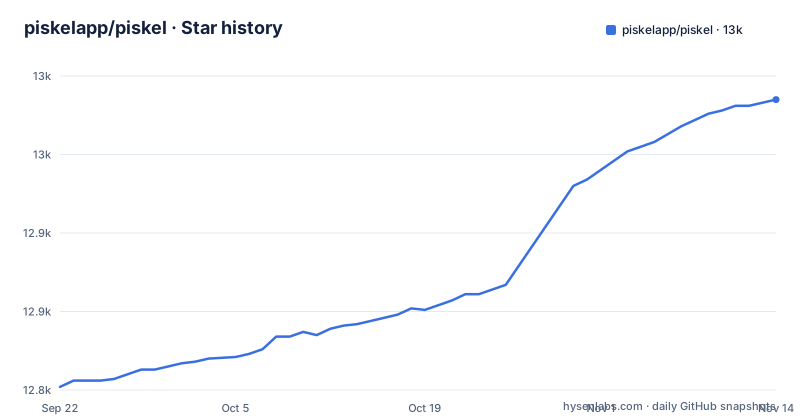
Star history
- piskelapp/piskel12,985 ★ · +183
| Repository | 2026-09-22 | 2026-11-14 |
|---|---|---|
| piskelapp/piskel | 12.8k | 13k |
183 Stars in the last 53 days, measured from the daily GitHub snapshot. Compare with other projects
Editorial analysis
The npm package is the build output, not the source
The piskel package on npm has a two entry `files` array: `dest/prod` and `misc/scripts/piskel-root`. The editor's source is not in it. What you install is a directory of built files plus one script, and `main` points at `./dest/prod/index.html`, an HTML page rather than a JavaScript entry point, because Piskel is an application you open instead of a library you import.
Two executables sit next to that array. `piskel-root` resolves to `./misc/scripts/piskel-root` and `piskel-cli` to `./cli/index.js`. Neither is mentioned in the README, and no flags for the CLI are given anywhere in it. So if your plan is to drive sprite generation from a build pipeline, the surface you can confirm from this repository is the directory layout and the two bin entries; what `piskel-cli` accepts has to be read out of `cli/index.js` yourself.
A build is three commands, and start rebuilds every time
Building the editor is three stages rather than one, and the scripts show the order:
"build": "npm run build:sprites && vite build && node scripts/partials.js",
"start": "npm run build && node scripts/serve.js",
"start:test": "npm run build && node scripts/serve.js --test",
`build:sprites` runs `node scripts/sprite.js`, the bundling step is `vite build`, and `node scripts/partials.js` runs after the bundle already exists. Nothing is served until all three finish.
The `start` script pays that cost on every invocation, because it builds first and calls `node scripts/serve.js` afterwards. `start:test` is the same chain with a `--test` flag handed to the server script. From a fresh clone, expect sprite generation and bundling to complete before anything appears in a browser, and expect that wait to repeat on the next start as well.
npm test can exit green over red unit tests
Read the separator in the test script. Karma runs the unit suite, Playwright runs the end to end suite, and the two are joined with a semicolon rather than `&&`:
"test": "npm run unit-tests; npm run e2e",
"unit-tests": "karma start",
"e2e": "npx playwright test",
A shell reports the exit status of the last command it runs, so a failing Karma run is simply followed by a Playwright run, and the suite can report success with red unit tests behind it.
Three neighbouring scripts tell you where the project draws that line. `unit-tests:watch` forwards `--auto-watch --no-single-run` to Karma, `e2e:interactive` forwards `--ui` to Playwright's runner, and `test-ci` does not use either, instead shelling out to `run-test-ci.sh` at the repository root. The version hook repeats the same combination, since `preversion` runs `npm run lint && npm test && npm run build`, so a release depends on the combined exit code rather than on Karma alone.
Brave is supported only with canvas fingerprinting switched off
Browser support is four entries: Chrome, Firefox, Edge and Brave, each at its latest version. Brave carries the only condition attached to any of them, and it is a user side switch rather than a fallback. The editor works in Brave only if canvas fingerprinting is disabled, with a wiki page given over to that subject.
The README does not say what happens when the setting is left on: no warning, no refused start, no degraded feature, and no name for the check that detects it. A team standardising browsers has to carry the instruction itself, and the person who trips over it sees behaviour the project never describes in writing.
The rest of the runtime picture is short. Piskel is built in JavaScript, HTML and CSS with no framework named as its base, and the README notes that jQuery is used only sporadically in the application. The rest of the dependency list is single purpose: spectrum for the colour picker, gifjs for animated GIF output in web workers, a modified SuperGif for importing GIFs, jszip for zip files, and canvas-toBlob as a shim.
No mobile support, stated in one line
There is no support for mobile. That is the whole of the mobile section, and its length matters less than what surrounds it: every other part of the project assumes a desktop browser. The support list names desktop engines, the offline builds are desktop applications, and the contribution workflow is a Node toolchain with a bundler, a linter and two test runners.
No fallback is offered anywhere to soften that. There is no touch gesture set, no reduced layout, no read only mode and no separate mobile build target in the repository root or the README. If sprite work happens on a tablet or a phone, this is a stop rather than an inconvenience, and installing the desktop build does not change it.
The consequence lands on who does the drawing. Illustration in a game is production work done by a person, not a review step, so the editor has to exist on the machine where that person sits. Teams that hand sprites to contractors on their own laptops inherit the browser list too, Brave and its fingerprinting switch included.
Desktop builds are npm scripts, installers live on a wiki page
The offline story is three npm scripts:
npm run build:desktop
npm run build:mac
npm run start:nw
`build:desktop` runs the linter, then the build, then `node scripts/desktop.js`. `build:mac` repeats those three steps and hands `--platform=macos` to the same script. `start:nw` builds and then runs `nw`. One platform flag exists in package.json.
For anyone working out how to install Piskel on a given machine, that is where the answer stops. The README says offline builds are available and points to a dedicated wiki page about desktop applications. It publishes no installer, no checksum, no Windows or Linux build command and no update path, and the npm package is not one either, since its `files` array ships `dest/prod` and a script.
Tags stopped in 2018 while master kept moving
The release list ends in 2018: v0.15.0 on 2018-11-25, v0.14.0 on 2018-03-04, v0.13.0 on 2017-10-22. The repository is not archived, its default branch is master rather than main, and the last push was on 2026-11-02. The version field in package.json reads `0.15.2-SNAPSHOT`, which is the more useful signal: work on master has moved past the last tagged release.
Two script chains show how a version leaves the building. `release` builds and then runs `node ./bin/copy-to-piskel-website`, and `release-piskel-web` runs the same build and then `node ./bin/copy-to-piskel-web`. The script names match the homepage and the editor used at piskelapp.com. Publishing to npm happens later, in `postversion`, which runs `git push && git push --tags && npm publish` behind the `preversion` lint, test and build chain.
So judge freshness by the version field, not by the last GitHub release. A contributor with a feature in mind should also read the contribution policy first, since pull requests that change the user experience are on the list of changes the project says it is unlikely to review.
Editorial conclusion
Use Piskel when one person draws game sprites on a desktop and needs a GIF out of the browser, and skip it for tablet work, for Brave users with default fingerprinting, or for anyone planning to extend the editor upstream. Before pinning anything, read the version field in package.json rather than the tag list, because it says 0.15.2-SNAPSHOT while the newest release tag is v0.15.0 from 2018-11-25.
Frequently asked questions
What is Piskel used for?
Piskel is an easy-to-use sprite editor for creating game sprites, animations and pixel art. It is the editor used at piskelapp.com and runs in a desktop browser.
How do I install Piskel?
The README points to a dedicated wiki page about desktop applications and says offline builds are available. In the repository, npm run build:desktop builds one, and npm run build:mac passes --platform=macos to the same desktop script.
Can you download Piskel?
Offline builds are available, with details in the wiki page on desktop applications rather than in the README. The npm package publishes dest/prod and misc/scripts/piskel-root, so it is the built application and a script, not a desktop installer.
Can I use Piskel on an iPad?
No. The README states there is no support for mobile, and the supported browsers are Chrome, Firefox, Edge and Brave at their latest versions.
How do I animate using Piskel?
Animation is one of the things the editor makes, alongside game sprites and pixel art. Animated GIF output goes through gifjs, which generates animated GIFs in JavaScript using webworkers, and a modified SuperGif handles importing existing GIFs.
What is Piskel art?
Piskel describes itself as a simple web-based tool for spriting and pixel art, built purely in JavaScript, HTML and CSS. The repository is licensed under the Apache License, Version 2.0, copyright 2017 Julian Descottes.
Official sources
Add this badge to your README
If you maintain this project, the badge below links readers to this analysis and shows its maintenance status from the daily GitHub snapshot. Paste the markdown into your README; add ?metric=license or ?metric=stars to the image URL for a different field.

[](https://hysenlabs.com/projects/piskelapp-piskel)Star history chart for your README
[](https://hysenlabs.com/projects/piskelapp-piskel)Was this useful?