OpenUSD: the scene interchange system whose Apple framework build is still experimental
Universal Scene Description
At a glance
- What is it?
- OpenUSD is the Universal Scene Description system that PixarAnimationStudios develops in C++, a time-sampled scene format meant for interchange between graphics applications. The build story is thorough on Linux, where CentOS 7 is named as the primary platform, and thinner wherever Apple frameworks are involved, because that path is labelled experimental on the page itself.
- Who is it for?
- Choose it when you need one scene format that several graphics applications can read and you are willing to compile it. Do not expect a turnkey install, because build_usd.py downloads and builds the dependencies itself and the tested version matrix lives in VERSIONS.md rather than in the script.
- Can I use it commercially?
- Check first. The repository uses a licence we do not classify automatically, so read its LICENSE file before any commercial use.
- Is it still maintained?
- Yes. The repository last received commits 1 day ago.
- What is it written in?
- Mainly C++, according to GitHub's language statistics.
Answers come from the project's GitHub data, last synced on November 14, 2026, and from our analysis. They are not legal advice.
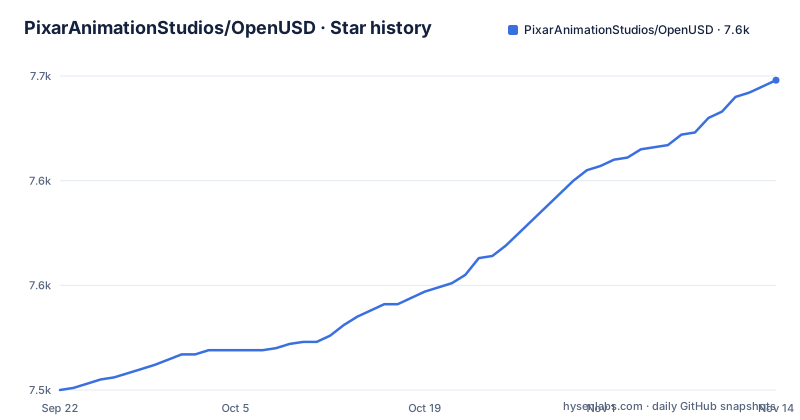
Star history
- PixarAnimationStudios/OpenUSD7,648 ★ · +148
| Repository | 2026-09-22 | 2026-11-14 |
|---|---|---|
| PixarAnimationStudios/OpenUSD | 7.5k | 7.6k |
148 Stars in the last 53 days, measured from the daily GitHub snapshot. Compare with other projects
Editorial analysis
build_usd.py fetches your dependencies, and the install directory had better be outside the clone
The stated simplest route is a supplied script that downloads the required dependencies, builds them, and installs them alongside USD into a directory you name. You get the source with git, then point the script somewhere else:
> git clone https://github.com/PixarAnimationStudios/OpenUSD
Cloning into 'OpenUSD'...> python OpenUSD/build_scripts/build_usd.py /path/to/my_usd_install_dirRun with its default behavior it builds the USD core libraries, Imaging, and USD Imaging. Two details decide how much trouble that line saves you. The script is structured with an out-of-source build in mind, and installing into the directory where the repository was cloned is explicitly called untested, so a same-directory install is on you. And every dependency version it resolves is hidden inside that one command, since nothing in it names a version. VERSIONS.md carries the version information, and BUILDING.md has the examples for driving cmake directly when the script defaults are not what you want.
Three required dependencies, and the whole imaging stack is optional
The required set is short: a C or C++ compiler, CMake, and Intel TBB. Everything past that belongs to an individual component, and those components can be disabled at build time. Imaging and USD Imaging require OpenSubdiv and can optionally use OpenEXR, OpenImageIO, OpenColorIO, OSL and Ptex. Python bindings require Python. usdview requires the bindings plus a Qt binding and PyOpenGL. The consequence is a build that grows or shrinks by decision. A default run gives you core, Imaging and USD Imaging, and passing --no-python to build_usd.py skips Python, PyOpenGL and PySide in one move. The trade is that usdview, the viewer, is a Python program, so a --no-python build has no viewer until you build the bindings later.
usdview is the component that drags PySide and PyOpenGL into the build
Look at what the viewer costs. usdview requires the Python bindings, PySide6 or PySide2, and PyOpenGL, which means a Qt binding is not an optional nicety for that component but a requirement, and PyOpenGL is called out separately again under prerequisites. Prerequisites also split by compiler: gcc, Xcode, and Microsoft Visual Studio are the three named C++ compilers. On macOS there is an extra step before the script runs, namely running xcode-select to ensure the command line developer tools are installed, and on Linux the same build_usd.py invocation is used. If your plan was to build USD for use inside an existing application that already embeds its own graphics stack, installing Qt on top of that is the step most likely to surprise you, and the page gives no version guidance for the Qt packages beyond the tested list in VERSIONS.md.
Cross compiled iOS and visionOS builds ship libraries only, with no Python and no tools
Embedding USD in an app on an Apple platform is done from a macOS system by cross compiling, and the build is restricted to libraries that can be embedded in an application for the target platform. A monolithic build can be helpful when embedding. The commands differ from the desktop case only by flags:
> python OpenUSD/build_scripts/build_usd.py --build-target iOS --build-monolithic /path/to/my_usd_install_dir> python OpenUSD/build_scripts/build_usd.py --build-target visionOS --build-monolithic /path/to/my_usd_install_dirThe limitation fits in one line: these builds do not support Python bindings or command line tools. What you get for a target platform is a library, not a toolkit. There is no usdview on an iOS or visionOS build, no Python to script against, and none of the command line entry points exist there. Anyone planning a pipeline that inspects scenes with usdview on the desktop and ships the same logic inside an app is looking at two different builds.
The Apple framework path is flagged experimental and cannot produce a universal macOS framework
Framework builds for Apple platforms are optional, enabled with the --build-apple-framework flag, and the note on them is unambiguous: the feature is experimental and may change how it functions in future OpenUSD versions. Four constraints come with it. Framework builds are on by default for iOS and visionOS targets and optional for macOS. They require monolithic builds. A universal macOS framework is not supported, so you generate the architectures separately and lipo them together afterwards. And to consume it you add OpenUSD.framework to your Xcode project, set it to Embed and Sign as recommended, and configure the Xcode SYSTEM_HEADER_SEARCH_PATHS to point at the headers, for example $(SRCROOT)/OpenUSD.framework/Headers. A combined XCFramework of multiple targets is also supported, driven by build_scripts/apple_utils.py with its xcframework subcommand, so the assembly work is yours on both paths.
CentOS 7 is the primary platform, and the tested matrix lives in a file
The platform story starts with an honest sentence: USD is primarily developed on Linux platforms, specifically CentOS 7, but is built, tested and supported on macOS and Windows. Beyond those three, libraries can be built for embedding in iOS and visionOS apps, and USD can be built to run in a WebAssembly virtual machine for use on the web or in other runtime environments such as Node.js. So the platform list is wide and the development baseline is old, which is the combination to weigh. Tested versions are printed nowhere in the command line above, because VERSIONS.md is where the explicitly tested versions and the third party library and application versions live. On a distribution CentOS 7 never saw, that file rather than the build script tells you whether your compiler and CMake are in the tested set.
dev is the default branch while releases carry date-based names, and the license is unstated in metadata
Two administrative details decide what you actually get. The default branch is dev, and the build status table covers both dev and v26.11 through the same buildusd.yml workflow, while the published releases are named by date, v26.05, v26.08 and v26.11.1, the last from 2026-10-21. So a plain clone gives you dev rather than the newest tag, and the two move on different clocks. Licensing needs the same kind of attention. The license field on the repository is left as NOASSERTION, so there is no one-line answer there, and the tree holds LICENSE.txt, NOTICE.txt, a SECURITY.md for reporting security issues, CHANGELOG.md, CODE_OF_CONDUCT.md and CONTRIBUTING.md. Two contributor licence agreements sit there too, USD_CLA_Corporate.pdf and USD_CLA_Individual.pdf, so read which one you are signing rather than assuming a single permissive licence applies.
Editorial conclusion
Choose it when you need one scene format that several graphics applications can read and you are willing to compile it. Do not expect a turnkey install, because build_usd.py downloads and builds the dependencies itself and the tested version matrix lives in VERSIONS.md rather than in the script. Before you start, read VERSIONS.md and BUILDING.md, confirm your platform combination is on the tested list, and if you need the Apple framework, know that it is experimental and that cross compiled iOS and visionOS builds carry no Python bindings and no command line tools.
Frequently asked questions
What is OpenUSD used for?
USD is an efficient, scalable system for authoring, reading, and streaming time-sampled scene description for interchange between graphics applications. The source is C++; the README links user and API documentation on openusd.org, and the repository carries VERSIONS.md and a BUILDING.md for advanced configuration.
how to install openusd
Clone the repository, then run python OpenUSD/build_scripts/build_usd.py /path/to/my_usd_install_dir, which downloads, builds and installs the dependencies along with USD. With default behavior it builds the core libraries, Imaging and USD Imaging, and the install directory should be outside the clone because in-tree installs are untested.
Who owns OpenUSD?
The repository lives under PixarAnimationStudios on GitHub and the site is openusd.org. Two contributor licence agreements ship in the tree, USD_CLA_Corporate.pdf and USD_CLA_Individual.pdf, so which one applies depends on whether you contribute as an organisation or as an individual.
Is OpenUSD free?
The repository record lists the license as NOASSERTION, and the tree carries LICENSE.txt, NOTICE.txt plus USD_CLA_Corporate.pdf and USD_CLA_Individual.pdf. No price for the software is stated on the project page.
what does openusd stand for
Universal Scene Description, abbreviated USD. It is a system for authoring, reading, and streaming time-sampled scene description so graphics applications can exchange scenes with each other.
Official sources
Add this badge to your README
If you maintain this project, the badge below links readers to this analysis and shows its maintenance status from the daily GitHub snapshot. Paste the markdown into your README; add ?metric=license or ?metric=stars to the image URL for a different field.

[](https://hysenlabs.com/projects/pixaranimationstudios-openusd)Star history chart for your README
[](https://hysenlabs.com/projects/pixaranimationstudios-openusd)Was this useful?