Notebook Intelligence runs four provider adapters and borrows Claude Code for chat
A JupyterLab extension supporting Claude Code, Copilot, Ollama, and OpenAI-compatible LLMs, with MCP, skills, plugins, and notebook agents.
At a glance
- What is it?
- Notebook Intelligence is a JupyterLab extension with chat, inline editing and completion across several providers. Its Claude mode uses Claude Code for the chat panel and reports estimated cost only in supported configurations.
- Who is it for?
- Adopt Notebook Intelligence if you want one chat surface across Copilot, a self-hosted OpenAI-compatible endpoint and local Ollama models, and you are willing to keep Node.js installed for the Claude and MCP paths. Do not adopt it expecting a single Claude story, because the chat panel and the inline features reach Anthropic by two different routes.
- Can I use it commercially?
- Yes, with conditions. GPL-3.0 is a copyleft licence: if you distribute software that includes it, you must release that software's source code under the same licence. Running it internally without distributing it does not trigger that obligation.
- Is it still maintained?
- Yes. The repository last received commits 1 day ago.
- What is it written in?
- Mainly Python, according to GitHub's language statistics.
Answers come from the project's GitHub data, last synced on November 15, 2026, and from our analysis. They are not legal advice.
Star history
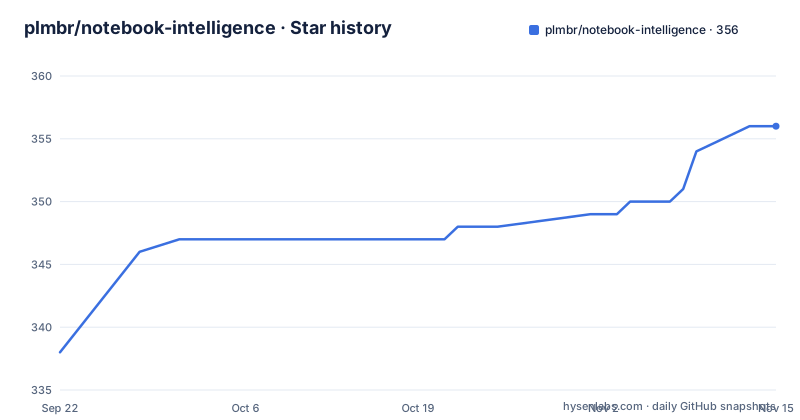
- plmbr/notebook-intelligence356 ★ · +18
| Repository | 2026-09-22 | 2026-11-15 |
|---|---|---|
| plmbr/notebook-intelligence | 338 | 356 |
18 Stars in the last 54 days, measured from the daily GitHub snapshot. Compare with other projects
Editorial analysis
Four provider adapters, and Claude is deliberately not one of them
Notebook Intelligence is a JupyterLab extension that adds chat, inline edit, auto-complete and an agent able to drive notebooks to whatever model you already pay for. The provider list is short and specific: GitHub Copilot, an OpenAI-compatible endpoint, a LiteLLM-compatible endpoint, and local Ollama models.
Anthropic Claude is not on that list as a provider adapter. It is reachable, but through a separate mode described later in this article, which is a design decision rather than an omission: Claude arrives with its own CLI, its own tool set and its own settings model, and pretending otherwise would hide where the data goes.
One more concept shapes everything else. Chat participants are personas you address with an @mention inside the panel, such as @workspace or @mcp, and each one routes the request to a specific tool surface. So the same chat box can address the notebook workspace or an MCP server, and the routing is explicit rather than inferred.
Claude mode splits chat panel from inline features, on purpose
In Claude mode the extension uses the Claude Code CLI for the chat panel and Claude models through the Anthropic API for inline chat and auto-complete suggestions. The reason is capability rather than convenience: routing the chat panel through the CLI is what brings Claude Code's tools, skills, MCP servers and custom commands into JupyterLab.
The distinction between the two is easy to miss. The Anthropic API at api.anthropic.com is the HTTPS endpoint the extension calls directly for the two inline features. Claude Code is Anthropic's local CLI agent, and the extension shells out to it for the chat panel; that CLI talks to Anthropic itself.
Configuration in the settings dialog is correspondingly split. Chat model and auto-complete model are chosen separately, setting sources can be user, project or both following Claude Code's own convention, and tool activation lists Claude Code tools, which are always on, alongside Jupyter UI tools that the extension provides itself, such as authoring notebooks and running cells. An API key and a base URL can point at Anthropic or at a self-hosted endpoint.
The dollar figure appears only where the pricing can be defended
Show turn usage is off by default. When you switch it on, every completed turn ends with a one-line italic footer giving that turn's duration and token counts.
A cost figure in dollars is a separate decision. It appears only when the extension is running against a direct Anthropic API key on Anthropic's own endpoint. The reason given is arithmetic rather than caution about features: the SDK prices from the CLI's built-in public list rates, and those rates are not the marginal cost on a subscription login, nor are they the rate on a custom base_url.
That is a small feature and an unusually honest one. Token counts and duration are always knowable, so they are always shown; a money number computed from list prices is a fiction in two of the three setups, so it is omitted. If you budget by turn, the count and the duration are the numbers to instrument, and the provider's own dashboard is the place to reconcile the bill.
Model fallback resolves by version inside a tier, not alphabetically
With no model selected, the chat model resolves to the newest Sonnet and auto-complete to the newest Haiku. Which Sonnet or Haiku that is gets decided against the model list fetched from the configured endpoint, not against an identifier compiled into the extension.
The fallback rule for a bad identifier is the detail worth knowing. If a configured ID no longer exists, resolution falls back within the same tier by version rather than alphabetically, so an ID like claude-sonnet-99 resolves to the newest Sonnet rather than to whatever sorts last.
Alphabetic fallback is the obvious implementation and a bad one: an invented future version number would resolve to a model nobody has, and a typo in the middle of the string would resolve to an unrelated tier. Version-ordered fallback inside a tier keeps a stale configuration pointing at something that exists and is in the same family, which is usually the intent behind a pinned ID anyway.
Rulesets, skills and plugins are three different ways to change behaviour
Three mechanisms inject context or behaviour into the agent, and they are not interchangeable.
A ruleset is markdown in ~/.jupyter/nbi/rules/, injected into the system prompt to enforce conventions, coding standards or domain rules. A skill is a directory under ~/.claude/skills/, or under a project's .claude/skills/, holding a SKILL.md plus helper files, which Claude can invoke like a callable plugin scoped to a workspace. A Claude plugin is packaged for claude plugin install and distributed through a marketplace, typically a GitHub repository publishing a manifest of plugins. That last one is explicitly distinct from the extension's own labextension, and plugins run inside Claude Code sessions rather than inside JupyterLab.
The separation matters if you are choosing where a rule belongs. Rulesets apply to every request the extension makes. Skills and plugins apply to Claude Code sessions, so they follow you into the CLI as well as into the notebook, at the cost of only taking effect when the CLI is the thing talking.
Node.js shows up in three places, and the install is two commands
The requirements are Python 3.10 or newer, JupyterLab 4.x, and Node.js. The last one is not optional dressing: it is required for Claude mode because of the Claude Code CLI, for ACP agent mode because that mode launches its adapter with npx on every start, and for MCP servers that launch through npx. A fresh virtualenv or conda environment is recommended so the extension does not collide with system Python.
Installation is two commands:
pip install notebook-intelligence
jupyter lab     # restart JupyterLab if it was already running
After the restart, open the NBI icon in the left sidebar, open settings from the gear icon in the chat panel or from Settings, then sign in: a click for Copilot, a pasted API key for an OpenAI- or LiteLLM-compatible endpoint, a local daemon address for Ollama, or the Claude mode toggle. Type a message and press Enter. An empty panel or a login that does nothing is the documented failure case, and the troubleshooting page in docs/ is where the project sends you.
pyproject pins hatchling below 1.32 and jupyter_server at 2.21
The build configuration is unusually honest about why each pin exists, which makes it a good place to see the project's real constraints.
The build backend is pinned to hatchling>=1.5.0,<1.32 because hatchling 1.32.0 made BuildHookInterface generic over two type parameters while hatch-jupyter-builder still subclasses it with one. Anything at or above 1.32 therefore breaks build_sdist and build_wheel at import time with a TypeError about too few arguments. The comment says to remove the pin once hatch-jupyter-builder catches up.
The runtime floor on JupyterLab is 4.6.2, chosen to pick up two XSS fixes, and jupyter_server is held at 2.21.0 or newer for a reason that reaches into this project's own code: 2.21.0 stops 5xx request logging from echoing token-bearing Referer header values into the server log, and the comment notes that the extension's own handlers can trigger those requests. That is a leak into a log file rather than into a response, and it is the sort of thing most projects leave undocumented.
GPL-3.0, a prerelease tag, and a doc copy that stops mid-sentence
The extension is GPL-3.0, declared the same way in the Python project metadata and the TypeScript package, and the repository carries LICENSE, PRIVACY.md, SECURITY.md, CHANGELOG.md and RELEASE.md beside it.
Release cadence is fast and the current tag is a prerelease. Version 6.0.0 shipped on 2026-09-23, 6.1.0 on 2026-09-26, and 6.2.0a1 on 2026-09-29, with the package version written 6.2.0-a1. The last push landed on 2026-09-29. Upgrading weekly is a reasonable assumption here, and pinning to a prerelease is a decision you make deliberately rather than one the project makes for you.
The code is a hybrid in a way the file tree makes obvious: a Python package, a TypeScript labextension built with tsc through jlpm, schema files, jest and ui-tests directories, a webpack config and a yarn.lock. setup.py is a one-line shim that hands off to setuptools.
One gap in the visible documentation: the README copy available here stops mid-paragraph inside the model defaults discussion, so the sections that follow it, agent mode, ACP agent mode, Chatbook, cell output actions, notebook toolbar generation, kernel-aware notebooks and the MCP configuration examples, exist in the table of contents but their detail is not visible. The documentation site at nbi.plmbr.dev is where the rest lives.
Editorial conclusion
Adopt Notebook Intelligence if you want one chat surface across Copilot, a self-hosted OpenAI-compatible endpoint and local Ollama models, and you are willing to keep Node.js installed for the Claude and MCP paths. Do not adopt it expecting a single Claude story, because the chat panel and the inline features reach Anthropic by two different routes. Before enabling Claude mode, check that the Claude Code CLI is on PATH and decide whether subscription login is acceptable, since the cost figure disappears in that case.
Frequently asked questions
What does Notebook Intelligence need to run?
Python 3.10 or newer, JupyterLab 4.x, and Node.js, which is required for Claude mode, for ACP agent mode because its adapter launches with npx on every start, and for MCP servers launched through npx. A fresh virtualenv or conda environment is recommended so it does not conflict with system Python.
Which LLM providers can Notebook Intelligence use?
Four provider adapters ship with it: GitHub Copilot, an OpenAI-compatible endpoint, a LiteLLM-compatible endpoint and local Ollama. Anthropic Claude is reached through Claude mode with the Claude Code CLI rather than as a top-level provider.
How do I install and open Notebook Intelligence in JupyterLab?
Run `pip install notebook-intelligence` and then `jupyter lab`, restarting JupyterLab if it was already running. Then click the NBI icon in the left sidebar, open settings from the gear icon, sign in to your provider and type a message in the chat panel.
Does Notebook Intelligence report the cost of a chat turn?
With Show turn usage enabled, each turn ends with a duration and token counts. A dollar figure appears only against a direct Anthropic API key on Anthropic's own endpoint, because the list rates the SDK uses are neither the marginal cost of a subscription login nor the rate on a custom base_url.
Where do Notebook Intelligence rulesets, skills and plugins differ?
A ruleset is markdown under ~/.jupyter/nbi/rules/ injected into the system prompt, a skill is a directory under ~/.claude/skills/ with a SKILL.md, and a Claude plugin is installed with claude plugin install from a marketplace and runs inside Claude Code sessions rather than inside JupyterLab.
Official sources
Add this badge to your README
If you maintain this project, the badge below links readers to this analysis and shows its maintenance status from the daily GitHub snapshot. Paste the markdown into your README; add ?metric=license or ?metric=stars to the image URL for a different field.

[](https://hysenlabs.com/projects/plmbr-notebook-intelligence)Star history chart for your README
[](https://hysenlabs.com/projects/plmbr-notebook-intelligence)Was this useful?