ASCII-Aquarium renders live on the ESP32 and documents its install through a web flasher
ASCII Aquarium turns your Cheap Yellow Display into an tiny animated ASCII fish tank. It renders a live aquarium scene with animated fish, bubbles, swaying seaweed, tap-to-feed food flakes, occasional octopus & seahorse visitors, selectable backgrounds, preferences, optional Wi-Fi clock sync, & More!
At a glance
- What is it?
- ASCII-Aquarium is ESP32 firmware that turns a 320x240 Cheap Yellow Display into a live ASCII fish tank with schooling fish, timed visitors, tap-to-feed and optional Wi-Fi time sync. The animation and the hardware caveats are documented in detail, while the licensing and the source build path are not documented at all.
- Who is it for?
- ASCII-Aquarium is a good fit for anyone who already owns one of the three named boards and wants a self-contained desk display with no video loop running the whole scene on the microcontroller. Before you commit, confirm the exact board revision, ask whether the 2.18 screenshot reset still applies in the current build, and get a licensing answer, since no license is recorded and the source build path is not written down anywhere in the visible documentation.
- Can I use it commercially?
- Not without permission. GitHub finds no licence file in the repository, and without a licence all rights are reserved by default: you may read the code but not reuse it. Check the README, or ask the authors, before using it.
- Is it still maintained?
- Yes. The repository last received commits 40 days ago.
- What is it written in?
- Mainly C++, according to GitHub's language statistics.
Answers come from the project's GitHub data, last synced on November 15, 2026, and from our analysis. They are not legal advice.
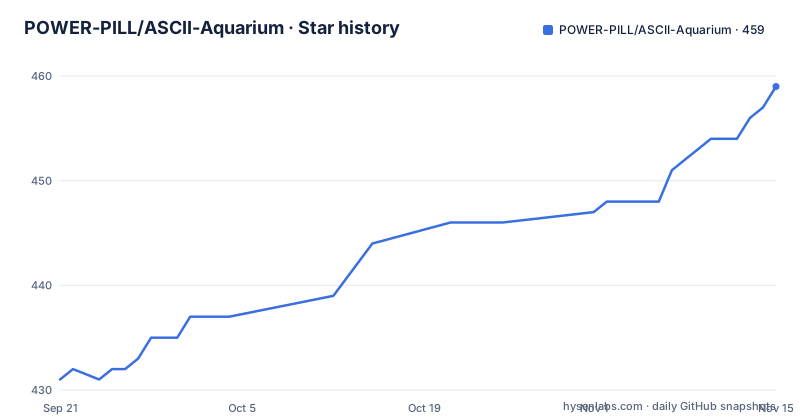
Star history
- POWER-PILL/ASCII-Aquarium459 ★ · +28
| Repository | 2026-09-21 | 2026-11-15 |
|---|---|---|
| POWER-PILL/ASCII-Aquarium | 431 | 459 |
28 Stars in the last 55 days, measured from the daily GitHub snapshot. Compare with other projects
Editorial analysis
The only documented install path is a browser flasher over serial
Installation is a web page rather than a toolchain. You open the flasher page, click Flash ASCII Aquarium CYD, pick the CYD serial port and let the installer finish. Three things have to be true first: a supported CYD board connected by a USB data cable, a desktop or laptop running Chrome, Edge or the latest Firefox, and the Arduino IDE Serial Monitor closed if it happened to be open.
That last prerequisite is the one that bites. The board is flashed over the same serial port the Arduino IDE monitor claims, so an open monitor window is a port conflict, and the failure appears as an installer that cannot find or lock the device rather than as a clear message about the monitor.
There is no documented alternative. The visible README contains no compile command, no PlatformIO invocation and no Arduino IDE build step, so if the web flasher does not work for your browser or board, the source tree at ASCII_Aquarium_CYD is the next stop with no written instructions for it. Board selection is compile-time rather than runtime, which the pair of headers at the top of the repository implies: User_Setup.h and User_Setup_Select_CYD.h sit beside the firmware directory, so you pick your board by choosing a header when you build.
The board is sold as a generic part, and the documentation links two different purchase pages for the same hardware, one on AliExpress and one on Amazon.
Three boards are supported and lookalikes are explicitly not
The primary target is the ESP32-2432S028R Cheap Yellow Display, described by its component list: an ESP32, an ILI9341 320x240 display and an XPT2046 resistive touchscreen, with an optional SD card used for BMP screenshots and frame capture.
Two more boards are claimed. Support for the CYD2USB variant was added with credit to @mjpcomp, and the JC3248w535 board is described as having preliminary support, with the web flasher used for both new firmwares. Preliminary is doing real work in that sentence, and it is the only qualifier attached to it.
The warning is the useful one for anyone shopping: other CYD-style boards may look similar but use different display, touch or SD hardware. Since the entire interface depends on a resistive touchscreen mapped to screen coordinates and the SD path depends on a specific card slot, a visually identical board with a different controller is not a drop-in substitute. Nothing in the documentation describes how to adapt the firmware to such a board, so a buyer of a lookalike is outside the supported set.
For physical mounting there are 3D printed cases referenced on MakerWorld, a basic snap-fit case and a desk buddy variant, which matters because the enclosure determines whether the touchscreen is usable at all.
A workaround note still points at build 2.18
The screenshot feature carries an explicit caveat. SD-card BMP screenshots and frame sequence capture are supported, and the note says that in build 2.18 the CYD will need to be reset after taking screenshots or sequences.
Two things are unresolved about that line. The reference is to a specific older build, while the newest release named in the documentation is 2.39, so whether the reset requirement still applies is not stated. And the requirement as described is severe enough that a user hitting it in the current build would have to power-cycle the board after every capture, which is exactly the kind of behavior people try to avoid.
The capture path is also the only feature that depends on the optional SD card, so the two failure modes stack: no card means no screenshots at all, and a card with an unrecognized layout is not described anywhere. Frame sequence capture in particular implies sustained writes, and the documentation gives no guidance on card capacity, write endurance or whether a sequence survives a reset.
Hidden HUD controls sit behind a tap on the top-left corner and cover setup, capture, Wi-Fi, settings, quick creature tests, respawn and randomize, which means the capture workflow is reachable without leaving the tank view but also invisible until you know it is there.
The scene is rendered live, with population and bubble counts you set
The central claim is that this is not a video loop. The aquarium is rendered live on the ESP32, and the fish wander, school, turn around, change brightness, avoid each other and chase food when the glass is tapped. Tapping the tank drops food flakes that nearby fish pursue.
Every population is a range rather than a fixed set. Fish count is configurable from 6 to 36, bubble count from 0 to 50, and the seaweed has adjustable sway, length and randomness. Visiting octopus and seahorse characters appear at selectable spawn rates, and the fish steer around both the visitors and each other, which is why separation behaviour is listed as a feature rather than assumed.
Backgrounds are a small fixed set plus a randomized one: black, a blue fade, a purple fade and a randomized Spongebob style flower backdrop. That backdrop is a reference to a trademarked character in shipped firmware, which is harmless in practice and mildly awkward in a project with no stated license.
The performance question the documentation does not answer is what the upper bounds cost. 36 schooling fish plus 50 bubbles plus a visitor, all redrawn as characters on a 320x240 panel at interactive touch rates, is a meaningful claim to make about an ESP32, and no frame rate, CPU figure or resolution scaling option is given anywhere.
Auto feeding exists because a beam splitter makes the screen untappable
The timed event system with auto feeding was added for a specific physical reason, stated plainly in the release notes for 2.20: it is useful if you use the beam splitter, because in that setup you cannot tap the screen.
That single sentence explains a lot of the feature list. Tap to wake on the LCD backlight and RGB ambient LED, and light schedules for both, exist for the same reason as auto feeding, since any interaction that depends on touching the glass has to have a scheduled or woken equivalent when the glass is behind a splitter. The timed event controls extended to Snail and Jellyfish appearances in 2.39 follow the same pattern.
The ambient lighting is tied to the background rather than being purely decorative. Ambient LED control can be linked to the background colour or use a different colour, and 2.39 added a shared rainbow-capable colour picker across background, clock and ambient-light selection plus Rainbow cycling for all three.
Auto Sky is the most involved addition, a clock-driven background mode that slowly blends the aquarium gradient through sunrise, day, sunset and night colours, with each of those four slots separately editable. A large ASCII clock was also lowered slightly so it sits more naturally behind the action, and the colour picker swatch grid was trimmed to stay compact.
Wi-Fi credentials are typed on the device and saved in flash
The Wi-Fi panel is a full credential manager rather than a network toggle: network scan, saved credentials, an on-screen keyboard, reconnect handling and NTP time sync. The on-screen keyboard exists because the device has no host, so credentials are entered on the touchscreen itself.
Where those credentials go is the part worth checking. Settings persistence is handled by ESP32 Preferences, which is the flash-based key-value store, and the same mechanism is described as holding gateway connection details, tank state and UI preferences. Saved Wi-Fi credentials therefore live in device flash, and nothing in the documentation states whether they are stored in the clear or whether the flash is encrypted.
The clock is optional and has two sources, manual time or internet time, with timezone selection, 12-hour and 24-hour formats, placement as a small top or bottom clock or a large ASCII style, and a colour picker. Twenty additional selectable ASCII clock fonts arrived in 2.20, which makes the clock a configurable surface in its own right rather than a fixed readout.
Reconnect handling is listed as a feature without detail, so whether the panel retries automatically after an outage or waits for a tap is not something the documentation settles.
No license is recorded and no license file sits in the tree
The project is distributed as downloadable firmware with a web flasher, printed case designs and a source tree, and no license is recorded for it. There is also no LICENSE file among the top-level entries, which are the firmware directory, the README, two release notes documents, the two setup headers and a docs folder.
For firmware that people flash onto hardware they own, the absence is inconvenient rather than academic. Modifying the fish behaviour, adding a background style or reusing the code in another project are all reasonable things to want, and none of them is clearly permitted. Printed case designs referenced on MakerWorld raise the same question separately, since those are hosted elsewhere under their own terms.
The documentation is otherwise unusually forthcoming about attribution. the CYD2USB support credit to @mjpcomp and the beam splitter suggestion are both attributed by name, which is a good norm that the missing license cuts against.
Version numbers skip prefixes and the image tables are empty
The releases are named v2.39, v2.20 and 1.67, so the prefix is inconsistent and the numbering does not sort as a semantic version, since the trailing component behaves more like a build counter than a patch level. The build referenced in the screenshot note, 2.18, sits inside that scheme without a tag of its own.
The visible README is also missing all of its media. Every GIF and video section is an HTML table with empty cells where the images were, which removes the only way a reader could judge what dithered gradients, the pixel look or the creature animations actually look like before flashing. The basic controls section is cut off mid-sentence, ending at Use the cap.
What remains in text is still detailed. Configurable values are given as concrete ranges, the settings menu is organized into Tank, Seaweed, Clock and Background tabs, and the character set includes multiple fish glyph species with varied colours and depth shading. The prose carries a few typos, including behaviouor in the fish behaviour line, and the project description contains its own grammar error in describing an tiny animated ASCII fish tank.
Editorial conclusion
ASCII-Aquarium is a good fit for anyone who already owns one of the three named boards and wants a self-contained desk display with no video loop running the whole scene on the microcontroller. Before you commit, confirm the exact board revision, ask whether the 2.18 screenshot reset still applies in the current build, and get a licensing answer, since no license is recorded and the source build path is not written down anywhere in the visible documentation.
Frequently asked questions
What hardware does ASCII-Aquarium need?
The primary target is the ESP32-2432S028R Cheap Yellow Display with an ILI9341 320x240 display and an XPT2046 resistive touchscreen, plus an optional SD card for BMP screenshots. Support was added for the CYD2USB variant and there is preliminary support for the JC3248w535 board.
How do I install ASCII-Aquarium on my board?
Open the web flasher page, click Flash ASCII Aquarium CYD, choose the CYD serial port and let the installer finish. You need a supported board on a USB data cable, Chrome, Edge or the latest Firefox, and the Arduino IDE Serial Monitor closed so the port is free.
Does ASCII-Aquarium play a video or render the fish live?
It renders live on the ESP32 rather than playing a video loop, with fish that wander, school, turn around, change brightness, avoid each other and chase food dropped by tapping the tank. Fish count is configurable from 6 to 36 and bubbles from 0 to 50.
Why does ASCII-Aquarium have an auto feeding mode?
Because some enclosures, such as one with a beam splitter, make the screen impossible to tap. Timed events with auto feeding, plus tap to wake and light schedules for the LCD backlight and RGB ambient LED, were added so interaction does not depend on touching the glass.
Can ASCII-Aquarium take screenshots?
With an optional SD card it writes BMP screenshots and frame sequence capture, and hidden HUD controls behind a tap on the top-left corner expose the capture tools. A note warns that in build 2.18 the board needs a reset after taking a screenshot or sequence.
What is the latest ASCII-Aquarium release?
The newest releases named are v2.39 from June 2026 and v2.20 from June 2026, with 1.67 before them, and the code was last pushed on 2026-07-19. Version 2.39 added Auto Sky backgrounds, a rainbow colour picker, a snail, a jellyfish and a rare Cthulhu octopus variant.
Official sources
Add this badge to your README
If you maintain this project, the badge below links readers to this analysis and shows its maintenance status from the daily GitHub snapshot. Paste the markdown into your README; add ?metric=license or ?metric=stars to the image URL for a different field.

[](https://hysenlabs.com/projects/power-pill-ascii-aquarium)Star history chart for your README
[](https://hysenlabs.com/projects/power-pill-ascii-aquarium)Was this useful?