Vocello: on-device speech from a Swift runtime on MLX, with a $19.99 iOS unlock
Vocello: a local, private voice studio for Apple Silicon. Write a script, pick or describe a voice, and generate speech on-device, faster than realtime on an 8 GB M2 Mac mini. Native Swift + MLX, no Python. Mac app out now, iPhone beta on TestFlight. (Formerly QwenVoice.)
At a glance
- What is it?
- A Mac and iPhone voice studio that generates speech locally through a first-party Swift runtime on MLX, with nine built-in speakers, voice design and consent-gated cloning. The readme also states which build it describes, which is not the one you can download, and what a $19.99 purchase on iOS does and does not unlock.
- Who is it for?
- Vocello is built for someone who will not send a script to a server, and the privacy claims are structural rather than promissory: a first-party Swift runtime on MLX, pinned model artefacts from Hugging Face, and local app storage for scripts, references, history and audio. Two things to weigh before you rely on it.
- Can I use it commercially?
- Yes. MIT is a permissive licence: you can use, modify and sell software built on it, as long as you keep its copyright and licence notices.
- Is it still maintained?
- Yes. The repository last received commits 1 day ago.
- What is it written in?
- Mainly Swift, according to GitHub's language statistics.
Answers come from the project's GitHub data, last synced on November 14, 2026, and from our analysis. They are not legal advice.
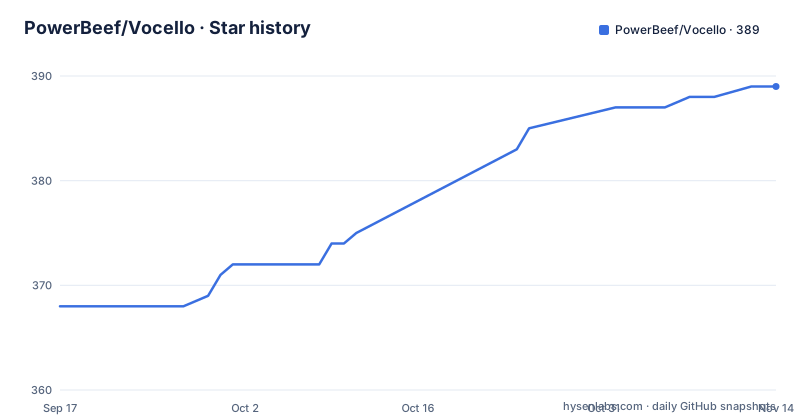
Star history
- PowerBeef/Vocello389 ★ · +21
| Repository | 2026-09-17 | 2026-11-14 |
|---|---|---|
| PowerBeef/Vocello | 368 | 389 |
21 Stars in the last 58 days, measured from the daily GitHub snapshot. Compare with other projects
Editorial analysis
The page describes a build you cannot download yet
The readme is explicit about which software it is talking about, and the answer is two different things.
The Mac download is Vocello 2.4.0, for macOS 26 and above. The page follows the current source, which is the upcoming Vocello 3.0. The Mac screenshots show the 3.0 interface, so the pictures are ahead of the binary. The iPhone screenshot is older still, and its mode tab still reads Custom rather than the newer Built-in Voice. Anything new in 3.0 is marked with a (3.0) tag in the text.
That is a short paragraph with an outsized effect on a reader. It means the feature list you are reading mixes three states: what the shipped Mac build does, what the iPhone beta does, and what the current source does. Without the note, the reasonable assumption is that everything listed is in the app you just installed.
It also explains the mode name changing underneath you. Built-in Voice with nine Qwen3 speakers is called Custom Voice in 2.4.0, which is exactly the kind of rename that strands documentation and support answers when a project moves quickly.
Nine built-in speakers, plus design and cloning
Three voice modes cover the whole product.
Built-in Voice picks one of nine Qwen3 speakers and then sets language and delivery. In 2.4.0 that same mode is called Custom Voice, which is the rename the screenshot note is about.
Voice Design takes a plain language brief instead. You describe character, age, accent, texture and delivery, and a voice is generated from that description. A design that works can be saved as a reusable voice reference, which is the bridge between designing a voice and then speaking with it.
Voice Cloning takes a reference you have permission to use. On both platforms you can record a clip in the app, import an audio file, or reuse a voice from Saved Voices, including one saved from Voice Design. The import formats differ by platform: WAV, MP3, AIFF, M4A and FLAC on the Mac, plus OGG where macOS can decode it, while on iPhone you pick from Files in WAV, MP3, AIFF or M4A. A transcript improves conditioning and is optional.
The refusal is stated twice in different places. Generation requires the visible consent acknowledgment in Settings, and the instruction is to clone only voices you own or are authorized to use.
Past 900 characters the script becomes a streaming project
Long scripts are handled by changing what generation means rather than by making the model work harder.
A script over 900 characters becomes a long-form project. The app plans segments, then streams them one after another while you listen along, and finally joins them into a single finished file. A per-segment map is kept in History, so the finished audio is navigable by the paragraph that produced it.
That design has two consequences worth naming. You get feedback while the later segments are still generating, so a bad segment is found before the whole file exists. And the join happens after the fact, which means the audio is assembled from parts you could have reviewed.
Ten languages are supported, with automatic detection: Chinese, English, Japanese, Korean, German, French, Russian, Portuguese, Spanish and Italian.
On storage, the sentence covers everything in one place. Scripts, references, history and audio all stay in local app storage unless you export them, which is the same claim the privacy section makes in more detail.
Four delivery presets land, four are described as hints
The delivery picker is the part of the readme that hedges most precisely, and the hedge is the information.
In 3.0, Built-in Voice and Voice Design offer eight delivery presets plus a free-text delivery description. Four of the presets come through reliably: Neutral, Calm, Whisper and Sad. The other four are called directional hints that shape energy and pace, where the named emotion may not land on every take.
So the picker tells you, in the product itself, which options are dependable and which are approximate. That is rarer than it should be in voice tooling, where a preset that produces something merely adjacent to the label is usually sold as the label.
Cloned voices behave differently. Voice Cloning follows the reference voice. With a curated emotion reference bank, a cloned persona additionally gets a delivery choice, and each delivery is backed by its own verified reference clip. In other words, the choice exists only where the system holds a reference for it.
The 2.4.0 arrangement was simpler: Custom Voice and Voice Design offered ten delivery styles at subtle, normal or strong intensity, plus a free-text description, and cloned voices had no delivery choice at all.
Takes record their seed in 3.0 and cannot be pinned in 2.4.0
Reproducibility arrives in 3.0, and the before-and-after is explicit.
The variation settings are called Expressive, Balanced and Consistent, and they trade take-to-take variety against stability. Multi-line batches share one seed, so the lines of a single generation form a consistent performance rather than eight unrelated readings.
Callers on the command line and in benchmarks can pass an explicit seed, which is what makes a benchmark reproducible in the first place. In the interactive 2.4.0 app, takes could be neither pinned nor replayed by seed.
In 3.0 every finished take records the seed it actually used. You can pin a take's seed from History, and subsequent generations reproduce it exactly with the same settings, or leave it unpinned for a fresh take each time. Pin and unpin are therefore two different intentions, not two states of the same control.
That is a real feature for anyone producing more than one line of the same voice: a character voice that changes slightly on every take is fine for exploration and unusable for a hundred lines. Storing the seed turns the character into something you can hold still.
The iOS purchase is $19.99 and nothing is obfuscated
The licence section is the most unusual document in the readme, because it describes a paid feature in an MIT project and then refuses to defend it technically.
The source stays MIT. For the upcoming official iOS 3.0 release, Design and Clone Export is a one-time purchase at a US base price of $19.99, with Apple-managed regional prices. Generation, listening, internal History, voice enrollment and Built-in audio exports remain free, and macOS and CLI exports are described as unrestricted.
Three paragraphs then define what the money does not buy. The purchase supports the official iOS distribution rather than granting an exclusive licence to the source. Anyone may build and modify the MIT-licensed code, including its export checks, subject to the licence terms. A modified build is not the official App Store app and creates no Apple purchase or entitlement.
The reason is stated as a decision rather than a constraint: they accept this tradeoff instead of adding a licensing server, obfuscation, or restrictions on forks. A licence server would have turned an offline product into one that phones home, and that would have contradicted the privacy claims.
Two caveats are printed alongside. The iOS product is configured but metadata, purchase testing and App Store review are still pending, which the page says explicitly is not an availability claim. And third-party models and assets keep their own terms, because a code licence does not clear content rights.
Cloning consent is a stored local choice, not a prompt
The privacy section is a list of what leaves your machine, and the answer is almost nothing.
Speech generation runs locally once models are installed. Generated audio, recorded references, transcripts, saved voices and history stay in local app storage unless exported. Model installation downloads pinned model artefacts from Hugging Face, so the download is bounded and reproducible rather than open-ended.
Three permission requests are named. Reference recording asks for microphone access. Transcript auto-fill asks for Speech Recognition access and uses on-device recognition with the required system language assets, which is why it needs system language files rather than a cloud service. Clone generation stays disabled until the visible consent acknowledgment is enabled in Settings, and that choice is stored locally and can be changed there.
That last one is the design decision most worth thinking about. The consent gate is a preference you set once, not a dialog you answer per clone. In exchange there is no server record of whether you had permission for a particular reference. The readme pairs it with the instruction to clone only voices you own or are authorized to use, which puts the enforcement where an offline app has to put it.
The section is cut off mid-sentence where it starts describing how generated audio is marked as AI generated, mentioning an inaudible marker. That detail is not readable here.
The Xcode project is still named after the old product
The top level tells you what kind of project this is and where the rename stopped.
The Xcode project is QwenVoice.xcodeproj, carrying the product's former name, while the app, the releases and the repository are all Vocello. Sources/, Tests/, Packages/, config/, scripts/, benchmarks/ and docs/ are conventional. Alongside them sit .swiftlint.yml, a .tool-versions file that pins tool versions, project.yml for XcodeGen-style project generation, ExportOptions-appstore.plist for App Store export configuration, and a .xcodebuildmcp/ directory.
Two of those deserve a second look. pytest.ini sits in a project that advertises no Python, which means some tooling in the repository is not the Swift product, and the benchmark harness the reproducibility section refers to is the obvious candidate. And .claude/ with a CLAUDE.md sits next to CONTRIBUTING.md, so agent instructions are versioned alongside human ones.
There are also PRODUCT.md, SECURITY.md and a design_references/ directory, plus website/ for the page you are reading. SECURITY.md is not boilerplate here: it carries a named section on the open-source purchase boundary, which is the document that explains why an MIT project can ship a paid iOS feature without obfuscation.
The licence is MIT, the default branch is main, the last push is dated 1 October 2026, and the three most recent releases are v2.4.0 on 1 August 2026, v2.3.0 on 31 July and v2.2.2 on 25 July.
Editorial conclusion
Vocello is built for someone who will not send a script to a server, and the privacy claims are structural rather than promissory: a first-party Swift runtime on MLX, pinned model artefacts from Hugging Face, and local app storage for scripts, references, history and audio. Two things to weigh before you rely on it. The Mac build you can download today is 2.4.0, while the page describes the upcoming 3.0, so features marked 3.0 are not in your hands. And the consent acknowledgment for cloning is a local Settings choice, which means the boundary is honoured by convention rather than by anything the app can verify.
Frequently asked questions
Does Vocello send my scripts or recordings to a server?
Generation runs locally after models are installed, through a first-party Swift runtime on MLX rather than a Python server. Scripts, references, history and generated audio stay in local app storage unless you export them, and model installation pulls pinned artefacts from Hugging Face.
Which version of Vocello is the readme describing?
The Mac download is Vocello 2.4.0 for macOS 26 and above, while the page follows the current source, the upcoming 3.0. The Mac screenshots show the 3.0 interface and features new in 3.0 are marked with a (3.0) tag.
What does the $19.99 Vocello iOS purchase include?
Design and Clone Export on iOS, as a one-time purchase supporting the official iOS distribution. Generation, listening, internal History, voice enrollment, Built-in audio exports, and all macOS and CLI exports remain free, and a modified build of the MIT code creates no Apple entitlement.
Can I pin a Vocello take so it reproduces exactly?
In 3.0, yes. Every finished take records the seed it used, and pinning that seed from History reproduces the take exactly with the same settings. In 2.4.0 interactive takes could not be pinned or replayed by seed, though CLI and benchmark callers can pass an explicit one.
Official sources
Add this badge to your README
If you maintain this project, the badge below links readers to this analysis and shows its maintenance status from the daily GitHub snapshot. Paste the markdown into your README; add ?metric=license or ?metric=stars to the image URL for a different field.

[](https://hysenlabs.com/projects/powerbeef-vocello)Star history chart for your README
[](https://hysenlabs.com/projects/powerbeef-vocello)Was this useful?