PSKoans: Learn PowerShell Through Pester Tests
A simple, fun, and interactive way to learn the PowerShell language through Pester unit testing.
At a glance
- What is it?
- PSKoans turns PowerShell practice into a progression of failing Pester tests that learners repair one at a time. It suits beginners who want guided exercises and experienced users who prefer feedback through test assertions rather than conventional courses.
- Who is it for?
- PSKoans is a sensible choice for developers who learn by editing small examples and reading precise failure messages. It is a poor fit for people who want a conventional prose course, isolated syntax reference, or assurance that its exercises match current PowerShell releases.
- Can I use it commercially?
- Yes, with conditions. GPL-3.0 is a copyleft licence: if you distribute software that includes it, you must release that software's source code under the same licence. Running it internally without distributing it does not trigger that obligation.
- Is it still maintained?
- Yes. The repository last received commits 20 days ago.
- What is it written in?
- Mainly PowerShell, according to GitHub's language statistics.
Answers come from the project's GitHub data, last synced on October 23, 2026, and from our analysis. They are not legal advice.
Star history
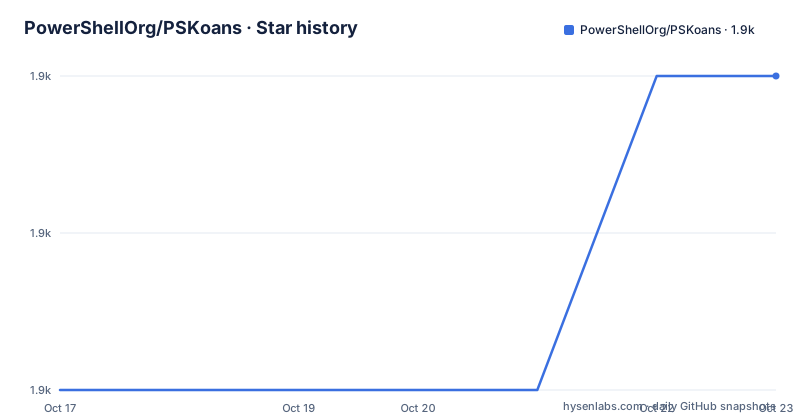
- PowerShellOrg/PSKoans1,881 ★ · +2
| Repository | 2026-10-17 | 2026-10-23 |
|---|---|---|
| PowerShellOrg/PSKoans | 1.9k | 1.9k |
2 Stars in the last 6 days, measured from the daily GitHub snapshot. Compare with other projects
Editorial analysis
Why PSKoans Uses Pester Failures as Lessons
PSKoans addresses the gap between reading PowerShell syntax and knowing what a working expression should produce. Its exercises, called koans, begin with failing Pester tests. Each test describes one expected behavior, and the learner must edit the test or its script so the assertion passes. The first documented exercise uses a blank value piped into `Should -Be $true`. Replacing that blank with `$true` is the entire first solution.
This format is useful for newcomers because it gives them a small, observable objective. They do not need to design a complete script before seeing whether their understanding is correct. It also gives experienced shell users a constrained environment in which to inspect operators, assertions, variables, and later PowerShell concepts without first building an application.
The progression is described as beginning with basic concepts and continuing into beginner, intermediate, and advanced areas. The README does not enumerate the full curriculum, so it would be unsafe to assume that every modern PowerShell topic is represented. Its documented strength is the guided sequence of 635 challenges shown after the first completed exercise. PSKoans teaches through test repair, not through a detached explanation of why a programming concept matters.
Install PSKoans and Prepare the PowerShell Session
The documented prerequisites are PowerShell 5.1 or PowerShell 6+, Pester v4.x, and NuGet on Windows. A user who has never installed PowerShell modules on Windows must install the package provider first:
Install-PackageProvider -Name NuGet -MinimumVersion 2.8.5.201 -ForceThe next README examples install Pester under the current user. It gives separate commands for PowerShell 5.1 and PowerShell 6.0+, so use the block that matches the session already open:
# PS 5.1 (upgrade to latest Pester)
Install-Module Pester -Force -SkipPublisherCheck -Scope CurrentUser -MinimumVersion 5.0.2# PS 6.0+ (Install Pester under current user)
Install-Module Pester -Scope CurrentUser -MinimumVersion 5.0.2There is a visible documentation inconsistency here. The prerequisite list says `Pester v4.x`, while both installation examples require at least `5.0.2`. The repository does not explain whether a newer Pester release supersedes the older statement or whether the examples were not aligned with the stated requirement. This should be resolved in the learner's environment before treating the koans as a reproducible training setup.
For an installed module, the documented Gallery route is a single PowerShellGet command:
Install-Module PSKoans -Scope CurrentUserInstall it from a normal PowerShell session. After the command completes, module discovery must make `Show-Karma` available in that session.
Start the First PSKoans Exercise with Show-Karma
Run `Show-Karma` without parameters. According to the README, it displays a page describing the current goal, starting at zero completed koans. The output includes red failure messages, and the final message points to the file that must be edited. For the first exercise, that path is `Introduction\AboutAssertions.Koans.ps1`.
The more convenient way to open the koan directory is `Show-Karma -Contemplate`. After reviewing the path in the failure output, open the indicated file and inspect a test resembling this:
It 'is a simple comparison' {
    # Some truths are absolute.
    $____ | Should -Be $true
}
The `$____` marker is the missing expression, while the right side of the assertion states the expected value. Replace `$____` with `$true`, leaving this completed test in place:
It 'is a simple comparison' {
    # Some truths are absolute.
    $true | Should -Be $true
}
Run `Show-Karma` again. The documented first-run example reports `1/635` completed and presents the next challenge. This is a real interaction with Pester rather than a preview of answers. Each exercise requires saving the koan file so the next run can discover the change.
A repository checkout follows a different route. Clone it, run `Get-ChildItem -Recurse | Unblock-File` from the repository directory, check `Get-ExecutionPolicy`, and add the checkout to `$env:PSModulePath` when scripts are blocked or the module is not found. The README specifically associates `RemoteSigned` and `CurrentUser` with a session that is insufficiently configured to execute local scripts.
PSKoans Progress Lives Outside the Installed Module
PSKoans keeps the learner's exercise copy somewhere separate from the installed module. `Get-PSKoanLocation` reports that directory. The README treats the folder as valuable user data rather than disposable module content, which explains why uninstalling the module does not remove koan files or configuration.
The documented backup command pipes that location into a recursive copy:
Get-PSKoanLocation | Copy-Item -Recurse -Destination "D:\Backups\PSKoans"This copies the current koan library to the stated backup path. The README does not describe merge behavior, partial progress handling, or what happens when that destination already exists, so the command should be used where the chosen destination is available for a new backup.
Several independent in-progress libraries can be supported through `Get-PSKoanLocation` and `Set-PSKoanLocation`. A missing directory is not necessarily an immediate error, because the documentation says it will be created and populated when `Show-Karma` is next called. The module retains only the current location, not a history of previous locations. That makes location switching practical, but restoring a previous session depends on the caller retaining the path and setting it again.
This separation also matters for removal. Uninstalling `PSKoans` leaves both the koan copy and configuration behind. The README provides commands to remove `~/.config/PSKoans` recursively and then remove the directory returned by `Get-PSKoanLocation`. Its own warning states that the second operation completely deletes saved progress.
Repository Cloning Adds Environment-Specific Setup
Installing from the Gallery is the shortest documented route. Downloading the repository is available for contributors or users who want the source tree, but it transfers responsibility for script execution and module discovery to the local checkout. The first setup operation unblocks downloaded files:
Get-ChildItem -Recurse | Unblock-FilePowerShell execution policy can still prevent the scripts from loading. The README directs users to inspect `Get-ExecutionPolicy` and, when the result is `Restricted` or `Undefined`, apply the following user-scoped setting:
Set-ExecutionPolicy -ExecutionPolicy RemoteSigned -Scope CurrentUserFrom the repository's main folder, the checkout can then be added to the current process module path:
$env:PSModulePath = "$(Get-Location)$([IO.Path]::PathSeparator)${env:PSModulePath}"This changes `$env:PSModulePath` only for the current PowerShell process according to the shown command. The README does not document persistence across new sessions. Based on the repository layout, checkout users also have the source files, `build.ps1`, tests, formatting configuration, and development documentation, while Gallery users install the packaged module experience. The source layout may assist contributors, but it adds setup steps that are unnecessary for the documented Gallery installation.
PSKoans Maintenance, Compatibility, and License Boundaries
The repository is not archived, and its last push was on 2026-10-03. That is recent enough to avoid describing it as abandoned, but recent repository activity does not by itself establish compatibility with current dependencies. The newest listed release is `v0.67.1`, dated 2020-07-06, with `v0.67.0` dated 2020-05-31. The gap between the release history and the latest push means prospective users should inspect the current module and Pester behavior rather than infer freshness solely from the repository date.
PSKoans is licensed under GPL-3.0. That license applies to the project code and repository content. The documentation does not discuss separate terms for completed learner solutions or organizational training use, so this review does not infer answers beyond the stated identifier.
PSKoans is the wrong tool when someone wants a reference that directly explains PowerShell syntax, a sandboxed production environment, or a curriculum whose maintenance guarantees are documented. It is also a poor first choice if the Pester mismatch prevents the initial `Show-Karma` flow from behaving as described. In contrast, a documentation-based course might explain concepts in prose but would not provide the same edit-a-failing-test loop. PSKoans is most appropriate where immediate assertion feedback and persistent, sequential exercises matter more than a conventional lesson format.
Editorial conclusion
PSKoans is a sensible choice for developers who learn by editing small examples and reading precise failure messages. It is a poor fit for people who want a conventional prose course, isolated syntax reference, or assurance that its exercises match current PowerShell releases. Before adopting it in a team learning program, verify the Pester compatibility first: the README lists Pester v4.x as a prerequisite while its installation commands request version 5.0.2 or newer. For an individual learner, first confirm that `Show-Karma`, the saved koan location, and the selected PowerShell version work in the intended environment.
Frequently asked questions
How do I install PSKoans in PowerShell?
Run `Install-Module PSKoans -Scope CurrentUser` from PowerShell. The README also lists PowerShell 5.1 or 6+ as prerequisites and describes NuGet setup for Windows users who have not installed modules before.
How do I start and complete the first PSKoans exercise?
Run `Show-Karma`, follow the reported path to the failing file, and replace the first blank with `$true`. Running `Show-Karma` again should report the completed exercise and present the next challenge.
Does uninstalling PSKoans delete my saved progress?
No. The README states that uninstalling the module leaves the koan files and configuration in place. A complete removal requires deleting both the configuration path and the directory returned by `Get-PSKoanLocation` before uninstalling.
Can I keep separate sets of unfinished PSKoans exercises?
Yes. `Set-PSKoanLocation` changes the directory used for koans, while `Get-PSKoanLocation` reports the current one. The module stores only the current location and does not retain a history of earlier locations.
Official sources
Add this badge to your README
If you maintain this project, the badge below links readers to this analysis and shows its maintenance status from the daily GitHub snapshot. Paste the markdown into your README; add ?metric=license or ?metric=stars to the image URL for a different field.

[](https://hysenlabs.com/projects/powershellorg-pskoans)Star history chart for your README
[](https://hysenlabs.com/projects/powershellorg-pskoans)Was this useful?