Tasuku: a task list you annotate from inside your own code
The minimal task visualizer for Node.js.
At a glance
- What is it?
- A minimal Node.js task runner that turns any function into a labelled row in a terminal task list, with nesting, grouping and concurrency control. It ships as a TypeScript library with an MIT license and is still on a 3.0 beta line.
- Who is it for?
- Tasuku earns a place in a Node.js codebase that has accumulated ad-hoc console logging around slow operations, because one `task()` call replaces a `console.log` pair and gives you pending, loading, warning, error and success states without configuring a renderer. It is not a build tool replacement: there is no task file, no dependency graph and no caching, and if you want those, a runner like npm scripts or a bundler already does the job.
- Can I use it commercially?
- Yes. MIT is a permissive licence: you can use, modify and sell software built on it, as long as you keep its copyright and licence notices.
- Is it still maintained?
- Yes. The repository last received commits 21 days ago.
- What is it written in?
- Mainly TypeScript, according to GitHub's language statistics.
Answers come from the project's GitHub data, last synced on October 23, 2026, and from our analysis. They are not legal advice.
Star history
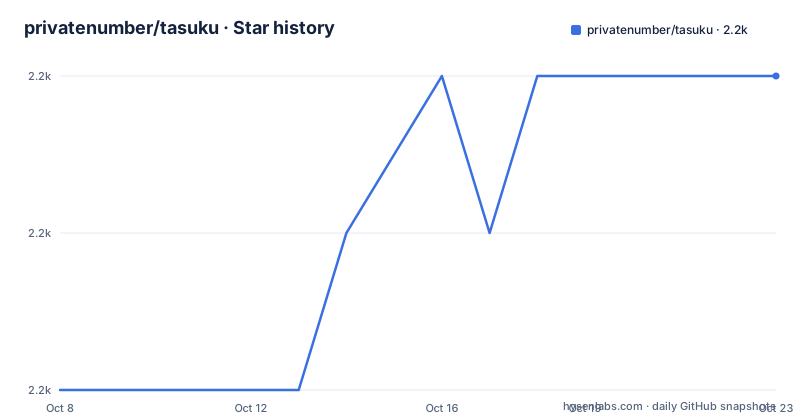
- privatenumber/tasuku2,210 ★ · +2
| Repository | 2026-10-08 | 2026-10-23 |
|---|---|---|
| privatenumber/tasuku | 2.2k | 2.2k |
2 Stars in the last 15 days, measured from the daily GitHub snapshot. Compare with other projects
Editorial analysis
A wrapper function instead of a task file
Tasuku is described in the README as a minimal task runner for Node.js, and the mechanism is small enough to state in one sentence: you label any task or function so that its loading, success and error states are rendered in the terminal.
The install is a single dependency:
npm i tasukuThe first example in the README is a script that copies a file, with the task call wrapping the actual work:
import { copyFile } from 'node:fs/promises'
import task from 'tasuku'

task('Copying file from path A to B', async ({ setTitle }) => {
    await copyFile('/path/A', '/path/B')

    setTitle('Successfully copied file from path A to B!')
})
Two things stand out. The title can be rewritten while the task runs, so the row does not have to describe the final state, and the task function is an ordinary async function, which means existing code can be wrapped rather than rewritten. The README calls this unopinionated and says you can call `task()` from anywhere, with the tasks displayed in the terminal as one consolidated list.
The word minimal is doing real work in that description. There is no task file to declare, no plugin system, no scheduler and no persistent state. If you are coming from a build tool, the absence of all of that is the feature, and also the limit.
Five states and the API that drives them
The README documents five task states: pending for a task that is queued and has not started, loading for a task that is running, warning for a task that completed with a warning, error for a task that exited with an error, and success for a task that completed without error.
The shape of the returned object follows directly from those states:
type TaskAPI = {
    // Result from taskFunction
    result: unknown

    // State of the task
    state: 'error' | 'warning' | 'success'

    // Warning message if state is 'warning', otherwise undefined
    warning: string | undefined

    // Error message if state is 'error', otherwise undefined
    error: string | undefined

    // Invoke to clear the results from the terminal
    clear: () => void
}
Note that pending and loading are not in the `state` union. They are renderer states derived from whether the task has started, whereas the three in the union are outcomes. The distinction matters if you build anything on top of the return value, because a task that has not finished has not yet produced a state you can branch on.
The inner API handed to the task function is wider than the outer one, and it is where most of the library lives: `task` for nesting, `setTitle`, `setStatus`, `setOutput`, `setWarning`, `setError`, `streamPreview`, `startTime` and `stopTime`. `setWarning` and `setError` both accept `false` and `null` as well as an `Error` or a string, which is how you clear a warning that has already been set.
Nesting, collapsing and grouped queues
Nesting is the feature that makes this more than a progress spinner. The README states that tasks can be nested indefinitely and that nested tasks stack hierarchically in the task list. The inner `task` function is passed into the task function precisely so this works:
await task('Do task', async ({ task }) => {
    await someAsyncTask()

    await task('Do another task', async ({ task }) => {
        await someAsyncTask()

        await task('And another', async () => {
            await someAsyncTask()
        })
    })
})
Because the parent awaits the child, the hierarchy reflects real control flow rather than a separate bookkeeping structure. The cost is that a long-running script with no `await` between task calls will produce a flat list, which is a reasonable and honest limitation of wrapping rather than rewriting code.
Two refinements come with it. Calling `.clear()` on a returned task API collapses the nested task, which matters for a loop that would otherwise emit hundreds of rows. And `task.group()` takes a function returning an array of tasks and runs them sequentially, which the README recommends for displaying a queue of tasks that have yet to run, since queued work shows as pending rather than appearing later out of nowhere:
const groupedTasks = await task.group(task => [
    task('Task 1', async () => {
        await someAsyncTask()

        return 'one'
    }),

    task('Waiting for Task 1', async ({ setTitle }) => {
        setTitle('Task 2 running...')

        await someAsyncTask()

        setTitle('Task 2 complete')

        return 'two'
    })

    // ...
])
The return value of each task lands in `.result`, and under TypeScript the type is inferred from the task function, so the example above prints an array typed from the two string returns rather than `unknown[]`.
Concurrency limits versus plain Promise.all
Parallelism is where the README is most opinionated, which is notable for a library that otherwise insists on having no opinions. Passing `{ concurrency: n }` as the second argument to `task.group()` limits how many tasks run at a time:
const api = await task.group(task => [
    task(
        'Task 1',
        async () => await someAsyncTask()
    ),

    task(
        'Task 2',
        async () => await someAsyncTask()
    )

    // ...
], {
    concurrency: 2 // Number of tasks to run at a time
})

api.clear() // Clear output
The README then makes the argument for why you would not just use `Promise.all()`: the advantage of `task.group()` is that you can limit concurrency, queued tasks display as pending, and it returns an API to clear the results. The plain version is still shown for comparison, with a `// No API` comment:
// No API
await Promise.all([
    task(
        'Task 1',
        async () => await someAsyncTask()
    ),

    task(
        'Task 2',
        async () => await someAsyncTask()
    )

    // ...
])
That is a fair summary of the trade. Both run the same work concurrently. One renders a bounded queue and hands you a handle to clean up, the other renders whatever finishes and hands you nothing. For a script that fans out to dozens of network calls, the concurrency cap is the difference between a readable progress display and a hundred interleaved rows.
streamPreview and carriage return progress bars
The feature most likely to change how you write a script is `streamPreview`, a `Writable` stream for displaying live output below the task. The README says you can pipe a child process or any readable stream into it to show a scrolling preview of the output, and that it handles both newline and carriage return, with programs such as `curl` that use `\r` for in-place progress bars working out of the box.
That last detail is the one that matters. Terminal progress reporting in Node.js usually means wiring a child process's `stdout` through several handlers, and the carriage return case is where naive implementations produce thousands of lines instead of one updating line. Handling `\r` as a control character rather than a line ending is exactly the detail that distinguishes a library that has been used on real tools from one that has only been tested with promises.
The README's example for it opens by importing `spawn` from `node:child_process` and `pipeline` from `node:stream/promises`, then awaiting a task named `Download` that destructures `streamPreview`.
There is also timing built in. `startTime()` and `stopTime(): number` on the inner API let a task record its own elapsed time, and `examples/elapsed-time.js` in the repository tree confirms that this is a supported path rather than an undocumented extra.
What the 3.0 betas say about the renderer's edges
The release history is the most informative part of this repository, and it is all beta tags. Version 3.0.0-beta.5 landed on 2026-03-04 with one feature, an agent skill for tasuku. Versions 3.0.0-beta.6 and 3.0.0-beta.7 both shipped on 2026-09-06, and the repository is not archived with the last push on that same date.
Those two same-day releases read as a fix pass on the renderer rather than new features. Beta.6 includes painting task state before synchronous blocking work, preserving raw stream writes during a task in the pinned renderer, sharing async context across createTasuku instances for cross-instance nesting, and deferring themes to a later release. Beta.7 fixes three things in the display: preserving inline child order after clearing tasks, removing cleared inline task rows, and showing full inline task titles instead of clipping them.
Three of those are about what stays on screen after a task goes away, which is a fair signal that clearing rows was the weak point of the design. If your script creates tasks in a loop and clears them, that is precisely the path these releases address.
Two project-level details are worth knowing before you pin a version. The `version` field in `package.json` is `0.0.0-semantic-release`, so published version numbers come from release automation rather than from the file. The `packageManager` field pins `[email protected]` even though the README installs with npm, so contributing means pnpm while consuming means any package manager. The license is MIT, the repository language is TypeScript, and the published files list contains only `dist`, with separate CommonJS and ESM entry points plus matching type declarations.
Editorial conclusion
Tasuku earns a place in a Node.js codebase that has accumulated ad-hoc console logging around slow operations, because one `task()` call replaces a `console.log` pair and gives you pending, loading, warning, error and success states without configuring a renderer. It is not a build tool replacement: there is no task file, no dependency graph and no caching, and if you want those, a runner like npm scripts or a bundler already does the job. Note that the repository description calls it a task visualizer while the README and `package.json` call it a task runner, which is a wording difference rather than a behavioural one. Start with `npm i tasuku` and one task, then read the `streamPreview` section, which is the feature most likely to change how you structure an existing script.
Frequently asked questions
How do I install and use tasuku in a Node.js script?
Install it with `npm i tasuku`, then wrap any async function in `task('Title', async () => { ... })`. Calling the function starts a task and displays it in a task list in the terminal, with the resolved value available as `.result` on the returned object.
How do I show the output of a child process inside a tasuku task?
Use the `streamPreview` writable stream passed into the task function and pipe the child process or any readable stream into it. The README states it handles both newline and carriage return, so in-place progress bars from tools like `curl` render correctly.
Does tasuku limit how many tasks run at once?
Yes, through the second argument to `task.group()`. Passing `{ concurrency: n }` limits how many tasks run at a time and shows queued work as pending, which the README contrasts with using `Promise.all()` directly.
Is tasuku a stable release or a beta?
The published releases are all 3.0.0 beta tags, with 3.0.0-beta.5 on 2026-03-04 and 3.0.0-beta.6 and 3.0.0-beta.7 both on 2026-09-06. The `version` field in `package.json` is `0.0.0-semantic-release`, so version numbers are assigned by release automation.
What license and runtime does tasuku target?
The project is MIT licensed and written in TypeScript, published as both CommonJS and ESM with matching type declarations. GitHub lists TypeScript as the primary language for this repository, and the topics are `cli`, `list`, `runner` and `task`.
Official sources
Add this badge to your README
If you maintain this project, the badge below links readers to this analysis and shows its maintenance status from the daily GitHub snapshot. Paste the markdown into your README; add ?metric=license or ?metric=stars to the image URL for a different field.

[](https://hysenlabs.com/projects/privatenumber-tasuku)Star history chart for your README
[](https://hysenlabs.com/projects/privatenumber-tasuku)Was this useful?