p5.js Editor: a browser IDE for creative coding sketches
The p5.js Editor is a website for creating p5.js sketches, with a focus on making coding accessible and inclusive for artists, designers, educators, beginners, and anyone else! You can create, share, or remix p5.js sketches without needing to download or configure anything.
At a glance
- What is it?
- The p5.js Editor is a website where you write, run, share and remix p5.js sketches with nothing to install, built on a React client, a Node server, MongoDB and S3 for asset storage. It suits an educator or artist who wants a zero-setup coding environment, and the project is midway through a TypeScript migration that the maintainers have opened to contributors.
- Who is it for?
- Adopt the p5.js Editor if you want a self-hosted zero-setup coding environment for a classroom, workshop or community, since the whole point is that a beginner opens a browser and writes a sketch. Skip it if you want a general-purpose online IDE, because this one is deliberately limited, designed with beginners in mind, with fewer features and frills.
- Can I use it commercially?
- Yes, with conditions. LGPL-2.1 is a weak copyleft licence: you can use it inside commercial and closed-source software, but if you distribute changes to its own files, you must publish those changes under the same licence.
- Is it still maintained?
- Yes. The repository last received commits 3 days ago.
- What is it written in?
- Mainly JavaScript, according to GitHub's language statistics.
Answers come from the project's GitHub data, last synced on November 7, 2026, and from our analysis. They are not legal advice.
Star history
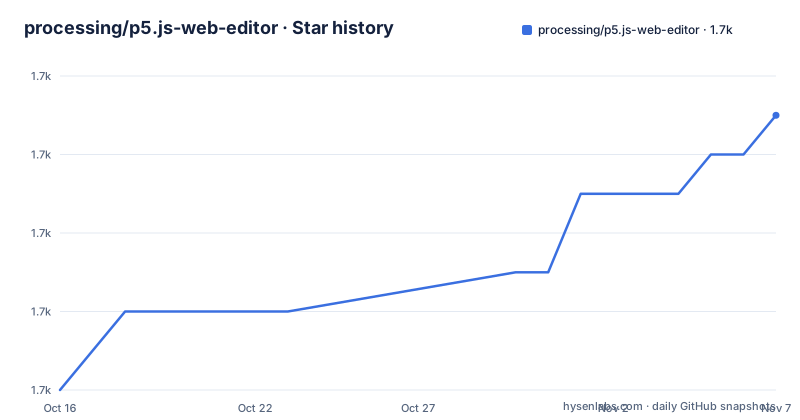
- processing/p5.js-web-editor1,721 ★ · +7
| Repository | 2026-10-16 | 2026-11-07 |
|---|---|---|
| processing/p5.js-web-editor | 1.7k | 1.7k |
7 Stars in the last 22 days, measured from the daily GitHub snapshot. Compare with other projects
Editorial analysis
What the editor is for, and what it deliberately leaves out
The p5.js Editor is a website for creating p5.js sketches, with a focus on making coding accessible and inclusive for artists, designers, educators, beginners and anyone else. You can create, share or remix p5.js sketches without needing to download or configure anything. The design constraint is stated plainly: it is designed with beginners in mind, limiting features and frills. That sentence does more work than it looks. An online IDE that supports every language server feature, every package manager and every terminal is an IDE for people who already know what to do with one, and the deliberate thinness is what makes a first-time visitor able to write `setup()` and `draw()` and see something move. The editor is free and open source, and the stated reason is a belief that software, and the tools to learn it, should be accessible to everyone. The homepage is editor.p5js.org, the licence is LGPL-2.1, the last push was on 2026-10-16, and the releases are v2.22.8 on 2026-10-14, v2.22.7 on 2026-10-11 and v2.22.6 on 2026-09-30, with a default branch of `develop`.
The two processes and the two ports
The application is a client and a server, and the environment template makes the split concrete. `EDITOR_URL` is the address of the editor at `http://localhost:8000` and `PREVIEW_URL` is the address of the live sketch preview at `http://localhost:8002`, with `PORT=8000` and `PREVIEW_PORT=8002` as the listening ports and `API_URL=/editor` as the path the client calls. The two-port design is the part worth understanding. A p5.js sketch runs in a canvas and, for most sketches, needs to keep running while you edit, so the preview is a separate long-lived page that the editor talks to. That is why the compose file publishes both `8000:8000` and `8002:8002`, and why the Dockerfile exposes both. The `UPLOAD_LIMIT` variable, set to 250000000, is the size ceiling for an asset upload, which tells you the editor stores user images alongside the sketches.
The compose file, and the whole configuration surface
The `docker-compose.yml` defines a mongo service on `mongo:8.0` with a named volume for the data, and an app service built from the Dockerfile with the production target. The app reads its configuration from the `.env` file, and the compose file lists every variable it expects, with the block commented out in the file so you can uncomment it if you would rather not export everything. The list is a good map of the system's dependencies. There is `MONGO_URL` for the database, the `AWS_ACCESS_KEY`, `AWS_REGION` and `AWS_SECRET_KEY` trio with `S3_BUCKET` and `S3_BUCKET_URL_BASE` for object storage, `SESSION_SECRET` for sessions, `EMAIL_SENDER` and `EMAIL_VERIFY_SECRET_TOKEN` for transactional email, `MAILGUN_DOMAIN` and `MAILGUN_KEY` as a mail provider, `GITHUB_ID` and `GITHUB_SECRET` plus `GOOGLE_ID` and `GOOGLE_SECRET` for sign-in, credentials for the example libraries as `GG_EXAMPLES_*` and `ML5_EXAMPLES_*`, `TRANSLATIONS_ENABLED` and `UI_ACCESS_TOKEN_ENABLED` as feature switches, and `CORS_ALLOW_LOCALHOST` for local development. The `CORS_ALLOW_LOCALHOST=true` default is a reminder that a deployment on a real domain needs it turned off.
The Dockerfile stages, and why the build is split three ways
The Dockerfile has a base stage on `node:18.20.8` with the app home set to `/usr/src/app` and ports 8000 and 8002 exposed. A development stage copies the package files, installs, then copies the source directories, `client`, `server`, `common`, `translations/locales` and `public`, and runs `npm start`. A build stage derives from development, switches `NODE_ENV` to production and runs `npm run build`. And a production stage derives from the base rather than from development, installs with `npm install --production`, and copies only the built `dist` directory across from the build stage before running `npm run start:prod`. The reason for deriving production from base instead of from development is that the production image then contains no build tooling at all, only the compiled output. The webpack configuration is split into three files to match, with `config.prod.js`, `config.server.js` and `config.examples.js` and a `build:client`, `build:server` and `build:examples` script for each.
How the code is organised, and the scripts that drive it
The repository root separates the three code areas you would expect, with `client/`, `server/` and `common/` at the top, plus `translations/` for the localisation files and `e2e/` for the end-to-end tests. The entry point is `index.js` at the root, with `loadEnv.js` beside it and a `nodemon.json` for the development watcher. The scripts in the package manifest show the development loop clearly. `start` runs nodemon in development mode with the Babel cache disabled, `start:prod` runs the built server in production mode, and `start:e2e` sets the app environment to e2e. Tests are Jest with a watch variant, and linting is ESLint over both the client and the server directories. The end-to-end tests are Playwright with three modes, a UI mode, a headed mode for watching it run, and a plain mode for CI, and there is a `playwright.config.ts` at the root. There is also a Storybook directory, which is how the React components get developed in isolation.
Fetching examples, and the syntax highlighting script
Several scripts exist to pull in the example sketches that make the editor useful on arrival. `fetch-examples` runs a script from the server scripts directory in development mode, with a production variant that runs the built bundle, and there are separate scripts for two external galleries, one identified as `gg` and one as `ml5`, each with its own set of credentials in the environment file. The `update-syntax-highlighting` script regenerates the highlighting definitions, which is a maintenance task that has to run when the language changes, and it is the kind of script that a fork will need to know about. The environment template also carries `EXAMPLE_USER_EMAIL` and `EXAMPLE_USER_PASSWORD` for a seeded example account, which is how a fresh deployment has something to show. The `CORS_ALLOW_LOCALHOST` and `UI_ACCESS_TOKEN_ENABLED` switches suggest the deployment surface is intended to be small and self-contained rather than a multi-tenant service.
The TypeScript migration, and what it asks of a contributor
The most substantive note in the README is a block quote about the TypeScript migration. The project has initiated migrating the repository to TypeScript as part of the p5.js Web Editor pr05 Grant, and the repo is now open to migration contributions. There are two documents to read: the Typescript Migration guidelines and the 2025 pr05 Typescript Migration Project page, which covers the details and the technical decisions for the migration project. The surrounding migration is consistent with the rest of the repository state, since the manifest already has a `tsconfig.base.json` alongside a `tsconfig.json`, the lint script covers both `.jsx` and `.tsx` extensions, and the package itself is JavaScript. The two readers are the practical point, because a migration of this size means a new contributor's first pull request is likely to be a TypeScript conversion rather than a feature, and the decisions about how that is done are already written down.
Deployment, community and who hosts it
The deployment artefacts are in the repository and they are numerous, with a `Procfile` for a platform-as-a-service style deploy, an `app.json` for a one-click deploy manifest, `kubernetes_app.yml` for a Kubernetes deployment, `deploy.sh` and `deploy_staging.sh` for scripted releases, an `infrastructure/` directory, a `docker-compose.yml` and a `docker-compose-development.yml`, and a `Dockerfile`. The community side is handled through the Processing Foundation's channels, with Instagram, YouTube, X, a Discord server and a Discourse forum, and the project describes itself as collaborative and created by many individuals, mostly volunteers, with all types of involvement welcome. The contributor path is spelled out as a numbered reading list, starting with the Community Statement and Code of Conduct, then the Contributor Docs for in-depth details about contributing to different areas including code, bug fixes, documentation and discussion, and then the All Contributors list on the p5.js repository. Support comes from the Processing Foundation, NYU ITP, CS4All in NYC, several university programmes, Grant for the Web, New Media Rights and others, with hosting and technical support from ReleaseHub and BrowserStack.
Editorial conclusion
Adopt the p5.js Editor if you want a self-hosted zero-setup coding environment for a classroom, workshop or community, since the whole point is that a beginner opens a browser and writes a sketch. Skip it if you want a general-purpose online IDE, because this one is deliberately limited, designed with beginners in mind, with fewer features and frills. Before you deploy it, read the contributor docs and the TypeScript migration guidelines, and note that the environment expects S3 for asset storage plus credentials for Discord, GitHub and Google sign-in, so a local run is not just a clone and a start command.
Frequently asked questions
What is the p5.js Editor?
A website for creating, sharing and remixing p5.js sketches with nothing to download or configure. It is designed with beginners in mind, limiting features and frills, and it is free and open source.
What are the two ports the p5.js Editor uses?
PORT 8000 for the editor and PREVIEW_PORT 8002 for the live sketch preview, with EDITOR_URL and PREVIEW_URL pointing at them. The preview is separate so a running sketch keeps running while you edit.
What services does a self-hosted p5.js Editor need?
MongoDB for the database, S3 for asset storage with AWS_ACCESS_KEY, AWS_REGION and AWS_SECRET_KEY, a session secret, an email sender for verification, and credentials for GitHub, Google and Discord sign-in. The docker-compose file sets MONGO_URL and the app reads everything else from the .env file.
Is the p5.js Editor repository being migrated to TypeScript?
Yes. The project has initiated migrating the repo to TypeScript as part of the p5.js Web Editor pr05 Grant, and the repository is open to migration contributions, with guidelines in contributor_docs/typescript_migration.md and the technical decisions in the pr05 migration project page.
Official sources
Add this badge to your README
If you maintain this project, the badge below links readers to this analysis and shows its maintenance status from the daily GitHub snapshot. Paste the markdown into your README; add ?metric=license or ?metric=stars to the image URL for a different field.

[](https://hysenlabs.com/projects/processing-p5-js-web-editor)Star history chart for your README
[](https://hysenlabs.com/projects/processing-p5-js-web-editor)Was this useful?