HAMi splits one physical GPU into vGPUs through a scheduler extender
Heterogeneous GPU Sharing on Kubernetes
At a glance
- What is it?
- HAMi is a CNCF Incubating Kubernetes layer that shares NVIDIA GPUs and other accelerators across pods without touching application code. It works as a mutating webhook, a scheduler extender, device plugins and per-vendor in-container virtualization, and its resource names mean two different things at the node and in the pod.
- Who is it for?
- HAMi fits platform teams who already run NVIDIA hardware with containerd, Docker or CRI-O and need quotas on scarce devices rather than whole-GPU allocation. Check three things before installing: that your driver and runtime match the prerequisite list, which vendor backends give you real memory and compute isolation rather than just scheduling, and how your workload reacts to a device that is smaller than the card it sees through.
- Can I use it commercially?
- Yes. Apache-2.0 is a permissive licence: you can use, modify and sell software built on it, as long as you keep its copyright and licence notices.
- Is it still maintained?
- Yes. The repository last received commits 2 days ago.
- What is it written in?
- Mainly Go, according to GitHub's language statistics.
Answers come from the project's GitHub data, last synced on October 21, 2026, and from our analysis. They are not legal advice.
Star history
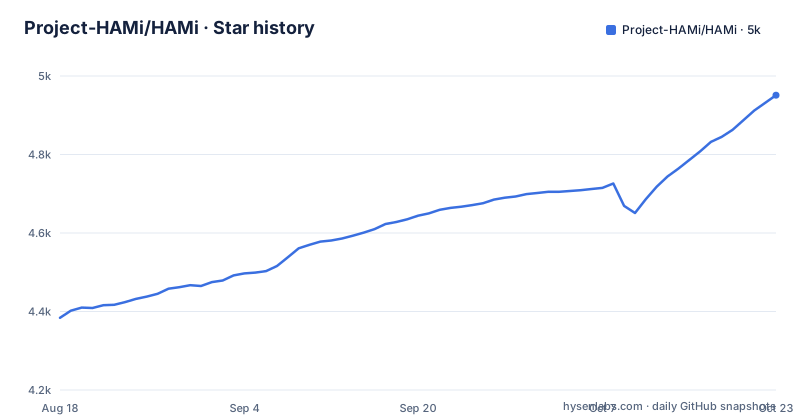
- Project-HAMi/HAMi4,912 ★ · +528
| Repository | 2026-08-18 | 2026-10-21 |
|---|---|---|
| Project-HAMi/HAMi | 4.4k | 4.9k |
528 Stars in the last 64 days, measured from the daily GitHub snapshot. Compare with other projects
Editorial analysis
nvidia.com/gpu means two different things at the node and in the pod
The request that gets a workload a slice of a card looks ordinary:
resources:
  limits:
    nvidia.com/gpu: 1
    nvidia.com/gpumem: 3000
Two notes under that example define the model. After HAMi is installed, the value of `nvidia.com/gpu` registered on the node defaults to the number of vGPUs, so the node advertises a count of virtual devices. Inside a pod, `nvidia.com/gpu` refers to the number of physical GPUs the current pod requires, while `nvidia.com/gpumem` carries the memory slice in the 3000 figure the example calls 3 GiB. The consequence is that the same key means capacity at one layer and consumption at the other, so capacity planning has to be done in virtual units while a single workload can still land on a dedicated card.
The webhook, the extender and Allocate() run in a fixed order
HAMi is four component types, and the order they run in is the part that matters when something fails:
Pod submission
  -> HAMi mutating webhook
  -> HAMi scheduler filter / score / bind
  -> device allocation written to pod annotations
  -> device plugin Allocate()
  -> container runtime environment
  -> HAMi monitor and metrics
Because the filter, score and bind stages sit before the device plugin, a scheduling decision is made while the pod is still pending, and the outcome is recorded as annotations before the runtime sees anything. The practical consequence is that a request HAMi cannot satisfy stays pending at the scheduler rather than failing inside the container, and the annotation is where you look to see what was actually granted.
Helm is three commands, and the prerequisites are the real gate
Nodes have to be labelled so HAMi knows which ones it manages, then the chart repo is added and the release installed:
kubectl label nodes <node-name> gpu=onhelm repo add hami-charts https://project-hami.github.io/HAMi/
helm repo updatehelm install hami hami-charts/hami -n kube-systemVerification is `kubectl get pods -n kube-system`, and you are looking for `hami-device-plugin` and `hami-scheduler` both `Running` before submitting `kubectl apply -f examples/nvidia/default_use.yaml`. The environment list is the part that decides whether this works at all on the NVIDIA path: driver 440 or newer, `nvidia-docker` newer than 2.0, NVIDIA set as the default runtime for containerd, Docker or CRI-O, Kubernetes 1.23 or newer, glibc 2.17 or newer, Linux kernel 3.10 or newer, and Helm newer than 3.0.
Memory and compute isolation exist only where the backend supports it
The value proposition is that workloads ask for a fraction of a device by memory, core or device count and get limits enforced, but that promise is conditional. HAMi enforces per-workload accelerator memory and compute limits where the device backend supports it, and device capabilities vary by vendor, model, driver and hardware generation. The maintained support matrix lives on the HAMi site rather than in the repository, so the README cannot tell you which of the NPUs, HCUs, MLUs, GCUs or XPUs it names give you hard limits today and which only get scheduled. For a multi-tenant pool this is the difference between a quota and a suggestion, and it has to be checked per backend before tenants are promised anything.
binpack and spread pull in opposite directions
Four scheduling modes are offered and they are not interchangeable. `binpack` consolidates workloads onto fewer nodes or devices, `spread` distributes them to reduce contention, topology-aware scheduling picks device combinations from GPU topology where that topology is exposed, and dynamic MIG creates and allocates NVIDIA MIG instances for the cards and modes that support them. Choosing between consolidation and isolation is the whole design decision: packing small jobs raises utilisation and puts neighbours on the same device, spreading them avoids contention and leaves the pool harder to fill. HAMi runs on the default kube-scheduler path and can also be paired with Volcano for batch oriented AI workloads.
Metrics sit on port 31993 and move with one Helm value
Observability starts at a scheduler endpoint that returns Prometheus style metrics:
http://<scheduler-ip>:<monitor-port>/metricsThe default monitor port is `31993` and it is changed through Helm values, for example `--set scheduler.service.monitorPort=<port>`. Two consequences for whoever operates this. First, the port is a plain service port on the scheduler, so leaving it as the default exposes your accelerator allocation data to anything that can reach the node network. Second, the dashboard layer is not part of this repository: HAMi-WebUI lives in its own project for visual cluster and device management, and the Grafana dashboards for accelerator monitoring are published on the documentation site, so a deployment means wiring three pieces together.
Thirteen example directories, thirteen different device stories
The vendor reach is visible in the example tree rather than in prose. Alongside `examples/nvidia/` there are directories for `ascend`, `awsneuron`, `biren`, `enflame`, `hygon`, `iluvatar`, `kunlun`, `metax`, `mlu`, `mthreads`, `remotegpu` and `vastai`. The first group covers on-premises accelerators from different vendors; the last two are remote and pooled capacity, which is a different scheduling problem from partitioning a card you own. The README's stated use cases line up with that spread: NVIDIA GPUs, Ascend, Cambricon, Hygon, Iluvatar, Kunlunxin, MetaX and Moore Threads are named as vendors to operate, and running notebooks, training and inference on one pool is the goal. Nothing in the repository states which of these share a code path.
Version stamping runs through ldflags and the Docker build uses a China Go proxy
The build files say more about the project than the feature list does. `go.mod` declares `go 1.27.0` and pins `k8s.io/kube-scheduler v0.37.1` alongside `k8s.io/api`, `k8s.io/apimachinery`, `k8s.io/client-go` and `k8s.io/kubelet` at the same version, which is what a scheduler extender has to do to stay aligned with the cluster it filters. `Makefile.defs` and `version.mk` are included first, then `GO_BUILD_LDFLAGS` stamps the version into `github.com/Project-HAMi/HAMi/pkg`, the NVIDIA device info package and the build date. The revision comes from `git rev-parse --short HEAD` locally and from `GITHUB_SHA` in CI, and the Docker targets pass `GOPROXY=https://goproxy.cn,direct` to `docker build`. In-container virtualization code sits in `libvgpu`, tests run through `hack/unit-test.s`, and released versions go out as v2.10.0, v2.9.0 and v2.8.3.
Editorial conclusion
HAMi fits platform teams who already run NVIDIA hardware with containerd, Docker or CRI-O and need quotas on scarce devices rather than whole-GPU allocation. Check three things before installing: that your driver and runtime match the prerequisite list, which vendor backends give you real memory and compute isolation rather than just scheduling, and how your workload reacts to a device that is smaller than the card it sees through. On non-NVIDIA hardware the support matrix on the project site, not the README, is the contract to read.
Frequently asked questions
Does HAMi require code changes in the workloads it shares GPUs with?
No. HAMi keeps standard Kubernetes resource requests and limits, so a pod asks for nvidia.com/gpu and nvidia.com/gpumem the way it always would. The allocated device resources are visible inside the container while HAMi coordinates scheduling, allocation and isolation.
How is HAMi installed and verified with Helm?
Label the nodes with kubectl label nodes <node-name> gpu=on, add the chart repo with helm repo add hami-charts https://project-hami.github.io/HAMi/, then helm install hami hami-charts/hami -n kube-system. Check that hami-device-plugin and hami-scheduler are both Running before applying examples/nvidia/default_use.yaml.
Which scheduling policies does HAMi support?
binpack to consolidate workloads onto fewer nodes or devices, spread to distribute them and reduce contention, topology-aware scheduling that picks device combinations from GPU topology, and dynamic MIG allocation for supported NVIDIA cards and modes. It runs on the default kube-scheduler path and can also be used with Volcano.
Where do HAMi cluster metrics come from?
From the scheduler monitor endpoint at http://<scheduler-ip>:<monitor-port>/metrics. The default monitor port is 31993 and it can be changed with Helm values such as --set scheduler.service.monitorPort=<port>.
Official sources
Add this badge to your README
If you maintain this project, the badge below links readers to this analysis and shows its maintenance status from the daily GitHub snapshot. Paste the markdown into your README; add ?metric=license or ?metric=stars to the image URL for a different field.

[](https://hysenlabs.com/projects/project-hami-hami)Star history chart for your README
[](https://hysenlabs.com/projects/project-hami-hami)Was this useful?