chrono: the release list runs 10, then 8, then 9, and three lines explain it
High-performance C++ library for multiphysics and multibody dynamics simulations
At a glance
- What is it?
- Project Chrono is a BSD-licensed C++ package for simulating rigid bodies, deformable bodies, granular material, fluid-coupled systems and sensor-equipped robots, with Python and C# interfaces on top. Its readme is a page of documentation links with one structural note at the bottom, and that note explains why its own release list is out of order.
- Who is it for?
- Chrono is a reasonable choice for a simulation that has to be coupled to something else, because the five template projects include one for the Functional Mock-up Interface standard and one for vehicle co-simulation, which is how you find out whether the library expects to share a timestep with another solver.
- Can I use it commercially?
- Yes. BSD-3-Clause is a permissive licence: you can use, modify and sell software built on it, as long as you keep its copyright and licence notices.
- Is it still maintained?
- Yes. The repository last received commits 1 day ago.
- What is it written in?
- Mainly C++, according to GitHub's language statistics.
Answers come from the project's GitHub data, last synced on November 14, 2026, and from our analysis. They are not legal advice.
Star history
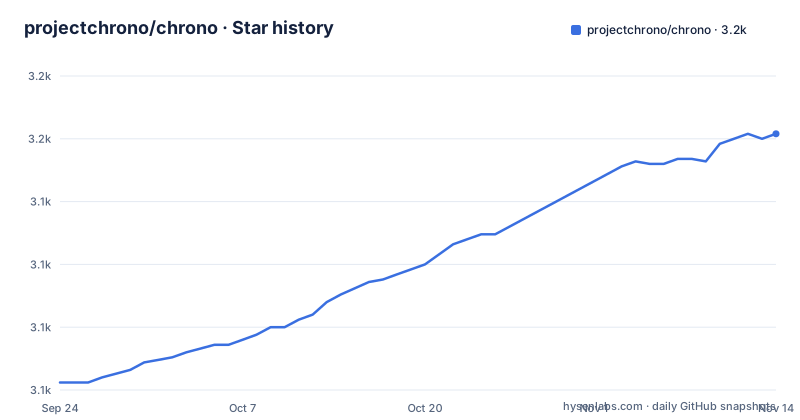
- projectchrono/chrono3,152 ★ · +99
| Repository | 2026-09-24 | 2026-11-14 |
|---|---|---|
| projectchrono/chrono | 3.1k | 3.2k |
99 Stars in the last 51 days, measured from the daily GitHub snapshot. Compare with other projects
Editorial analysis
The release list runs 10, then 8, then 9
The three most recent releases, in the order the page prints them, are version 10.0.0 from April 2026, version 8.1.0 from June 2025, and version 9.0.1 from July 2024. The versions therefore go up, down and up again as you read down the list. That is not a mistake in the list; it is the consequence of a branching policy described three lines from the bottom of the readme. Releases live in branches named after their minor version, with tags of the form major-dot-minor-dot-patch, so 8.1.0 was cut from the 8 line at a date later than the one on which 9.0.1 was cut from the 9 line. That is a maintenance release on an older series shipped after a newer series existed, which is what a project does when a long-lived branch still has users who cannot move. The documentation links follow the same logic: there is a reference for the main development branch, one for release 10.0.0 and one for release 9.0.0, and no reference for the 8 series.
The branch note also explains a default branch rename
The same three-bullet note carries two more facts about how the repository is laid out. The main development branch is now called main, where it was previously called develop. And the master branch, described as obsolete, was deleted. So the project moved from a develop-and-master convention to a single main branch with per-minor release branches, and a reader arriving from an older checkout or an older tutorial will have the wrong branch name. That note is also the reason the documentation section is organised the way it is, with one API reference built from the development branch and one per recent release, and it is worth reading before anything else on the page because it determines which reference matches the code you have. The last push on main is dated 2026-10-03 and the newest release is 10.0.0 from April, so the branch is about six months ahead of any tagged build.
Five template projects sit at the repository root
The top level of the repository holds five directories whose names all begin with the same prefix and a single file. They are the starting points, one per integration route: a plain template, one for C sharp, one for the Functional Mock-up Interface standard, one for a robotics middleware, and one for vehicle co-simulation. Two of those are worth pausing on. A template for the Functional Mock-up Interface is for coupling to third-party simulation tools that share a timestep, and one for vehicle co-simulation is the same idea applied to vehicle dynamics. So the set of templates is a statement about what this library expects to be used next to, more than it is a list of language bindings. Alongside them sit a CMake preset file, a CTest configuration file, a platform support document, a source directory, a documentation directory, a doxygen directory, a contribution directory and a data directory.
The same granular problem is offered as an inequality or as equations
The list of what the package models is organised by mathematical character, and one entry is unusually explicit about a choice it is offering. Granular dynamics is available in two formulations: a non-smooth contact formulation, whose governing problems are differential variational inequalities, or a smooth contact formulation, whose problems are differential-algebraic equations. Those are different kinds of mathematical object and they carry different consequences for how contact is resolved numerically and for how a solution behaves at a contact transition, so the choice is a modelling decision rather than an accuracy setting. The rest of the list covers the other three categories in the same order of decreasing algebraic complexity: large systems of connected rigid bodies as differential-algebraic equations, deformable bodies as partial differential equations, fluid-solid interaction as coupled equations of both kinds, and first-order dynamic systems as ordinary differential equations. Nothing on the page says which to pick for a given material.
A single-photon avalanche diode is listed beside a camera
The last item on the modelling list is sensors, and the parenthetical is worth reading twice. It names a camera, a lidar, GPS, an inertial measurement unit, and a single-photon avalanche diode, in that order, as the sensors supported for simulation in robotics and autonomous agents through a robotics middleware interface. A single-photon avalanche diode is a photon-counting sensor, so it sits in a simulation library that otherwise models mechanics and rigid bodies because the intended application includes agents that perceive in low light, and it is the only item on the page that is not about mechanics at all. The prose around the list describes a mature code base used by researchers in academia, industry and federal government across multibody dynamics, finite element analysis, granular dynamics, fluid-solid interaction, ground vehicle simulation, robotics, embodied AI and terramechanics, which is a wide spread for one package and is the clearest signal of what a new user is inheriting.
Almost entirely C++ is the hedge the page uses for its own implementation
One sentence carries the language story and it is hedged. The package is implemented almost entirely in C++, and it also provides Python and C sharp interfaces. The build is CMake based, and the library is platform-independent and tested on Linux, Windows and MacOS with a variety of compilers. Almost entirely is doing work that the page never explains, and the tree suggests where the remainder sits: five template projects in four languages or integration standards, a separate directory for contributions, a Python interface documented under its own name, and a git submodules file. So the interpreter-side and managed-language surfaces are real and documented, while the core is native. The docs section pairs them accordingly, with a C++ API reference set, a Python interface page, and reference manuals for the core module and a vehicle module.
A Google Group is the only support channel on a GitHub hosted repository
The Support section is one line and one link, pointing at a Google Groups user forum. That is the entire support surface named on the page. The repository itself is hosted on a code host with its own issue tracker, and the readme mentions neither the tracker nor a chat channel, which means the one route a reader would assume is not the one the page directs them to. Two other links round out the entry points and both point away from the repository in interesting ways. The first badge in the readme tracks commits on a GitLab mirror, so the main development branch is mirrored to a second host and the badge reads from there rather than from the canonical repository. The documentation links are all served from a separate documentation host, and the project website and the licence text are both addressed over plain HTTP.
The readme tells Claude users to create a symlink the repository does not ship
There is a short section addressed to people working on this repository with a coding agent. It points at an agent instruction file in the repository root, describing it as covering the recommended workflow for both developers and external users, including build setup, template projects, module manuals, demos and contribution expectations. Then it gives a local setup instruction for one particular agent, and the instruction is a single shell command that creates a symbolic link from the agent's expected filename to that instruction file, with an explicit recommendation to create a link rather than a copy. The instruction file itself is in the repository; the filename the command creates is not, so a fresh checkout does not satisfy the setup until the reader runs it. The recommendation to link rather than copy is the right one for a file that changes, and it is worth saying that the linked file is the same one the readme asks every other agent to read. The whole step is one command:
ln -s AGENTS.md CLAUDE.mdEditorial conclusion
Chrono is a reasonable choice for a simulation that has to be coupled to something else, because the five template projects include one for the Functional Mock-up Interface standard and one for vehicle co-simulation, which is how you find out whether the library expects to share a timestep with another solver. It is a poor fit if you want a single physics formulation for everything, because granular contact in particular is offered in two mathematically different forms and choosing between them is a modelling decision the readme does not guide you through. Before you start, read the branch note at the bottom of the readme rather than the documentation links, because which documentation set matches your checkout depends on it, and note that the newest release is half a year behind the branch.
Frequently asked questions
What is Project Chrono?
It is an open-source multi-physics package under a permissive BSD licence, used to model and simulate large systems of connected rigid bodies as differential-algebraic equations, deformable bodies as partial differential equations, granular dynamics in either a non-smooth formulation or a smooth one, fluid-solid interaction as coupled equations of both kinds, first-order systems as ordinary differential equations, and sensors including camera, lidar, GPS, an inertial unit and a single-photon avalanche diode through a robotics middleware interface.
Which programming languages does Project Chrono support?
It is implemented almost entirely in C++ and also provides Python and C sharp interfaces, with a CMake based build tested on Linux, Windows and MacOS. The repository root carries five template projects: a plain one, one for C sharp, one for the Functional Mock-up Interface, one for a robotics middleware and one for vehicle co-simulation.
Where do I find the Project Chrono documentation?
Three C++ API reference sets are linked, one built from the main development branch and one each for release 10.0.0 and release 9.0.0. There is a Python interface introduction page, a guide for running on AMD GPUs covering CPU Python versus HIP and fluid-structure interaction with CMake hints and a device visibility variable, and reference manuals for the core module and the vehicle module.
How do I get support for Project Chrono?
The readme names exactly one channel, a Google Groups user forum. No issue tracker, discussion board or chat channel is mentioned, even though the repository is hosted on GitHub, where a tracker exists.
What is the branch layout of the Project Chrono repository?
The main development branch is now called main and was previously called develop, and the obsolete master branch was deleted. Releases live in branches named after their minor version with tags of the form major, dot, minor, dot, patch, which is why the release list shows 10.0.0, then 8.1.0, then 9.0.1: the 8 series received a maintenance release after the 9 series existed.
How do I set up an AI coding agent on the Project Chrono repository?
The readme points at an agent instruction file in the repository root, which it says describes the recommended workflow including build setup, template projects, module manuals, demos and contribution expectations. For local use of one particular agent it recommends creating a symbolic link to that file rather than copying it, and that linked filename is not present in a fresh checkout until the reader runs the command.
Official sources
Add this badge to your README
If you maintain this project, the badge below links readers to this analysis and shows its maintenance status from the daily GitHub snapshot. Paste the markdown into your README; add ?metric=license or ?metric=stars to the image URL for a different field.

[](https://hysenlabs.com/projects/projectchrono-chrono)Star history chart for your README
[](https://hysenlabs.com/projects/projectchrono-chrono)Was this useful?