ClawSec: signed advisories, guarded installs and drift detection for AI agents
A complete security skill suite for OpenClaw, Hermes, PicoClaw and NanoClaw agents (and variants). Protect your SOUL.md (etc') with drift detection, live security recommendations, automated audits, and skill integrity verification. All from one installable suite.
At a glance
- What is it?
- ClawSec is an AGPL collection of security skills and signed advisory intelligence for AI agent runtimes. It verifies the advisory feed and a checksum manifest before matching published risk against installed skills, stops a risky install until a second confirmation is given, keeps baselines for critical agent files so configuration drift is visible, and ships separate entry points for OpenClaw, NanoClaw, Hermes and Picoclaw.
- Who is it for?
- ClawSec fits an operator running an agent runtime that can install skills on your machine, who needs to know that a skill has not changed underneath them and that a known advisory is being blocked before it lands. It does not fit a team that only writes their own skills in a trusted directory, since most of what it does is verification of things you did not write, and it does not fit a platform where the runtime contract does not support the checks.
- Can I use it commercially?
- Yes, with strict conditions. AGPL-3.0 is a network copyleft licence: if people use a modified version over a network, for example as a hosted service, you must offer them its source code under the same licence.
- Is it still maintained?
- Yes. The repository received new commits within the last day.
- What is it written in?
- Mainly JavaScript, according to GitHub's language statistics.
Answers come from the project's GitHub data, last synced on November 7, 2026, and from our analysis. They are not legal advice.
Star history
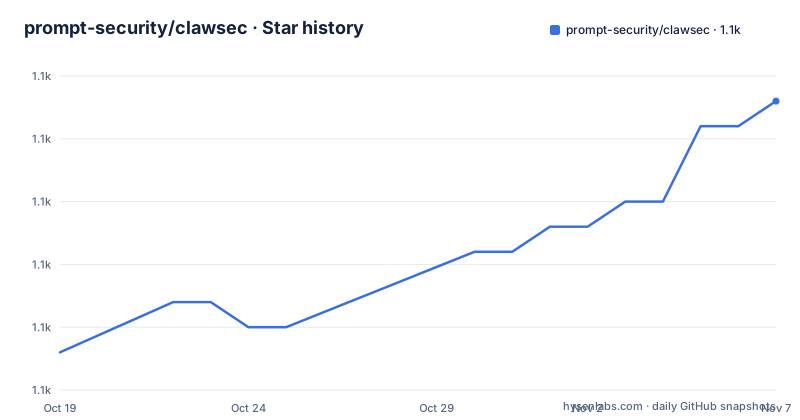
- prompt-security/clawsec1,134 ★ · +10
| Repository | 2026-10-19 | 2026-11-07 |
|---|---|---|
| prompt-security/clawsec | 1.1k | 1.1k |
10 Stars in the last 19 days, measured from the daily GitHub snapshot. Compare with other projects
Editorial analysis
What the suite is actually defending
ClawSec is an AGPL collection of security skills and signed advisory intelligence for AI agent runtimes. The description in the README says it helps operators verify skill artifacts, detect configuration drift, audit agent environments, and approval-gate risky installs across OpenClaw, NanoClaw, Hermes and Picoclaw.
The problem behind that list is a new one. An agent runtime that can install a skill, and that reads a file such as a SOUL.md to shape its behaviour, has a supply chain, and that supply chain has the same properties as any other: somebody else wrote the artifact, and a change to it changes what your agent does. There is no package manager checksum in the traditional sense, and the files that define an agent's behaviour are not the ones a user is likely to look at.
So the protection model has two halves. One half is about the incoming artifacts, checking an install against published advisories before it lands. The other half is about the state you already have, keeping a baseline of the files that matter so that a silent modification is detectable.
The framing of the whole project is careful about its own authority. ClawSec recommends and gates actions, and destructive removal and install overrides remain approval-controlled. That is a deliberate limit on what an automated security tool will do to your machine, and it is a sensible one: a scanner that can delete a compromised skill on its own is a scanner that can delete a working one on a false positive.
The project is licensed AGPL-3.0, the site is clawsec.prompt.security, and the last push to the repository was on 2026-10-15.
Four protection layers
The README has a table of the protection layers, and it is the clearest description of the project.
Signed intelligence verifies the advisory feed and the checksum manifest before matching published risk against installed skills. So the check is not performed against whatever the feed says at the moment of the query, it is performed against feed material whose signature and checksums have been verified first. That is the difference between a scanner and a script that fetches a list.
Guarded installs stop on advisory matches and require a second, explicit confirmation before a risky install can continue. A single confirmation, the one that already happens when you install anything, is not enough to install something the advisory feed knows about.
Integrity and drift gives the platform-specific skills baselines for critical files, configuration, attestations and release artifacts. The baseline is the reference copy, and a mismatch is a finding rather than a surprise.
Audits and reporting provides focused audit, posture, self-test and community-reporting packages where the platform contract supports them. The qualifier matters, because not every runtime exposes the hooks that an audit needs, and the project is explicit about where the coverage stops.
The design is a set of small, separable packages rather than one monolith, which is what lets the same idea be expressed for four different runtimes without pretending they are the same.
Installing the OpenClaw suite is two reviewable steps
The OpenClaw entry point is the package called clawsec-suite, and the README is careful that adding the package and activating its persistent hook are separate, reviewable steps. That separation is the design.
The first step adds the suite with its signed advisory trust set, heartbeat workflow, guarded installer and setup scripts.
npx skills add prompt-security/clawsec --skill clawsec-suite -a openclaw --global -yThe second step is the one that changes your runtime's configuration, and it is a script you run and read the output of.
SUITE_DIR="${INSTALL_ROOT:-$HOME/.openclaw/skills}/clawsec-suite"
node "$SUITE_DIR/scripts/setup_advisory_hook.mjs"
The setup script prints its preflight before it changes persistent OpenClaw configuration, and after it succeeds you restart the OpenClaw gateway and run /new once to trigger the first advisory scan. The optional protections are separate packages that the suite discovers from the published catalog, which you can list with the discover script.
node "$SUITE_DIR/scripts/discover_skill_catalog.mjs"There is a paragraph in the README about installing for someone else, and it is the most security-aware sentence in the document. Ask their agent to install the suite with the command above, show them the hook preflight, and wait for approval before enabling the hook or the optional cron job. The same reasoning that makes a scanner worth having also makes it worth watching, because a security tool that installs itself quietly is the thing you were trying to avoid.
The path notes are practical rather than philosophical. For bash and zsh you export INSTALL_ROOT as "$HOME/.openclaw/skills" and keep the home variable expandable rather than single-quoting it, in PowerShell you build the path explicitly with Join-Path, and POSIX shell workflows on Windows need WSL or Git Bash.
The advisory feed is signed, and the key is pinned in the repository
The signed advisory channel is the part of the project that makes the rest meaningful, and the README documents its trust material as a list of files.
There is the advisory feed itself, advisories/feed.json, a detached signature at advisories/feed.json.sig, a pinned Ed25519 public key at advisories/feed-signing-public.pem, and a signing and verification runbook in the wiki. A second copy of the public key sits at the repository root as clawsec-signing-public.pem.
The consolidated feed can contain relevant NVD CVEs, approved community reports, and provisional GitHub advisories that do not yet have CVE identifiers. That last category is the interesting one, because a project that only matched published CVEs would miss exactly the newly reported problems that have not been assigned an identifier yet.
Querying it directly is a pipe.
curl -fsSL https://clawsec.prompt.security/advisories/feed.json \
  | jq '.advisories[] | select(.severity == "critical" or .severity == "high")'
There is also a migration note. The legacy /releases/latest/download/feed.json endpoint remains a compatibility mirror, and new consumers should use the canonical /advisories/feed.json endpoint. The repository has a workflow that polls NVD CVEs, with its own status badge, so the feed is built continuously rather than by hand.
The runbook is the document to read before trusting the feed in your own environment, because it is where the verification procedure is written down rather than assumed.
Four entry points, and one category that is only a specification
Each runtime gets its own package, because the platform contracts differ.
For OpenClaw the README tells you to start with clawsec-suite for signed advisory monitoring and guarded installs, then discover the separate drift and audit protections. For NanoClaw there is clawsec-nanoclaw, for NanoClaw specific advisory, integrity, verification and security-tool workflows. For Hermes there is hermes-attestation-guardian, for signed advisory checks, guarded verification, deterministic attestations and baseline drift detection. For Picoclaw there is picoclaw-security-guardian, for posture, advisory, drift and release-artifact checks, with self-pen testing as a separate opt-in package.
Then there is the sentence that keeps an honest reader honest. The *-traffic-guardian directories are specification baselines for platform builders. They are not shipped runtime proxies today.
That distinction is easy to miss and it matters. A directory named traffic-guardian sounds like something that inspects your traffic, and what it actually is, at least for now, is a document describing what such a thing should do for someone building a runtime. Treating a specification as a shipped proxy would be a bad way to learn that a network component is not actually in the path.
The catalogue is browsable live at clawsec.prompt.security, the full comparison including shipped, limited and specification-only coverage is in the wiki's skill feature matrix, and the packages themselves are in the skills/ directory.
The repository is a catalogue site, a wiki and a set of skills
The repository layout explains the shape of the project. Alongside the skills/ directory and the advisories/ directory there is a whole website, with App.tsx, index.tsx, components/, pages/, public/, assets/ and a Vite build, plus a wiki/ directory that holds the documentation, the skill feature matrix and the signing runbook.
The web catalogue is built with Vite and React 19, with react-router, react-markdown and remark-gfm for rendering, and lucide-react for icons. The dependency list is short and mostly about rendering, which fits a catalogue that displays packages rather than running them.
The internationalisation work is more than a badge. There are separate README files in German, Spanish, French, Japanese and Korean, and the package scripts include a Python quality check at scripts/i18n/qa_check.py plus bootstrap scripts that seed a new language from English, with pyproject.toml defining a clawsec-utils package that requires Python 3.10 or newer and configures ruff with the bandit rule set enabled, and a separate bandit configuration that skips the assert check.
The ruff configuration shows the shape of the security tooling in the repo: the S rules from bandit are on, and the three suppressions are documented, with asserts allowed, subprocess calls without a shell check allowed because the inputs are controlled, and partial executable paths allowed.
The test tooling is modern as well, with fast-check for property based testing, node's own test runner for the readme hero manifest, and a prepare script that points git at a .githooks directory so the hooks are versioned with the code.
Editorial conclusion
ClawSec fits an operator running an agent runtime that can install skills on your machine, who needs to know that a skill has not changed underneath them and that a known advisory is being blocked before it lands. It does not fit a team that only writes their own skills in a trusted directory, since most of what it does is verification of things you did not write, and it does not fit a platform where the runtime contract does not support the checks. Verify three things before you enable the hook: that you read the preflight output, because the setup script prints it before it changes persistent configuration and the README asks you to review it, that the pinned signing key and the detached signature are the ones you expect, since trust in a feed is the whole basis of the advisory matching, and which of the packages are shipped code and which are specification baselines, because the README says the traffic-guardian directories are not shipped runtime proxies today.
Frequently asked questions
What does ClawSec actually do for an agent runtime?
It verifies the advisory feed and a checksum manifest before matching published risk against installed skills, stops a risky install until a second explicit confirmation is given, keeps platform specific baselines for critical files, configuration, attestations and release artifacts so drift is visible, and provides audit, posture, self-test and community-reporting packages where the platform contract supports them. It recommends and gates actions, and destructive removal and install overrides stay approval-controlled.
How do I install the ClawSec suite for OpenClaw?
Add the package with npx skills add prompt-security/clawsec --skill clawsec-suite -a openclaw --global -y, then review and enable the advisory hook by running node "$SUITE_DIR/scripts/setup_advisory_hook.mjs" with SUITE_DIR pointing at the installed suite. The setup script prints a preflight before it changes persistent configuration, after which you restart the OpenClaw gateway and run /new once to trigger the first scan.
How is the ClawSec advisory feed trusted?
The trust material is in the repository: the feed at advisories/feed.json, a detached signature at advisories/feed.json.sig, a pinned Ed25519 public key at advisories/feed-signing-public.pem and a signing and verification runbook in the wiki. The feed can carry NVD CVEs, approved community reports and provisional GitHub advisories that have no CVE identifier yet, and the legacy /releases/latest/download/feed.json path is only a compatibility mirror.
Which agent runtimes does ClawSec support?
Four, each with its own package: clawsec-suite for OpenClaw, clawsec-nanoclaw for NanoClaw, hermes-attestation-guardian for Hermes and picoclaw-security-guardian for Picoclaw, with Picoclaw self-pen testing as a separate opt-in package. The traffic-guardian directories are specification baselines for platform builders and are not shipped runtime proxies today.
What licence is ClawSec under?
AGPL-3.0, with the package manifest declaring AGPL-3.0-or-later. The recent releases include clawsec-suite 0.1.16 from 2026-07-14, hermes-attestation-guardian 0.1.7 from 2026-07-13 and nanoclaw-traffic-guardian 0.0.2 from 2026-09-07, and the repository was last pushed to on 2026-10-15.
Official sources
Add this badge to your README
If you maintain this project, the badge below links readers to this analysis and shows its maintenance status from the daily GitHub snapshot. Paste the markdown into your README; add ?metric=license or ?metric=stars to the image URL for a different field.

[](https://hysenlabs.com/projects/prompt-security-clawsec)Star history chart for your README
[](https://hysenlabs.com/projects/prompt-security-clawsec)Was this useful?