OpenDraft: offline screenwriting across four delivery targets
Open Draft - Free, open-source screenwriting software — a modern alternative to Final Draft. Professional screenplay formatting, real-time collaboration, beat boards, and version control. Desktop (macOS/Windows/Linux) & browser.
At a glance
- What is it?
- OpenDraft is MIT-licensed screenplay software built as a Tauri desktop shell, a Python backend and a separate collaboration server, shipped for macOS, Windows, Linux, iOS and Android plus a browser demo. The README argues from offline ownership, and the build files back that up.
- Who is it for?
- OpenDraft suits a writer who wants screenplay formatting, a beat board and version diffs on a machine with no account and no subscription, and who is willing to install a build or self-host a container to get them. It does not suit a team that needs a plugin ecosystem or a hosted collaboration service with persistence, since the collaboration path is a link and nothing is kept on a server afterwards.
- Can I use it commercially?
- Yes. MIT is a permissive licence: you can use, modify and sell software built on it, as long as you keep its copyright and licence notices.
- Is it still maintained?
- Yes. The repository last received commits 1 day ago.
- What is it written in?
- Mainly TypeScript, according to GitHub's language statistics.
Answers come from the project's GitHub data, last synced on October 21, 2026, and from our analysis. They are not legal advice.
Star history
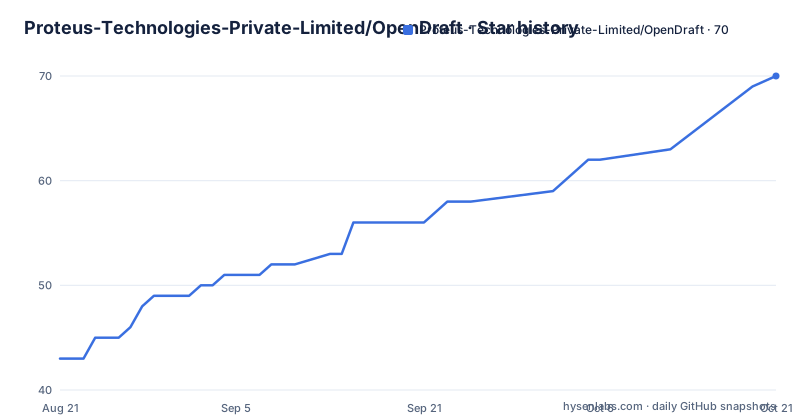
- Proteus-Technologies-Private-Limited/OpenDraft70 ★ · +27
| Repository | 2026-08-21 | 2026-10-21 |
|---|---|---|
| Proteus-Technologies-Private-Limited/OpenDraft | 43 | 70 |
27 Stars in the last 61 days, measured from the daily GitHub snapshot. Compare with other projects
Editorial analysis
Seven desktop artifacts and two store apps
The download section is a table of version-stamped filenames rather than a single installer, and it covers seven desktop targets. On macOS there is a build for Apple Silicon and a separate one for Intel, both .dmg files. Windows gets a 64-bit .exe and an MSI in en-US. Linux gets a .deb for Debian and Ubuntu, an AppImage, and an rpm for Fedora, with the rpm following the distribution convention of a dash and a release number while the other Linux files use underscores. Mobile is two store links, one for iOS and one for Android, and the claim attached to them is that the app is fully standalone with everything bundled inside and no account or setup required. The README also states that most users are writing in under two minutes, and that no account is needed to open the browser demo.
The Docker image drops pyinstaller on purpose
Self-hosting runs through a two-stage Dockerfile, and the filtering step is the interesting part. Stage one builds the frontend on node:20-slim with npm ci and npm run build. Stage two is python:3.12-slim, and before installing anything it strips desktop-only dependencies out of the backend requirements:
ENV OPENDRAFT_DATA_DIR=/app/data
ENV PORT=8080

EXPOSE 8080

CMD ["uvicorn", "app.main:app", "--host", "0.0.0.0", "--port", "8080"]
The comment above that line says pyinstaller is for desktop builds only, and the copy step writes the built frontend into the static directory served by the backend, so the container is a single process on port 8080 with projects stored under a data directory set by an environment variable. Backing that model, the root package.json is almost empty, holding a private flag and one script that forwards to tauri. The desktop app is therefore a Tauri shell, not a Node application, and the Node tree at the root is not where the product lives.
Frontend, backend, collab-server and src-tauri
The top level is a map of the architecture. frontend/ is the web client that the Docker build compiles, backend/ is the Python service behind it, and src-tauri/ is the desktop shell. collab-server/ is separate from both, which matches the feature description of collaboration as a link-based session rather than a document store. Around them sit landing/ and user-manual/ as the published sites, docs/ for the feature list, deploy/ for deployment, fastlane/ for the mobile builds, dictionaries-extra/ for spell check data, test-script/ and images/. The shell scripts at the root are named for what they do, including build.sh, build-desktop.sh, build-ios-device.sh, build-appstore.sh, release.sh, setup.sh, setup_auth_env.sh, and four start scripts for the backend, the collaboration server, the demo and the frontend. One oddity: node_modules appears as a top-level entry rather than something ignored.
Version history with diff is the row that matters
The comparison table has eighteen rows across OpenDraft, Final Draft, WriterDuet and Fade In, and the version history row is where it draws a distinction rather than a wall. OpenDraft is the only column marked Yes for version history with diff; the other three are all marked Limited. The feature itself is described as checking in drafts, comparing versions side by side and restoring any previous draft instantly, and the screenshot captions name the same three parts: check-in, diff and restore. That combination is the practical answer to a writer who has lost a draft, and it is the one place where the table claims more than parity. The rest of the table is closer to parity, with real-time collaboration and beat boards marked Yes across all four products.
The comparison is dated and asks for corrections
Read the footnote before the rows. The table is stated to be based on publicly available product information as of April 2026, with a link to open an issue if a row is wrong, which is an admission that a competitor matrix ages badly. The numbers in the price row are the ones to treat carefully: OpenDraft is listed as Free, Final Draft at $250, WriterDuet as Free or $12 a month, and Fade In at $80. Several rows are about the licence and the account rather than the feature set, with Open Source listed as Yes under MIT while the other three are No, Self-Hostable as Yes against three No answers, and No Account Required as Yes where WriterDuet and Final Draft are No. Plugin Architecture is the other row that is not parity, marked Yes only for OpenDraft.
Collaboration is a link, and nothing stays afterwards
The collaboration model is the part of the design that most affects trust, and it is described in one line: invite co-writers with a link, with real-time cursors and permissions, and when the session ends nothing stays on any server. The feature list adds presence indicators and edit or view permissions, and the screenshot caption describes multiple writers editing simultaneously. That is a different proposition from a shared document with a history, and the privacy claim and the collaboration claim have to be read together: the README says your scripts never leave your machine, yet it also offers simultaneous editing. What the project claims is that the live session is transient, and the separate collab-server/ directory with its own start script is where that session runs.
Offline is the load-bearing claim
Four badges sit under the title and they are the same claim stated four ways: free forever, works 100% offline, your scripts never leave your machine, and import from Final Draft in seconds. The reasoning is given explicitly. Your script is intellectual property, cloud-based screenwriting tools store work on corporate servers where it can be mined, leaked, or used to train AI, and OpenDraft keeps every word on the machine. The feature list backs the offline part with desktop apps for Mac, Windows and Linux, mobile apps for iOS and Android, and no internet required, and the download section repeats it by calling the app fully standalone with everything bundled. The privacy row in the comparison table is the marketing form of the same idea, listed as privacy-first with no tracking.
MIT, three releases in four days, and a docs trail
The project is MIT licensed and moving quickly: v2.3.0 was released on 2026-09-18, v2.3.1 on 2026-09-19 and v2.3.2 on 2026-09-21, and the last push to the default branch main is dated 2026-09-25, so the repository is not archived and the branch is ahead of the newest tag. The documentation is part of the repository rather than a side site: docs/FEATURES.md holds the longer list covering the scene navigator, spell check, search and replace, script notes and asset management, and user-manual/ is the manual that the repository homepage field points at. Alongside them sit CODE_OF_CONDUCT.md, SECURITY.md, a LICENSE file and a CLAUDE.md, which suggests the same agent-assisted workflow the scripts and the Dockerfile already imply.
Editorial conclusion
OpenDraft suits a writer who wants screenplay formatting, a beat board and version diffs on a machine with no account and no subscription, and who is willing to install a build or self-host a container to get them. It does not suit a team that needs a plugin ecosystem or a hosted collaboration service with persistence, since the collaboration path is a link and nothing is kept on a server afterwards. Before adopting it, check the artifact list for your platform, remember the comparison table is dated April 2026, and read the self-host path in the Dockerfile if you plan to run it yourself. The newest release is v2.3.2 from 2026-09-21.
Frequently asked questions
What is OpenDraft?
OpenDraft is free, MIT-licensed screenwriting software, positioned as an alternative to Final Draft. It provides industry-standard screenplay formatting with autocomplete, a beat board of drag-and-drop index cards, character profiles, version history with diff and restore, and import and export for Final Draft .fdx, Fountain and PDF.
Which platforms can I download OpenDraft for?
Seven desktop artifacts: .dmg builds for Apple Silicon and Intel macOS, a 64-bit .exe and an en-US .msi for Windows, and a .deb, an AppImage and an .rpm for Linux. Mobile builds are published for iOS and Android, and a browser demo opens with no account.
How does real-time collaboration work in OpenDraft?
Co-writers are invited with a link and the session provides real-time cursors, presence indicators and edit or view permissions. The stated design is that when the session ends nothing stays on any server, and the collaboration server runs as a separate process from the editor backend.
Can I self-host OpenDraft?
Yes. The Dockerfile builds the frontend on node:20-slim, then runs the Python backend on python:3.12-slim with uvicorn on port 8080, storing projects under the OPENDRAFT_DATA_DIR directory. Pyinstaller is filtered out of the backend requirements because it is only needed for desktop builds.
How does OpenDraft compare with commercial screenwriting software?
The README publishes an eighteen-row table against Final Draft, WriterDuet and Fade In, marked as based on publicly available product information as of April 2026 with an issue link for corrections. OpenDraft is listed as free and MIT licensed with no account required, and as the only one of the four with version history including diff.
Official sources
Add this badge to your README
If you maintain this project, the badge below links readers to this analysis and shows its maintenance status from the daily GitHub snapshot. Paste the markdown into your README; add ?metric=license or ?metric=stars to the image URL for a different field.

[](https://hysenlabs.com/projects/proteus-technologies-private-limited-opendraft)Star history chart for your README
[](https://hysenlabs.com/projects/proteus-technologies-private-limited-opendraft)