snarkOS: what running an Aleo validator actually costs, and which ports must stay shut
A Decentralized Operating System for ZK Applications
At a glance
- What is it?
- The Rust node software behind the Aleo network, documented in two Build Guide sections that are really a hardware specification and a firewall specification. A validator is specified at 64 cores, 256GiB of memory and 4TB of disk, and its REST port is marked deny for every address, while a client is a smaller machine with the opposite instruction on that same port.
- Who is it for?
- Fit if you are running Aleo infrastructure and can meet a written hardware and firewall specification. Skip it if you are evaluating on a laptop, since the validator requirements are server numbers, or if you need a REST interface on a validator, which the port table explicitly forbids.
- Can I use it commercially?
- Yes. Apache-2.0 is a permissive licence: you can use, modify and sell software built on it, as long as you keep its copyright and licence notices.
- Is it still maintained?
- Yes. The repository received new commits within the last day.
- What is it written in?
- Mainly Rust, according to GitHub's language statistics.
Answers come from the project's GitHub data, last synced on November 22, 2026, and from our analysis. They are not legal advice.
Star history
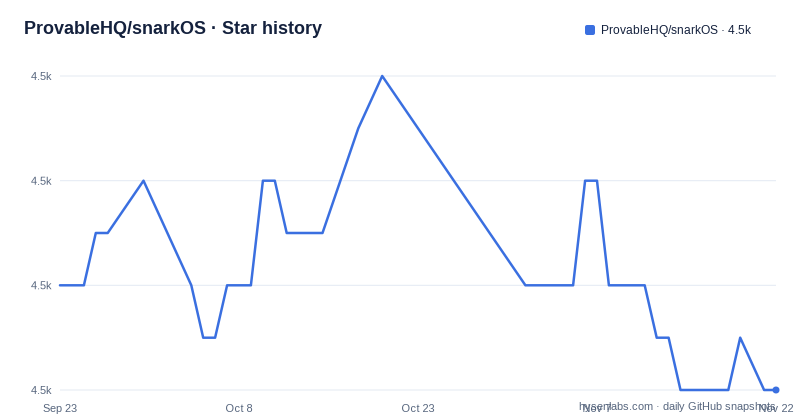
- ProvableHQ/snarkOS4,526 ★ · -2
| Repository | 2026-09-23 | 2026-11-22 |
|---|---|---|
| ProvableHQ/snarkOS | 4.5k | 4.5k |
-2 Stars in the last 60 days, measured from the daily GitHub snapshot. Compare with other projects
Editorial analysis
Three node types, and clients split by what they connect to
The definitions section is short and it settles every configuration argument later. A validator participates in consensus and must be started with an account that is bonded into the committee, which is the gate on who may run one. A client does not participate in consensus but maintains a ledger, provides information about the network, and accepts solutions and transactions and passes them to its peers. A prover is dedicated to solving the Aleo puzzle, and neither participates in consensus nor keeps a copy of the ledger. The client type is then split further, and the reason given is configuration management rather than protocol: all clients run the same software, but a core client connects directly to a validator node while an outer client connects only to other clients or prover nodes. That distinction is what the two separate port tables exist to serve.
Validators are specified down to the core count
The requirements list reads like a procurement document. Operating systems must be 64-bit and kept current, with Ubuntu 22.04 LTS listed for validators while clients may use that, macOS Ventura or later, or Windows 11 or later. Validators are called for 64 cores with 128 or larger preferred, against 24 cores for clients with 32 or larger preferred. Memory is DDR4 or better, 256GiB for validators with 384 preferred, and 128GiB for clients with 192 preferred. Storage must be PCIe Gen 3 x4, PCIe Gen 4 x2 NVMe SSD or better, 4TB for validators with 6TB preferred, and 2TB for clients with 4TB preferred. The network line asks for symmetric commercial always-on connectivity, 500Mbps upload and download for validators against 250Mbps for clients. Provers get no numbers at all, with the explanation that proving hardware varies widely and that the Aleo community publishes resources on it.
The install is a clone of mainnet, then cargo install --locked
Installation is three commands after Rust is present, and the Rust version comes from the repository's own toolchain file rather than from a number in the prose. The clone names its branch explicitly:
git clone --branch mainnet --single-branch https://github.com/ProvableHQ/snarkOS.gitThen you move into the directory:
cd snarkOSUbuntu users get a helper script for dependencies, run from that same directory:
./build_ubuntu.shAnd the install itself carries `--locked`, so the committed lockfile is honoured rather than resolved afresh:
cargo install --locked --path .The branch name is the part that catches people. The repository's default branch is `staging`, while the instructions tell you to clone `mainnet` with `--single-branch`, so a plain clone of the default branch gives you code the build guide did not ask for. After installing, the guide asks you to make sure ports `4130/tcp` and `3030/tcp` are open on your router and your OS firewall.
Validators must deny 3030/tcp while clients must allow it
The port tables are the security section, and the difference between them is the point. A core client needs one port open, `4130/tcp` allowed from all IPv4 and IPv6 for TCP traffic to peers. An outer client needs that plus `3030/tcp`, also from all addresses, for its REST server. A validator needs six entries and they are not all permissive: `4130/tcp` open to all for peer traffic, `5000/tcp` allowed only from trusted validator IPs because it carries BFT communication between validators, `3000/tcp` for a metrics dashboard restricted to an internal VPC or VPN, `3030/tcp` marked deny from all addresses with the note that the REST server should always be disabled for validators, and `9000/tcp` for metrics export plus `9090/tcp` for Prometheus, both restricted to an internal VPC or VPN. One more requirement sits below the tables: the open file limit should be 16,384 or above, with a recommended `<username> - nofile 65536` setting for your user.
CUDA is a leftover feature, not an optimisation
The optional accelerator section is unusually candid about its own status. The build is optional, installed by adding a feature flag to the same install command:
cargo install --locked --path . --features cudaWhat that flag does today is nothing useful. The current snarkOS puzzle does not leverage CUDA acceleration, and the README describes the feature as a leftover from a previous event, while noting that CUDA may become relevant again with ARC-43. It is labelled unstable and experimental, with breaking changes expected. So the correct reading for a prover operator is that this is a dormant code path kept around, not a performance switch: installing it will not make proving faster on today's puzzle, and it will not stay source-compatible. The people this section is aimed at are prover operators willing to experiment, and even they are pointed at community resources for guidance on proving hardware rather than given a specification.
The MSRV is pinned in four files at once
One line in the manifest is worth reading slowly, because the comment next to it is the kind of thing that saves a build. `rust-version` is set to 1.96.0, and the comment says the MSRV is pinned in `Cargo.toml`, `rust-toolchain.toml` and `.github/workflows/benchmarks.yml`, and that all of them must be changed together. A contributor who bumps one and forgets the other two gets a build that disagrees with itself. The rest of the manifest is a 21-member workspace, with `account`, `cli`, `display`, `node` and its sub-members broken out by concern, including `node/bft`, `node/bft/events`, `node/bft/ledger-service`, `node/bft/storage-service`, `node/cdn`, `node/consensus`, `node/metrics`, `node/network`, `node/rest`, `node/router`, `node/sync`, `node/tcp` and `utilities`. Dependencies are pinned in ways that matter: `aleo-std` at 1.0.4 with default features off, and snarkvm pulled from a git revision rather than the registry, with the local path left commented out.
Two release lines ship for the same version
The release history has parallel tracks. v4.12.1 is dated 2026-10-31 and `testnet-v4.12.1` 2026-10-21, with v4.12.0 dated 2026-10-13 behind them. The manifest version reads 4.12.0, the edition is 2024, the licence is Apache-2.0, and the last push landed on 2026-11-02. The pairing is what makes the branch instruction in the install guide coherent: a mainnet tag and a testnet tag for the same version number are two different networks. The tree also shows how the project is policed rather than just built, with `deny.toml` for dependency policy, `CI.md` describing the pipeline, `.ci/` and `.github/` as two separate automation homes, `.rustfmt.toml` and `.rusty-hook.toml` for formatting and hooks, `build.rs`, `AGENTS.md` and `scripts/`. The table of contents points to a development guide with quick start, operations, local devnet, feature flags and local backups sections, and two entries, a JSON-RPC interface and additional information, are commented out rather than written.
Editorial conclusion
Fit if you are running Aleo infrastructure and can meet a written hardware and firewall specification. Skip it if you are evaluating on a laptop, since the validator requirements are server numbers, or if you need a REST interface on a validator, which the port table explicitly forbids. Before you build, confirm which release line you want, since mainnet and testnet tags ship for the same version, raise your open file limit as the guide says, and check that the MSRV files still agree with each other.
Frequently asked questions
What is snarkOS and what does it do?
snarkOS is a decentralized operating system for zero-knowledge applications, written in Rust. It forms the backbone of the Aleo network, which verifies transactions and stores encrypted application state in a publicly-verifiable manner.
What is the difference between an Aleo validator, client and prover?
Validators participate in consensus and must be started with an account bonded into the committee. Clients do not participate in consensus but maintain a ledger and pass solutions and transactions to peers, in either a core client connected to a validator or an outer client connected only to clients and provers. Provers solve the Aleo puzzle and keep no ledger copy.
How do I install snarkOS?
Ensure Rust is installed at the version in the repository's toolchain file, then clone the mainnet branch with `git clone --branch mainnet --single-branch https://github.com/ProvableHQ/snarkOS.git`. On Ubuntu run `./build_ubuntu.sh` for dependencies, then install with `cargo install --locked --path .`.
What hardware does an Aleo validator need?
Ubuntu 22.04 LTS on 64-bit hardware, 64 cores with 128 or larger preferred, 256GiB of DDR4 or better with 384 preferred, 4TB of PCIe NVMe storage with 6TB preferred, and 500Mbps of symmetric always-on bandwidth. Clients need less: 24 cores, 128GiB, 2TB and 250Mbps.
Which ports should an Aleo validator expose?
`4130/tcp` open to all for peer traffic, `5000/tcp` allowed only from trusted validator IPs for BFT communication, and `3000/tcp`, `9000/tcp` and `9090/tcp` restricted to an internal VPC or VPN for dashboards and metrics. The REST server on `3030/tcp` should always be denied for validators and is only opened for outer clients.
Official sources
Add this badge to your README
If you maintain this project, the badge below links readers to this analysis and shows its maintenance status from the daily GitHub snapshot. Paste the markdown into your README; add ?metric=license or ?metric=stars to the image URL for a different field.

[](https://hysenlabs.com/projects/provablehq-snarkos)Star history chart for your README
[](https://hysenlabs.com/projects/provablehq-snarkos)Was this useful?