ESP32-A2DP: a Bluetooth speaker or sender on an ESP32, and the profiles it leaves out
A Simple ESP32 Bluetooth A2DP Library (to implement a Music Receiver or Sender) that supports Arduino, PlatformIO and Espressif IDF
At a glance
- What is it?
- ESP32-A2DP is an Apache-2.0 C++ library that turns an ESP32 into an A2DP music receiver or sender for Arduino, PlatformIO and Espressif IDF. It is audio streaming only: no hands-free, no headset profile, and a dependency on AudioTools for the examples.
- Who is it for?
- ESP32-A2DP fits anyone building a Bluetooth speaker, a streaming sender or an audio gadget on an ESP32 with Arduino. It is the wrong choice if you need hands-free calling, a headset profile or standalone AVRCP, and you should check your Arduino core version against the legacy I2S note before upgrading.
- Can I use it commercially?
- Yes. Apache-2.0 is a permissive licence: you can use, modify and sell software built on it, as long as you keep its copyright and licence notices.
- Is it still maintained?
- Yes. The repository last received commits 15 days ago.
- What is it written in?
- Mainly C++, according to GitHub's language statistics.
Answers come from the project's GitHub data, last synced on November 15, 2026, and from our analysis. They are not legal advice.
Star history
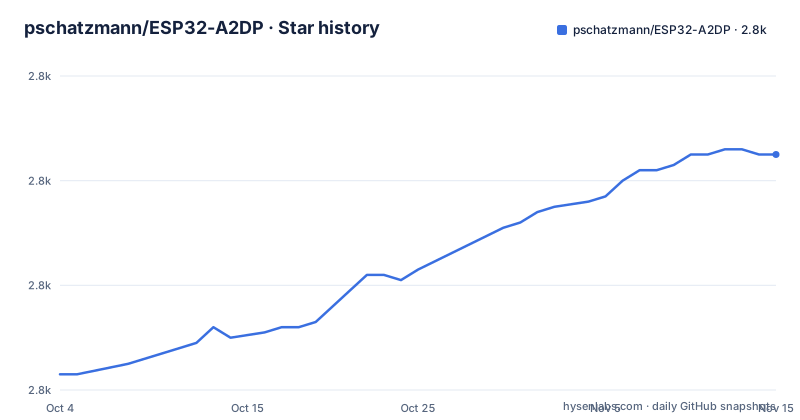
- pschatzmann/ESP32-A2DP2,805 ★ · +42
| Repository | 2026-10-04 | 2026-11-15 |
|---|---|---|
| pschatzmann/ESP32-A2DP | 2.8k | 2.8k |
42 Stars in the last 42 days, measured from the daily GitHub snapshot. Compare with other projects
Editorial analysis
It speaks A2DP and AVRCP together and nothing else
The library is named after the A2DP Bluetooth profile, which only provides audio streaming. It adds support for the Audio/Video Remote Control Profile (AVRCP), but only alongside A2DP. Three things are explicitly not supported: the Hands-Free Profile (HFP), the Headset Profile (HSP), and AVRCP used on its own without A2DP.
The consequence is concrete. A project that needs a microphone channel back to a phone, for example a hands-free car kit or a call headset, cannot be built on this library, because those roles belong to HFP and HSP. A project that only wants a remote-control surface without audio is also out of scope. What you get is a one-way audio pipe in either direction, plus play, pause and track-style control commands that ride on top of it. The repository's example folders reflect this focus, with names such as bt_music_receiver, bt_music_sender_avrc and bt_music_receiver_with_metadata.
The sink hands you decoded PCM, and by default it lands on I2S pins 14, 15 and 22
In receiver mode the ESP32 exposes the Bluetooth A2DP API so it can accept sound from a phone and make it available through a callback. The output is a PCM data stream decoded from SBC format. The library then connects that stream to I2S, the serial bus used to carry PCM audio between chips.
The smallest receiver is only a few lines:
#include "AudioTools.h"
#include "BluetoothA2DPSink.h"

I2SStream i2s;
BluetoothA2DPSink a2dp_sink(i2s);

void setup() {
    a2dp_sink.start("MyMusic");
}

void loop() {
}
This registers a Bluetooth device called MyMusic and sends output to the default I2S pins: BCK = 14, WS = 15, DATA = 22. Those pins must be wired to an external DAC, so a bare ESP32 board will not produce sound from a speaker on its own. Custom pins, output through the ESP32 I2S API or the internal DAC, data callbacks, metadata and AVRC commands are covered in the A2DP Sink wiki page.
Espressif's legacy I2S API disappears with Arduino v3.0.0 and IDF v5
Espressif is retiring its legacy I2S API. With Arduino v3.0.0, which is built on IDF v5, the author's old I2S integration will no longer be available. The legacy syntax keeps working only as long as you do not upgrade the core.
This is the main trap for existing projects. A sketch written against the old integration can compile today and break the day the board package moves to v3.0.0. To avoid a version-dependent output API, the author recommends installing and using the AudioTools library, and the documentation and all examples have been updated to that approach.
You are not locked into it. The sink can write to any class that inherits from Arduino Print, such as the Arduino ESP32 I2SClass, or you can skip I2S and consume the audio in a data callback. The choice decides how much of your code survives a core upgrade, so it is worth settling before the first sketch rather than after.
The source expects raw PCM at 44.1kHz, two channels and 16 bits, and you supply every byte
For sending, the library feeds a Bluetooth speaker with audio you generate. The required format is fixed: PCM data at a 44.1kHz sampling rate, two channels, 16 bits per sample. If your source material is at another rate, resampling is your job, which is why the examples include a resample48000 sketch for the receiver side and why you should expect to do conversion work for odd sources.
#include "BluetoothA2DPSource.h"

BluetoothA2DPSource a2dp_source;

int32_t get_sound_data(uint8_t *data, int32_t byteCount) {
    // generate your sound data
    // return the effective length in bytes
    return byteCount;
}

void setup() {
  a2dp_source.set_data_callback(get_sound_data);
  a2dp_source.start("MyMusic");
}

void loop() {}
The callback receives a buffer and a byte count, and must return how many bytes it actually filled. Returning byteCount without writing valid samples sends whatever happens to be in the buffer. Frame callbacks, Arduino Streams as a data source and the choice of target device are documented in the A2DP Source wiki page.
Examples need a second repository, AudioTools, cloned beside the library
For Arduino you can download the library as a zip and use Include Library, then zip library. Alternatively, clone it into the Arduino libraries folder. Because the provided examples depend on AudioTools, that library is cloned as well:
cd  ~/Documents/Arduino/libraries
git clone https://github.com/pschatzmann/ESP32-A2DP.git
git clone https://github.com/pschatzmann/arduino-audio-tools.git
Skipping the second clone is the usual reason an example fails to compile, since the first line of the sink sketch includes AudioTools.h. For frameworks other than Arduino, installation details live in the project wiki, and the repository ships a CMakeLists.txt, a component.mk and a library.properties, which cover the IDF and Arduino packaging paths. PlatformIO and Espressif IDF are named in the description as supported, but the steps are in the wiki rather than on the main page.
Debugging runs through the ESP32 logger, and the issue tracker is for bugs only
The library does not bring its own logging layer. It uses the ESP32 logger, which you switch on in the Arduino IDE under Tools, Core Debug Log. When a pairing or streaming problem appears, that is the first place to look.
The maintainer also sets firm rules for reporting problems. Read the documentation first, then check existing issues and discussions. Open issues only for bugs; questions belong in a discussion. Any report should state the selected scenario or sketch, what you are trying to do, your hardware, your ESP32 version from the Board Manager, and the version of the ESP32-A2DP library. Emails and questions on the author's personal website are explicitly unwelcome.
For readers, the practical point is that a vague report will not get help. If your problem is a how-do-I question rather than a defect, the discussions area, including its Show and Tell category of projects that use the library, is the correct venue.
Releases land every few months, and the library is paired with AudioTools for processing
The last push to the repository was on 31 October 2026, the same day as release v1.8.12. Before that came v1.8.11, tagged May 2026, and v1.8.10 from April 2026. That is a release roughly every one to five months across the three most recent tags, which is a steady cadence for a single-maintainer Arduino library.
Beyond plain forwarding, the library is part of the author's AudioTools project, so received audio can be processed with an equalizer, filters or sound effects, analysed with FFT, or redirected to a different output. On the sending side, audio can come from any AudioTools source, such as MP3 files, a microphone or a synthesizer. The AudioTools repository holds a communication examples folder with A2DP sketches for this.
The software is free to use. The author invites optional tips through the sponsor links, and the Wiki holds the class documentation, the Design Overview covering architecture and dependencies, and the full change history.
Editorial conclusion
ESP32-A2DP fits anyone building a Bluetooth speaker, a streaming sender or an audio gadget on an ESP32 with Arduino. It is the wrong choice if you need hands-free calling, a headset profile or standalone AVRCP, and you should check your Arduino core version against the legacy I2S note before upgrading.
Frequently asked questions
Can I use an ESP32 as a Bluetooth audio receiver?
Yes. The ESP32-A2DP library provides an A2DP sink that receives audio from a phone and outputs decoded PCM, by default on I2S pins BCK 14, WS 15 and DATA 22 for an external DAC.
What is A2DP in Bluetooth?
A2DP is the Bluetooth profile that provides audio streaming only. ESP32-A2DP also supports AVRCP together with it, but not HFP, HSP or standalone AVRCP.
how to install esp32-a2dp
For Arduino, download the library as a zip and use Include Library, then zip library, or git clone it into the Arduino libraries folder. The examples also need the arduino-audio-tools library cloned beside it.
Official sources
Add this badge to your README
If you maintain this project, the badge below links readers to this analysis and shows its maintenance status from the daily GitHub snapshot. Paste the markdown into your README; add ?metric=license or ?metric=stars to the image URL for a different field.

[](https://hysenlabs.com/projects/pschatzmann-esp32-a2dp)Star history chart for your README
[](https://hysenlabs.com/projects/pschatzmann-esp32-a2dp)Was this useful?