psd-tools: Read and Render Photoshop PSD Files in Python
Python package for reading Adobe Photoshop PSD files
At a glance
- What is it?
- psd-tools gives Python developers programmatic access to PSD and PSB structure, layer images, and partial rendering. It suits inspection and extraction, but it does not replace Photoshop for advanced editing.
- Who is it for?
- Adopt psd-tools for Python services, asset pipelines, and research tools that need controlled access to PSD structure or extracted images. Do not choose it as a replacement for Photoshop when editable text, shape layers, smart objects, fonts, or complete layer-effect rendering are required.
- Can I use it commercially?
- Yes. MIT is a permissive licence: you can use, modify and sell software built on it, as long as you keep its copyright and licence notices.
- Is it still maintained?
- Yes. The repository received new commits within the last day.
- What is it written in?
- Mainly Python, according to GitHub's language statistics.
Answers come from the project's GitHub data, last synced on October 23, 2026, and from our analysis. They are not legal advice.
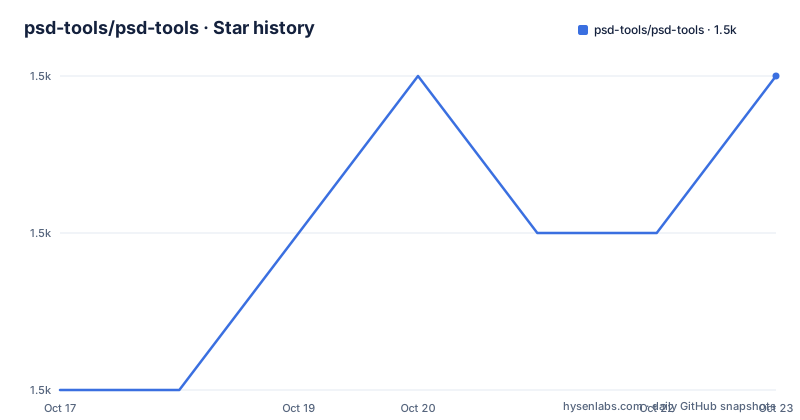
Star history
- psd-tools/psd-tools1,483 ★ · +2
| Repository | 2026-10-17 | 2026-10-23 |
|---|---|---|
| psd-tools/psd-tools | 1.5k | 1.5k |
2 Stars in the last 6 days, measured from the daily GitHub snapshot. Compare with other projects
Editorial analysis
psd-tools Targets Automated PSD Inspection and Extraction
psd-tools solves a practical problem for Python developers: reading Adobe Photoshop documents without driving the Photoshop application. The package can read and write the low-level PSD and PSB file structure, export raw layer images as NumPy or PIL data, and render a document or individual layer into an image. That makes it relevant to document inspection, asset extraction, graphics research, automated previews, and pipelines that receive Photoshop files as input.
The intended users are developers working in Python, not people seeking a visual Photoshop replacement. The project supports basic pixel layers and groups, several adjustment layers, fill effects, vector masks, and common blending modes. Its support is narrower for editing. Type layers, shape layers, smart objects, text editing, many layer effects, and font rendering are outside its stated editing scope.
This boundary matters because a PSD file contains much more than a stack of embedded images. Type may depend on fonts and layout data, shapes may carry vector semantics, smart objects may refer to separate assets, and effects may require a renderer that interprets a substantial part of Photoshop's behavior. psd-tools provides access to much of the container and some rendering paths, but it does not claim to reproduce all of those systems.
The package metadata classifies psd-tools as Beta. That declaration should be considered alongside the explicit list of unsupported features when selecting it for a production workflow. The project is suitable for controlled automation, but file coverage and rendering fidelity need to be checked against the kinds of documents an application actually receives.
PSDImage.open Drives Document and Layer Access
The documented entry point is `PSDImage`, imported from `psd_tools`. Calling `PSDImage.open` with a file path loads a document object. The object can produce a composed image through `psd.composite()`, while iteration with `for layer in psd` exposes the document's layers. Each layer also has a `composite()` method that returns an image for that layer.
This creates a direct path from a PSD file to Python-managed image files. In the README example, the composed document is saved as PNG through the returned image object. Individual layers are also saved as PNG files using their layer names. That design is useful when a downstream system needs separate visual assets rather than one flattened preview.
The package also provides lower-level access. Its feature list includes read and write operations for PSD and PSB structures, as well as raw layer image export in NumPy and PIL formats. NumPy output fits array-oriented processing, while PIL output aligns with a familiar Python imaging interface. The repository layout places the implementation under `src/psd_tools`, with tests under `tests` and documentation under `docs`.
Compositing is not uniformly implemented. The README says basic compositing can use cached previews or simple pixel-based operations. More advanced composition depends on optional dependencies and can cover vector shapes, strokes, gradients, patterns, layer effects, and a defined set of adjustment layers. Dissolve blending is excluded from the supported blending-mode list. A successful call to `composite()` therefore does not establish that every visible Photoshop feature has been recreated.
Installing psd-tools for a First PSD Export
The base installation uses `pip` and includes the documented runtime dependencies `attrs`, Pillow, and NumPy. The package requires Python 3.11 or later according to `pyproject.toml`. Install the base package when raw inspection, basic image export, cached-preview compositing, or simple pixel-layer rendering is enough.
Run the following command in an environment where you want the package installed. It installs the package name exactly as documented in the README.
pip install psd-toolsAfter installation, replace `example.psd` with the path to a PSD file you have permission to process. The first operation opens that document and saves a composed PNG. The loop then prints each layer and saves its rendered image, using the layer name to construct each output filename.
from psd_tools import PSDImage

psd = PSDImage.open('example.psd')
psd.composite().save('example.png')

for layer in psd:
    print(layer)
    layer_image = layer.composite()
    layer_image.save('%s.png' % layer.name)
The reader should see `example.png` after the first save call, followed by one PNG operation for each iterated layer. Layer names can contain characters that are awkward or unsafe in filenames on a particular operating system, so a production script may need to normalize output names before invoking the save operation.
The repository defines a `psd-tools` command through `pyproject.toml`, but the README does not document its invocation or output. This tutorial therefore uses the documented Python API rather than inferring CLI options from the entry point.
The composite Extra Expands Rendering and Platform Costs
Install the `composite` extra when an application needs advanced rendering features rather than only cached previews or simple pixel operations. The README associates this extra with vector shape and stroke rendering, gradient and pattern fills, and layer effects.
This is the documented full compositing installation command. Quoting the extra keeps the brackets from being interpreted by the shell.
pip install 'psd-tools[composite]'The extra adds `aggdraw` and `scipy`. Platform conditions in `pyproject.toml` select `aggdraw>=1.3.16` outside Windows and `aggdraw>=1.4.1` on Windows. This distinction should be considered when building reproducible environments across operating systems.
There is also a Windows-specific packaging caveat. The README says the extra may not be available on every platform. When `aggdraw` lacks a wheel and is built from source on Windows, a build that cannot find FreeType can succeed when `AGGDRAW_FREETYPE_ROOT` is set to an empty value.
That fallback affects installation and maintenance, not normal application configuration. It is intended for source-build environments where `aggdraw` fails during dependency setup. Teams with repeatable builds should record whether their Windows environment receives a wheel or compiles the dependency, because these paths have different operational requirements. The project also uses Cython for an RLE compression extension, and `pyproject.toml` lists `cython` as a build requirement for source builds.
psd-tools Rendering Has Explicit Fidelity Limits
The main failure mode is confusing structural access with complete visual reproduction. psd-tools can open a document and expose layers even when some layer types cannot be edited or rendered in full. A pipeline that accepts arbitrary PSD files may therefore encounter unsupported type layers, shape layers, smart objects, text, complex effects, or font-dependent content.
The clearest limitations are explicit in the README. Editing type and shape layers is not supported. Smart-object editing is not supported. Text inside type layers cannot be edited, and fonts are not rendered. Many layer effects cannot be composed. The supported adjustment-layer set includes BrightnessContrast, Levels, Curves, Exposure, Invert, Posterize, and Threshold. Dissolve is excluded from blending-mode support.
Basic compositing may use cached previews instead of rebuilding every visual component. That can be a sensible fast path, but output fidelity then depends on what Photoshop placed in the file. Advanced rendering does not remove every boundary because the README continues to list unsupported object types and effects.
psd-tools is the wrong tool when the requirement is to turn a type layer into editable text, update a smart object, render typography consistently across machines, or reproduce arbitrary Photoshop effects as a full editor would. In those cases, Photoshop or another renderer whose documentation explicitly covers the required feature set is the more defensible choice. The README does not claim that psd-tools can replace Adobe Photoshop.
Raw Export Is the Lighter Alternative to Full Compositing
For applications that only need pixels, psd-tools offers an alternative to its advanced compositor: export raw layer data in NumPy or PIL form. This avoids the `aggdraw` and `scipy` dependencies associated with the `composite` extra when the application does not need vector fills, layer effects, or the advanced rendering paths that use them.
The choice is architectural. Full compositing reconstructs document appearance by interpreting layers and supported effects. Raw export supplies layer image data in an array or PIL-compatible form for a narrower processing task. Cached-preview or simple-pixel composition offers another path when a flattened image is sufficient.
These approaches should not be treated as equivalent. A raw NumPy array requires application code to interpret its dimensions, channels, and color representation before drawing conclusions. PIL output does not recover editable Photoshop semantics. A successful flattened export can also conceal unsupported composition details.
For asset extraction, start with the lightest documented path that satisfies the output contract. Add advanced compositing only after confirming that cached previews or basic pixel operations cannot produce the required result. That avoids installing optional rendering dependencies for a workflow that only reads image data.
Release Activity and MIT Upgrade Boundaries
The GitHub repository is not archived, and its last push was on 2026-10-15. Releases include v1.25.0 on 2026-10-14, v1.24.0 on 2026-10-06, and v1.23.1 on 2026-10-06. These dated records show recent repository and package activity. The README does not provide a backward-compatibility policy or a migration guide for moving between those releases.
Versioning is dynamic in `pyproject.toml`, so the package version is not pinned there as a static dependency string. Applications should separately record the installed version when reproducibility matters. The package declares support for Python 3.11 through Python 3.15 and includes a Cython extension for RLE compression. Environments that build from source therefore need an appropriate compiler toolchain in addition to the declared build packages.
The project is licensed under the MIT License. That license governs use, modification, distribution, and sublicensing of the project subject to its copyright and permission-notice conditions. It does not grant rights in Photoshop documents, fonts, linked assets, or other third-party content. An application must separately assess the permissions attached to every file it processes.
Editorial conclusion
Adopt psd-tools for Python services, asset pipelines, and research tools that need controlled access to PSD structure or extracted images. Do not choose it as a replacement for Photoshop when editable text, shape layers, smart objects, fonts, or complete layer-effect rendering are required. Before adoption, open representative production files and compare their rendered output with the expected previews or reference renders.
Frequently asked questions
How do I install psd-tools with advanced layer compositing?
Install the package with the `composite` extra using `pip install 'psd-tools[composite]'`. The extra supplies optional dependencies for advanced rendering features and may not be available on every platform.
How do I open and export a PSD file with psd-tools?
Use `PSDImage.open('example.psd')` and call `save` on the result of `psd.composite()`. The README also documents iterating over layers and saving each layer's composed image.
Can psd-tools edit Photoshop text and render fonts?
No. Text editing in type layers and font rendering are explicitly unsupported. psd-tools is intended for PSD structure access and a defined set of image operations, not full Photoshop editing.
Official sources
Add this badge to your README
If you maintain this project, the badge below links readers to this analysis and shows its maintenance status from the daily GitHub snapshot. Paste the markdown into your README; add ?metric=license or ?metric=stars to the image URL for a different field.

[](https://hysenlabs.com/projects/psd-tools-psd-tools)Star history chart for your README
[](https://hysenlabs.com/projects/psd-tools-psd-tools)Was this useful?