Pulsar is Atom's fork still carrying dot-atom/, ppm and a jasmine runner, on Electron 32
A Community-led Hyper-Hackable Text Editor
At a glance
- What is it?
- Pulsar is a community-run fork of Atom built on Electron, described as hyper-hackable but usable with its defaults, MIT licensed and documented entirely off the repository. What the tree shows is a long transition: the manifest is at a dev version, the newest tag is v1.133.1 from November 2026, two package managers sit side by side, and a badge announcing the upstream sunset is defined in the link list but never shown.
- Who is it for?
- Pulsar is a reasonable choice for someone who wants Atom's package ecosystem without Atom, particularly if their packages depend on the Pulsar-scoped forks of the Atom libraries rather than the originals, since the dependency list shows those maintained in place. Three things to check first.
- Can I use it commercially?
- Check first. The repository uses a licence we do not classify automatically, so read its LICENSE file before any commercial use.
- Is it still maintained?
- Yes. The repository received new commits within the last day.
- What is it written in?
- Mainly JavaScript, according to GitHub's language statistics.
Answers come from the project's GitHub data, last synced on November 15, 2026, and from our analysis. They are not legal advice.
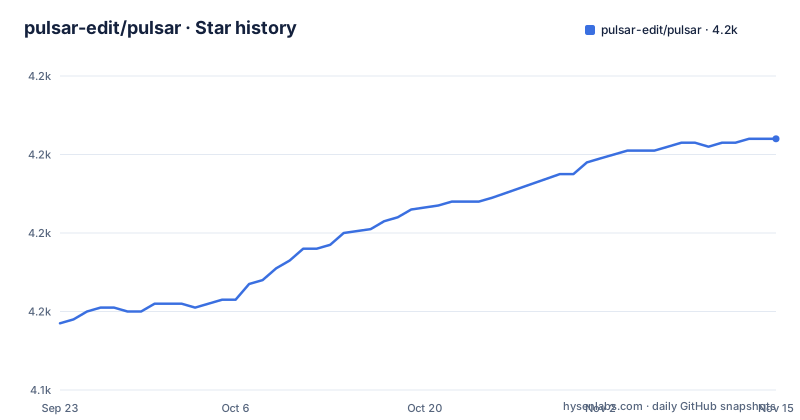
Star history
- pulsar-edit/pulsar4,204 ★ · +47
| Repository | 2026-09-23 | 2026-11-15 |
|---|---|---|
| pulsar-edit/pulsar | 4.2k | 4.2k |
47 Stars in the last 53 days, measured from the daily GitHub snapshot. Compare with other projects
Editorial analysis
Forked from Atom, and the tree still carries dot-atom/, ppm and jasmine
The readme describes the project in three clauses: a community-led hyper-hackable text editor, forked from Atom, built on Electron, designed to be deeply customizable but still approachable with the default configuration. The Atom link in the readme points at GitHub's own announcement about sunsetting Atom, which dates the fork precisely.
The tree has not been cleaned of its origins. There is a `dot-atom/` directory for user configuration, a `ppm` file for Atom's package manager, a `pulsar.sh` launcher script of its own, and separate `keymaps/`, `menus/` and `locales/` directories at the root rather than inside a package. The manifest still carries an Atom test runner field pointing at a jasmine2 runner, which is how the original test suite executed.
The dependency list completes the picture. Alongside ordinary libraries sit several packages scoped to the project itself, including its own keymap, fuzzy finder, git utilities, path watcher, a text buffer and a superstring implementation, and then a long run of local packages referenced by file path with Atom names, such as the dark and light syntax and UI themes, an about panel, an archive view and several autocomplete providers.
Node 20.18.1 and Electron 32.3.3, plus a bridge into the renderer
The runtime requirements are stated in the manifest rather than in prose. The engine field requires Node 20.18.1 or newer, the Electron version is pinned to 32.3.3, and the entry point is the main process file under `src/main-process/`. The tree also carries an `.nvmrc`, which is how a contributor gets the matching Node version without reading the manifest.
One dependency deserves a second look. The list includes `@electron/remote`, pinned to an exact version, alongside a source-map support helper and a Babel core pinned to an exact build. The remote package is the bridge that gives code running in the renderer access to Node APIs, which is what Atom-era packages expect. It is also the kind of dependency that widens what any installed package can reach, so it belongs in your threat model if you install packages from outside the project's own set.
The rest of the runtime is a mix of caret ranges and exact pins, which is normal for a project that has to keep a decade of package compatibility while upgrading its own internals.
yarn.lock, pnpm-workspace.yaml and a yarnrc in the same root
Two package managers coexist in the root, and the readme does not explain the arrangement. There is a `yarn.lock`, a `.yarnrc`, and a `pnpm-workspace.yaml`. A workspace file for one tool and a lockfile for another is either a migration in progress or two install paths maintained deliberately.
Either way, it has a practical consequence: which lockfile is authoritative is not something the repository states, and getting it wrong means installing a different dependency tree than the one the project tested. The readme's build link points to a documentation site rather than to anything in the repository.
Elsewhere the tooling is more conventional. Linting is ESLint with an ignore file and a configuration, there is a Codacy configuration for automated review, and the badge row shows a build status from Cirrus CI, a Codacy grade badge, and Crowdin for translations, which is how a project with a volunteer translation team keeps locale files in the tree.
The manifest says 1.132.1-dev; the newest tag is from May 2026
The version record is worth reading carefully. `package.json` carries `1.133.1-dev`, so the working tree is a development build sitting just past the last release number.
The newest published tag is v1.133.1 dated 2026-11-01, before it v1.133.0 on 2026-10-30, and before that v1.132.1 from 2026-05-20. The default branch is `master`, and it was last pushed on 2026-11-02.
So the newest release is only a day older than the last push, and the dev suffix in the manifest marks the checked-out tree as a development build rather than what a user would download.
An upstream sunset badge is defined in the link list and never shown
The readme is mostly a wall of Markdown link definitions. Every badge is declared at the bottom as a named reference and used at the top with an image tag.
In that list there is a badge for upstream status reading Sunset, with a colour chosen to look like a warning. It is defined, and it is not used anywhere in the visible readme. So the badge meant to tell visitors that the project this forked from is no longer maintained exists in the file and does not appear on the page.
The same pattern shows the project's care in a smaller way. There is an HTML comment explaining that the Reddit subscriber badge was broken, with links to two upstream badge issues, and a static replacement badge defined immediately below it. That is the kind of note a maintainer leaves when a badge service fails and they would rather say so than ship a broken image.
Playwright for end-to-end tests alongside the Atom-era jasmine specs
The testing setup has two generations in it. The manifest's test runner field still points at a jasmine2 runner inherited from Atom, and the tree carries a `spec/` directory for those unit tests. Alongside it sits a `playwright.config.ts`.
That combination is a fair description of the project's position: the unit suite is the one Atom left behind, and the end-to-end layer is newer work added on top. Both are in the root rather than in a package, which keeps them close to the application rather than to any one workspace package.
The rest of the top level follows the same pattern of inherited structure. There are `exports/`, `hooks/`, `integration/`, `static/` and `vendor/` directories, a `resources/` tree holding the readme preview image, and a `docs/` directory, although the documentation the readme sends you to is hosted rather than in the repository.
MIT in the manifest and the badge, nothing in the repository licence field
The licensing is one of the simpler things to sort out, though the records differ in an odd way. The readme carries a licence badge that reads MIT and links to a file named `LICENSE.md` at the repository root, and the package manifest also declares MIT as the licence. The repository's own licence metadata, however, records NOASSERTION rather than MIT.
The practical difference is small for a human and real for a tool: a licence scanner that reads the repository metadata will come back with NOASSERTION, while one that reads the manifest or the badge will get MIT. The root file being named `LICENSE.md` rather than `LICENSE` is worth knowing for the same reason.
Beyond code, the project is funded through OpenCollective and translated through Crowdin, and its community presence spans a Discord server, a GitHub Discussions area, a Mastodon account and two different Reddit and Lemmy communities. The readme's own description of the editor, deeply customizable but approachable by default, is the standard this fork has set itself, and the package ecosystem scoped under the project's own namespace is how it meets it.
Editorial conclusion
Pulsar is a reasonable choice for someone who wants Atom's package ecosystem without Atom, particularly if their packages depend on the Pulsar-scoped forks of the Atom libraries rather than the originals, since the dependency list shows those maintained in place. Three things to check first. The build and installation instructions are not in the repository at all, they live on a documentation site, so budget time to find your route in. The manifest pins a renderer bridge package that re-enables Node access inside the renderer process, which is worth understanding before you install packages from the wider Atom ecosystem into it. And the manifest carries a dev-suffixed version, `1.133.1-dev`, rather than the newest tag's v1.133.1.
Frequently asked questions
What is Pulsar?
Pulsar is a community-led text editor described as hyper-hackable, forked from Atom and built on Electron, designed to be deeply customizable while remaining usable with its default configuration. It is MIT licensed per the package manifest, requires Node 20.18.1 or newer, and runs on Electron 32.3.3.
What is the relationship between Pulsar and Atom?
Pulsar is a fork of Atom, and the readme links to GitHub's announcement about sunsetting Atom. The heritage is still visible in the repository: a `dot-atom/` directory, the Atom package manager script, root-level keymap, menu and locale directories, an Atom-era jasmine test runner in the manifest, and many Atom-named packages referenced by local file path.
How do I install or build Pulsar?
The repository contains no installation command. The readme's install button points at a documentation page for installing on your system, and a separate build link points at a contributing page describing how to build the editor yourself. The tree does carry an `.nvmrc` for the Node version and a workspace file, so a contributor needs the tooling set up before following those pages.
What is the latest Pulsar release?
The newest tag is v1.133.1 dated 2026-11-01, preceded by v1.133.0 on 2026-10-30 and v1.132.1 from 2026-05-20. The package manifest on the default branch carries the version `1.133.1-dev`, and the branch itself was last pushed on 2026-11-02.
Is Pulsar free and open source?
The package manifest declares the MIT licence and the readme carries an MIT badge pointing at a `LICENSE.md` file at the repository root, although the repository's own licence metadata field records NOASSERTION. The project is funded through OpenCollective and translated through Crowdin, and no paid edition is described.
Official sources
Add this badge to your README
If you maintain this project, the badge below links readers to this analysis and shows its maintenance status from the daily GitHub snapshot. Paste the markdown into your README; add ?metric=license or ?metric=stars to the image URL for a different field.

[](https://hysenlabs.com/projects/pulsar-edit-pulsar)Star history chart for your README
[](https://hysenlabs.com/projects/pulsar-edit-pulsar)Was this useful?