SmartDNS: one answer per lookup, picked by a local probe
A local DNS server to obtain the fastest website IP for the best Internet experience, supporting DoT, DoH and DoQ.
At a glance
- What is it?
- A local DNS server in C that fans a lookup out to many upstreams, measures every returned address from the client side network, and hands back only the fastest. This is what the repository actually shows, including the gaps in its speed demonstration and the parts of its build you have to opt into.
- Who is it for?
- SmartDNS fits a home network where the router itself can answer port 53 and a single fastest address per name is acceptable, run by someone willing to maintain client lists and address pins by hand. It does not fit an operator who needs several candidate addresses handed to the client, who needs to see which upstream answered, or who expects a shipped filter list or a documented install command.
- Can I use it commercially?
- Yes, with conditions. GPL-3.0 is a copyleft licence: if you distribute software that includes it, you must release that software's source code under the same licence. Running it internally without distributing it does not trigger that obligation.
- Is it still maintained?
- Yes. The repository last received commits 3 days ago.
- What is it written in?
- Mainly C, according to GitHub's language statistics.
Answers come from the project's GitHub data, last synced on November 14, 2026, and from our analysis. They are not legal advice.
Star history
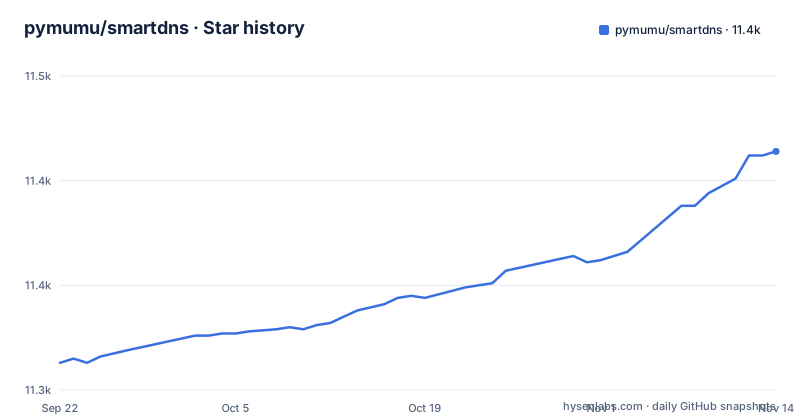
- pymumu/smartdns11,414 ★ · +101
| Repository | 2026-09-22 | 2026-11-14 |
|---|---|---|
| pymumu/smartdns | 11.3k | 11.4k |
101 Stars in the last 53 days, measured from the daily GitHub snapshot. Compare with other projects
Editorial analysis
Every answer is measured from the local network before it is returned
The query path is a fan out, a measurement, and a single answer. A client on the local network asks for a name. SmartDNS sends the same question to several upstream servers over UDP on the standard or a non standard port, or over TCP. The upstreams answer with lists of addresses. SmartDNS then checks which of those addresses responds fastest from the client's own network and returns only that one. This is the mechanism the project sets against dnsmasq. The README contrasts it with dnsmasq's all-servers mode: SmartDNS returns the result with the fastest access speed, measured from the local network. Supported transports are UDP, TCP, DOT, DOH, DOQ, and DOH3, plus lookups tunnelled through a socks5 or HTTP proxy.
The speed demonstration is one hostname and two ICMP packets
The project's showcase resolves the same name twice, once directly against a public resolver and once through SmartDNS, then pings what came back. A direct query to 223.5.5.5 and a query through SmartDNS are shown for www.baidu.com.
$ nslookup www.baidu.com 223.5.5.5
Server:         223.5.5.5
Address:        223.5.5.5#53

Non-authoritative answer:
www.baidu.com   canonical name = www.a.shifen.com.
Name:   www.a.shifen.com
Address: 180.97.33.108
Name:   www.a.shifen.com
Address: 180.97.33.107

$ ping 180.97.33.107 -c 2
PING 180.97.33.107 (180.97.33.107) 56(84) bytes of data.
64 bytes from 180.97.33.107: icmp_seq=1 ttl=55 time=24.3 ms
64 bytes from 180.97.33.107: icmp_seq=2 ttl=55 time=24.2 ms

--- 180.97.33.107 ping statistics ---
2 packets transmitted, 2 received, 0% packet loss, time 1001ms
rtt min/avg/max/mdev$ nslookup www.baidu.com
Server: 192.168.1.1
Address: 192.168.1.1#53
Non-authoritative answer:
www.baidu.com canonical name = www.a.shifen.com.
Name: www.a.shifen.com
Address: 14.215.177.39
$ ping 14.215.177.39 -c 2
PING 14.215.177.39 (14.215.177.39) 56(84) bytes of data.
64 bytes from 14.215.177.39: icmp_seq=1 ttl=56 time=6.31 ms
64 bytes from 14.215.177.39: icmp_seq=2 ttl=56 time=5.95 ms
--- 14.215.177.39 ping statistics ---
2 packets transmitted, 2 received, 0% packet loss, time 1001ms
rtt min/avg/max/mdev = 5.954/6.133/6.313/0.195 msThe project's own reading of the gap is that SmartDNS found the fastest address, five times faster than the direct result. What the demo establishes is far narrower: a single site, a single comparison, two ICMP packets per address, and lookups and pings that were not captured at the same instant. Nothing here says what happens on a site whose addresses all answer within a millisecond of each other, which is the case the mechanism is supposed to improve.
The two sides of the comparison are not reported the same way
The blocks above are not symmetrical, and the asymmetry matters for anyone planning to repeat them. The first block ends on the bare line rtt min/avg/max/mdev with no figures after it, while the second prints rtt min/avg/max/mdev = 5.954/6.133/6.313/0.195 ms. The direct query also returns two addresses, 180.97.33.108 and 180.97.33.107, and only the second is pinged, so the address that gets measured on the direct side is a choice, not the upstream's only option. Through SmartDNS the answer collapses to one address and that address is measured. The README does not say how many probes run per candidate address or how a candidate is picked when several respond. The consequence for a reader is that the five times figure cannot be recomputed or audited from what is written, so treat it as an illustration of the mechanism rather than a general result.
Filtering means hand written address pins, and no list is shipped
Two separate mechanisms can remove a name from the answer you get. One pins a chosen IP address to a specific domain, which the project presents as the way to filter advertising and avoid malicious sites. The other is domain suffix matching, which the project says lets a large filter set stay cheap: 200,000 records filter in under 1ms. The cost of that speed is that both mechanisms are built by hand. No blocklist file, update command, or source feed is named anywhere in the README, so the sub millisecond figure is a lookup cost and not a maintenance pipeline. Suffix matching also widens every rule you write, so a short entry can quietly cover more names than the operator intended. Pinning is broader still: once an address is fixed for a name there is no address list left to measure, so a wide pin list removes the speed behaviour you installed the daemon for.
Client rules key on MAC and IP, so the inventory is yours to maintain
Per client behaviour is keyed on MAC address and IP address. Groups of clients can be given different query rules, which the project offers as the basis for parental control, and separate virtual DNS servers can run on different ports with their own rule sets and their own client lists. The README describes no way to discover devices, so the client lists have to be maintained by you. Two consequences follow for a reader. First, the rules are only as current as your inventory, and a device that changes address silently drops out of its group. Second, a virtual server on a non standard port is invisible to clients that only ever ask port 53, so per client rules silently do nothing until the client is pointed somewhere else.
Parallel upstreams are fault tolerant and completely opaque
Upstreams are queried at the same time rather than one after another, and the project states that a server that misbehaves among them does not break the query. That tolerance is exactly what you want on a home network, but the same design leaves you with no failure surface. The README describes no per upstream timeout, no way to see which servers contributed to a particular answer, and no health or status output. So when a name resolves slowly or to an address you did not expect, the README gives no way to tell a dead upstream from a bad candidate address. If the socks5 or HTTP proxy in the path stops accepting connections, the README does not say whether the remaining direct upstreams are still used or whether answers start coming back empty for names that only the proxy could reach.
The dashboard is off by default and the unit path is fixed at build time
The showcase includes a dashboard, but a default build does not contain it.
PLUGINS :=
WITH_UI ?= 0

ifeq ($(WITH_UI), 1)
PLUGINS += plugin/smartdns-ui
endif
The unit file is not committed either. It is copied from a template and rewritten, and the install directory is resolved from pkg-config while make runs.
$(SMARTDNS_SYSTEMD): systemd/smartdns.service.in
	cp $< $@
	sed -i 's|@SBINDIR@|$(SBINDIR)|' $@
	sed -i 's|@SYSCONFDIR@|$(SYSCONFDIR)|' $@
	sed -i 's|@RUNSTATEDIR@|$(RUNSTATEDIR)|' $@
DESTDIR must be set before make, since the Makefile creates it early and then switches to its realpath, so a staged package built without it installs straight onto the build machine. For the platforms, package/build-pkg.sh is the single script that produces LuCI, Debian, OpenWrt, and Optware packages, and the container build compiles its own OpenSSL, adding a compiler flag on aarch64.
ARG OPENSSL_VER=3.5.4
ARG NODE_VERSION=20.x if [ "$(uname -m)" = "aarch64" ]; then \
./config --prefix=/opt/build $OPENSSL_OPTIONS -mno-outline-atomics ; \
else \
./config --prefix=/opt/build $OPENSSL_OPTIONS ; \
fi && \The container build chain expects a C toolchain, cargo, Node, and a locally built TLS library; the default Makefile build has WITH_UI off.
Nightly builds sit beside numbered releases on the master branch
Activity is recent and comes in two flavours. The master branch, which is the default branch, was last pushed on 2026-08-30, and that same day carries a release titled nightly (SmartDNS Nightly Build). Numbered releases follow close behind, with Release 48.4 on 2026-08-05 and Release 48.3 on 2026-07-27. So there is a moving tip to follow and stable tags to pin, and a reader who wants fixes should take master while a reader who wants predictability should take a numbered release. The top level of the tree is worth knowing before you build: src/, plugin/, package/, etc/, systemd/, doc/, and test/ sit beside a Dockerfile, a Makefile, .clang-format, and .clang-tidy. Documentation is not built from the master tree either, it lives on a separate doc branch, and building it needs mkdocs and a run of mkdocs build.
Editorial conclusion
SmartDNS fits a home network where the router itself can answer port 53 and a single fastest address per name is acceptable, run by someone willing to maintain client lists and address pins by hand. It does not fit an operator who needs several candidate addresses handed to the client, who needs to see which upstream answered, or who expects a shipped filter list or a documented install command. Before adopting it, confirm your platform has a maintained package, decide whether the dashboard is worth building with WITH_UI=1, and weigh the fact that pinning addresses broadly removes the very speed behaviour you would be installing it for.
Frequently asked questions
What does SmartDNS do?
It is a local DNS server that takes a query from a client, sends the same question to several upstream DNS servers, checks which returned address answers fastest from the local network, and returns only that address. It speaks UDP, TCP, DOT, DOH, DOQ, and DOH3, supports queries on ports other than 53, and can reach upstreams through a socks5 or HTTP proxy.
What are the disadvantages of SmartDNS?
Returning only the fastest address means a client that wanted several candidates gets one, and the choice is made by a probe instead of the client's own connection logic. A faulty upstream is tolerated by design, so the README gives no visibility into which upstreams answered. Filtering is hand built, with no list shipped and no update command.
how to use smartdns
The README carries no install command and no run command, and it sends readers to the project site at https://pymumu.github.io/smartdns for usage guidance. What the repository does supply is package/build-pkg.sh for building LuCI, Debian, OpenWrt, and Optware packages, plus a Makefile exposing WITH_UI and WITH_ZLIB build options.
How do I set up smart DNS on my device?
Named targets are standard Linux systems including Raspberry Pi, OpenWrt firmware, ASUS router native firmware, WSL, and Windows. The README's demo shows clients querying 192.168.1.1#53, the router's own address, but it names no configuration file path, no command line flag set, and no default configuration, so the setup detail lives on the project site rather than in the repository.
Official sources
Add this badge to your README
If you maintain this project, the badge below links readers to this analysis and shows its maintenance status from the daily GitHub snapshot. Paste the markdown into your README; add ?metric=license or ?metric=stars to the image URL for a different field.

[](https://hysenlabs.com/projects/pymumu-smartdns)Star history chart for your README
[](https://hysenlabs.com/projects/pymumu-smartdns)Was this useful?